react-fns: Declarative React Components for Browser APIs, Frozen in 2018
GitHub describes it as Browser API's turned into declarative React components and HoC's. The repository metadata lists TypeScript as its primary language. The metadata lists the MIT license. This article stays within the project description and details documented in the GitHub repository README.
At a glance
- What is it?
- react-fns wraps browser APIs like geolocation, network status, and media queries into React components and higher-order components. It solves a real ergonomic problem but has been unmaintained since early 2018, so adoption requires caution.
- Who is it for?
- Adopt react-fns only if you are maintaining a legacy React codebase that already uses it, or if you need a small, MIT-licensed utility for a few browser APIs and can accept that it will not receive updates. Do not adopt it for new projects: the repository has not been pushed to since February 2018, so it predates React Hooks and modern React 18 features, and there is no evidence of ongoing maintenance.
- Can I use it commercially?
- Yes. MIT is a permissive licence: you can use, modify and sell software built on it, as long as you keep its copyright and licence notices.
- Is it still maintained?
- Probably not. The repository last received commits 46 months ago, on January 24, 2023.
- What is it written in?
- Mainly TypeScript, according to GitHub's language statistics.
Answers come from the project's GitHub data, last synced on November 15, 2026, and from our analysis. They are not legal advice.
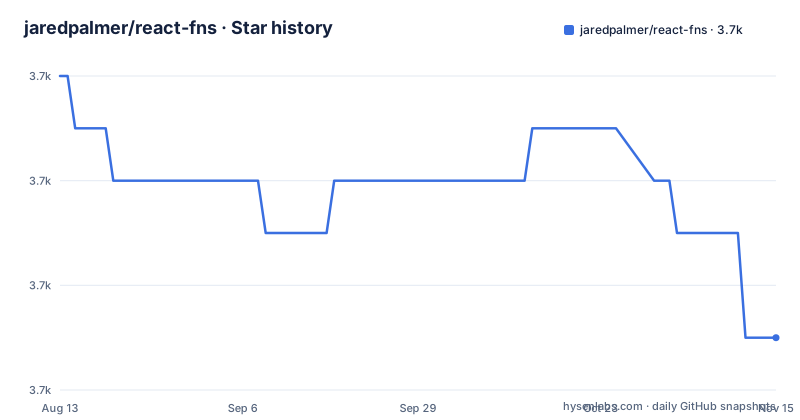
Star history
- jaredpalmer/react-fns3,697 ★ · -5
| Repository | 2026-08-13 | 2026-11-15 |
|---|---|---|
| jaredpalmer/react-fns | 3.7k | 3.7k |
-5 Stars in the last 94 days, measured from the daily GitHub snapshot. Compare with other projects
Editorial analysis
What react-fns Actually Does
react-fns is a collection of React components and higher-order components (HoCs) that wrap imperative browser APIs. The README describes it as turning 'imperative Browser API's into declarative React components and higher-order components for lots of common situations.' In practice, that means instead of calling navigator.geolocation.getCurrentPosition and managing the callback yourself, you render a <GeoPosition /> component and receive the position data as props. The library covers a range of APIs, though the README itself does not list them all; the API reference on the project website does. The target user is a React developer who wants to consume browser features without writing effect hooks or lifecycle boilerplate. The value proposition is ergonomic: declarative composition instead of imperative calls. That is a legitimate problem, and the library addresses it directly.
The Mechanism: Components and HoCs Over Callbacks
The core mechanism is simple. Each exported component wraps one browser API. For example, a network status component would subscribe to the online and offline events and pass a boolean down to its children. The README gives no code examples, but the pattern is consistent across the library. You can use the same functionality as a higher-order component, which lets you inject the API data into an existing component's props. This dual approach was common in the React ecosystem around 2017, before hooks existed. The data flow is unidirectional: the component listens to the browser event, stores the latest value in its internal state, and re-renders its children with that value. This is a clean abstraction for consumers, but it hides the subscription lifecycle. The library handles mounting and unmounting, so you do not have to remember to remove event listeners. That is a genuine convenience, but it also means you have less control over when subscriptions happen.
Getting Started: Installation and Entry Points
The README gives a single installation command: 'npm i react-fns --save'. That is the entire quick start. There is no configuration, no peer dependency list, and no setup code. You import the components or HoCs you need from the package. The project website at https://react-fns.netlify.com hosts an API reference, but the README does not include any usage examples. This is a real gap for a library whose whole point is ergonomics. A new user has to visit the external site to learn the exact props for each component. The lack of inline examples in the README is a documentation weakness. The package is written in TypeScript, so type definitions are likely included, but the README does not confirm that. The last release is v1.4.0 from February 2018, so the installation command works, but you are installing a snapshot from over six years ago.
Maintenance Status: A Frozen Project
The repository has not received a push since February 5, 2018. The last release, v1.4.0, is from that same date. This is not an active project. The README lists a Discord community and a website, but those are external resources. There is no indication of any roadmap or issue triage. For an engineer evaluating adoption, this is the single most important fact. React itself has changed enormously since 2018. Hooks were introduced in React 16.8, which came out in February 2019, one year after the last react-fns release. That means react-fns was designed for class components and lifecycle methods. It may still work with function components if you wrap it, but it does not use hooks internally. The library is not archived, which is a small positive, but 'not archived' is not the same as 'maintained'. There is no evidence of any activity, so the realistic assessment is that it is abandoned.
Limitations and Failure Modes
The most obvious limitation is the maintenance freeze. If a browser API changes its behavior or a new browser version breaks a feature, there is no one to fix it. Another limitation is the age of the design. React's context API changed in 16.3, and the way HoCs interact with context has shifted. react-fns may rely on the old context, which could cause subtle bugs in modern React. The README does not specify which React versions it supports, so you cannot be sure. A more practical failure mode is the lack of flexibility. If you need to customize how a browser API is called, for example passing options to geolocation, you are limited to what the component exposes. The README does not document any options, so you have to dig into the source code. Finally, the library is all-or-nothing in terms of bundle size. There is no tree-shaking guarantee in the README, so importing one component might pull in the whole library. That is a performance concern for modern web apps.
Alternatives and the Hook Revolution
The natural alternative is to write your own React hooks. Since 2019, hooks like useEffect and useState make it straightforward to wrap a browser API in a few lines of code. For example, a useNetworkStatus hook can subscribe to online and offline events and return a boolean. The difference in approach is fundamental: react-fns offers a component-based abstraction, while hooks offer a function-based one. Hooks are more composable, easier to test, and do not require a wrapper component in your JSX. Another alternative is the react-use library, which provides a large collection of hooks for browser APIs. react-use is actively maintained and covers similar ground as react-fns, but with a modern API. The key difference is that react-use uses hooks, not components, and it is updated regularly. For a new project, hooks are the idiomatic choice. react-fns is a relic from a time before hooks existed.
Licence and Upgrade Considerations
react-fns is licensed under MIT, which is permissive and allows commercial use, modification, and redistribution. That is a positive for adoption, but it does not compensate for the lack of maintenance. The MIT licence means you can fork the code and fix it yourself, but that is a cost you must factor in. The upgrade path is unclear. The last release is v1.4.0, and there is no changelog in the README. If you adopt react-fns, you are locked into that version unless you fork it. For a library this small, the upgrade cost is low in terms of code changes, but the real cost is the risk of using an unmaintained dependency. You must verify that every component you plan to use works with your React version. The README does not give any compatibility matrix, so you have to test it yourself.
Editorial conclusion
Adopt react-fns only if you are maintaining a legacy React codebase that already uses it, or if you need a small, MIT-licensed utility for a few browser APIs and can accept that it will not receive updates. Do not adopt it for new projects: the repository has not been pushed to since February 2018, so it predates React Hooks and modern React 18 features, and there is no evidence of ongoing maintenance. Before using it, verify that every component you need still works with your current React version, check the API reference on the Netlify site for the exact props, and be prepared to fork the package if you encounter bugs. For any new work, prefer a maintained alternative or write your own hooks.
Frequently asked questions
What is react-fns?
An MIT-licensed collection that turns imperative browser APIs into declarative React components and higher-order components for common situations. It is installed from npm and documented on a static site with an API reference page.
How do I install react-fns?
With npm and the save flag, as the readme's quick start shows. The package declares itself free of side effects, which is what lets a bundler drop the components a page does not use.
What are the 3 pillars of ReactJS?
This repository does not discuss them. It contains only the wrapper library, and the readme contains no tutorial content, only a description, an install command, links and a contributors table.
Is react-fns still maintained?
The default branch was last pushed on 2023-01-24 and the newest release tag is v1.4.0 from 2018-02-05. The readme carries no status note, so the commit and release dates are the only available signal.
Which React version does react-fns target?
Its development dependencies are the fifteenth major version of React and renderer, with a sixteenth-major type package for React alongside fifteenth-major type packages for the renderer and the DOM package, and the test runner is pinned to a 2017 release.
Official sources
Add this badge to your README
If you maintain this project, the badge below links readers to this analysis and shows its maintenance status from the daily GitHub snapshot. Paste the markdown into your README; add ?metric=license or ?metric=stars to the image URL for a different field.

[](https://hysenlabs.com/projects/jaredpalmer-react-fns)Star history chart for your README
[](https://hysenlabs.com/projects/jaredpalmer-react-fns)Was this useful?