twtrubiks/docker-tutorial: Docker Compose with Django and PostgreSQL
Docker 基本教學 - 從無到有 Docker-Beginners-Guide 教你用 Docker 建立 Django + PostgreSQL 📝
At a glance
- What is it?
- twtrubiks/docker-tutorial is a Chinese-language Docker teaching repository built around Django, PostgreSQL, Docker Compose, and container-management examples. Its main value is a concrete reference project for learning service relationships, not a production deployment framework.
- Who is it for?
- Adopt this repository as a learning reference if you need a small Docker Compose example connecting Django and PostgreSQL. Do not treat its hard-coded credentials, development server command, or tutorial structure as a production deployment design.
- Can I use it commercially?
- Yes. MIT is a permissive licence: you can use, modify and sell software built on it, as long as you keep its copyright and licence notices.
- Is it still maintained?
- Yes. The repository last received commits 147 days ago.
- What is it written in?
- Mainly Python, according to GitHub's language statistics.
Answers come from the project's GitHub data, last synced on October 24, 2026, and from our analysis. They are not legal advice.
Star history
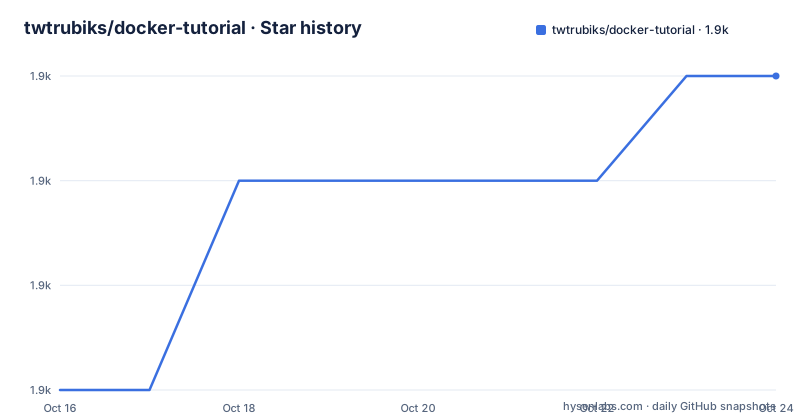
- twtrubiks/docker-tutorial1,888 ★ · +3
| Repository | 2026-10-16 | 2026-10-24 |
|---|---|---|
| twtrubiks/docker-tutorial | 1.9k | 1.9k |
3 Stars in the last 8 days, measured from the daily GitHub snapshot. Compare with other projects
Editorial analysis
Why twtrubiks/docker-tutorial exists
The repository addresses a common teaching problem: Docker is often introduced through isolated commands and images, while application developers need to see how several services work together. twtrubiks/docker-tutorial uses a Django application backed by PostgreSQL as its main example. The README describes the goal as building a Django and PostgreSQL setup with Docker, and it also links to lessons about Docker Compose networks, port publishing, container logging, health checks, profiles, YAML anchors, environment variables, automatic startup, and container monitoring.
The intended audience appears to be beginners who want a guided route from basic Docker concepts to an application-shaped example. The repository is written mainly in Traditional Chinese, with an English README linked from the main page. The teaching material is broad enough to cover individual Docker ideas, but it remains centered on a small Compose project. It does not present itself as a framework, a reusable application template, or a production platform. That distinction matters because a tutorial can make the relationships visible while still omitting operational concerns that appear in a real service deployment.
Images, containers, registries, and the Compose project
The README explains the core Docker objects in direct terms. An image is presented as a read-only layer, a container is created from an image and can be started, stopped, or deleted, and a registry is compared with a repository that stores images. The top-level docker-compose.yml then applies those concepts to two services named `db` and `web`. This is a useful progression for a beginner because the file connects abstract image and container terminology to concrete service definitions.
The `db` service uses the `postgres` image, sets `POSTGRES_PASSWORD` to `password123`, publishes port `5432`, and connects to a named network called `proxy`. It also defines a `pgdata` volume mounted at `/var/lib/postgresql/data/`. The `web` service builds from `./api`, runs `python manage.py runserver 0.0.0.0:8000`, publishes port `8000`, and attaches to the same network. The repository layout includes an `api/` directory, so the Compose file is tied to application code rather than being an isolated Compose demonstration.
The health check is explicit: `pg_isready -U postgres` runs through `CMD-SHELL`, with an interval of `10s`, a timeout of `5s`, and five retries. This makes the database readiness mechanism visible in configuration, although the file does not show how the web service waits for or consumes that health status beyond `depends_on`.
Installing Docker on Windows and checking the tools
The README provides a Windows installation path through Docker's official site. It instructs Windows users to download the stable version, complete the installer, sign out and back in, and enable Hyper-V if requested. It then says to configure Shared Drives. After restarting, the documentation uses command-line version checks to confirm that Docker and Docker Compose are available. These are the exact commands shown in the installation section:
docker --version
docker-compose --version
The two lines are verification commands, not application startup commands. The README does not provide a complete Linux or macOS command sequence in the displayed installation section. It links to Docker's Linux and macOS pages, and it also points to a separate Ubuntu installation video. The repository mentions Kitematic as a GUI option and links to Portainer as another GUI-oriented tool, but it does not provide a Portainer deployment procedure.
For a first practical use, the documented Windows setup leads to checking whether both Docker components are installed. After that, the repository's `docker-compose.yml` is the concrete project file to inspect. The README does not show the exact command used to start the Django and PostgreSQL services, so that command should not be inferred from the configuration alone.
The Django and PostgreSQL service boundary
The Compose file separates the database from the application. `db` runs PostgreSQL and owns the database storage volume. `web` builds the image from `./api`, uses a repository entrypoint at `/docker_api/docker-entrypoint.sh`, and starts Django's development server on port `8000`. The service publishes `8000:8000`, while PostgreSQL publishes `5432:5432`. These mappings are written as host-to-container port pairs in the repository comments.
The application receives three Django-related environment values: `DJANGO_SUPERUSER_USERNAME=admin`, `DJANGO_SUPERUSER_PASSWORD=admin1234`, and `[email protected]`. The web service declares `depends_on: db`, which expresses an ordering relationship in the Compose file. Both services use the `proxy` network, whose declared name is `my_network`.
The configuration is useful for understanding relationships, but it also exposes tutorial-specific boundaries. The database password and administrator password are written directly into the file. The web process uses Django's `runserver` command rather than a production server configuration. The repository does not document a migration sequence, backup procedure, secret rotation process, or production readiness check. These omissions mean the project should be read as a learning example before it is adapted for a shared or public environment.
Logging, health checks, networks, and volumes
The repository does more than define containers. Its Compose example demonstrates operational building blocks that beginners commonly need to distinguish. Both services use Docker's `json-file` logging driver, with `max-file` set to `1` and `max-size` set to `200m`. The database health check uses `pg_isready`, while the `pgdata` volume preserves PostgreSQL data outside the container's writable layer. The web service has a separate `api_data` volume mounted at `/docker_api`.
The README's related links also identify standalone directories for `docker-env-tutorial`, `docker-compose-override`, `docker-compose-profiles`, `docker-yaml-anchors`, and `entrypoint-tutorial`. Those directory names show that the repository treats Compose configuration as a set of concepts to inspect separately. For example, an override file can represent an additional Compose configuration, while profiles and YAML anchors are presented as separate tutorial topics. The README does not document the contents of those directories, so their exact behavior should be checked in the files themselves.
This combination makes the example more informative than a single `docker run` command. It shows that containers have networking, storage, health, and logging concerns. It does not prove that the example is tuned for production. In particular, the `json-file` settings control local file rotation, but the README does not say how logs are collected after rotation, how database backups are performed, or how a failed dependency is handled by the application.
Portainer, Kitematic, and the alternative management approach
The README names Kitematic and Portainer as GUI options, while the repository also documents command-line concepts and a Compose file. Portainer represents a different management approach from editing Compose configuration directly. The README describes it as a way to manage Docker through a GUI and includes a separate video lesson, but it does not provide Portainer installation commands, supported Compose syntax, authentication settings, or a deployment example. Kitematic is presented as a Docker GUI that can be launched from the Windows Docker icon and downloaded separately.
This is a real alternative in terms of workflow. The Compose project describes the intended relationship between images, containers, ports, volumes, networks, environment variables, and health checks in a versionable file. A GUI manager can offer a different control surface for operating containers, but the README does not establish whether Portainer preserves the same configuration model for this project. It would be incorrect to claim that switching tools automatically makes the example production-ready.
For a learner, the choice depends on the question being studied. Use the repository files to understand declarative service relationships. Use the linked GUI material only when the goal is to study container management through an interface, and first verify which Compose features and security settings the chosen GUI supports.
Maintenance, licensing, and upgrade boundaries
The repository is not archived, and its last push was on 2026-05-30. It has no GitHub releases, so the project does not provide a release-based upgrade path. It is licensed under MIT. That identifier permits reuse and modification under the terms of the MIT License, but this review is not legal advice and does not replace reading the repository's LICENSE file or checking how third-party Docker images, Django code, and PostgreSQL components are licensed.
The Compose file uses the unversioned `postgres` image tag rather than a documented digest or explicit version. It also uses the legacy-style `docker-compose` command in the README's installation check, while Docker environments may expose Compose through a different command or version. These details matter when copying the tutorial into a current environment. The repository does not state a supported Docker version, Django version, PostgreSQL version, migration policy, or upgrade procedure.
Because there are no releases, upgrading means reviewing repository changes and the behavior of referenced images rather than selecting a documented project release. Before reusing the configuration, inspect the exact image versions, dependency files under `api/`, startup entrypoint, database migrations, and the meaning of the named volume data before replacing any existing deployment.
Editorial conclusion
Adopt this repository as a learning reference if you need a small Docker Compose example connecting Django and PostgreSQL. Do not treat its hard-coded credentials, development server command, or tutorial structure as a production deployment design. Verify the Docker and Compose versions, image tags, secret handling, database persistence, and startup behavior before using the project beyond local practice.
Frequently asked questions
What does twtrubiks/docker-tutorial teach?
It teaches Docker through examples that include Django, PostgreSQL, Docker Compose, networks, ports, volumes, logging, health checks, environment variables, profiles, YAML anchors, and container management tools. The main README describes it as a beginner guide for building a Django and PostgreSQL setup with Docker.
How do I verify Docker and Docker Compose on Windows?
After installing the stable Docker version described by the README, the documented checks are `docker --version` and `docker-compose --version`. The README also requires configuring Shared Drives and may require enabling Hyper-V and restarting Windows.
Does the repository provide a production-ready Django deployment?
The Compose file is designed as a tutorial example. It runs Django with `python manage.py runserver 0.0.0.0:8000`, includes administrator credentials in the environment configuration, and does not document production server, backup, or secret-management procedures.
What database and application services are defined in docker-compose.yml?
The `db` service uses the `postgres` image and publishes port `5432`. The `web` service builds from `./api`, publishes port `8000`, runs the Django development server, and depends on `db`.
Official sources
Add this badge to your README
If you maintain this project, the badge below links readers to this analysis and shows its maintenance status from the daily GitHub snapshot. Paste the markdown into your README; add ?metric=license or ?metric=stars to the image URL for a different field.

[](https://hysenlabs.com/projects/twtrubiks-docker-tutorial)Star history chart for your README
[](https://hysenlabs.com/projects/twtrubiks-docker-tutorial)Was this useful?