Claude HUD puts context, rate limits and agent activity under the Claude Code prompt
A Claude Code plugin that shows what's happening - context usage, active tools, running agents, and todo progress.
At a glance
- What is it?
- Claude HUD is an MIT-licensed Claude Code plugin that replaces the status line with a two-line readout of model, git branch, context use and subscriber rate limits, with optional tool, agent and todo lines. It is configured by talking to Claude through /hud, and its sandboxing is the part worth reading before you install.
- Who is it for?
- Claude HUD fits Claude Code users who want context fill and rate limit headroom visible at all times and who can run Node.js 22.18 or later alongside Claude Code v2.1.260 or later. It is not for anyone who cannot upgrade Node, or who wants a status line that never changes on its own schedule without manual updates.
- Can I use it commercially?
- Yes. MIT is a permissive licence: you can use, modify and sell software built on it, as long as you keep its copyright and licence notices.
- Is it still maintained?
- Yes. The repository last received commits 3 days ago.
- What is it written in?
- Mainly JavaScript, according to GitHub's language statistics.
Answers come from the project's GitHub data, last synced on November 13, 2026, and from our analysis. They are not legal advice.
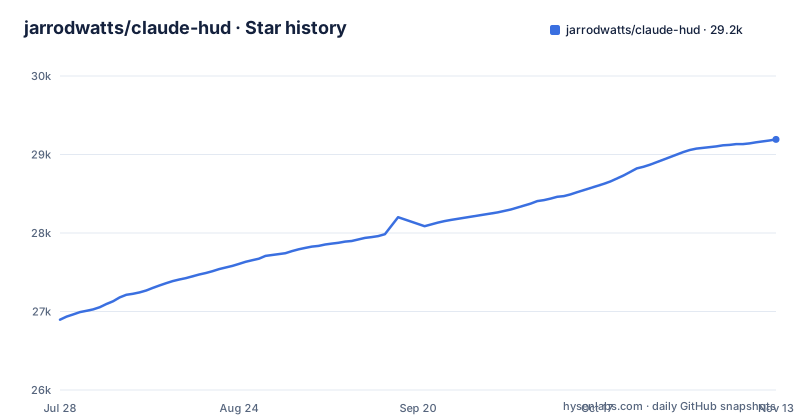
Star history
- jarrodwatts/claude-hud29,192 ★ · +2,296
| Repository | 2026-07-28 | 2026-11-13 |
|---|---|---|
| jarrodwatts/claude-hud | 26.9k | 29.2k |
2,296 Stars in the last 108 days, measured from the daily GitHub snapshot. Compare with other projects
Editorial analysis
Four slash commands, and /hud does the wiring
Installation happens inside Claude Code through its plugin marketplace:
/plugin marketplace add jarrodwatts/claude-hud
/plugin install claude-hud
/reload-plugins
/hud
The last command matters most. /hud checks your setup and, after asking you, points your status line at the HUD. It needs Node.js 22.18 or later, and if the Node on your PATH is older, /hud looks for a newer one on your machine or helps you install one. That removes the usual failure where a status line script silently runs on the wrong interpreter. If you prefer the shell, the same plugin installs with these two commands, followed by /reload-plugins and /hud inside a session:
claude plugin marketplace add jarrodwatts/claude-hud
claude plugin install claude-hud@claude-hud
Two default lines that track context and subscriber limits
Out of the box the HUD draws two lines:
[Opus] │ my-project git:(main*)
Context █████░░░░░ 45% │ Usage ██░░░░░░░░ 25% (resets in 1h 30m)
The first line shows the model, a provider label when one is detected (Bedrock, Vertex or MiniMax), the project path and the git branch. The second line carries the two numbers that change during a session: how much of the context window is used, colored green, then yellow, then red as it fills, and your subscriber rate limits with the time until they reset. That second line is the practical reason to install it. You see the context bar turning red before a long task runs out of room, and you see the usage bar before a rate limit stops you mid-task, instead of finding out from an error.
Optional lines for tools, agents and todos
Beyond the default pair, there are optional lines for tools, agents and todos, plus about a hundred other options:
◐ Edit: auth.ts | ✓ Read ×3 | ✓ Grep ×2        ← tools
◐ explore [haiku]: Finding auth code (2m 15s)    ← agents
▸ Fix authentication bug (2/5)                   ← todos
The tools line counts completed calls per tool and marks the one in progress. The agents line names a running subagent, its model and its elapsed time. The todos line shows the current task and progress as a fraction. Each extra line costs vertical space under the input box, so turning all three on in a small terminal window trades scrollback for visibility.
Configuration by conversation, stored in one JSON file
Instead of a settings reference to read, you ask Claude, or type /hud and describe the change in words such as "show tool activity" or "use the compact layout". Claude looks up the options, shows a preview and saves the change once you approve it. /hud can also undo the last change. Troubleshooting runs through the same entry point: describe "the HUD is blank" or "the context bar looks wrong" and /hud replays the last real render to explain what you see. For a real bug it writes a scrubbed report that you read in full before anything is filed.
Under the conversation, settings live in ~/.claude/plugins/claude-hud/config.json, or under $CLAUDE_CONFIG_DIR if that variable is set. To switch the HUD off for a single session, start Claude Code with CLAUDE_HUD_DISABLE=1.
A permission-locked Node process with an import fence
The HUD's logic runs in a Node process locked down by Node's permission model, which blocks it from starting programs, reading your credentials, and writing anywhere except its own data folder. An import fence keeps Node's network modules and globals out of reach. The project's own claim is careful: the fence blocks every way out found so far and is tested against each one on every change. That is a statement about known escapes, not a proof, and a reader should weigh it that way.
The pieces are visible in the repository root: hud.mjs is the package's main entry, with fence.mjs, collector.mjs and install.mjs beside it. A small separate file runs the fixed git, jj and memory commands the HUD needs. The data it reads is Claude Code's stdin, the session transcript, Claude config files, and git or jj metadata for the current directory, and it calls no undocumented APIs.
--extra-cmd reopens the hole the sandbox closes
One option deliberately steps outside that model. --extra-cmd runs a shell command on every refresh and puts its output on the first line. It is ignored unless CLAUDE_HUD_ALLOW_EXTRA_CMD=1 is set in the HUD's environment, and the project tells you to treat it as arbitrary code execution and never use a command from an untrusted source.
The consequence is concrete. A command that runs on every refresh runs constantly, so a slow command slows the status line, and a command copied from a forum post runs with your shell's full rights, outside the permission model described above. If a teammate's shared config enables it, the environment variable is the gate to check.
Updates are manual unless you switch them on
Claude Code does not auto-update third-party plugins by default, so a fresh install stays on the version you installed. To change that, run /plugin, open Marketplaces, select claude-hud and choose Enable auto-update. Otherwise update by hand with claude plugin marketplace update claude-hud and claude plugin update claude-hud@claude-hud, then /reload-plugins. Setup does not need repeating.
This matters because releases are frequent: v0.14.1 on 2026-10-30, v0.14.2 on 2026-11-01 and v0.15.0 on 2026-11-02, with package.json already at 0.15.1. Requirements are Claude Code v2.1.260 or later and Node.js 22.18 or later; Bun can start the HUD, which then runs on Node. Contributors clone the repository and run npm ci && npm test, and ARCHITECTURE.md and CHANGELOG.md sit at the root.
Editorial conclusion
Claude HUD fits Claude Code users who want context fill and rate limit headroom visible at all times and who can run Node.js 22.18 or later alongside Claude Code v2.1.260 or later. It is not for anyone who cannot upgrade Node, or who wants a status line that never changes on its own schedule without manual updates. Before installing, check both version floors, decide whether you will enable auto-update, and leave CLAUDE_HUD_ALLOW_EXTRA_CMD unset unless you control the command you plan to run.
Frequently asked questions
How do I install Claude HUD?
Inside Claude Code run /plugin marketplace add jarrodwatts/claude-hud, then /plugin install claude-hud, /reload-plugins and /hud. The /hud step points your status line at the HUD after asking you, and needs Node.js 22.18 or later.
What is Claude HUD?
Claude HUD is an MIT-licensed Claude Code plugin that shows context usage, rate limits, active tools, running agents and todo progress below your input. By default it draws two lines: model, path and git branch, then context and usage bars.
How to use Claude HUD?
Type /hud and describe what you want, such as "show tool activity" or "use the compact layout". Claude shows a preview and saves the change to ~/.claude/plugins/claude-hud/config.json once you approve it.
Is Claude HUD safe?
Its logic runs in a Node process whose permission model blocks starting programs, reading credentials and writing outside its data folder, with an import fence against network access. The --extra-cmd option runs arbitrary shell commands and only works if CLAUDE_HUD_ALLOW_EXTRA_CMD=1 is set.
Official sources
Add this badge to your README
If you maintain this project, the badge below links readers to this analysis and shows its maintenance status from the daily GitHub snapshot. Paste the markdown into your README; add ?metric=license or ?metric=stars to the image URL for a different field.

[](https://hysenlabs.com/projects/jarrodwatts-claude-hud)Star history chart for your README
[](https://hysenlabs.com/projects/jarrodwatts-claude-hud)Was this useful?