JSDoc 4.0.4: The JavaScript API Documentation Generator That Still Runs on Node 8
Project brief: An API documentation generator for JavaScript. Run jsdoc help for a complete list of command-line options.
At a glance
- What is it?
- JSDoc is a long-standing API documentation generator for JavaScript, now at version 4.0.4. It parses JSDoc comments and outputs HTML, but its release cadence and Node version support show its age.
- Who is it for?
- Adopt JSDoc if you maintain a JavaScript library or internal module and want a straightforward, comment-driven HTML documentation generator with a large ecosystem of templates. Do not adopt it if you need TypeScript support, active feature development, or fast release cycles.
- Can I use it commercially?
- Yes. Apache-2.0 is a permissive licence: you can use, modify and sell software built on it, as long as you keep its copyright and licence notices.
- Is it still maintained?
- Yes. The repository received new commits within the last day.
- What is it written in?
- Mainly JavaScript, according to GitHub's language statistics.
Answers come from the project's GitHub data, last synced on November 14, 2026, and from our analysis. They are not legal advice.
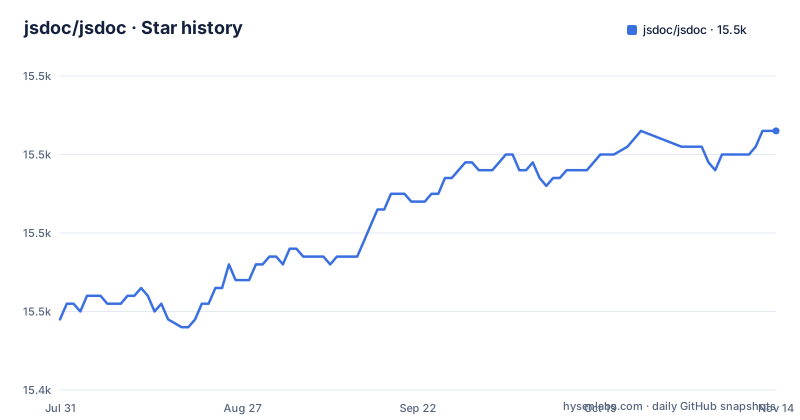
Star history
- jsdoc/jsdoc15,473 ★ · +24
| Repository | 2026-07-31 | 2026-11-14 |
|---|---|---|
| jsdoc/jsdoc | 15.4k | 15.5k |
24 Stars in the last 106 days, measured from the daily GitHub snapshot. Compare with other projects
Editorial analysis
What JSDoc Solves and Who It Serves
JSDoc addresses a specific pain: turning comments in JavaScript source code into structured, browsable API documentation. It is for library authors, framework maintainers, and teams that want to publish reference docs without writing them by hand. The tool reads your source files, extracts specially formatted comments, and generates an HTML site. It is not a general-purpose documentation system like Sphinx or a runtime type checker. It is a comment parser with a template engine attached. The target user is someone who already writes JSDoc-style comments or is willing to adopt that convention.
How JSDoc Works: From Comments to Static HTML
The mechanism is straightforward. You annotate your code with comments that start with `/**` and contain tags like `@param`, `@returns`, and `@example`. JSDoc parses these comments, associates them with the surrounding code constructs, and builds a documentation model. That model is then rendered through a template, producing static HTML files. The default output goes to a directory named `out`. The README does not detail the internal architecture, but the behavior is clear: it is a two-stage pipeline of parsing and rendering. The template system is pluggable, which is why the community has produced many alternatives. The generated site is static, so it can be hosted anywhere without a server.
Installation and Basic Usage: Commands You Will Actually Run
The README gives exact commands. To install globally, run `npm install -g jsdoc`. For a project-local install, run `npm install --save-dev jsdoc`. The README recommends using the tilde operator (`~3.6.3` in the example) instead of the default caret, to limit updates to patch-level changes. After a local install, the command is `./node_modules/.bin/jsdoc yourJavaScriptFile.js`. For a global install, it is `jsdoc yourJavaScriptFile.js`. By default, output lands in `out`. Use `--destination` or `-d` to change that. Run `jsdoc --help` for the full list of options. That is all you need to start.
The Release Gap: A Real Maintenance Concern
The repository shows a significant gap in releases. Version 3.5.5 came out in September 2017, and then version 4.0.4 arrived in October 2024. That is a seven-year gap between GitHub releases. The last push to the default branch was on 2026-11-02, so the project is not archived and is receiving activity. But the sparse GitHub release history suggests a slow release cycle. For a tool that generates documentation, this matters less than for a runtime dependency, but it still affects you. If you encounter a bug, you may wait a long time for a fix. The README does not mention any roadmap or release cadence, so you cannot plan around future updates.
Node Version Support: Old but Broad
JSDoc supports stable versions of Node.js 8.15.0 and later. That is a very low floor. Node 8 was released in 2017 and reached end-of-life in 2019. The default branch tells a different story: its root package.json is an ES module workspace that declares Node ^22.13.0 || >=23.0.0, so the README's 8.15.0 floor does not match the code currently on main. For most users today, this is not a problem because they run Node 18 or 20.
Templates and Ecosystem: The Real Value
The README lists seven community templates: jaguarjs-jsdoc, DocStrap, jsdoc3Template, minami, docdash, tui-jsdoc-template, and better-docs. This is the ecosystem's strength. The default template is plain, but you can swap it out. There are also build tool integrations: a Grunt plugin, a Gulp plugin, and a GitHub Action. For documentation generation, there is jsdoc-to-markdown, which converts JSDoc output to Markdown, useful for wiki-style docs. This ecosystem means you are not locked into the default look. However, the README does not say which templates are actively maintained. Some of those template repositories may be dormant, so verify before adopting one.
Limitations and When JSDoc Is the Wrong Tool
JSDoc is a comment-based system. If your codebase has no comments, it generates nothing useful. It is also JavaScript-only; the README says it is for JavaScript, and there is no mention of TypeScript support. For a TypeScript project, you would need a different tool or a plugin that is not listed. Another limitation is that the README does not mention any built-in search index for the static HTML output. For large codebases, navigating the generated docs can be cumbersome. Also, because the tool relies on comment correctness, outdated or incorrect comments produce misleading documentation. If you need docs that stay in sync with code types, a tool that reads type signatures directly would be better.
Alternatives: What Else Exists and How They Differ
The README does not name competitors, but the obvious alternative is TypeDoc, which is designed for TypeScript and reads type information directly from the code, not just comments. Another is ESDoc, which is now largely unmaintained. The key difference in approach is that JSDoc relies on comments as the source of truth, while TypeDoc extracts types from the compiler. For plain JavaScript, JSDoc is a natural fit. For TypeScript, TypeDoc gives you more accurate and complete documentation with less comment writing. You could also use documentation.js, which also parses JSDoc but focuses on modern JavaScript and has a different template system. The choice depends on your language and how much you trust your comments.
License and Upgrade Costs
JSDoc is licensed under Apache-2.0, a permissive open source license. You can use it in commercial projects, modify it, and distribute it, as long as you preserve the copyright notice. The README states it is free software and points to the LICENSE file for details. That is a low-license-risk tool. The upgrade cost is minimal: it is a dev dependency, so you install it with npm and run it in your build. There is no runtime dependency. The main cost is maintaining your comments and possibly migrating to a new template if you switch. The seven-year gap between 3.x and 4.x means you may need to update your configuration if you were on an older version, but the README does not list breaking changes. Check the changelog before upgrading.
Editorial conclusion
Adopt JSDoc if you maintain a JavaScript library or internal module and want a straightforward, comment-driven HTML documentation generator with a large ecosystem of templates. Do not adopt it if you need TypeScript support, active feature development, or fast release cycles. Before committing, verify that your Node.js version is 8.15.0 or later and that your codebase uses JSDoc-style comments consistently. Check the template you plan to use for maintenance status. JSDoc 4.0.4 is a stable, dependable tool, but it is not evolving quickly, so budget for potential community forks or migration to a more actively maintained alternative if your needs outgrow it.
Frequently asked questions
What is JSDoc used for?
JSDoc is an API documentation generator for JavaScript. You annotate your source with comments and it produces reference documentation, writing the result to a directory named out by default, with the --destination or -d option available to send it elsewhere. Run jsdoc help for the complete list of command-line options.
how to install jsdoc
Globally with npm install -g jsdoc, which might require elevated permissions, or locally as a development dependency with npm install --save-dev jsdoc, which records it in your package.json. A local install puts the command-line tool in ./node_modules/.bin, so you invoke it as ./node_modules/.bin/jsdoc yourJavaScriptFile.js rather than as jsdoc.
how to use jsdoc
Run the command against your file or project and it generates documentation, saving it to out unless you pass --destination or -d. The front page shows the invocation for both a global and a local install, and directs you to jsdoc help for the complete list of command-line options and to jsdoc.app for documentation.
Is JSDoc better than TypeScript?
The project makes no comparison with TypeScript and says nothing about type checking. What it describes is comment-driven documentation generation, a global or local command-line install, a set of community templates and build integrations, and a recommendation to use the tilde version operator so updates stay at the patch level.
Official sources
Add this badge to your README
If you maintain this project, the badge below links readers to this analysis and shows its maintenance status from the daily GitHub snapshot. Paste the markdown into your README; add ?metric=license or ?metric=stars to the image URL for a different field.

[](https://hysenlabs.com/projects/jsdoc-jsdoc)Star history chart for your README
[](https://hysenlabs.com/projects/jsdoc-jsdoc)Was this useful?