TinyTuya: Local and Cloud Control for Tuya Devices
Python API and command line tool for Tuya WiFi smart devices using a direct local area network (LAN) connection or the cloud (TuyaCloud API).
At a glance
- What is it?
- TinyTuya is a Python API and command line tool for reading and controlling Tuya-compatible WiFi devices through LAN discovery or TuyaCloud. It suits developers and homelab users who need direct device access, but setup still depends on device activation, credentials, protocol knowledge, and firewall rules.
- Who is it for?
- TinyTuya is appropriate for Python developers and homelab operators who can obtain each device's address, ID, protocol version, and Local_Key and can satisfy its LAN or cloud prerequisites. It is less suitable for users who need a finished consumer interface, isolated installations with no viable cryptography backend, or Tuya hardware that does not expose a supported local API.
- Can I use it commercially?
- Yes. MIT is a permissive licence: you can use, modify and sell software built on it, as long as you keep its copyright and licence notices.
- Is it still maintained?
- Yes. The repository last received commits 10 days ago.
- What is it written in?
- Mainly Python, according to GitHub's language statistics.
Answers come from the project's GitHub data, last synced on October 23, 2026, and from our analysis. They are not legal advice.
Star history
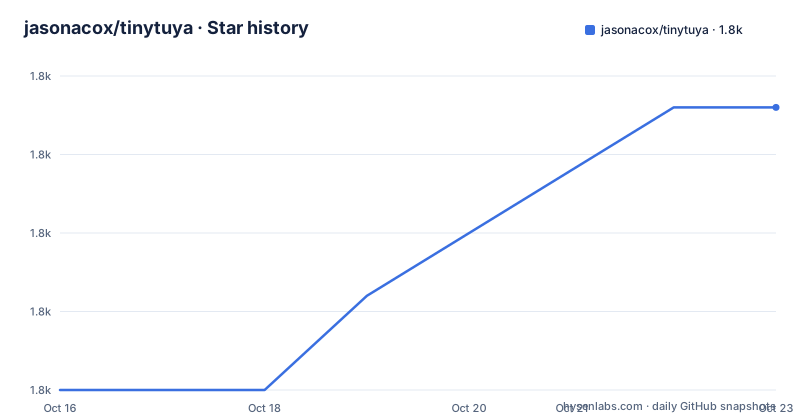
- jasonacox/tinytuya1,779 ★ · +9
| Repository | 2026-10-16 | 2026-10-23 |
|---|---|---|
| jasonacox/tinytuya | 1.8k | 1.8k |
9 Stars in the last 7 days, measured from the daily GitHub snapshot. Compare with other projects
Editorial analysis
Why TinyTuya targets both LAN automation and TuyaCloud
TinyTuya solves a specific home automation problem: giving Python programs structured access to compatible Tuya WiFi devices such as plugs, switches, lights, and window covers. The project supports two routes to the same broad device model. A program can communicate directly with hardware on the local area network, avoiding the cloud path, or it can use the TuyaCloud API when local access is unsuitable.
The library supports Tuya protocols 3.1, 3.2, 3.3, 3.4, and 3.5. That range is important because the caller must select a version that matches the device rather than relying on automatic negotiation. The README also identifies TinyTuya as a compatible replacement for the `pytuya` PyPI module, which makes migration from code using that package's basic model more direct.
This is aimed at developers, not consumers looking for a ready-made control panel. A typical use is a script, service, or home automation integration that polls state and sends commands. The user still needs device-specific configuration, including an IPv4 address, Device ID, protocol version, and Local_Key for LAN operation. The documentation also requires the device to have been activated through the Smart Life App. TinyTuya provides the communication layer, but it does not remove the provisioning work required by Tuya hardware.
TinyTuya's device communication and command flow
The Python interface begins with `tinytuya.Device`, which receives the device identity and connection details. The documented call creates a client with a Device ID, IPv4 address, Local_Key, and explicit protocol version. A subsequent `status()` call polls the device and returns its state data. Other classes in the repository address cloud requests, monitors, raw DPS operations, infrared learning, and related device capabilities.
The LAN route depends on the device exposing a local API. That matters because Tuya devices are designed primarily around TuyaCloud, and the README does not claim that every compatible device offers identical local behavior. Direct communication still needs traffic to reach the device over its IP address. The scanner uses network discovery and reports an address, Device ID, and protocol version, but discovery alone is not control. The caller must still have the Local_Key required to access the device.
The cloud route uses requests against the Tuya IoT Platform and depends on the setup wizard to produce a `devices.json` file containing registered device records, including names and Local_Key values. The cloud path therefore adds external account, project, region, and authorization configuration. It is useful when direct LAN operation is not the chosen architecture, but it also makes the cloud's availability and account setup part of the dependency chain.
Installing TinyTuya and performing the first status request
For a normal Python environment, install the library with pip. The README lists the command below, which installs TinyTuya and attempts to add its dependencies, including `cryptography`, `requests`, and `colorama` when they are missing.
python -m pip install tinytuyaIf the command line tool is wanted separately, the documentation uses `pipx` to install it in an isolated environment.
pipx install tinytuyaOn systems with limited space, such as an OpenWRT router, or when another cryptography implementation is preferred, the README documents a manual dependency path. It lists `cryptography`, `PyCryptodome`, `pyaes`, and `PyCrypto` as supported choices, but it marks `pyaes` and `PyCrypto` as abandoned and says they do not support v3.5+ devices.
python -m pip install cryptographyInstall TinyTuya without automatic dependencies only after selecting a cryptography backend and installing any needed optional packages.
python -m pip install --no-deps tinytuyaFor a first LAN request, replace the placeholders with values obtained from device preparation or the scanner. The version must match the device.
import tinytuya

d = tinytuya.Device('DEVICE_ID_HERE', 'IP_ADDRESS_HERE', 'LOCAL_KEY_HERE', version=3.3)
data = d.status()
print('Device status: %r' % data)
The reader should receive a status representation if the device is reachable, the selected protocol version is correct, and the credentials are valid. The example does not show command syntax, so it should be treated as a status-read starting point rather than a complete automation tutorial.
Network discovery, firewall requirements, and credential preparation
TinyTuya includes a network scanner that searches the local network for Tuya devices. The documented command is:
python -m tinytuya scanThe scanner is expected to show each discovered device's address, Device ID, and version. The README is specific about the network permissions required for this operation: UDP ports 6666, 6667, and 7000, plus TCP port 6668, must be allowed by the LAN and firewall. A workstation may therefore be able to execute TinyTuya yet discover nothing if those rules are missing or if the device is on an unreachable network segment.
Credentials remain a separate problem. The setup wizard uses the Tuya IoT Cloud Platform to generate `devices.json`, which includes Local_Key and Name fields for registered devices. The documented preparation sequence starts by pairing devices in the Smart Life or Tuya Smart app. The README warns that devices must be activated and also advises against using a guest account because it can be deleted during the later setup process.
The wizard process requires a Tuya account, a developer project, the correct data center region, and the project's API ID and Secret. It also links the Tuya App Account to that project through a QR code. These steps demonstrate why TinyTuya's LAN control does not always equal a completely offline onboarding process. The library can avoid cloud calls during runtime, but obtaining a device's Local_Key may still involve Tuya's platform.
Protocol support is broad, but compatibility remains device-specific
TinyTuya's protocol range is a central adoption factor, yet it should not be read as a guarantee that every device behaves identically. The caller must provide the version that matches the hardware, and the documentation presents 3.1 through 3.5 as the supported choices. A mismatch can prevent a client from interpreting commands or responses correctly.
The repository layout shows that the project extends beyond a minimal status client. It includes examples for bulbs, scenes, music, raw DPS operations, cloud requests, projectors, gateways, monitors, snapshots, and threading. Those files indicate several supported use cases, but the README does not claim that each example applies to every plug, switch, light, or cover. Device capabilities, supported DPS mappings, and available commands still depend on the hardware and its Tuya implementation.
The pyaes and PyCrypto warning is a concrete boundary. Those libraries are described as abandoned and as lacking support for v3.5+ devices. A constrained system can still use TinyTuya without default dependencies, but the selected cryptography backend must match the protocol target. `cryptography` is listed first in the dependency strategy, while PyCryptodome is the documented alternative for systems where it is more appropriate. This is an operational choice with protocol consequences, not merely an installation preference.
LAN control and cloud control make different trade-offs
The direct LAN approach is the more appropriate fit for local scripts that should not depend on a remote service for each operation. It requires the device to expose its local API, the correct IPv4 address, the matching protocol version, and a valid Local_Key. The scanner can reduce address and version discovery work, but it cannot replace credential acquisition. Network reachability is equally important because the required UDP and TCP rules are explicit in the README.
The TuyaCloud approach has a different dependency model. It is available through the cloud examples and the setup wizard, and it can issue commands and poll status for registered devices. In exchange, it depends on Tuya account and project configuration, region selection, API credentials, and cloud availability. A program that adopts the cloud path should not be described as purely local, even if the resulting integration is convenient.
TinyTuya is described as a compatible replacement for the `pytuya` PyPI module, but the available documentation does not establish a direct performance or feature comparison between them. The repository does not provide a benchmark or migration guide sufficient to claim a performance difference, so the practical comparison is scope and compatibility, not speed.
Maintenance signals, release scope, and licensing constraints
The repository is not archived, and its last push was on 2026-10-13. Recent releases include v1.20.0 on 2026-07-06, focused on monitor reliability, security, and bug fixes; v1.19.0 on 2026-06-29, described as an experimental monitor class for multi-device single-thread operation; and v1.18.1 on 2026-05-29, focused on an IR Learn frame fix. These release descriptions indicate recent work in monitoring, reliability, and infrared behavior. The README does not provide a long-term support schedule, so it does not establish a compatibility guarantee for future Tuya portal or hardware changes.
Upgrade cost is likely to vary by integration. The package version is imported from `tinytuya`, while the build configuration uses `setuptools`, `colorama`, `requests`, and `cryptography` as build requirements. Projects that rely on monitors, IR learning, or cloud functionality should review release notes and their own device behavior when upgrading. The experimental status assigned to the v1.19.0 monitor class is worth noting for users considering that feature.
TinyTuya is distributed under the MIT License. That identifies the project's licensing model, but this review does not provide legal advice or assess how the license interacts with a particular deployment. Users should read `LICENSE` and account for their own distribution, security, and compliance requirements.
Editorial conclusion
TinyTuya is appropriate for Python developers and homelab operators who can obtain each device's address, ID, protocol version, and Local_Key and can satisfy its LAN or cloud prerequisites. It is less suitable for users who need a finished consumer interface, isolated installations with no viable cryptography backend, or Tuya hardware that does not expose a supported local API. Verify the supported protocol version, discoverability through the required ports, credential availability, and the behavior of your chosen command before building automation around it.
Frequently asked questions
How do I install TinyTuya for Python?
The README documents `python -m pip install tinytuya` for the library and `pipx install tinytuya` for the optional command line tool. The normal installation attempts to install `cryptography`, `requests`, and `colorama` when needed.
How does TinyTuya find Tuya devices on a local network?
Run `python -m tinytuya scan`. The scanner reports each discovered device's address, Device ID, and version, but the LAN and firewall must permit UDP 6666, 6667, 7000 and TCP 6668 traffic.
What information does TinyTuya need for LAN control?
The documented `Device` constructor takes a Device ID, IPv4 address, Local_Key, and protocol version. The device must also have been activated through the Smart Life App, and the selected version must match the device.
Can TinyTuya work without its default dependencies?
Yes. The README documents installing a cryptography library manually, then installing TinyTuya with `python -m pip install --no-deps tinytuya`. It identifies `cryptography`, PyCryptodome, `pyaes`, and PyCrypto as choices, while noting that the latter two do not support v3.5+ devices.
Does TinyTuya support TuyaCloud as well as LAN control?
Yes. TinyTuya supports both a direct local area network connection and the TuyaCloud API. The cloud and setup wizard require Tuya account and project configuration, including project credentials and a linked app account.
Official sources
Add this badge to your README
If you maintain this project, the badge below links readers to this analysis and shows its maintenance status from the daily GitHub snapshot. Paste the markdown into your README; add ?metric=license or ?metric=stars to the image URL for a different field.

[](https://hysenlabs.com/projects/jasonacox-tinytuya)Star history chart for your README
[](https://hysenlabs.com/projects/jasonacox-tinytuya)Was this useful?