PiracyChecker: Android Licensing and Signature Checks
An Android library that prevents your app from being pirated / cracked using Google Play Licensing (LVL), APK signature protection and more. API 14+ required.
At a glance
- What is it?
- PiracyChecker is an Apache-2.0 Android library for developers combining Google Play Licensing, APK signature verification, and installer checks. It raises the cost of opportunistic tampering, but its own disclaimer says a determined attacker can remove these checks.
- Who is it for?
- PiracyChecker fits Android developers who distribute through recognized stores and want several inexpensive tamper signals in the application. It does not fit apps distributed outside its supported installer model, and it should not be treated as protection against a determined reverse engineer.
- Can I use it commercially?
- Yes. Apache-2.0 is a permissive licence: you can use, modify and sell software built on it, as long as you keep its copyright and licence notices.
- Is it still maintained?
- Yes. The repository last received commits 156 days ago.
- What is it written in?
- Mainly Java, according to GitHub's language statistics.
Answers come from the project's GitHub data, last synced on November 7, 2026, and from our analysis. They are not legal advice.
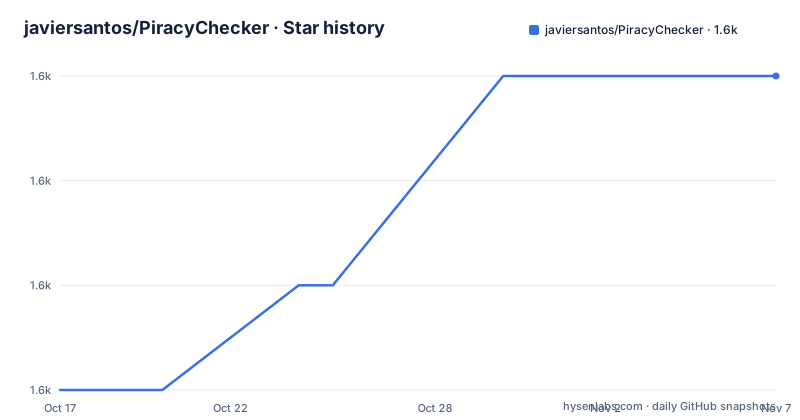
Star history
- javiersantos/PiracyChecker1,573 ★ · +3
| Repository | 2026-10-17 | 2026-11-07 |
|---|---|---|
| javiersantos/PiracyChecker | 1.6k | 1.6k |
3 Stars in the last 21 days, measured from the daily GitHub snapshot. Compare with other projects
Editorial analysis
PiracyChecker's Anti-Tampering Scope
PiracyChecker addresses Android applications that may be redistributed or modified outside the developer's intended distribution channel. Its primary audience is an Android developer who publishes through Google Play and wants an application-level response when licensing, signing information, or installer identity appears invalid. The library is not a general malware scanner and does not analyze code for malicious behavior. Instead, it checks a small set of facts associated with the installed application and its distribution environment.
The project supports API 14 and later and is written primarily in Java. Its README describes three explicit checks: Google Play Licensing, APK signing certificates, and installer identity. These checks address different forms of misuse. Licensing asks Google Play whether the current user is licensed. Signature verification asks whether the installed APK still carries an expected certificate. Installer verification asks whether the package came from one of the configured stores.
The README is unusually direct about the boundary of this design. It says the techniques are intended to thwart reverse engineers and attackers, but are not guaranteed to stop piracy. Its stated goal is to make casual and automated attacks harder by raising the required effort. That distinction matters when selecting the library. It can reject common altered or redistributed packages, but the checks still execute inside code that an attacker may inspect and modify.
Google Play Licensing Lifecycle in PiracyChecker
The Google Play Licensing path is built around a query for the current user's licensing status. The developer supplies a Base64 license key through `enableGooglePlayLicensing`, and the library starts the configured check chain with `start()`. The README links this integration to Google Play Licensing and states that applications published through Google Play can query the service without special account registration.
A real key must first exist for the application. According to the README, the developer uploads the app to the Google Play Developer Console and then retrieves the Base64 license key from the app's "Services and APIs" area. This creates an integration dependency on Google infrastructure and on a Play console record that already exists. An unlicensed development build or an application that has not completed the relevant upload process does not have the same key path documented here.
Lifecycle management is the main operational detail in this integration. The README instructs users to call `destroy()` in the Activity's `onDestroy()` method to avoid multiple instances of the licensing service running. It points to a separate Wiki sample for an Activity implementation. The top-level README does not describe offline behavior, retry policy, response codes, or the exact failure action selected by the builder, so those details should be checked in the Wiki or library source before relying on an invalid-license path.
APK Certificate Checks and Google Play App Signing
Signature verification compares the installed application's signing certificates against a certificate supplied by the developer. The README explains that an altered APK normally must be resigned before installation. PiracyChecker uses the expected certificate as a tamper signal: if the installed package has been signed by another key, the configured check can consider it invalid.
The expected value must come from the exact release variant. The README warns the developer to sign a distributable APK with the production keystore rather than the debug key, install that build, and retrieve its signatures through the utility API. It gives this operation:
apkSignatures.forEach { Log.e("SIGNATURE", it) }For a Java activity, the equivalent documented form is:
for (String signature : LibraryUtilsKt.getApkSignatures(this)) {
    Log.e("SIGNATURE", signature);
}
These calls print the signatures to the console. The resulting production value can then be supplied through `enableSigningCertificates`:
piracyChecker {
    enableSigningCertificates("478yYkKAQF+KST8y4ATKvHkYibo=")
    // Add any other checks required by your app.
}.start()
The README warns against this method with Google Play App Signing. Google signs distributed APKs with the app signing key, which may differ from the upload key; using the upload certificate as the expected installed certificate can therefore fail. Verify the actual distributed certificate, key rotation and library behavior for each supported device and channel. It also means multiple build channels, such as production and debug, need separate handling. The repository does not provide a rotation or rollback procedure for a changed production certificate.
Adding PiracyChecker Through JitPack
The documented installation path uses JitPack rather than Maven Central. First, add the JitPack repository to the root project configuration. The README uses the older `build.gradle` repository syntax:
allprojects {
    repositories {
        maven {
            url "https://jitpack.io"
        }
    }
}
Then add the AndroidX dependency to the module's `build.gradle`:
dependencies {
    implementation 'com.github.javiersantos:PiracyChecker:1.2.8'
}
Version `1.2.8` is both the latest listed release and the version shown in the current README. The README also provides `1.2.4` for projects that predate AndroidX, but labels that path as no longer supported. A first build should confirm that the existing Android Gradle Plugin and Gradle configuration can resolve this JitPack coordinate. The repository contains an Android app and library module, but the README does not provide a modern Android Studio setup tutorial or a supported minimum Android Gradle Plugin version.
The recommendation to enable ProGuard in every production release matters because configuration and API minimization can affect checks that developers expect to remain intact. The README repeats this recommendation, including at the end of its recommendations section. It does not supply a PiracyChecker-specific ProGuard rule file or document an exact release-build command, so the consuming app must follow its own verified production build configuration.
Installer Identity Checks and Unsupported Distribution
Installer checks compare the package's installer source with an allowed list. The documented stores are Google Play, Amazon Appstore, and Galaxy Apps. A developer can configure them through `enableInstallerId`:
piracyChecker {
    enableInstallerId(InstallerID.GOOGLE_PLAY, InstallerID.AMAZON_APP_STORE, InstallerID.GALAXY_APPS)
    // Add any other checks required by your app.
}.start()
This is the narrowest feature in the project. It is appropriate when an app is intended for one of those stores and installation through another marketplace or direct APK installation should be rejected. The README calls the technique "really restrictive" and warns that it blocks installation through another market or by installing the APK directly.
That behavior rules out many valid distribution scenarios. PiracyChecker would be the wrong tool for an app intended for direct sideloading, an enterprise deployment process, an unlisted market, or any store not represented by the documented constants. The top-level README excerpt does not state what happens when the installer is unknown, how device-to-device transfer behaves, or whether sideloaded Play acquisitions remain valid on a particular device. It also does not document bypass or recovery for users who legitimately installed through another channel.
A signature check and an installer check should not be treated as interchangeable. Certificates answer whether the APK carries an expected signing identity. Installer identity answers where Android reports that the package was installed from. Either check can be too restrictive when the release model differs from the one assumed during setup.
PiracyChecker Maintenance and License Boundaries
PiracyChecker is distributed under Apache-2.0. That identifier permits use and modification under the license's stated conditions, but this review does not provide legal advice. Consumers remain responsible for reviewing the repository `LICENSE` file and complying with its notice, license, and patent provisions when embedding the library in an application.
Repository maintenance is uncertain from the release history alone. The last push was on 2026-06-04, while the listed releases are `1.2.8` from 2020-11-08, `1.2.7` from 2020-04-08, and `1.2.6` from 2019-09-12. The repository is not archived, but the long interval between the listed release dates means there is no recent release evidence for assuming compatibility with current Android tooling.
The alternative approach is to implement licensing and integrity decisions in the consuming application. Google Play Licensing alone checks Play licensing without comparing installer identities. Platform App Signing changes the APK certificate managed by Google, which is why it can conflict with an expected original certificate. Network-only backend enforcement moves part of the authorization decision to a server, although the repository does not describe such an implementation. Against those approaches, PiracyChecker packages several client-side checks behind one builder-style API. Its trade-off is equally concrete: it adds immediate client-side enforcement without making server authority or attacker-resistant licensing part of the library.
PiracyChecker Release Behavior and Invalid-License Handling
The README recommends starting PiracyChecker in the Activity's `onCreate()` method so a license check occurs as soon as possible. It also recommends displaying an invalid result in a new Activity rather than a Dialog because the main Activity should finish. Those choices prevent protected features from remaining visible behind a dismissible result, but they also create a direct user-facing failure path.
The README does not show the complete callback implementation, default builder options, offline result mapping, or a complete invalid-license Activity. It links to a README anchor titled "Display results in a Dialog or a new Activity" and to the LVL Wiki, so implementation details should be taken from those project pages rather than inferred from the dependency declaration alone.
For Java, the shortest documented start sequence is:
new PiracyChecker(this)
    .enableGooglePlayLicensing("BASE_64_LICENSE_KEY")
    ...
    .start();
A developer should expect to pair this with `destroy()` in `onDestroy()`. The ellipses shown by the README indicate that checks and result handling can be configured around the start call. They are not executable code and must be replaced with the project's chosen checks and Activity logic. Before shipping, verify the real invalid-license experience against a production-signed build, because signature and installer failures can otherwise look like a licensing failure with very different causes.
Editorial conclusion
PiracyChecker fits Android developers who distribute through recognized stores and want several inexpensive tamper signals in the application. It does not fit apps distributed outside its supported installer model, and it should not be treated as protection against a determined reverse engineer. Before adoption, verify that your Play licensing key is available, your production signing strategy is compatible, your release builds use ProGuard, and invalid-license handling closes access to the main application.
Frequently asked questions
How do I install PiracyChecker in an AndroidX application?
Add `https://jitpack.io` to the project repositories, then declare `implementation 'com.github.javiersantos:PiracyChecker:1.2.8'` in the module dependencies. The README identifies `1.2.8` as the AndroidX version and says the pre-AndroidX path is no longer supported.
Does PiracyChecker work with Google Play App Signing?
The library README warns against its certificate check with Play App Signing. Google signs distributed APKs with the app signing key, which can differ from the upload key. Check the certificate on the actual distributed build, account for key rotation and device variants, and test the library before relying on it; the README does not establish general compatibility.
What does PiracyChecker check in an Android app?
It can query Google Play Licensing, compare expected APK signing certificates, and verify the installer against configured stores. It does not claim to guarantee protection against a skilled attacker who has time to remove the checks.
Which Android stores can PiracyChecker accept as valid installers?
The documented installer constants cover Google Play, Amazon Appstore, and Galaxy Apps. Enabling this check blocks direct APK installation and installation through another marketplace.
Official sources
Add this badge to your README
If you maintain this project, the badge below links readers to this analysis and shows its maintenance status from the daily GitHub snapshot. Paste the markdown into your README; add ?metric=license or ?metric=stars to the image URL for a different field.

[](https://hysenlabs.com/projects/javiersantos-piracychecker)Star history chart for your README
[](https://hysenlabs.com/projects/javiersantos-piracychecker)Was this useful?