django-taggit: a TaggableManager field instead of a tagging app
Simple tagging for django
At a glance
- What is it?
- django-taggit replaces a separate tagging application with one manager field on your model. It is a small dependency with a clear boundary, and the boundary matters more than the feature list.
- Who is it for?
- Adopt django-taggit when you want per-object tags and nothing more: add "taggit" to INSTALLED_APPS, put a TaggableManager on the model, and run migrate. Do not adopt it if you need hierarchical categories, tag renaming with redirects, or tag metadata such as descriptions and counts maintained by you, because the README describes none of those.
- Can I use it commercially?
- Yes. BSD-3-Clause is a permissive licence: you can use, modify and sell software built on it, as long as you keep its copyright and licence notices.
- Is it still maintained?
- Yes. The repository last received commits 3 days ago.
- What is it written in?
- Mainly Python, according to GitHub's language statistics.
Answers come from the project's GitHub data, last synced on November 14, 2026, and from our analysis. They are not legal advice.
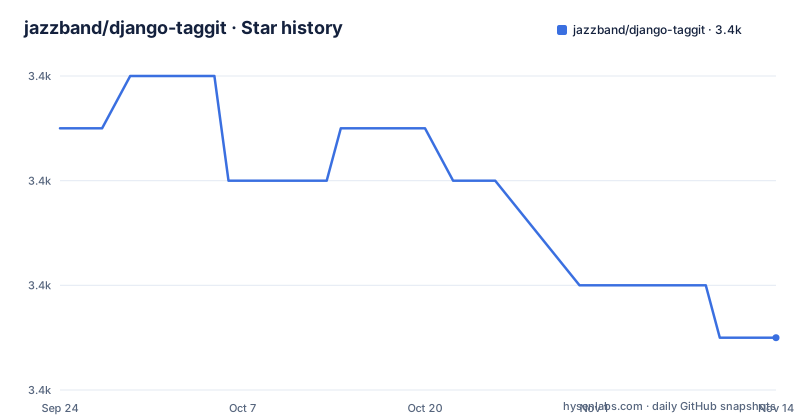
Star history
- jazzband/django-taggit3,443 ★ · -4
| Repository | 2026-09-24 | 2026-11-14 |
|---|---|---|
| jazzband/django-taggit | 3.4k | 3.4k |
-4 Stars in the last 51 days, measured from the daily GitHub snapshot. Compare with other projects
Editorial analysis
The problem django-taggit solves, and the projects it does not fit
Tagging looks like a small feature and behaves like a data modelling decision. If you build it yourself you end up with a Tag model, a through model, uniqueness constraints, and a form widget that turns a comma-separated string into rows. django-taggit exists so that none of that is written by hand. The README states the whole proposition in one line: add "taggit" to INSTALLED_APPS, add a TaggableManager to your model, and the API is available.
The audience is Django developers who want labels on objects and do not want a second application to own them. A blog post, a product, a photo, a support ticket: anything where a user types a few words and later filters by them. The README uses Food as the example model, which is a fair picture of the scale it targets. There is no tag hierarchy, no tag description field, and no editorial workflow in the README.
That narrowness is the point. If your requirement is a category tree with parent and child nodes, django-taggit is the wrong tool, and the repository makes no claim otherwise. The library gives you a manager, a related model, and admin and form integration. Everything above that layer is yours to build.
How TaggableManager stores and queries tags
Adding a TaggableManager to a model is what wires the machinery. The README example is short:
from django.db import models

from taggit.managers import TaggableManager


class Food(models.Model):
    # ... fields here

    tags = TaggableManager()
The manager is the access point. Creating an object and calling .add() with plain strings is how tags are written, and .all() returns Tag instances rather than strings. The README shows the round trip: create a Food named apple, add "red", "green" and "delicious", read them back as Tag objects, remove "green", and read back the remaining two. The manager is doing the work of resolving strings to rows and rows back to objects.
Filtering goes through the same relation. The README gives Food.objects.filter(tags__name__in=["red"]), which is an ordinary Django lookup across the tag relation rather than a special query API. That matters for planning: any query you can express with Django's relation lookups works, and any query you cannot express that way does not. The README does not document aggregation helpers, tag clouds, or counts.
The third piece is presentation. The README states that tags show up automatically in forms and in the admin. That is the reason the manager approach beats a hand-rolled through model for most projects: the form field and the admin widget are already there, and you did not write them.
Installing django-taggit and tagging a model for the first time
The package is distributed on PyPI under the name django-taggit, which is how the README's badges and the repository's pyproject.toml point at it. Install it into the environment that runs your Django project:
pip install django-taggitThen register the app. The README is explicit that "taggit" is the string that goes into INSTALLED_APPS, not the distribution name:
INSTALLED_APPS = [
    # ...
    "taggit",
]
The README states that django-taggit requires Django 5.2 or greater. Check that before you start; on an older Django the install will succeed and the failure will come later, at import or migration time.
With the app registered, add the manager to a model and create the migrations. The README's Food example is the smallest complete case:
from django.db import models
from taggit.managers import TaggableManager


class Food(models.Model):
    name = models.CharField(max_length=100)
    tags = TaggableManager()
Run makemigrations and migrate as usual; the taggit app ships its own migrations, so the tag tables are created by the same migrate run. After that, the README's API works as written: create an object, call tags.add("red", "green", "delicious"), and read them back with tags.all(). If you open the Django admin, the tags field appears on the form without further configuration, which is the quickest way to confirm the wiring is correct.
Where django-taggit stops: no hierarchy, no tag metadata, no rename story
The README documents one model of tagging: flat labels attached to objects. There is no parent field, so a tag cannot contain another tag, and filtering by a parent tag is not something the README describes. Projects that need a tree usually reach for a hierarchy library and a separate relation instead.
The Tag model is also not documented as a place to hang your own data. The README shows Tag objects coming back from .all(), but says nothing about descriptions, slugs, colours, or per-tag counters. If your product needs any of that, you are adding fields to a model the library owns, and you inherit the consequences of that at upgrade time.
Renaming is the quieter problem. The README does not document what happens to existing references when a tag is renamed, and it does not document redirects from an old tag name to a new one. For a public site where tag URLs are indexed, that is a gap you have to close yourself.
The last boundary is scale of curation. Nothing in the README suggests django-taggit is meant to police which tags exist. Users can create tags by typing them. If you need a controlled vocabulary, you need an approval step that this library does not provide.
django-taggit compared with django-tagging and django-mptt
The closest alternative in name and purpose is django-tagging, which appears in the related searches alongside django-taggit. Both attach tags to Django models. The practical difference is maintenance and packaging: django-taggit is a Jazzband project with a public contributor code of conduct and a documented requirement of Django 5.2 or greater, while django-tagging is not described in this material at all, so its current state is something you would have to check yourself. If you are starting now, the version requirement in the django-taggit README is at least a known quantity.
django-mptt solves a different shape of problem. It is a tree library, and the related searches pair it with django-taggit because people often want both: flat tags for free-form labelling, and a tree for categories that must nest. They are not substitutes. Choosing django-mptt for tags gives you a hierarchy you may not want; choosing django-taggit for categories gives you no place to put a parent.
The third comparison is against writing it yourself. A Tag model, a through model and a form field is perhaps an afternoon of work, and you would own the schema. django-taggit's advantage is that the schema, the form widget and the admin integration already exist and are tested by the project's own suite. Its disadvantage is that the schema is not yours, so every field you want to add is a field you are adding to someone else's model.
Maintenance, licence and the cost of upgrading django-taggit
The repository is not archived, and the last push was on 2026-08-24. That is recent enough that the project is being touched, though the README gives no release history and the repository has no published releases, so there is no changelog to read beyond the CHANGELOG.rst file in the repository root. Before upgrading, read that file; it is the only place in the repository layout where version-to-version changes would be recorded.
The stated version floor is the main upgrade cost. The README says django-taggit requires Django 5.2 or greater. That is a hard constraint, not a suggestion, and it means a Django upgrade and a django-taggit upgrade are coupled. Plan them together rather than one at a time.
The second cost is migrations. The taggit app ships migrations, and any upgrade that changes the tag schema will produce a migration on your database. On a large table, that is a deployment event with a window, not a background task. The repository layout shows a tests/ directory and a sample_taggit/ project, so you can exercise an upgrade against the sample before touching production.
The licence is BSD-3-Clause, per the LICENSE file in the repository root and the project metadata. That is a permissive licence, which in practice means you can use django-taggit in closed-source projects. This is a description of the licence identifier, not legal advice; if your organisation has rules about which licences are acceptable, route the decision through whoever owns that policy.
Editorial conclusion
Adopt django-taggit when you want per-object tags and nothing more: add "taggit" to INSTALLED_APPS, put a TaggableManager on the model, and run migrate. Do not adopt it if you need hierarchical categories, tag renaming with redirects, or tag metadata such as descriptions and counts maintained by you, because the README describes none of those. Before committing, check the taggit/migrations directory in the installed package and confirm that the migrations it ships match the database you are pointing it at.
Frequently asked questions
What is django-taggit?
It is a Django library that adds tagging to models through a TaggableManager field, so you do not write a Tag model and a through model yourself. The README describes it as a simpler approach to tagging with Django, and states that tags appear automatically in forms and in the admin.
What is django-taggit in Python, and how do you install it?
It is a Python package published on PyPI as django-taggit and installed with pip. You then add the string "taggit" to INSTALLED_APPS, add a TaggableManager to your model, and run your migrations.
How do you filter objects by tag in django-taggit?
The README shows an ordinary Django relation lookup: Food.objects.filter(tags__name__in=["red"]). There is no separate query API, so filtering follows Django's normal lookup syntax across the tag relation.
Which Django version does django-taggit require?
The README states that django-taggit requires Django 5.2 or greater. It is a hard floor, so upgrading Django and upgrading django-taggit are coupled decisions.
Does django-taggit support hierarchical tags?
The README documents flat tags only. There is no parent field or tree lookup described, so nested categories are outside what this library provides.
Official sources
Add this badge to your README
If you maintain this project, the badge below links readers to this analysis and shows its maintenance status from the daily GitHub snapshot. Paste the markdown into your README; add ?metric=license or ?metric=stars to the image URL for a different field.

[](https://hysenlabs.com/projects/jazzband-django-taggit)Star history chart for your README
[](https://hysenlabs.com/projects/jazzband-django-taggit)Was this useful?