Tkinter Designer reads a Figma URL and writes Python Tkinter source
An easy and fast way to create a Python GUI 🐍
At a glance
- What is it?
- Tkinter Designer turns a Figma design file into Python Tkinter code and images, using the Figma API and a personal access token. It is a code generator rather than a visual editor, which makes regeneration cheap and hand edits to the output expensive.
- Who is it for?
- Use Tkinter Designer if your team already designs in Figma and wants a starting directory of Tkinter files rather than a hand-written widget tree. Skip it if you need an offline generator, a framework that ships its own visual designer, or output you can keep editing across regenerations.
- Can I use it commercially?
- Yes. BSD-3-Clause is a permissive licence: you can use, modify and sell software built on it, as long as you keep its copyright and licence notices.
- Is it still maintained?
- Yes. The repository last received commits 29 days ago.
- What is it written in?
- Mainly Python, according to GitHub's language statistics.
Answers come from the project's GitHub data, last synced on November 13, 2026, and from our analysis. They are not legal advice.
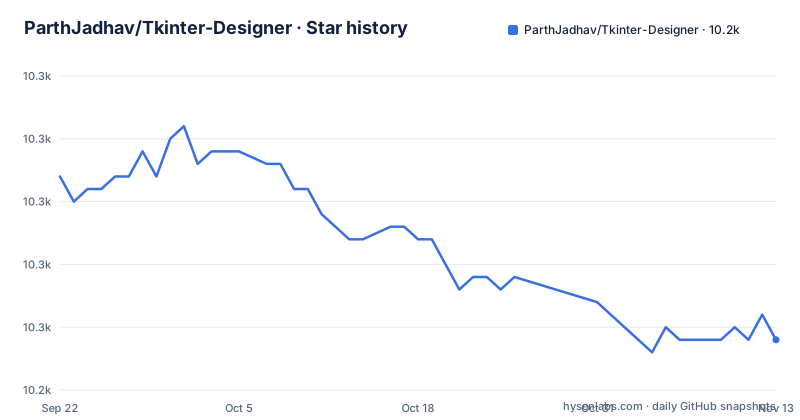
Star history
- ParthJadhav/Tkinter-Designer10,249 ★ · -13
| Repository | 2026-09-22 | 2026-11-13 |
|---|---|---|
| ParthJadhav/Tkinter-Designer | 10.3k | 10.2k |
-13 Stars in the last 52 days, measured from the daily GitHub snapshot. Compare with other projects
Editorial analysis
A Figma URL and an access token are the whole input
Tkinter Designer reads a Figma design through the Figma API and writes out the Python files and images a Tkinter interface needs. There is no layout canvas and no preview window inside the tool. The entire contract is a design file URL plus an API token, which the README describes as the only thing a user has to supply.
The package installs from PyPI and needs Python 3.9 or newer, a constraint that also appears in pyproject.toml as python = ">=3.9,<4.0". A first generation run looks like this:
pip install tkdesignertkdesigner "$FILE_URL" "$FIGMA_TOKEN"Because the design lives in Figma rather than on your disk, the generator cannot run without a Figma account and a token that can read that file. No offline mode and no local .fig import are documented, so a build machine that cannot reach Figma cannot produce code at all.
Quote the Figma URL or the shell eats the query string
Figma links routinely carry ? and & query parameters. Left unquoted in a shell, those characters end the command early and the generator receives a truncated URL. The README's instruction is explicit: always wrap Figma URLs in quotes when running from a shell. The quoted form above is the one to copy.
The Makefile target at the repository root does not follow that advice:
poetry run tkdesigner ${FIGMA_PROJECT_URL} ${FIGMA_TOKEN} -fThe variables expand unquoted there, so a URL containing an ampersand will split into two arguments under make even though the same command works when typed by hand. Contributors running `make cli` need to keep the URL free of shell metacharacters or export it in a form that survives expansion.
The token rides on the same command line. No config file and no environment variable for storing it is documented, so the default outcome is a token sitting in your shell history and in any process listing while the run happens.
Three templates decide the shape of the generated application
The default run emits a plain script. Two flags change its structure. `--template class` produces a class-based Tkinter app, and `--template pages` produces one application with Back and Next navigation across multiple Figma frames, matching the multi frame support described in the project's announcement.
tkdesigner --template class $FILE_URL $FIGMA_TOKENtkdesigner --template pages $FILE_URL $FIGMA_TOKENThe frame question is answered in the browser before you copy the link. The CLI accepts both current figma.com/design/... links and legacy figma.com/file/... links, and if a specific frame is selected before the link is copied, that selected frame is what gets generated.
The cost of this arrangement is that the template decision is baked into the generated layout. Switching templates means regenerating from scratch, and the `-f` flag exists to clear and regenerate an existing build directory. Anything you hand-edited inside that directory does not come back.
gui.py imports without mainloop, which is the only documented seam
One integration point is stated precisely: generated gui.py files can be imported from another Python file without starting mainloop() automatically. That lets you attach commands separately and regenerate the UI later, which is the sane way to use the tool. Behaviour lives in a module you own; the generated file stays disposable.
That sentence is the whole of the documented seam. There is no described hook for wiring a Figma component to a callback, no documented naming convention for generated widget variables, and no statement about which parts of the build directory are safe to edit. The instructions page linked from the README lives in docs/ and is where further detail is expected.
So the practical test is simple: after generating, check whether your handlers live in a file you wrote or in a file the tool wrote. Handlers inside the build directory are destroyed the next time you pass -f.
The newest tag is v1.0.7 from 2023-01-22 and pyproject still says 1.0.6
Version numbering does not line up between the repository and the release tags. pyproject.toml declares version = "1.0.6" under [tool.poetry], while the most recent GitHub release is v1.0.7 dated 2023-01-22, ahead of v1.0.5 from 2022-10-30 and v1.0.4 from 2021-08-07. The last push to the repository was on 2026-10-16, so code has moved since that tag without a new release.
For a user installing with `pip install tkdesigner`, that means the version number on your machine cannot be mapped to a repository state without checking both places. There is no changelog file among the top-level entries, so upgrade notes come from release tags alone, and the newest one is more than three years old.
Contributors have a better path. The Makefile exposes lint and test targets, `make precommit` runs both, and dev dependencies are pinned in pyproject.toml as pytest ^8.0, flake8 ^7.0 and pylint ^3.0:
poetry run flake8 --ignore=E251,E226 --max-line-length=127The container installs Tk and then asks for your token at run time
A Dockerfile at the repository root packages the generator:
FROM python:3.12-slimRUN pip install --no-cache-dir .
ENTRYPOINT ["tkdesigner"]It installs python3-tk and tk from apt, then installs the package itself. Since the entrypoint is the CLI, the container is a generator rather than a runtime for the apps it produces. Tk still needs a display to draw anything, and no X server or virtual display is configured here, so the generated application has to run somewhere else.
Credentials are not baked in, which is the right shape: the Figma token is supplied when the container runs. Note also that the image pins Python 3.12 while the project supports 3.9 and newer, so the container tests only the newest end of that range.
Three advantages are asserted without a measurement
The README lists its advantages in three numbered lines: interfaces with drag and drop, a great deal quicker than writing code by hand, and producing more gorgeous interfaces. None of the three carries a number, a benchmark or a comparison against a written equivalent. Nothing in the repository measures how much time a design-to-code run saves, so the saving has to be estimated on your own project.
The example gallery is credited in the README as not the author's creations, which means they were made by others, and the README does not say they were checked against the current generator. Treat them as possibilities rather than as expected output.
The alternative approach worth naming is a designer that ships with its own toolkit. Qt Designer is bundled with Qt and writes .ui XML that the framework loads at run time, so there is no external account, no token and no generated Python to maintain. Tkinter Designer inverts that: it lives outside the GUI toolkit, needs a Figma account, and produces source files that you then own and edit. That is a better fit when the design source of truth is already Figma, and a worse one when it is not.
Editorial conclusion
Use Tkinter Designer if your team already designs in Figma and wants a starting directory of Tkinter files rather than a hand-written widget tree. Skip it if you need an offline generator, a framework that ships its own visual designer, or output you can keep editing across regenerations. Verify first that a plain Tkinter app from the build directory runs on your Python, then read the instructions page in docs/ before trusting the README as the usage guide.
Frequently asked questions
what is tkinter designer
Tkinter Designer is a Python package, published as tkdesigner, that uses the Figma API to read a design file and generate the Tkinter code and images for it. A Figma file URL and an API token are the only inputs it needs.
how to install tkinter designer
Install it with `pip install tkdesigner` on Python 3.9 or newer. The package depends on requests, Jinja2, Pillow and urllib3, and the project also ships a Makefile with poetry based setup, lint and test targets.
how to use tkinter designer
Design the interface in Figma, select a frame if you want only that frame, then pass the file URL and your API token to the CLI. Use `--template class` for a class based app or `--template pages` for Back and Next navigation, and add `-f` to clear and regenerate an existing build directory.
Is there a designer for Tkinter?
Tkinter Designer is one, and it works through Figma rather than by drawing Tkinter widgets directly. The generated gui.py can be imported without starting mainloop(), so you attach commands in your own file and regenerate the interface later.
is tkinter designer free
The code is published under the BSD 3-Clause licence. The README asks for donations through Buy Me a Coffee and PayPal and does not list a price or a paid tier, so check the project homepage for anything the repository itself does not state.
Official sources
Add this badge to your README
If you maintain this project, the badge below links readers to this analysis and shows its maintenance status from the daily GitHub snapshot. Paste the markdown into your README; add ?metric=license or ?metric=stars to the image URL for a different field.

[](https://hysenlabs.com/projects/parthjadhav-tkinter-designer)Star history chart for your README
[](https://hysenlabs.com/projects/parthjadhav-tkinter-designer)Was this useful?