django-two-factor-auth puts a second factor in front of Django's own login
Complete Two-Factor Authentication for Django providing the easiest integration into most Django projects.
At a glance
- What is it?
- django-two-factor-auth is a Jazzband package that layers one-time passwords onto Django's built-in authentication, with phone, SMS, token app, hardware key and WebAuthn paths. It suits Django teams that need two-factor without assembling the flow themselves, and it comes with a stack of optional dependencies to check.
- Who is it for?
- django-two-factor-auth suits a Django team that wants a working two-factor flow this week and would rather not assemble OTP devices, phone verification and login views by hand. It is the wrong choice for a project already delegating authentication to an external identity provider, and for one that cannot accept a phone number or a hardware token in its user base.
- Can I use it commercially?
- Yes. MIT is a permissive licence: you can use, modify and sell software built on it, as long as you keep its copyright and licence notices.
- Is it still maintained?
- Yes. The repository last received commits 4 days ago.
- What is it written in?
- Mainly Python, according to GitHub's language statistics.
Answers come from the project's GitHub data, last synced on November 6, 2026, and from our analysis. They are not legal advice.
Star history
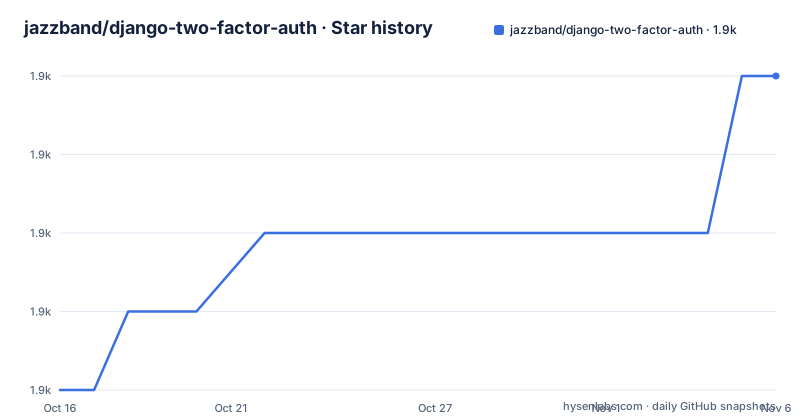
- jazzband/django-two-factor-auth1,883 ★ · +4
| Repository | 2026-10-16 | 2026-11-06 |
|---|---|---|
| jazzband/django-two-factor-auth | 1.9k | 1.9k |
4 Stars in the last 21 days, measured from the daily GitHub snapshot. Compare with other projects
Editorial analysis
Built on django-otp and Django's own auth framework
The architecture of this package is a stack of two layers, and the README is explicit about both. The project is built on top of the one-time password framework django-otp and on Django's built-in authentication framework, django.contrib.auth, and the stated purpose of that arrangement is to provide the easiest integration into most Django projects.
That framing explains the design. django-otp handles the cryptography and device model, the one-time password concept itself, the token generation and verification, and the per-device state. django-two-factor-auth sits on top and handles what a user actually experiences: the login views, the verification step, the phone number collection, the forms, the templates and the URLs.
The user experience is explicitly modelled on Google's Two-Step Authentication, and the README says so. Users can authenticate through a call, through text messages, through a token generator app such as Google Authenticator, or optionally through a YubiKey hardware token generator.
The alternative to this package is not another library, it is building the same thing yourself on top of django-otp, which is the route a team takes when it wants full control of the views and the flow. The difference in approach is that django-two-factor-auth hands you a conventional Django set of views, forms and templates wired to the URL configuration, while doing the OTP plumbing through django-otp underneath. A team that dislikes the default flow can fork it, since the code is MIT licensed, but a team that wants a different flow will find more of its own work here than in the raw framework.
Five optional dependencies, each one a decision
The dependency list is where the practical decisions sit, because the package splits its extras by method:
[project.optional-dependencies]
call = ['twilio>=6.0']
sms = ['twilio>=6.0']
webauthn = ['webauthn>=2.0,<2.99']
yubikey = ['django-otp-yubikey']
phonenumbers = ['phonenumbers>=7.0.9,<8.99']
phonenumberslite = ['phonenumberslite>=7.0.9,<8.99']
The call and sms groups both pull in twilio at 6.0 or later, so a voice call and a text message cost you the same dependency, with the difference sitting in configuration and in what the user experiences. The webauthn group pins the webauthn package between 2.0 and 2.99, and the yubikey group adds django-otp-yubikey. The two phone-number groups are alternatives to each other, the full phonenumbers package or the lite variant, and picking between them is a decision about how much data you need to carry for number parsing and validation.
The core requirements are small and worth reading as a set: Django 4.2 or later, django-otp 0.8.0 or later, qrcode below version 9, django-phonenumber-field below version 9, and django-formtools. The qrcode dependency exists because setting up a token app involves showing a QR code, and django-formtools is there because multi-step forms are exactly what a two-factor flow is.
The metadata declares the package as a production stable, Django framework library, Python 3.11 or newer, and it lists classifiers for Django 4.2 through 5.2 as well as Python 3.11 through 3.14. The README adds a compatibility note that at the time of writing this covers Django 5.2 and 6.0 on Python 3.11 to 3.14, which is a narrower statement than the classifier list and worth reconciling before you upgrade.
The example app is the fastest way to see the flow
The README points readers to an example app in the repository and recommends using it to test drive the package. It demos most features except the Twilio integration, which is a sensible omission given that the call and sms paths need a real provider account and real phone numbers.
The example is part of the repository, and the Makefile has targets that run it:
example:
	DJANGO_SETTINGS_MODULE=example.settings PYTHONPATH=. \
		django-admin migrate
	DJANGO_SETTINGS_MODULE=example.settings PYTHONPATH=. \
		django-admin runserver
The same pattern applies to the tests, which run under a tests.settings module, and to migrations, which use makemigrations against the two_factor package. A separate target exists for the WebAuthn settings variant:
example-webauthn:
	DJANGO_SETTINGS_MODULE=example.settings_webauthn PYTHONPATH=. \
		django-admin migrate
Looking at the example directory listing shows the shape of a real integration: a settings.py, a settings_private.py.dist that you copy and fill in, a settings_webauthn.py, a gateways.py, urls.py, views.py, templates and a locale directory. The settings_private.py.dist file is the usual pattern, a template of the secrets file that the example needs and that the repository cannot ship.
The example also includes django-user-sessions, which gives Django sessions a foreign key to the user, and the README makes a point of it: the package is optional, but it improves account security control over django.contrib.sessions. That is worth understanding, because binding a session to a user row is what lets a device or credential change invalidate that user's existing sessions rather than leaving them alive.
Where the flow has limits you should read before deploying
Two limits are visible in the documentation and both matter for a production decision.
The first is that the phone-based paths need a paid provider. The Twilio dependency is optional and the example deliberately does not demo it, so a project choosing call or SMS authentication is choosing to hold provider credentials, handle delivery failures and pay per message. The phone number itself is a separate dependency, django-phonenumber-field, and the phonenumbers or phonenumberslite extra is what does the parsing and validation behind it. A project whose users do not want to give a phone number has to look at the token app path or WebAuthn instead, and those are different products with different hardware requirements.
The second is the WebAuthn pin. The webauthn extra allows 2.0 up to but not including 2.99, and the example ships a separate settings module for it, which suggests it is a configuration path you opt into rather than something enabled by default. The upper bound is a deliberate constraint, and the README does not explain the reasoning, so a team on a newer webauthn release has to find out for itself whether the constraint is a compatibility floor or a stale one.
A third consideration is the surface itself. This package owns your login views. That is the point of it, and it is also the coupling: a project that has already built a custom login flow, or that delegates authentication to an external identity provider, gets little from this package and inherits a second opinion about how login works. The MIT licence makes forking it easy, and for many teams that is the right answer.
An established package with a quiet release cadence
Maintenance is a matter of the recorded facts. The repository is not archived and the last push was on 2026-10-19, so work on the branch continues. The published releases are 1.18.1 on 2025-09-28, 1.18.0 on 2025-09-16 and 1.17.0 on 2025-09-16, and the version in the project metadata reads 1.18.1. The default branch is master, not main, which matters for anyone scripting a clone or pinning a branch.
The release pattern is a package that is stable and moving slowly, which is what you want from something sitting in the authentication path. There is a CHANGELOG.md in the repository for the version history, and a tox.ini plus a Makefile, where the test target runs django-admin test under the tests settings module and the coverage target runs coverage with parallel mode, combines the results and produces an HTML report.
The translation story is unusually complete for a security package. The package is translated into English, Dutch and other languages, the repository has a.tx directory for Transifex, and the Makefile has tx-pull and tx-push targets that pull translations and then compile the message catalogues for both the two_factor package and the example application. A pull target that ends with compilemessages in two directories is a sign of a project that treats its interface translations as a first-class part of the release, which matters when your users do not read English.
The licence is MIT, with the licence file in the repository root. For a package that will sit in front of your users' accounts, that is the straightforward choice: no obligations beyond keeping the notice, and no copyleft reach into the rest of your codebase.
Editorial conclusion
django-two-factor-auth suits a Django team that wants a working two-factor flow this week and would rather not assemble OTP devices, phone verification and login views by hand. It is the wrong choice for a project already delegating authentication to an external identity provider, and for one that cannot accept a phone number or a hardware token in its user base. Before you adopt it, read the installation instructions on readthedocs, decide which optional dependency groups you actually need because each one adds a package to your lock file, and confirm your Django and Python versions fall inside the supported range, which the project states as Django 5.2 and 6.0 on Python 3.11 through 3.14.
Frequently asked questions
How do I install django-two-factor-auth in a Django project?
The README does not list the steps itself and points to the installation instructions in the documentation on readthedocs. The package itself is published on PyPI as django-two-factor-auth, and the supported versions are Django 5.2 and 6.0 on Python 3.11 to 3.14.
Which second-factor methods does django-two-factor-auth support?
The README lists authentication by call, by text message, with a token generator app such as Google Authenticator, and optionally with a YubiKey hardware token. The package metadata also defines a webauthn extra, so WebAuthn is available as a separate optional dependency.
What does django-otp add on top of django-two-factor-auth?
The README states that the project is built on top of the one-time password framework django-otp together with Django's built-in django.contrib.auth, with the goal of making integration into most Django projects straightforward.
How do I try django-two-factor-auth before putting it in production?
The repository ships an example app and the README recommends it for test driving the package, noting that it demos most features except the Twilio integration. The Makefile has an example target that runs the migrations and starts the development server under the example settings module.
Official sources
Add this badge to your README
If you maintain this project, the badge below links readers to this analysis and shows its maintenance status from the daily GitHub snapshot. Paste the markdown into your README; add ?metric=license or ?metric=stars to the image URL for a different field.

[](https://hysenlabs.com/projects/jazzband-django-two-factor-auth)Star history chart for your README
[](https://hysenlabs.com/projects/jazzband-django-two-factor-auth)Was this useful?