pyWhat hides matches with rarity under 0.1 by default, so a bare YouTube ID returns nothing
🐸 Identify anything. pyWhat easily lets you identify emails, IP addresses, and more. Feed it a .pcap file or some text and it'll tell you what it is! 🧙♀️
At a glance
- What is it?
- An MIT-licensed Python command line tool that names what a piece of text, a file or a directory contains: emails, URLs, crypto wallets, API keys and more. Its last tagged release is 5.1.0 from 2021-12-04, while the repository was pushed on 2026-10-13.
- Who is it for?
- pyWhat suits security analysts, CTF players and bug bounty hunters who want a quick regex-backed answer to what a string or file contains, with filters to keep noise down. It is not a classifier that understands context, so every hit still needs a human check, and it hides low-rarity matches unless you change the default.
- Can I use it commercially?
- Yes. MIT is a permissive licence: you can use, modify and sell software built on it, as long as you keep its copyright and licence notices.
- Is it still maintained?
- Yes. The repository last received commits 21 days ago.
- What is it written in?
- Mainly Python, according to GitHub's language statistics.
Answers come from the project's GitHub data, last synced on November 26, 2026, and from our analysis. They are not legal advice.
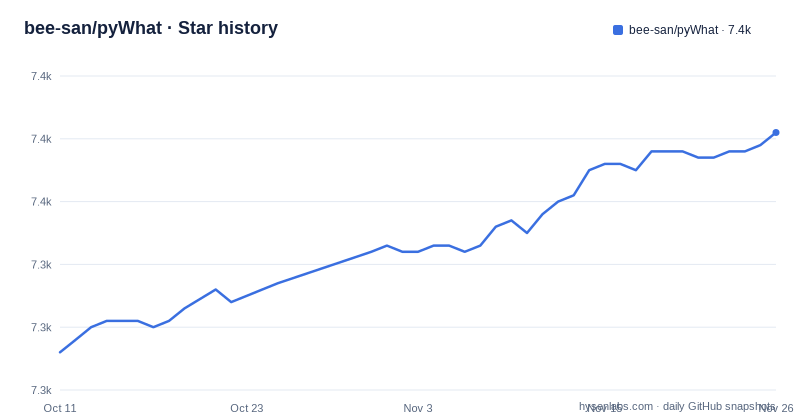
Star history
- bee-san/pyWhat7,361 ★ · +35
| Repository | 2026-10-11 | 2026-11-26 |
|---|---|---|
| bee-san/pyWhat | 7.3k | 7.4k |
35 Stars in the last 46 days, measured from the daily GitHub snapshot. Compare with other projects
Editorial analysis
Two commands, pywhat and what, run the same entry point
The README's headline install is pip3 install pywhat followed by pywhat --help. pyproject.toml registers two console scripts, pywhat and what, both pointing at pywhat.what:main. So `what "0x52908400098527886E0F7030069857D2E4169EE7"` and the pywhat form do the same thing, and the README mixes them freely.
The core job is to identify what something is, whether text, a file or the hex of a file. The tool is recursive: it looks for matches in text inside files too. The README frames the tool with a puzzle: you find mysterious text such as 0x52908400098527886E0F7030069857D2E4169EE7 or dQw4w9WgXcQ and want to know what it is, so you ask `what` and it answers. That makes it a lookup step you can drop into a longer workflow, not a full analysis suite. The package requires Python ^3.7 and depends on click ^8.0.0 and rich >=11.0.0, with orjson as an optional extra named optimize.
Installation comes in four forms and one of them adds orjson
The plain install is:
$ pip3 install pywhatThe faster variant installs the optional dependency:
# installs optional dependencies that may improve the speed
$ pip3 install pywhat[optimize]
On macOS, Homebrew works with `$ brew install pywhat`, and MacPorts users run `$ sudo port install pywhat`. The repository also has a Dockerfile based on python:3.10-alpine that installs the package from git and sets the entrypoint to python -m pywhat, with a working directory of /workdir. Mount your files there to scan them from the container. Because the image installs from the git repository head rather than a pinned release, two builds on different days can contain different regex sets. The README says the optimize extra may improve speed, with no measured figure.
Low-rarity matches are dropped, and a YouTube ID shows why
By default, pyWhat shows only matches with a rarity of 0.1 or more, because lower-rarity matches are often false positives. The README's own example is dQw4w9WgXcQ: a YouTube video ID on its own could be any 11 random characters, so running `what dQw4w9WgXcQ` finds nothing. Running `what --rarity 0: dQw4w9WgXcQ` shows it.
The consequence is that silence is not proof of absence. A short token you are hunting for can sit below the cutoff. The README also shows a range form, `what --rarity 0.2:0.8 --include Identifiers,URL https://skerritt.blog`, to keep only a band. Rarity ties into the Top matches option, where the most likely matches have the highest rarity. The README adds that fragments of a longer word or match, which boundaryless mode finds, are ranked as less likely: `what --top 1 0x52908400098527886E0F7030069857D2E4169EE7` shows the Ethereum address, not the card and social security numbers in it. In practice, start with the default, then lower the cutoff only for the single string you are chasing, so a whole directory scan does not drown you in noise.
Filters work by tag and by regex name, with short aliases
Output can be filtered to what you care about, such as AWS, bug bounties or cryptocurrencies. Run `pywhat --tags` to see all filters. They combine, so seeing all cryptocurrency wallets except Ripple looks like this:
pywhat --include "Cryptocurrency Wallet" --exclude "Ripple Wallet" 1KFHE7w8BhaENAswwryaoccDb6qcT6DbYYThe names of the regexes act as tags, and many have shorter alternatives: BTC Wallet stands for Bitcoin (₿) Wallet Address and ARN for Amazon Resource Name (ARN). To see only Bitcoin and Ethereum wallets, run:
pywhat --include "BTC Wallet,ETH Wallet" TEXTThe command pywhat --names lists every regex name with its alternatives.
Sorting, top matches and JSON export shape long results
Sorting uses `what -k rarity --reverse TEXT`. For too many results, `what --top 10 TEXT` shows only the 10 most likely matches, most likely first, and `what --top 5% TEXT` the most likely 5 percent. For a directory or several inputs, the top matches are taken across all of them.
Export uses `what --json`, and `what --json > file.json` writes to a file. The JSON is printed on one line, so you can pipe it, as in `what --json TEXT | jq`. Multiple inputs are accepted at once, like `what file1 file2 this/is/a/directory 'some text'` or `find . -name '*.log' -exec what {} +`. Each match shows its file, matches in text sit under text, and --json returns everything in one object. When a search takes a while, progress bars show how far it has got.
Files, directories and Unicode text are handled without extra flags
Pass a path such as `what 'this/is/a/file/path'` and the tool works out it is a file. A directory is searched recursively. Text piped in or read from files can be UTF-8, or UTF-16 or UTF-32 with a byte order mark, like the Unicode text files Windows saves. It also searches the UTF-16 strings inside binary files, in the way of strings -el, which is how Windows programs store most of their text.
Characters your terminal cannot show are printed as escape sequences such as `\u20bf` instead of crashing. The use case for a pcap is listed directly: a .pcap file from a network attack can be scanned to find all URLs, emails, phone numbers, credit card numbers, cryptocurrency addresses and Social Security Numbers, in seconds rather than minutes.
The bug bounty mode scans repositories and mirrored sites for keys
A built-in tag, Bug Bounty, targets API keys, webhooks and credentials. The command is `pywhat --include "Bug Bounty" TEXT`. The README gives two recipes. For GitHub, download all repositories of an organisation with a curl and git clone pipeline, then loop:
find . -type f -execdir pywhat --include 'Bug Bounty' {} \;For a website, mirror it with `wget -r -np -k https://skerritt.blog` and run the same find loop. It prints when it finds things. A match is only a pattern hit, so you must check whether a key is live and whether the program accepts the report, and only scan repositories and sites you are authorised to test. A third use case in the README is malware triage, where the reader is told to use a domain registrar API afterwards: pull the hardcoded domains out of a sample like Wannacry, whose kill-switch domain stopped the virus once registered.
On upkeep, the tagged releases are 5.1.0 (2021-12-04), 5.0.0 (2021-10-22) and 4.3.1 (2021-10-10), and the repository saw a push on 2026-10-13.
Editorial conclusion
pyWhat suits security analysts, CTF players and bug bounty hunters who want a quick regex-backed answer to what a string or file contains, with filters to keep noise down. It is not a classifier that understands context, so every hit still needs a human check, and it hides low-rarity matches unless you change the default. Before you trust a scan, run it once with --rarity 0: on a sample you know and compare against the default output.
Frequently asked questions
What does pyWhat do?
It identifies what a string, file or directory contains, such as emails, URLs, IP addresses, cryptocurrency wallets and API keys, and reports the matches with a rarity score.
Why does pyWhat find nothing for a short ID?
It hides matches with rarity below 0.1 by default because they are often false positives. Use --rarity 0: to show them, for example on a bare YouTube ID.
How do I install pyWhat?
Run pip3 install pywhat, or pip3 install pywhat[optimize] for the optional orjson dependency. Homebrew has brew install pywhat and MacPorts has sudo port install pywhat.
Official sources
Add this badge to your README
If you maintain this project, the badge below links readers to this analysis and shows its maintenance status from the daily GitHub snapshot. Paste the markdown into your README; add ?metric=license or ?metric=stars to the image URL for a different field.

[](https://hysenlabs.com/projects/bee-san-pywhat)Star history chart for your README
[](https://hysenlabs.com/projects/bee-san-pywhat)Was this useful?