Fernflower reads Java bytecode the way a compiler wrote it, if you tell it what the libraries are
Decompiler from Java bytecode to Java, used in IntelliJ IDEA.
At a glance
- What is it?
- Fernflower is JetBrains' analytical decompiler for Java class files, bundled inside IntelliJ IDEA and usable as a standalone jar. Its default output leans heavily on what you feed it through the -e= library path and on which of its thirty-odd switches you change.
- Who is it for?
- Adopt Fernflower when you need readable Java out of class files you control and can supply a -e= library path for, and when you are willing to keep hes, hdc, dgs, ren and mpm tuned per job. Do not adopt it as an unattended batch service, since mpm defaults to 0 and one hostile class file can stall a run, and do not expect it to explain obfuscated jars, because ren only rewrites reserved words and names shorter than 3 characters into class_N and method_N.
- Can I use it commercially?
- Yes. Apache-2.0 is a permissive licence: you can use, modify and sell software built on it, as long as you keep its copyright and licence notices.
- Is it still maintained?
- Yes. The repository received new commits within the last day.
- What is it written in?
- Mainly Java, according to GitHub's language statistics.
Answers come from the project's GitHub data, last synced on November 13, 2026, and from our analysis. They are not legal advice.
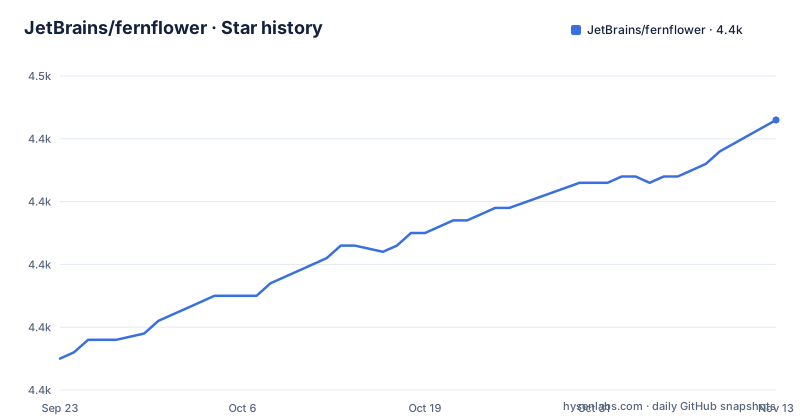
Star history
- JetBrains/fernflower4,443 ★ · +38
| Repository | 2026-09-23 | 2026-11-13 |
|---|---|---|
| JetBrains/fernflower | 4.4k | 4.4k |
38 Stars in the last 51 days, measured from the daily GitHub snapshot. Compare with other projects
Editorial analysis
The -e= library path decides how good your names are
Fernflower's output quality is not a fixed property of the decompiler. It depends on how much context you hand it. A source argument prefixed with -e= is a library: it is not decompiled, but it is parsed, and what the analyser learns from it flows into the names you get back. The README says this directly for identifier renaming, which is the point where missing context hurts most. If the obfuscator gave a class the name a, Fernflower sees only that one letter and has nothing to match it against. Hand it rt.jar and the same byte now sits next to thousands of classes whose names describe real APIs, and the rename decision changes.
That is the difference between running the tool and configuring it. Here is the stand-alone invocation in its general form, copied from the README:
java -jar fernflower.jar [-<option>=<value>]* [<source>]+ <destination>Directories are scanned recursively, and the allowed extensions are class, zip and jar. Anything you leave as a plain source path gets written out as Java. Anything you mark with -e= gets consumed and discarded.
The urc interface name in the prose does not match the code sample
Two different names appear for the same extension point. The urc entry in the option table describes a class implementing the IIdentifierRenamer interface, while the renaming section says to pass a class that implements org.jetbrains.java.decompiler.main.extern.IMemberIdentifierRenamer. The second is the one that appears in a fully qualified form, with a package, and it is the one to trust if you are writing the class. The option-table name lacks both the Member part and the package.
Four methods carry the work. toBeRenamed decides whether an element is renamed at all; the other three hand back new names for classes, methods and fields. The class has to sit on the application classpath, which is a real constraint for a fat jar distribution. Fernflower offers no configuration file and no plugin loader: the -urc value is the entire extension surface, and it is a bare string on the command line, not a manifest entry.
The built-in strategy is blunt, and the numbers matter. An element is renamed when its name is a reserved word or when it is shorter than 3 characters. Replacement names follow a single pattern, class_N / method_N / field_N with a consecutive number. So a two-character obfuscated name is rewritten and a three-character name is left alone.
Running it against a jar with a library on the side
The second README example decompiles one jar plus a loose class, with generic signatures switched on, and writes into a destination directory:
java -jar fernflower.jar -dgs=1 c:\Temp\binary\library.jar c:\Temp\binary\Boot.class c:\Temp\source\Read the shape rather than the paths. Multiple sources are accepted, a jar and a class file can be mixed freely, and the destination comes last with no flag in front of it. The first example does the same thing but keeps a library on the -e= side and turns two defaults off:
java -jar fernflower.jar -hes=0 -hdc=0 c:\Temp\binary\ -e=c:\Java\rt.jar c:\Temp\source\-hes=0 stops Fernflower from hiding the empty super() call, -hdc=0 stops it from hiding the empty default constructor. Both default to 1, so both switch the output away from what IntelliJ shows you by default toward something closer to what the compiler emitted. Whether that helps depends on what you are reading the output for: recovered shape, or code you intend to rebuild.
mpm and urc are the two switches that are not on or off
The README says that except for mpm and urc, 1 means on and 0 means off, though ind and log also take other values. mpm takes a number of seconds and defaults to 0, which means no upper limit at all; set it and a single method that the analyser cannot converge on stops consuming the machine. urc takes a class name rather than a flag value, and its default is shown as a dash because there is none.
The README also singles out six options as the ones a user is expected to touch: hes, hdc, dgs, mpm, ren and urc. The remaining switches are aimed at professional reverse engineers, which is a fair warning. Several of them are explicitly workarounds for compiler bugs rather than readability features: bto=1 reads the integer 1 as boolean true, nns=1 allows an unset synthetic attribute, uto=1 treats nameless types as java.lang.Object and describes the cause as a compiler architecture flaw. bto and uto are already on by default, while nns is off.
One cosmetic default is worth knowing about before you diff output: ind is the indentation string and defaults to three spaces, while nls=0 means CRLF and the unset default follows the host operating system. Output generated on Windows and output generated on Linux are not byte-identical.
Building from source puts the startup script in build/install/engine/bin
There is no Maven coordinate in the README; releases are published in the IntelliJ Community repository, and the engine is bundled in IntelliJ IDEA. To get a launcher from a checkout, the README gives one Gradle task:
./gradlew :installDistThe script lands at build/install/engine/bin.
The repository layout explains why building is heavier than it looks. There are two module files, intellij.java.decompiler.engine.iml and intellij.java.decompiler.engine.tests.iml, plus BUILD.bazel alongside build.gradle.kts, and a testData directory holding the regression corpus. You are compiling a piece of the IntelliJ Community codebase, not a standalone library with a thin dependency tree.
Contributions go the other way round from what most readers expect. Patches are opened as pull requests against the IntelliJ Community repository, not against this one, following that repository's contribution guidelines. The project itself is licensed under the Apache License 2.0, and the last push landed on 2026-10-30.
Where the decompiler is the wrong tool
Obfuscated input is the failure case the option table cannot repair. The ren strategy triggers on reserved words and names shorter than 3 characters, and it rebuilds names as class_1, method_1 and so on. That produces unique identifiers, which is what the compiler needs, but it does not produce meaning. If your goal is to work out what an obfuscated jar does, Fernflower gives you a compiling skeleton and no insight. Its own framing agrees: the renaming section argues the point is recompilation without conflicts, not comprehension.
mpm is the second real edge. It defaults to 0, an unbounded per-method budget, so a malformed or adversarial class file can sit in the analyser for as long as the hardware allows. If you plan to point this at third-party jars as a service, set mpm before you do.
Two smaller gaps. The README documents no GUI, no plugin loader and no configuration file; everything goes through argv. And it does not state which class file versions are accepted or what happens on an unsupported one. There is no changelog to check a build against, and the issue tracker is a YouTrack subsystem inside the IDEA project rather than GitHub Issues.
CFR and Procyon take a different route through the same bytecode
Fernflower describes itself as analytical, and the option table is what that word costs: it exposes the passes it makes, the library context it needs and the places where it hides scaffolding.
That difference shows up in where each tool stops. Fernflower will fold a switch into a pattern, reconstruct a try-with-resources block and check that the resource implements AutoCloseable before it commits, and it will decode lambdas into anonymous classes with lac=1 when a downstream tool cannot read invokedynamic.
Fernflower's own history matters here. It was originally developed by Stiver and has been maintained by JetBrains since 2014, and some patches from MinecraftForge's ForgeFlower were merged in. The distinction in practice is that IDEA users get Fernflower without choosing it, and everyone else chooses on the output they need.
Editorial conclusion
Adopt Fernflower when you need readable Java out of class files you control and can supply a -e= library path for, and when you are willing to keep hes, hdc, dgs, ren and mpm tuned per job. Do not adopt it as an unattended batch service, since mpm defaults to 0 and one hostile class file can stall a run, and do not expect it to explain obfuscated jars, because ren only rewrites reserved words and names shorter than 3 characters into class_N and method_N. Verify one thing first: decompile a single small class from your own build with -dgs=1, pass the matching runtime jar through -e=, and check whether the result recompiles and reads the way you need. If that output holds, the rest of your decision is about how much of the option table you actually want to own.
Frequently asked questions
Is it possible to decompile a jar file with Fernflower?
Yes. Allowed source extensions are class, zip and jar, directories are scanned recursively, and multiple sources can be passed in a single invocation. Mark a jar with -e= if you want it used as analysis context only rather than decompiled.
How do I use Fernflower?
Run the jar in stand-alone mode as java -jar fernflower.jar with optional -option=value arguments, one or more sources, and a destination directory last. Fernflower is also bundled inside IntelliJ IDEA, where it is used to show Java code when debugging or navigating class files.
What is the Fernflower decompiler?
It is JetBrains' analytical decompiler from Java bytecode to Java, originally developed by Stiver and maintained by JetBrains since 2014. It ships inside IntelliJ IDEA and is also available as a stand-alone command line tool.
How do I install Fernflower?
Releases are published in the IntelliJ Community repository rather than on GitHub, and the engine is already bundled with IntelliJ IDEA. From a source checkout, running ./gradlew :installDist generates a startup script at build/install/engine/bin.
Fernflower vs CFR for Java decompilation
Fernflower exposes its analysis passes as switches such as dgs, mpm and ren, and accepts library input through -e= to inform identifier renaming.
Fernflower vs Procyon for Java decompilation
Fernflower is analytical and lets you control passes such as dgs=1 for generic signatures or lac=1 to turn lambdas into anonymous classes. Fernflower also needs a -e= library path when identifier names matter.
Official sources
Add this badge to your README
If you maintain this project, the badge below links readers to this analysis and shows its maintenance status from the daily GitHub snapshot. Paste the markdown into your README; add ?metric=license or ?metric=stars to the image URL for a different field.

[](https://hysenlabs.com/projects/jetbrains-fernflower)Star history chart for your README
[](https://hysenlabs.com/projects/jetbrains-fernflower)Was this useful?