JetBrains IntelliJ Platform Gradle Plugin for Plugin Builds
Gradle plugin for building plugins for JetBrains IDEs
At a glance
- What is it?
- JetBrains/intellij-platform-gradle-plugin configures Gradle builds for IntelliJ-based IDE plugins, covering builds, tests, verification, and publishing. It is a focused Gradle integration for plugin maintainers, with stable and nightly snapshot distribution paths.
- Who is it for?
- Gradle-based maintainers of IntelliJ Platform plugins should evaluate this project for its build, test, verification, and publication lifecycle, while projects using another build system should look elsewhere. Users of nightly snapshots should verify the documentation's current Usage configuration first, because the README does not pin a snapshot version or describe rollback.
- Can I use it commercially?
- Yes. Apache-2.0 is a permissive licence: you can use, modify and sell software built on it, as long as you keep its copyright and licence notices.
- Is it still maintained?
- Yes. The repository last received commits 2 days ago.
- What is it written in?
- Mainly Kotlin, according to GitHub's language statistics.
Answers come from the project's GitHub data, last synced on November 7, 2026, and from our analysis. They are not legal advice.
Star history
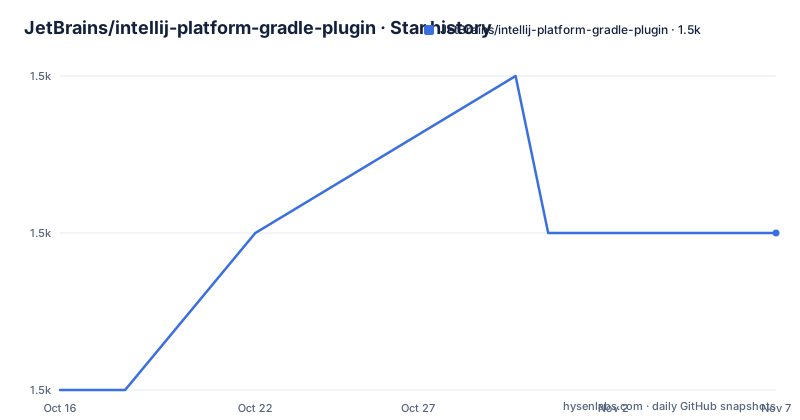
- JetBrains/intellij-platform-gradle-plugin1,533 ★ · +1
| Repository | 2026-10-16 | 2026-11-07 |
|---|---|---|
| JetBrains/intellij-platform-gradle-plugin | 1.5k | 1.5k |
1 Stars in the last 22 days, measured from the daily GitHub snapshot. Compare with other projects
Editorial analysis
Why the IntelliJ Platform Gradle Plugin exists
Writing a plugin for an IntelliJ-based IDE is not simply compiling Kotlin or Java against a library. The build must configure an environment associated with the target platform, then coordinate the operations needed to produce and validate the plugin. The JetBrains IntelliJ Platform Gradle Plugin places those concerns inside Gradle. According to the README, it helps configure the environment for building, testing, verifying, and publishing plugins for IntelliJ-based IDEs.
The intended users are maintainers of JetBrains IDE plugins who already use Gradle as their build system. That scope matters. This is not a general-purpose Gradle plugin, nor is it a runtime library that application code imports. Its job is build orchestration around IntelliJ Platform plugins. The repository is written primarily in Kotlin, which fits the JetBrains development ecosystem, while its published artifact is consumed through Gradle rather than compiled directly into a plugin.
The repository also includes integration-test material, a changelog, Gradle wrapper files for Unix-like systems and Windows, and build logic under `build-logic/`. Based on that layout, the project includes both implementation sources and project-level build infrastructure. The README does not document individual task names or the complete lifecycle, so adoption should begin with the linked SDK documentation rather than assumptions about the plugin's task graph.
How the Gradle integration is organized
The repository identifies the artifact as `org.jetbrains.intellij.platform` through its Gradle Plugin Portal link. The top-level `settings.gradle.kts` and `build.gradle.kts` show that the plugin itself is a Gradle project. Additional build definitions live under `build-logic/`, while implementation code is under `src/`. This separation is visible in the repository layout, although the README does not describe the internals of each module or task.
At the use-site level, Gradle applies the plugin and obtains its configuration from the project's plugin setup. The repository's snapshot configuration demonstrates that integration at the `pluginManagement` level in `settings.gradle.kts`. The documented data path is therefore split across Gradle resolution and project configuration: Gradle resolves the plugin implementation first, and the applied plugin then configures the build environment for the IntelliJ Platform lifecycle. The README does not expose the names of configuration objects, task inputs, output directories, or compatibility attributes.
The four supported activities are building, testing, verification, and publishing. This is a broader lifecycle than a compile-only helper, but it should not be mistaken for a complete release system. The README does not state how credentials are supplied, how Marketplace submissions are authenticated, or whether publication can target JetBrains Marketplace directly. Those details must be checked in the SDK documentation linked by the project.
Installing a snapshot for Gradle plugin resolution
The README does not include a complete first-plugin build. It directs users to the Usage section of the IntelliJ Platform Plugin SDK documentation for installation. The one executable configuration shown in the README enables Maven Snapshots in `settings.gradle.kts`.
Add the following repository inside `pluginManagement.repositories`. This is the exact snapshot configuration published by the project:
pluginManagement {
  repositories {
    maven("https://central.sonatype.com/repository/maven-snapshots/")
    gradlePluginPortal()
  }
}
This adds the Sonatype Maven Snapshots repository while retaining `gradlePluginPortal()`. The README says snapshot releases are built nightly from the `main` branch and contain the always-latest plugin version. A snapshot workflow therefore differs from a stable workflow: it can introduce changes without matching the cadence of numbered releases.
The README does not provide a literal snapshot version, because it renders that value through Maven metadata. It also does not show the subsequent `plugins` block that applies a chosen snapshot. The linked Usage documentation is therefore required to complete a first build. The repository's `gradlew` and `gradlew.bat` files indicate that a Gradle wrapper is used in its own development, but the README does not prescribe a wrapper command for plugin consumers.
Stable releases, nightly builds, and upgrade choices
The stable channel is distributed through the Gradle Plugin Portal. The README identifies the release page as the authoritative place to review all releases and links `CHANGELOG.md` as part of the repository documentation. The listed recent releases include version `2.19.0` on 2026-09-14, `2.18.1` on 2026-07-10, and `2.18.0` on 2026-07-09.
The snapshot channel is built nightly from `main`. That makes it useful for checking the newest implementation, but it should not be treated as a stable release channel merely because it is recent. A build tied to an always-latest snapshot may change as new snapshots replace earlier artifacts. The README does not document retention, rollback, compatibility guarantees, or how to pin a snapshot safely. Projects that need reproducible dependency resolution should confirm the chosen artifact and related IntelliJ Platform configuration before adopting a snapshot.
The repository is not archived, and the last push was on 2026-10-16. That supports recent development activity, but it does not remove normal upgrade work. Plugin authors should inspect release notes for changes to build, test, verification, or publication behavior. The Apache-2.0 license permits use and modification under its terms, with attribution and license obligations applying. This is a technical note rather than legal guidance.
Verification coverage and documentation gaps
The README includes GitHub Actions and TeamCity status badges, while the repository contains `INTEGRATION_TESTS.md`. Those files indicate that the project has build and test infrastructure, but their presence does not establish which IDE versions or operating systems are covered. No test matrix is provided in the README, and there are no reported pass rates or performance figures.
For plugin authors, verification should not be reduced to a successful Gradle configuration. The plugin is described as supporting verification alongside building and testing, yet the README does not identify the exact command, task, CLI options, failure output, or supported target platforms. The linked SDK documentation is the real source for those operational details. It is also the place to confirm whether publication requires separate credentials or service configuration.
This documentation gap creates a concrete evaluation risk. A build may appear configured successfully while target IDE compatibility, signing, or Marketplace requirements remain unverified. The repository's integration test documentation may help maintainers understand its own test strategy, but the README does not state that it is a consumer-facing compatibility guide. Anyone adopting the plugin should first map each of their release requirements, such as testing and publishing, to a documented Gradle operation.
When a Gradle-specific IntelliJ build is the wrong choice
This plugin is the wrong choice for a project that does not need Gradle to build an IntelliJ Platform plugin. The README does not describe support for Maven, standalone command-line compilation, or projects whose source is not packaged as a JetBrains IDE plugin. It also does not document a local development server workflow, although that absence alone should not be read as a claim that the SDK documentation lacks one.
The snapshot channel is another case where the fit is weaker. Nightly artifacts from `main` remove the release boundary associated with numbered versions. A team that cannot tolerate changing plugin build inputs should prefer the stable Gradle Plugin Portal path and review each release before upgrading. The README does not document rollback, so it provides no basis for promising quick restoration of a previous setup after a breaking change.
The plugin also does not replace IDE-side validation. Its stated scope stops at configuring the Gradle environment for plugin build activities. The documentation does not claim that it verifies every runtime behavior inside every IntelliJ-based IDE. A practical comparison is therefore between this integration and maintaining the IntelliJ Platform build configuration outside Gradle: the former centralizes the lifecycle in Gradle, while the latter serves projects committed to a different build system but requires details not covered by this README.
Editorial conclusion
Gradle-based maintainers of IntelliJ Platform plugins should evaluate this project for its build, test, verification, and publication lifecycle, while projects using another build system should look elsewhere. Users of nightly snapshots should verify the documentation's current Usage configuration first, because the README does not pin a snapshot version or describe rollback. Stable consumers should review `CHANGELOG.md` and release notes before upgrading to `2.19.0` or a later version.
Frequently asked questions
What is the JetBrains IntelliJ Platform Gradle Plugin used for?
It configures Gradle environments for building, testing, verifying, and publishing plugins for IntelliJ-based IDEs.
Where can I find installation instructions for the IntelliJ Platform Gradle Plugin?
The README directs users to the Usage section of the IntelliJ Platform Plugin SDK documentation. It does not contain a complete installation example.
How are nightly snapshot releases resolved through Gradle?
The README shows adding `https://central.sonatype.com/repository/maven-snapshots/` inside `pluginManagement.repositories` while retaining `gradlePluginPortal()`. Snapshot releases are built nightly from `main`.
Official sources
Add this badge to your README
If you maintain this project, the badge below links readers to this analysis and shows its maintenance status from the daily GitHub snapshot. Paste the markdown into your README; add ?metric=license or ?metric=stars to the image URL for a different field.

[](https://hysenlabs.com/projects/jetbrains-intellij-platform-gradle-plugin)Star history chart for your README
[](https://hysenlabs.com/projects/jetbrains-intellij-platform-gradle-plugin)Was this useful?