Devbox (jetify-com/devbox): Nix-backed dev shells without the Nix learning curve
Instant, easy, and predictable development environments
At a glance
- What is it?
- Devbox is a Go CLI that turns a devbox.json package list into an isolated shell powered by Nix. It fits teams that need the same tool versions on every laptop, and it is the wrong tool if you cannot install Nix.
- Who is it for?
- Adopt Devbox if your team already tolerates Nix or is willing to install it, and you want one devbox.json to drive local shells, devcontainers and production images. Skip it if you cannot run the Nix daemon in your environment, or if you want a single binary that vendors its own package store.
- Can I use it commercially?
- Yes. Apache-2.0 is a permissive licence: you can use, modify and sell software built on it, as long as you keep its copyright and licence notices.
- Is it still maintained?
- Yes. The repository last received commits 1 day ago.
- What is it written in?
- Mainly Go, according to GitHub's language statistics.
Answers come from the project's GitHub data, last synced on November 14, 2026, and from our analysis. They are not legal advice.
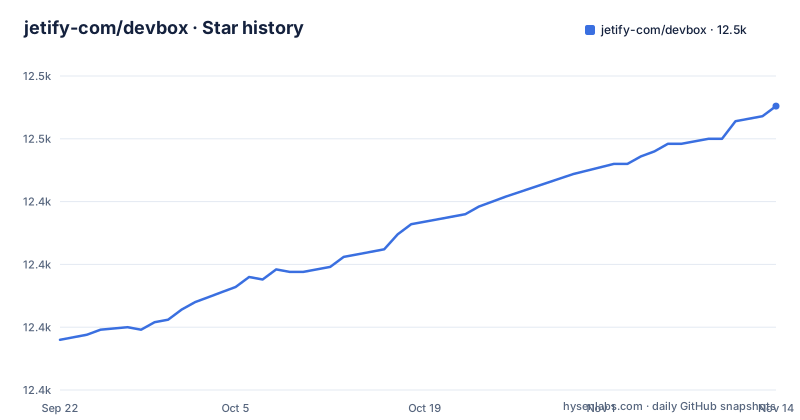
Star history
- jetify-com/devbox12,463 ★ · +93
| Repository | 2026-09-22 | 2026-11-14 |
|---|---|---|
| jetify-com/devbox | 12.4k | 12.5k |
93 Stars in the last 53 days, measured from the daily GitHub snapshot. Compare with other projects
Editorial analysis
What Devbox solves, and for whom
The problem is version drift across machines. A project needs Python 3.10 and Go 1.18, one laptop has them from Homebrew, another has them from apt, a third has a newer Python that breaks the build. Devbox replaces that with a declarative list. The README describes it as a command-line tool that creates isolated shells for development, and it draws the analogy to yarn: you declare packages, and the tool materializes them. The difference is that the packages are operating-system level, the kind you would normally install with brew or apt-get.
Who it is for: teams that want one definition of an environment and several consumers of it. The README lists a local shell via devbox shell, a devcontainer for VSCode, a Dockerfile for a production image with the same tools, and a remote cloud environment. That portability is the actual selling point, more than the shell itself. Individual developers get a second benefit: trying a tool without installing it system-wide. You add a package, use it inside the shell, and remove it without touching the host.
Who it is not for: anyone expecting a container runtime or a virtual machine. Devbox environments run on the host, and the README states this explicitly as a speed argument, saying environments are created right on your laptop without an extra layer of virtualization slowing the file system. That is a real trade-off, not a free win. Host-level isolation means a process inside the shell can still see and modify files outside the project directory.
How Devbox uses Nix to build an isolated shell
Devbox is written in Go and is internally powered by nix, per the README. The repository layout supports that: there is a nix/ directory, a flake.nix and a flake.lock at the top level, alongside cmd/, internal/ and pkg/ for the CLI itself. Nix supplies the isolated shells; Devbox supplies the interface.
The data flow is short. devbox.json holds a packages array. devbox add resolves a package name and version against the Nix Package Registry, which the README says exposes over 400,000 package versions through Nixhub.io. The lock file, devbox.lock, is present at the repository root and is what pins resolution results. devbox shell then enters an environment where those packages are on PATH, leaving the rest of the machine untouched, and devbox run executes a single command inside that environment without opening an interactive shell.
Two implementation details are visible in go.mod and worth knowing. The CLI depends on github.com/f1bonacc1/process-compose, which is the project that handles running multiple processes,. It also depends on github.com/tailscale/hujson, a human JSON parser,.
The dependency on Nix is the whole architecture and also the whole constraint. If Nix cannot run on the machine, Devbox cannot create the environment.
Install Devbox and run your first shell
The README gives one install path: a shell script fetched over HTTPS. It does not document a Homebrew formula, an apt repository or a Windows installer in the README, so treat the script as the supported route.
curl -fsSL https://get.jetify.com/devbox | bashAfter that, work in an empty directory. The first command creates the config file, which the README says you should commit to source control.
devbox initAdd a package. The README uses Python 3.10 as the example, and the version pin is part of the package string.
devbox add [email protected]The resulting devbox.json is small enough to read at a glance. This is the shape the README shows after the add command.
{
  "packages": [
    "[email protected]"
  ]
}
Now enter the environment. The README notes that the shell prompt changes, which is how you know you are inside a Devbox shell rather than your normal terminal.
devbox shellVerify the package resolves to the version you asked for, and confirm that host-level configuration is still visible. The README demonstrates both checks.
python --version
git config --get user.name
Leave with exit. For non-interactive use, devbox run executes a command in the environment without opening a shell, which is the form you would put in a script or a CI job. devbox help lists the rest of the commands; the README points to the online CLI reference for the full set.
The lock file, and what it does not promise
devbox.lock sits at the repository root, and its presence tells you the project takes reproducibility seriously: devbox.json is the human-edited intent, the lock file is the resolved result. Commit both. If you commit only devbox.json, two developers can resolve the same package name to different store paths, which defeats the point of the tool.
What the README does not document is rollback. There is no described command for reverting an environment to a previous lock state, and no described mechanism for pinning a whole environment to a date. You can revert the lock file in Git, but the README is silent on whether Devbox caches old store paths in a way that makes that instant. Treat lock-file discipline as a Git problem, not a Devbox feature.
The other gap is platform coverage. The README's install section shows a curl-to-bash script, which is a Unix-shaped instruction. There is a NUSHELL.md file at the repository root, which suggests Nushell support is at least considered, but the README does not describe Windows-native shell support. If your team is on Windows, verify what the docs say about WSL or another compatibility layer before you plan a rollout; the README does not answer that question.
Where Devbox is the wrong tool
The clearest failure mode is the Nix dependency itself. Devbox does not ship its own package store. Every environment it creates is a Nix environment, so the install path includes Nix whether or not the README spells that out in the quickstart. On a locked-down corporate laptop where you cannot run a daemon or write to a system store, Devbox is blocked before it starts. A tool that vendors its own binaries would not be.
The second case is production isolation. Devbox shells run on the host. If your requirement is that a build step cannot read your SSH keys or your home directory, a host shell does not give you that, and neither does the README claim it does. The container path exists, but the README frames it as something you do when you are ready to ship, not as the default developer experience.
The third case is a single-language project with a well-behaved toolchain. If your project is one Node version and one package manager, a version manager or a language-native tool already solves the problem with less machinery. Devbox earns its place when the environment spans languages and system-level binaries, which is exactly the case the README's Python-plus-Go demo illustrates.
Finally, note the release cadence. The last push to the repository was on 2026-11-01, and the most recent release listed is 0.19.0 on 2026-10-29. That is a pre-1.0 version number, so expect the config schema and CLI surface to keep moving.
Devbox against Docker Compose for local development
The natural alternative is Docker Compose, and the difference is where the boundary sits. Compose builds a container image and runs your process inside it, so the toolchain lives in an image layer and the file system boundary is enforced by the kernel. Devbox builds a shell on the host and puts binaries on PATH, so the boundary is a PATH and environment-variable change rather than a namespace.
That difference shows up in two places. Startup and file I/O: the README argues Devbox avoids an extra layer of virtualization slowing the file system, which is the standard complaint about bind-mounting a source tree into a container on macOS. Configuration reuse: Compose files describe services and ports, while devbox.json describes packages. They overlap, but a Compose file is not portable into a VSCode devcontainer the way the README says a Devbox definition is.
A second alternative is Nix itself, through a flake and nix develop. Devbox is a wrapper over the same substrate, and the honest comparison is ergonomics against control. A hand-written flake gives you the full Nix expression language and no extra abstraction; Devbox gives you a small JSON file and a package registry you can search on Nixhub.io. If your team already writes flakes comfortably, Devbox adds a layer you may not want. If your team has never touched Nix, that layer is the entire product.
A third option worth naming is a language-native version manager. It is simpler and it does not cover system-level binaries, which is the gap Devbox exists to fill.
Licence, maintenance and upgrade cost
Devbox is licensed under Apache-2.0, and the LICENSE file is at the repository root. Apache-2.0 is a permissive licence with an explicit patent grant, which matters if you are embedding the CLI in internal tooling. It does not impose copyleft obligations on your own code. This is not legal advice; if you redistribute Devbox or a modified build, read the licence text and your own policy.
One thing the licence does not cover: the packages you install. Those come from the Nix Package Registry and carry their own licences, which can be stricter than Apache-2.0. The repository has an examples/insecure/ directory, but the README does not discuss package-level licence auditing.
Maintenance cost is mostly lock-file churn. Each devbox add or upgrade rewrites devbox.lock, and those diffs need review like any other dependency change. Because the project is at 0.19.x, upgrades can move the config schema, so pin the CLI version your team installs rather than always pulling latest from the install script. The install script as documented fetches the latest version, which is convenient for a first look and awkward for a fleet of laptops that need to match.
Upgrade cost is also bounded by Nix. If a package version disappears from the registry or a store path is no longer cached, resolution can fail, and the README does not describe an offline or vendored mode.
Editorial conclusion
Adopt Devbox if your team already tolerates Nix or is willing to install it, and you want one devbox.json to drive local shells, devcontainers and production images. Skip it if you cannot run the Nix daemon in your environment, or if you want a single binary that vendors its own package store. Before rolling it out, verify three things on a representative machine: that the installer places devbox on your PATH, that devbox.lock resolves and commits cleanly for every package in devbox.json, and that your CI can run devbox run without network access to the Nix cache.
Frequently asked questions
What is Devbox and what is it used for?
Devbox is a command-line tool that creates isolated development shells from a declared list of packages, and it is internally powered by Nix. The README lists its uses as a local shell, a devcontainer for VSCode, a Dockerfile for a production image, and a remote cloud environment, all from one definition.
How do I install Devbox?
The README gives a single install path: a shell script fetched from get.jetify.com and piped to bash. The README points to the Devbox docs for more detail on installing, and it does not document Homebrew, apt or Windows installer routes in the README.
How do I use Devbox in a project?
Run devbox init in an empty folder to create devbox.json, then devbox add to add packages such as [email protected]. Run devbox shell to enter an isolated shell with those tools, or devbox run to execute a single command inside the environment.
What is devbox.json?
It is the file devbox init creates in the current directory, and it holds the packages array that defines the environment. The README says you should commit it to source control, and it shows the file containing a single [email protected] entry after the add command.
How do I run a command inside a Devbox environment?
Use devbox run, which executes a command in the environment without opening an interactive shell, or devbox shell for an interactive session. The README notes the shell prompt changes inside a Devbox shell, which is how you tell it apart from your regular terminal.
Official sources
Add this badge to your README
If you maintain this project, the badge below links readers to this analysis and shows its maintenance status from the daily GitHub snapshot. Paste the markdown into your README; add ?metric=license or ?metric=stars to the image URL for a different field.

[](https://hysenlabs.com/projects/jetify-com-devbox)Star history chart for your README
[](https://hysenlabs.com/projects/jetify-com-devbox)Was this useful?