jev-chat reads the chat on your Android screen, judges the other person first, then fills a reply you still have to send
A conversation co-pilot for your phone: it reads the other person's messages in QQ, X and Feishu, suggests candidate replies, and fills them into the input box with one tap; whether to send is up to you. Non-intrusive: it only reads the screen, with no hooking or app modification.
At a glance
- What is it?
- jev-chat/jev-chat-jarvis holds the two Android editions of Jev, a reply assistant that reads QQ, Feishu, X and WhatsApp through the accessibility service. It sends nothing on its own and routes chat text to a model provider you pay for, which shapes both its safety and its cost.
- Who is it for?
- jev-chat suits Android users on Android 11 or later who want help reading tone and drafting replies in QQ, Feishu, X or WhatsApp, and who are comfortable sending chat text to a model provider under their own key. It is the wrong tool if you want replies sent automatically, or if you cannot grant an accessibility service screen access.
- Can I use it commercially?
- Yes. MIT is a permissive licence: you can use, modify and sell software built on it, as long as you keep its copyright and licence notices.
- Is it still maintained?
- Yes. The repository last received commits 9 days ago.
- What is it written in?
- Mainly Kotlin, according to GitHub's language statistics.
Answers come from the project's GitHub data, last synced on November 14, 2026, and from our analysis. They are not legal advice.
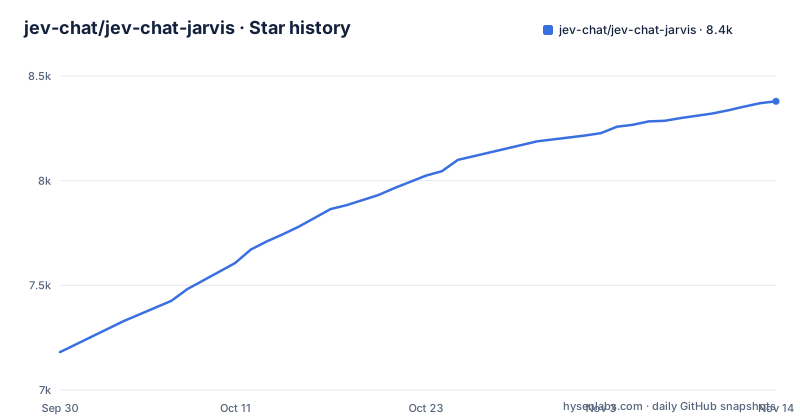
Star history
- jev-chat/jev-chat-jarvis8,379 ★ · +1,198
| Repository | 2026-09-30 | 2026-11-14 |
|---|---|---|
| jev-chat/jev-chat-jarvis | 7.2k | 8.4k |
1,198 Stars in the last 45 days, measured from the daily GitHub snapshot. Compare with other projects
Editorial analysis
Judgment runs before any reply is drafted
Most reply helpers go straight from an incoming message to a suggested answer. jev-chat inserts a step. Its Jev judgment model reads the conversation and works out what the other person wants, how risky the moment is, what they need, and the best action, before any draft exists. The question it is built around is whether the other person is upset, testing you, or just chatting.
Only after that does it draft replies. Each draft is checked against the judgment and ranked, so the best fit is listed first. Tapping one fills it into the chat app's message box. The v1.7 release changed the analysis result into a persistent card, so the judgment stays visible next to the drafts instead of disappearing once you pick one.
The effect for a user is that you see the reasoning, not just the output. If the judgment reads a message as hostile when it was a joke, you can see that mismatch and discard the drafts built on it. The drafts are only as good as that first read, and because the judgment is a model's interpretation of a few lines of text, it can misjudge tone. You are expected to check it, which is the whole premise of keeping the send button in your hands.
On Android it reads the screen through the accessibility service
jev-chat does not hook into chat apps, modify them, or log in to them. On Android it reads the conversation through the accessibility service and draws its interface as an overlay on top of the chat. After installing either APK, you open the app and follow its guide to turn on two things: the accessibility service and the overlay permission.
That design is what lets one app work across QQ, Feishu, X and WhatsApp without a separate integration for each, and without touching their accounts. It also means the permission you grant is the decisive trust decision. An accessibility service is how the app sees the text on your screen; that is the same access it needs to do its job, and you are relying on the app to use it only for the conversations it is meant to read.
The screen-reading approach has a second consequence. jev-chat sees the chat the way you see it, so what it can analyse depends on what the chat app shows. On desktop the sibling apps use screenshots with on-device OCR or system text APIs instead, and on iOS it only sees the message you copy. On Android, screenshots used for OCR never leave the phone.
Two Android editions share this repository but target different chats
The repository's top level is small: cn/, global/, LICENSE, NOTICE and .github/. The two folders are two separate Android apps, and both can be installed on the same phone.
The Chinese edition, Jev Chat Assistant, is at v1.7. It is for chats in Chinese on QQ, Feishu, X and WhatsApp, and it needs an ARM64 phone. Its APK, jev-assistant-v1.7-release.apk, is downloaded from the cn/apk path on the main branch rather than as a release asset. v1.7 is the version that added WhatsApp support.
The global edition, Jev for WhatsApp, is a preview at v0.1.0, released under the global-v0.1.0 tag as jev-whatsapp-v0.1.0-release.apk. It covers only WhatsApp chats in English, and it is built by a separate contributor, @smgonthebeat.
Both editions require Android 11 or later. The consequence of the split is that neither app does everything: an English speaker on QQ or Feishu has no matching edition and the global edition is still labelled a preview. The repository description also still lists only QQ, X and Feishu, which undersells the WhatsApp support both editions now have.
Windows, macOS and iOS live in other repositories with different limits
jev-chat is presented as five apps across Android, Windows, macOS and iOS, but only the two Android editions are in this repository. The rest are separate projects with their own release pages and setup instructions.
Jev for Windows sits beside your chat window and reads it with screenshots and on-device OCR. It needs Windows 10 1903 or later, or Windows 11, and is marked released. Jev for macOS is an overlay that reads the chat on screen and judges with a local model. It is Apple Silicon only and needs macOS 13 or later, so Intel Macs are not supported. Jev Keyboard for iOS is a custom keyboard: you copy a message, and intent, risk and replies show up on the keyboard. It works in any app, but there is no App Store build, so you have to build it yourself with Xcode from source.
For a reader, this means the platform you are on decides which codebase you are actually evaluating. Bug reports, privacy handling and update cadence for desktop and iOS sit in those other repositories, and the Android privacy statements here do not cover them; each project's own README explains how it handles data.
Your key, your provider, and no Jev server in between
jev-chat does not run a backend. On Android, chat text, plus any background you choose to turn on, goes only to the model provider you configure, using your own API key. The project states it runs no server and never receives your chats.
This removes one party from the data path, which is a real privacy advantage over services that proxy your messages through their own infrastructure. It does not remove the provider. Every conversation you analyse is sent to whichever model API you configured, under that provider's own terms and retention rules. If you would not paste a chat into that provider's web interface, you should not let jev-chat analyse it either.
It also means cost is yours and variable. jev-chat is MIT licensed and the APKs are free to download, but every analysis is a paid call against your key. Heavy use across busy group chats will show up on your provider bill, not on any jev-chat subscription. Separate privacy policies exist for the global and Chinese Android editions, and reading the one for your edition before installing is the sensible order of operations.
It fills the input box and stops there
jev-chat never sends a message by itself. It only fills the chosen reply into the message box, and you press send. That is stated as a core design rule, not a setting.
This is the main safety property of the tool. A misjudged tone or a badly ranked draft cannot reach the other person without you seeing it first.
The flip side is that jev-chat cannot be used as an autoresponder. If you were hoping to have it answer customers or keep a chat going while you are away, it does not do that, and nothing in its design points toward adding it. Every reply costs you a glance, a tap and a send. That suits someone who wants a second opinion on a delicate message; it does not suit someone trying to handle high message volume with less attention. On iOS the loop is even more manual, since you first copy the incoming message before the keyboard can analyse it.
Recent activity and what changed in the last releases
The Chinese edition reached v1.7 on 2026-10-05, adding WhatsApp support and turning the analysis result into a persistent card. The global edition's first preview, v0.1.0, followed on 2026-10-06. The last push to the repository was on 2026-11-01, so the Android code is still being worked on.
The code is Kotlin and MIT licensed, with a NOTICE file alongside the LICENSE. The README also lists commercial sponsors, among them Bocha, a search API provider, and a store selling digital products and account services. Sponsorship does not change how the app handles data, but it is part of who funds the project, and a reader judging whether to grant an accessibility service to this app may reasonably want to know it.
One naming detail can confuse searches: the repository is called jev-chat-jarvis, while the apps ship as Jev, Jev Chat Assistant and Jev for WhatsApp, and the official website is chatjevs.com. Searching for Jarvis alone returns unrelated assistants, so use the Jev names when looking for releases or issues.
Editorial conclusion
jev-chat suits Android users on Android 11 or later who want help reading tone and drafting replies in QQ, Feishu, X or WhatsApp, and who are comfortable sending chat text to a model provider under their own key. It is the wrong tool if you want replies sent automatically, or if you cannot grant an accessibility service screen access. Before installing, decide which provider will receive your conversations and read that edition's privacy policy.
Frequently asked questions
How much does jev-chat-jarvis cost per month?
jev-chat-jarvis is MIT licensed and its Android APKs are free to download. Analysis runs against the model provider you configure with your own key, so what you pay depends on that provider.
Does jev-chat send messages automatically?
No. jev-chat only fills the reply you pick into the message box; you press send.
Which Android phones can run jev-chat?
Both Android editions need Android 11 or later, and the Chinese edition also needs an ARM64 phone.
Official sources
Where developers are discussing it
Posts on Hacker News, dev.to and Lobsters that link to this repository, found by our scan of those communities. 1 in the last 30 days; newest first.
- Is "没事" really fine? A private texting copilot that runs on your own laptopdev.to · Oct 18, 2026 · 6 points · 7 comments
Add this badge to your README
If you maintain this project, the badge below links readers to this analysis and shows its maintenance status from the daily GitHub snapshot. Paste the markdown into your README; add ?metric=license or ?metric=stars to the image URL for a different field.

[](https://hysenlabs.com/projects/jev-chat-jev-chat-jarvis)Star history chart for your README
[](https://hysenlabs.com/projects/jev-chat-jev-chat-jarvis)Was this useful?