letta-ai/letta is now a signpost: the Letta agent code moved to letta-code and the V1 server is retired
Platform for stateful agents: AI with advanced memory that can learn and self-improve over time.
At a glance
- What is it?
- Letta, formerly MemGPT, builds stateful agents with memory that learn over time, but the letta-ai/letta repository no longer carries that code. It points to letta-ai/letta-code for the current harness, terminal UI and App Server, and keeps the retired V1 API server on an archive branch for reproducibility.
- Who is it for?
- Letta is aimed at developers who want agents that keep memory and identity across sessions and who can work with an npm-installed terminal UI, a self-hosted App Server or a TypeScript SDK. The letta-ai/letta repository itself is only useful for reproducing old work on the retired V1 API server through its tags and archive branch; nobody should start a new project from it.
- Can I use it commercially?
- Yes. Apache-2.0 is a permissive licence: you can use, modify and sell software built on it, as long as you keep its copyright and licence notices.
- Is it still maintained?
- Yes. The repository last received commits 26 days ago.
- What is it written in?
- GitHub does not report a main language for this repository.
Answers come from the project's GitHub data, last synced on November 13, 2026, and from our analysis. They are not legal advice.
Star history
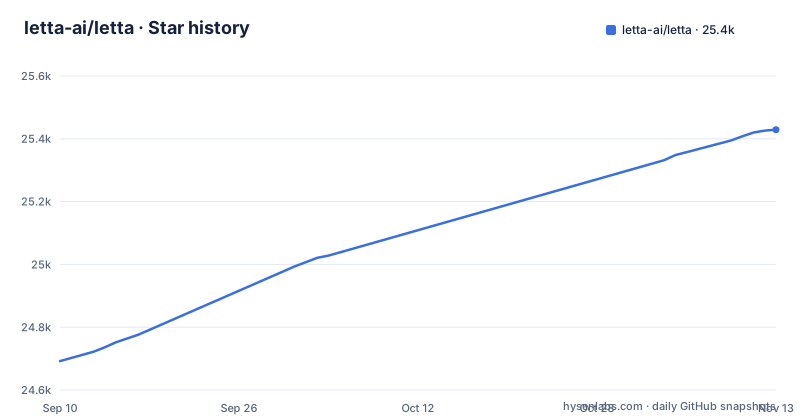
- letta-ai/letta25,429 ★ · +737
| Repository | 2026-09-10 | 2026-11-13 |
|---|---|---|
| letta-ai/letta | 24.7k | 25.4k |
737 Stars in the last 64 days, measured from the daily GitHub snapshot. Compare with other projects
Editorial analysis
The repository that made MemGPT famous no longer holds its source
Letta was formerly known as MemGPT, and its goal has stayed the same: build stateful agents with memory that can learn and improve over time. What changed is where the code lives. The current source sits in a different repository, letta-ai/letta-code, which contains the agent harness, the interactive terminal UI, the App Server, channels, and the runtime behind the desktop and web apps.
The top level of letta-ai/letta now holds only project files: AGENTS.md, AI_POLICY.md, CITATION.cff, CONTRIBUTING.md, LICENSE, PRIVACY.md, README.md, SECURITY.md and TERMS.md, plus a .github directory. There is no source tree on the default branch, which is also why GitHub reports no primary language for it. The license is Apache-2.0.
The practical consequence for readers is simple. Links, bookmarks, blog posts and dependency files that point at letta-ai/letta for code are pointing at a signpost. Anything you want to read, patch or audit is in letta-code.
The V1 API server was retired to the archive branch
The previous generation of Letta, the V1 API server, has been retired. Its code lives on the archive branch of letta-ai/letta, and the existing tags and releases stay available so that older results can be reproduced. The stated guidance is that active projects should move to the current source in letta-code.
The last releases published from this repository were 0.16.6 on 4 March 2026, 0.16.7 on 31 March 2026 and 0.16.8 on 14 May 2026. If your deployment is pinned to one of those versions, it will keep working as far as the artifacts remain available, but you should not expect further releases of the V1 server from here. That leaves two options: freeze on a 0.16.x tag for reproducibility, or move to letta-code and accept that the agent harness, App Server and runtime are a different codebase from the one you deployed.
The repository is not archived on GitHub, and its last push was on 10 September 2026.
Letta now ships as an npm package, @letta-ai/letta-code
The current way to install Letta is a global npm install:
npm install -g @letta-ai/letta-codeThis is a meaningful shift for anyone who knew the project in its server form. You need npm on the machine, and the package installs a letta command into your global path. Teams that manage tools per project rather than globally will want to decide where that command lives before rolling it out to several developers.
For anything beyond this first step, the canonical reference is docs.letta.com, which carries the current installation, development and deployment instructions. Because the code moved, older installation guides that build or run the V1 server from letta-ai/letta describe the retired system, not the one the npm package installs. When a tutorial and the docs disagree, follow the docs and the letta-code repository.
letta opens a terminal UI; letta server runs the App Server
The installed command has two entry points that do different jobs. Running it bare launches the interactive terminal UI:
lettaThat is the route for a single developer working with an agent from a terminal. For local or self-hosted agents that other clients connect to, the same command starts the App Server:
letta serverThe distinction matters when you plan a deployment. The terminal UI is a personal tool on one machine. The App Server is what you run when agents need to live somewhere that other interfaces, such as channels or an application built on the SDK, can reach. Self-hosting means you own that server process, its uptime and its data. If you only want to try Letta, start with the terminal UI; if you are wiring agents into other systems, the App Server is the piece to evaluate.
Browser, chat channels, a TypeScript SDK and Letta Cloud
Letta is not limited to the terminal. chat.letta.com gives browser access, including on mobile. Channels connect agents to Slack, Telegram, Discord and custom channels. The Letta Agent SDK is for building agents into TypeScript applications. Letta Cloud keeps agent memory, identity and conversations available across computers.
Each surface has a cost to weigh. The SDK named here targets TypeScript, so teams working in another language should confirm on docs.letta.com what client support exists for their stack before planning an integration. Letta Cloud solves the problem of an agent's memory being tied to one machine, but it also means that memory and conversations are held by a hosted service; the repository's PRIVACY.md and TERMS.md are the files to read before sending real data there. Self-hosting with letta server is the alternative when that is not acceptable.
Stateful memory is the point, and it raises its own questions
The idea that separates Letta from a stateless chat wrapper is persistence: an agent keeps memory and identity over time and can learn and improve from what it has seen. That is the reason the project exists under both names, MemGPT and Letta, and it is what Letta Cloud is built to carry between machines.
Persistence changes how you operate an agent. A stateless assistant forgets each session, so a bad answer stays in that session. An agent that learns can carry a mistake forward, and its stored memory becomes data you have to look after: where it is kept, who can read it, and how you reset it. Those operational questions are answered in the current documentation and code in letta-code, not in this repository, which is another reason to read that source before depending on Letta in production.
What is still worth opening in letta-ai/letta
Even without source code, the repository has a few uses. CITATION.cff gives the citation entry for researchers who reference the project. AI_POLICY.md and CONTRIBUTING.md set expectations for contributions, and SECURITY.md is the place to check how to report a vulnerability. AGENTS.md carries instructions aimed at coding agents working in the repository.
The archive branch and the release tags are the other reason to visit: they are the only stable reference for the V1 API server, so anyone reproducing an older experiment or debugging a legacy deployment should pin to a specific tag there instead of tracking main.
For everything else, including filing issues against current behaviour, reading how memory is implemented today, or checking what the App Server exposes, the right repository is letta-ai/letta-code and the right reference is docs.letta.com.
Editorial conclusion
Letta is aimed at developers who want agents that keep memory and identity across sessions and who can work with an npm-installed terminal UI, a self-hosted App Server or a TypeScript SDK. The letta-ai/letta repository itself is only useful for reproducing old work on the retired V1 API server through its tags and archive branch; nobody should start a new project from it. Before committing, read the current source in letta-ai/letta-code and the installation and deployment pages on docs.letta.com, and plan a migration if any of your systems still depend on the 0.16.x releases published here.
Frequently asked questions
What is Letta?
Letta, formerly known as MemGPT, is a platform for building stateful agents with memory that can learn and improve over time. Its current source lives in the letta-ai/letta-code repository and it is licensed Apache-2.0.
How do I install Letta?
Install it globally from npm with npm install -g @letta-ai/letta-code. The docs at docs.letta.com hold the current installation, development and deployment instructions.
How do I use Letta after installing it?
Run letta to open the interactive terminal UI, or letta server to run the App Server for local or self-hosted agents. Letta is also reachable through chat.letta.com, Slack, Telegram and Discord channels, and the TypeScript Letta Agent SDK.
Official sources
Add this badge to your README
If you maintain this project, the badge below links readers to this analysis and shows its maintenance status from the daily GitHub snapshot. Paste the markdown into your README; add ?metric=license or ?metric=stars to the image URL for a different field.

[](https://hysenlabs.com/projects/letta-ai-letta)Star history chart for your README
[](https://hysenlabs.com/projects/letta-ai-letta)Was this useful?