HID Remapper: browser-configured USB input remapping
Programmable adapter for USB input devices
At a glance
- What is it?
- HID Remapper is a hardware USB adapter that remaps keyboard, mouse, and other HID inputs without requiring software on the host during normal use. Its configuration path is convenient for Chrome users, but hardware support, firmware variants, and custom licensing require careful review.
- Who is it for?
- HID Remapper fits users who want persistent, device-level control over several USB inputs and are comfortable selecting the correct hardware and firmware. It is a poor fit for users who need Firefox or Safari, host software that can be changed frequently, or a clearly identified open source licence.
- Can I use it commercially?
- Check first. The repository uses a licence we do not classify automatically, so read its LICENSE file before any commercial use.
- Is it still maintained?
- Yes. The repository last received commits 3 days ago.
- What is it written in?
- Mainly JavaScript, according to GitHub's language statistics.
Answers come from the project's GitHub data, last synced on October 25, 2026, and from our analysis. They are not legal advice.
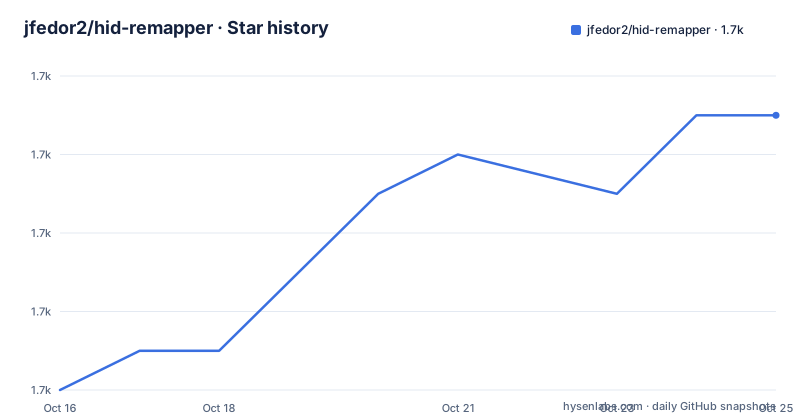
Star history
- jfedor2/hid-remapper1,725 ★ · +7
| Repository | 2026-10-16 | 2026-10-25 |
|---|---|---|
| jfedor2/hid-remapper | 1.7k | 1.7k |
7 Stars in the last 9 days, measured from the daily GitHub snapshot. Compare with other projects
Editorial analysis
HID Remapper's hardware-level input problem
HID Remapper sits between USB input devices and a computer as a configurable dongle. It targets people who want to reassign mouse buttons, alter keyboard layouts, translate mouse buttons into keyboard input, or turn keystrokes into mouse actions. Its defining distinction from software remappers is operational placement: the README states that the mapping works completely in hardware and requires no software running on the computer during normal use.
That makes it relevant to setups where the same mouse and keyboard must behave consistently across computers. A workstation user can keep a pointer transformation, drag-lock rule, or unusual button assignment in the adapter instead of installing a configuration utility on every host. It also supports scroll generated by mouse movement, temporary or permanent sensitivity changes, and mouse-axis rotation by angles other than 90 degrees.
The project is not limited to a single input device. Wireless receivers are supported, and several devices can be connected through a USB hub. According to the README, each connected device can have a different mapping. The same hardware design can also overclock input polling up to 1000 Hz. Separate documentation covers a serial RS-232 version and a Bluetooth version based on nRF52840 boards, but the central repository and web configurator concern the standard USB HID adapter.
WebHID configuration and mapping data flow
Configuration takes place through a browser page at remapper.org/config. The README requires Chrome or a Chrome-based browser because the tool uses WebHID. After connecting to a HID Remapper, a user can configure mappings and firmware from the web interface. The full interaction procedure is documented in the HID Remapper Manual rather than the repository README.
The hardware-oriented flow begins when a keyboard, mouse, or receiver sends USB HID input to the remapper. The firmware applies the selected transformation, then presents the resulting keyboard or mouse behavior to the host computer. This explains why a mapping can remain active without a host-side remapping process. It does not mean the device is independent of setup software. The browser is still needed to connect, change mappings, and perform firmware operations.
For environments where WebHID is unsuitable, the repository includes a command-line configuration tool. It accepts JSON on standard input, using the same format as the web tool. The author states that it was tested only on Linux, although Windows and Mac support is considered theoretically possible. That distinction matters: the browser route has an explicit Chrome requirement, while the command-line tool has a documented platform caveat rather than a confirmed cross-platform support matrix.
Feather RP2040 setup and first configuration
The quickest documented starting point is Adafruit's Feather RP2040 USB Host board. The README says that this board is ready to use once the matching firmware is copied to its UF2 drive. Download `remapper_feather.uf2` from the latest release, hold the board's "Boot" button, and press "Reset". A USB drive should appear on the computer. Copying the firmware file to that drive completes the initial flash described in the README.
The firmware file used for this first setup is:
remapper_feather.uf2After flashing, open the HID Remapper configuration site in Chrome or a Chrome-based browser, connect the device, and click "Open device". The README does not document individual buttons for defining a mapping in this excerpt, so those steps belong to the linked HID Remapper Manual. A first practical check is to select a remapping, apply it through the configuration tool, and test the intended mouse or keyboard action with the host disconnected from any host-side remapping utility. The repository does not provide a command for creating a mapping, so inventing a JSON example would go beyond its documented interface.
Users building other forms should not apply this firmware by assumption. Raspberry Pi Pico variants have separate hardware instructions in HARDWARE.md, while custom-board production files are under `custom-boards/`. The distinction matters because firmware files are tied to board variants.
Firmware variants across Pico and custom boards
HID Remapper is not distributed as one universal UF2 image. A single Pico uses `remapper.uf2`, while a dual Pico requires two separate images: `remapper_dual_a.uf2` and `remapper_dual_b.uf2`. Each Pico must be flashed separately. The B side has a distinct manual procedure involving the OTG adapter, the BOOTSEL button, the `RPI-RP2` drive, and reconnection after copying its firmware.
The Feather RP2040 USB Host board uses `remapper_feather.uf2`. Several custom-board revisions share `remapper_board.uf2`, but the required post-flash action differs. Custom boards v1, v2, v5, v6, and v7 must be disconnected and reconnected after flashing. This revision-specific matrix is a genuine deployment risk: selecting by product family rather than exact board revision can leave the adapter unusable or incorrectly configured.
Firmware upgrades normally preserve the current configuration. The README recommends exporting the configuration to JSON before updating, particularly because moving from newer firmware to older firmware can lose the configuration. The export can also support a later return to an older firmware version. This creates a specific upgrade boundary that users should account for before treating device-local mappings as durable data.
Serial, Bluetooth, and hub deployment boundaries
The repository contains separate paths for serial and Bluetooth input. SERIAL.md documents a version that accepts input from a serial RS-232 mouse and translates it to USB. BLUETOOTH.md documents a version that runs on nRF52840-based boards and translates Bluetooth input to USB. These are not interchangeable firmware choices with the standard USB adapter. The README's primary flashing instructions concern USB-connected HID Remapper variants, so a prospective serial or Bluetooth user needs the matching document and hardware instructions rather than applying the Feather procedure.
Standard USB deployments can attach multiple devices through a USB hub. The README explicitly supports this arrangement and permits distinct mappings per device. It does not document host software discovery, per-device ordering, or behavior when a hub exposes devices in an unexpected order. Those details should not be inferred from the simple statement of support.
Polling-rate overclocking up to 1000 Hz is also documented. However, the README does not explain host compatibility, power requirements, or whether every connected input device can sustain that rate. HID Remapper is therefore a hardware mapping solution with extended deployment modes, not a universal replacement for every keyboard, receiver, or serial interface.
Custom licensing and maintenance implications
The repository declares its licence as a custom licence that GitHub cannot classify, with the authoritative text in the LICENSE file. The README excerpt does not reproduce the permissions, restrictions, redistribution conditions, or firmware modification terms. This is a material adoption issue. Engineers should read LICENSE directly before copying firmware, manufacturing a board, modifying source code, or shipping a device based on the project. The repository description alone does not establish that the hardware designs, firmware, documentation, and configuration files all carry the same permissions.
The repository is not archived, and its last push was on 2026-08-29. Releases listed around that date include `r2026-08-29-test`, followed by `r2026-05-25` and `r2026-05-20`. The test-labelled release name should be treated as a release identifier, not as proof that every deployment is production-qualified. Maintenance cost is concentrated in choosing the correct board image, tracking revision-specific flashing instructions, and retaining configuration exports before moving between firmware versions.
The repository's primary language is JavaScript, while the repository layout also contains `firmware/`, `firmware-bluetooth/`, hardware documentation, enclosure files, and custom-board material. The documentation does not provide a complete statement of toolchain versions or build instructions in the excerpt, so source-build cost cannot be quantified from this information.
Where HID Remapper is the wrong tool
HID Remapper is the wrong choice when browser configuration is a hard requirement to reject. The web tool requires Chrome or a Chrome-based browser through WebHID. A user who works primarily in Firefox or Safari should first evaluate the command-line tool, but the README only confirms testing on Linux and does not establish Windows or Mac support.
It is also a poor fit for a temporary experiment. The device is designed to hold input transformations in hardware between USB devices and the host. That is an advantage for consistency across computers, but it introduces hardware selection, firmware flashing, and configuration persistence into the task. A host application remapper may be easier when mappings are temporary, tied to one desktop session, or expected to change frequently.
The project does not claim support for every USB input class. Its documented examples concern mice, keyboards, and other HID devices, with separate serial and Bluetooth implementations for other sources. Users needing a particular device should verify that its reports can be handled by the relevant firmware rather than assuming that “USB input device” covers all hardware.
Editorial conclusion
HID Remapper fits users who want persistent, device-level control over several USB inputs and are comfortable selecting the correct hardware and firmware. It is a poor fit for users who need Firefox or Safari, host software that can be changed frequently, or a clearly identified open source licence. Verify browser support, board variant, firmware filename, configuration backup, and the LICENSE file before adoption.
Frequently asked questions
How do I install firmware on a Feather RP2040 USB Host HID Remapper?
Download `remapper_feather.uf2`, hold the board's "Boot" button, press "Reset", and copy the file to the USB drive that appears. The repository says this completes the initial flashing procedure for the Feather RP2040 USB Host board.
Which browsers can configure HID Remapper?
The web configuration tool uses WebHID and requires Chrome or a Chrome-based browser. The README also identifies a command-line tool for environments where the browser tool cannot be used.
Does HID Remapper need software running on the computer during normal use?
No. The README states that remapping works completely in hardware and requires no software running on the computer during normal use. Browser-based software is still used for configuration and firmware operations.
Can HID Remapper preserve mappings when I update firmware?
The README says the current configuration is normally preserved during firmware updates. It advises exporting the configuration to JSON first because moving from newer firmware to older firmware can lose the configuration.
What licence applies to HID Remapper?
The repository identifies the project as using a custom licence that GitHub cannot classify. The README points readers to the LICENSE file, whose terms are not reproduced in the available documentation.
Official sources
Add this badge to your README
If you maintain this project, the badge below links readers to this analysis and shows its maintenance status from the daily GitHub snapshot. Paste the markdown into your README; add ?metric=license or ?metric=stars to the image URL for a different field.

[](https://hysenlabs.com/projects/jfedor2-hid-remapper)Star history chart for your README
[](https://hysenlabs.com/projects/jfedor2-hid-remapper)Was this useful?