Pandoc: The Universal Markup Converter That Swallows Formats Whole
GitHub describes it as Universal markup converter. The repository metadata lists Haskell as its primary language. The metadata lists the GPL-2.0 license. This article stays within the project description and details documented in the GitHub repository README.
At a glance
- What is it?
- Pandoc is a Haskell-based command-line tool that converts between dozens of markup formats, from Markdown and LaTeX to docx and EPUB. It is the closest thing to a universal translator for documents, but its breadth comes with complexity and a steep learning curve.
- Who is it for?
- Adopt Pandoc if you routinely move documents between Markdown, LaTeX, HTML, docx, EPUB, or any of the dozens of supported formats, and if you value a single, scriptable tool over native fidelity. Skip it if you need exact round-trip preservation of complex Word or PowerPoint files, or if you cannot tolerate the occasional format-specific quirk.
- Can I use it commercially?
- Yes, with conditions. GPL-2.0 is a copyleft licence: if you distribute software that includes it, you must release that software's source code under the same licence. Running it internally without distributing it does not trigger that obligation.
- Is it still maintained?
- Yes. The repository received new commits within the last day.
- What is it written in?
- Mainly Haskell, according to GitHub's language statistics.
Answers come from the project's GitHub data, last synced on November 23, 2026, and from our analysis. They are not legal advice.
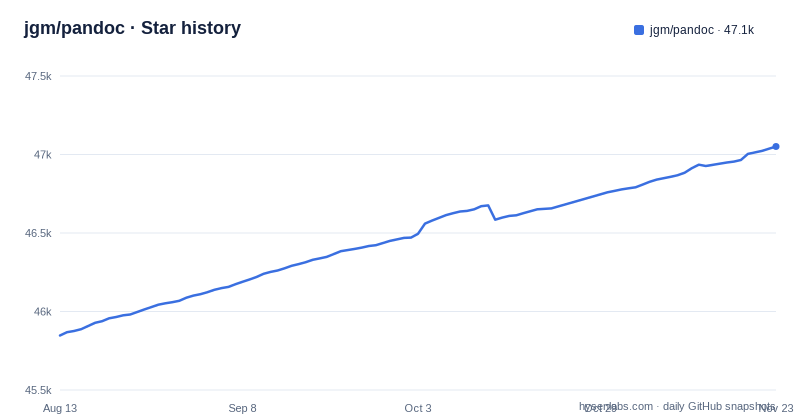
Star history
- jgm/pandoc47,051 ★ · +1,204
| Repository | 2026-08-13 | 2026-11-23 |
|---|---|---|
| jgm/pandoc | 45.8k | 47.1k |
1,204 Stars in the last 102 days, measured from the daily GitHub snapshot. Compare with other projects
Editorial analysis
What Pandoc Actually Solves
Pandoc solves a specific, chronic problem: moving documents between markup formats without losing structure. A team writes in Markdown, but the publisher wants LaTeX. A researcher keeps notes in Org mode, but the journal requires docx. A technical writer maintains docs in reStructuredText, but the customer portal needs HTML. Without a converter, each migration means rewriting or copy-pasting through a word processor, which mangles code blocks, tables, and citations. Pandoc targets exactly this pain. It is for engineers, academics, and technical writers who live in plain-text formats but must deliver in something else. It is not a WYSIWYG editor, and it does not try to be. It is a command-line tool and Haskell library that transforms a parsed document from one representation to another.
The Architecture: A Universal AST in the Middle
Pandoc does not convert directly from format A to format B. Instead, it parses the input into a native abstract syntax tree, or AST, and then serializes that AST into the target format. The README lists a `native` format, which is the Haskell representation of the AST, and a `json` format that exposes the same tree as data. This design is what gives Pandoc its breadth. A reader for each input format produces the AST, and a writer for each output format consumes it. That means adding a new format requires writing one reader or writer, not a matrix of pairwise converters. The practical consequence is consistency: the same document structure, once parsed, can be emitted as HTML, LaTeX, or docx with predictable behavior. The cost is abstraction loss. Format-specific features that do not fit the AST, such as a Word style that has no Markdown equivalent, get dropped or approximated. The AST is the contract, and everything else is a projection.
Getting It Running: Install, Convert, and Customize
The README carries badges for GitHub releases, Hackage, Homebrew and Stackage, and INSTALL.md at the repository root covers installation. On macOS, `brew install pandoc` pulls the formula from Homebrew. There is also a Hackage package for Haskell users and a Stackage LTS entry. The command-line interface is straightforward: `pandoc input.md -o output.docx` converts a Markdown file to a Word document. The format is inferred from the file extension, or you can force it with `-f` for input format and `-t` for output format. For example, `pandoc -f org -t latex notes.org -o notes.tex` converts Org mode to LaTeX. The README shows a more advanced use: the README itself is generated from a template using a Lua filter, specifically `pandoc --lua-filter tools/update-readme.lua README.template -o README.md`. This demonstrates that Pandoc is not just a one-shot converter. It supports custom readers and writers written in Lua, which lets you transform the AST programmatically. That is where the real power lies, and also where the learning curve steepens.
The Format List: Breadth as a Double-Edged Sword
The README lists more than fifty input formats and a long list of output formats. Inputs include AsciiDoc, BibTeX, CSV, DocBook, docx, EPUB, HTML, Jupyter notebooks, LaTeX, Markdown variants, MediaWiki, Org, reStructuredText, and even xlsx spreadsheets. Outputs include ANSI, BBCode variants, beamer slides, chunked HTML, ConTeXt, docx, EPUB, PDF (via LaTeX), PowerPoint, and Typst. That breadth is the project's core value proposition. But it also means no single format gets perfect treatment. The README itself notes that `gfm` is preferred over the deprecated `markdown_github` because the latter is "less accurate." That is a honest admission: some readers are better than others. If your workflow depends on a niche format, you should test it early. The format list is a promise of coverage, not a guarantee of fidelity.
A Genuine Limitation: Lossy Conversion and Style Fidelity
The most concrete limitation is lossy conversion. Pandoc's AST is a normalized model of document structure. It captures headings, paragraphs, lists, tables, and inline formatting. It does not capture every nuance of a Word style or a LaTeX macro. When you convert a docx with custom styles or character spacing, those features do not survive the trip through the AST. Users often expect a round-trip to preserve everything. It will not. A table with merged cells in docx may become a simple table in Markdown, losing the merge. A LaTeX document with custom commands will need those commands defined in the output template. For documents that are already plain text, such as Markdown or Org, Pandoc is excellent. For binary office formats, it is a best-effort extraction, not a preservation tool. If you need exact round-trip fidelity, you are better off staying in the native format.
Alternatives: Pandoc Is Not the Only Converter
The main alternatives are format-specific tools. For Markdown to HTML, there is the original `markdown` script or CommonMark reference implementations, but they handle only that one pair. For LaTeX to docx, there is `pandoc` itself, but also `tex4ht` or `latexml`, which convert LaTeX to HTML or XML with a focus on math and cross-references. For reStructuredText to HTML, Sphinx is a full documentation framework that uses Docutils under the hood. The difference in approach is significant. Sphinx is a static site generator with themes, navigation, and a build process, whereas Pandoc is a single-purpose converter with no opinion about site structure. For a documentation site, Sphinx gives you a ready-made system. For a one-off conversion or a scripted pipeline, Pandoc is lighter and more flexible. Another alternative is `multimarkdown`, which handles MultiMarkdown syntax specifically and can export to various formats, but it does not have Pandoc's breadth. If you need one tool that speaks many dialects, Pandoc has no serious rival. If you need deep integration with a specific ecosystem, a dedicated tool may serve better.
Maintenance and License: GPL-2.0 and Active Development
Pandoc is licensed under GPL-2.0, which means if you distribute a modified version, you must make the source available under the same license. For most internal use, this is a non-issue. If you embed Pandoc in a proprietary product, you need to consider the license implications, though using the command-line tool as a separate process is generally fine. The project is actively maintained. The latest release, 3.13, came out on 2026-10-26, with 3.12.1 on 2026-10-08 and 3.12 on 2026-09-29 before it. That cadence suggests regular bug fixes and new features. Upgrading is usually a matter of replacing the binary or running `brew upgrade pandoc`. The main maintenance cost is not the tool itself but your own templates and Lua filters. If you write custom filters, they may break when the AST changes between major versions. The README shows that the project itself uses a Lua filter. Test your filters after each upgrade.
Editorial conclusion
Adopt Pandoc if you routinely move documents between Markdown, LaTeX, HTML, docx, EPUB, or any of the dozens of supported formats, and if you value a single, scriptable tool over native fidelity. Skip it if you need exact round-trip preservation of complex Word or PowerPoint files, or if you cannot tolerate the occasional format-specific quirk. Before committing, verify that your particular source and target formats are in the supported lists, and test a representative sample of your documents, especially those with tables, citations, or custom styles. Pandoc is not a drop-in replacement for a full office suite; it is a power tool for those who accept its trade-offs.
Frequently asked questions
What is pandoc used for?
It converts between markup formats. The input list covers more than fifty names, including Markdown variants, LaTeX, docx, epub, html, jats, typst and xlsx, and the writers include beamer, context, docbook and docx. The project is a Haskell library with a command line tool built on it.
Is pandoc free?
Yes, under the GPL-2.0, with COPYING.md and COPYRIGHT at the repository root. It is also distributed through Hackage, Stackage, the Homebrew formula and GitHub releases, and the manual that the README is generated from is MANUAL.txt in the same tree.
Is pandoc a Python library?
No. The primary language is Haskell, and the project describes itself as a Haskell library for converting between markup formats plus a command line tool that uses it, built with cabal and stack. The repository contains no Python package.
How safe is pandoc?
The repository ships a SECURITY.md for reporting problems, and the distribution channels named in the README are GitHub releases, the Hackage package, the Homebrew formula and the Stackage LTS package, which is where you confirm what you install.
How do I install pandoc?
Installation is covered by INSTALL.md at the repository root, and the README badges point to the distribution channels: GitHub releases, the Hackage package, the Homebrew formula and the Stackage LTS package.
How do I convert Markdown to a Word document with pandoc?
docx appears in both the input and the output list, so Word documents can be read and written. The README is generated from README.template and MANUAL.txt, and the manual is MANUAL.txt at the repository root.
Official sources
Add this badge to your README
If you maintain this project, the badge below links readers to this analysis and shows its maintenance status from the daily GitHub snapshot. Paste the markdown into your README; add ?metric=license or ?metric=stars to the image URL for a different field.

[](https://hysenlabs.com/projects/jgm-pandoc)Star history chart for your README
[](https://hysenlabs.com/projects/jgm-pandoc)Was this useful?