BetterVia for Android: installation, compatibility, and limitations
让Via变得更好 / Make Via Better
At a glance
- What is it?
- BetterVia is an Xposed module for the Via Android browser, with root and non-root installation paths plus browser-focused customization. Its usefulness depends on Via compatibility, module-framework support, and acceptance of its integrity checks.
- Who is it for?
- BetterVia suits Android users who already operate LSPosed or LSPatch, use Via 6.6.0 or later, and want additional browser controls without maintaining a fork. It is a poor fit for stock Via installations without a module framework, devices outside the documented compatibility range, or users who require documented open-source licensing terms.
- Can I use it commercially?
- Not without permission. GitHub finds no licence file in the repository, and without a licence all rights are reserved by default: you may read the code but not reuse it. Check the README, or ask the authors, before using it.
- Is it still maintained?
- Yes. The repository last received commits 38 days ago.
- What is it written in?
- Mainly JavaScript, according to GitHub's language statistics.
Answers come from the project's GitHub data, last synced on November 7, 2026, and from our analysis. They are not legal advice.
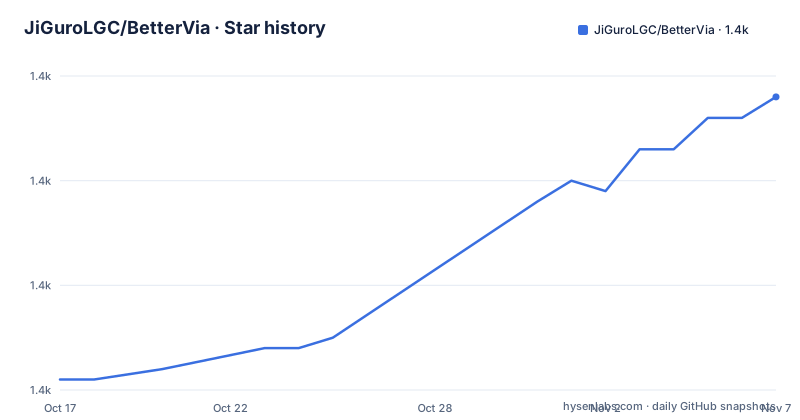
Star history
- JiGuroLGC/BetterVia1,408 ★ · +27
| Repository | 2026-10-17 | 2026-11-07 |
|---|---|---|
| JiGuroLGC/BetterVia | 1.4k | 1.4k |
27 Stars in the last 21 days, measured from the daily GitHub snapshot. Compare with other projects
Editorial analysis
BetterVia's target browser and modification scope
BetterVia addresses gaps in Via, an Android browser distributed by Shanghai Zhiwei Network Technology Co., Ltd. The README says Via emphasizes a small footprint, straightforward operation, privacy protections, resource sniffing, and extensions, but that some functions remain incomplete or inconvenient. The concrete problem BetterVia targets is restriction imposed by Via's built-in site whitelist. The documented resource-sniffing list includes `v.qq.com`, `youku.com`, `iqiyi.com`, `mgtv.com`, `bilibili.com`, `ximalaya.com`, and `film.qq.com`. Separate lists restrict advertising rules and browser scripts on selected sites.
This is relevant to users who browse video and social sites while relying on Via's sniffing, ad filtering, or scripting capabilities. BetterVia is not a standalone browser and does not replace Via. Its target is specifically `mark.via`, `mark.via.gp`, or another package name, provided that installation is running Via 6.6.0 or later. The README also states support for domestic and Google variants, with Simplified Chinese, Traditional Chinese, and English interfaces.
That package-name flexibility sounds broad, but the repository documentation does not provide a whitelist of every compatible Via distribution. BetterVia also is not a generic Android browser extension system. Its settings and modifications are tied to Via and to an Xposed-style module environment, so installing it without that integration does not produce the documented interface.
BetterVia's Xposed integration and exposed controls
The repository layout identifies an Android application project under `app/`, Gradle build files at the root, and separate configuration data including `adblock.json`, `scripts.json`, `scripts_config.json`, `themes.json`, `themes_new.json`, `update.json`, and `mapping.json`. This supports the description of BetterVia as an Android Xposed module with its own settings and packaged browser resources. The README does not document individual JavaScript hook classes, so the exact interception path through Via cannot be confirmed from the README or repository layout.
After activation, BetterVia adds a settings entry inside Via. The documented functions include removing whitelist restrictions, switching themes, browsing a script collection, sampling colors with Monet, downloading advertising rules, managing cookies, applying a privacy lock, enabling super incognito, adding screenshot protection, enabling an eye-protection mode, blocking components, running actions at startup, and setting video playback speed. These are module-level controls rather than proof that every option works with every Via release.
The project also includes an integrity mechanism. The README says signature checks and other checks can produce a security warning or an invalid-module message after an update or reverse-engineering modification. A documented recovery path is to clear the software's storage and open it again. Newer versions reportedly provide a “安全修复” option that can use Root or file-reading permission. This mechanism may help recover legitimate local modifications, but it also means installation state and the selected framework matter to normal operation.
Installing BetterVia through LSPosed or LSPatch
The README does not provide package-manager or Gradle installation commands for end users. It directs users to GitHub Releases, Gitee Releases, Xposed-Modules-Repo, or the listed 蓝奏云网盘 backup. It labels these locations as the project's distribution channels. The module manager itself is separate: rooted devices are directed to LSPosed or another compatible framework, while non-rooted devices are directed to LSPatch or another non-root framework.
For a rooted device, the documented first sequence is to have a working LSPosed or other module framework installed, install the BetterVia APK, read and accept the software use statement, enable BetterVia in the module manager, and select its scope. The repository does not spell out the framework's exact menu labels or provide a universal command, so those steps must be completed through the chosen manager.
For a device without Root, install LSPatch or another non-root framework, grant the permissions requested by that framework, and patch Via. The README distinguishes local patching from integrated patching. After patching, install the resulting package. For local patching, the user must also enable the module and select its scope in the module manager. Then launch Via and look for BetterVia's settings button in Via's settings interface. This is a configuration tutorial, not a source-build guide, because the README gives no supported `gradlew` deployment sequence for users.
Framework conflicts and unsupported-device failure modes
The clearest limitation is framework variability. BetterVia says it supports LSPosed and LSPatch, but also states that non-root patching can conflict with BetterVia or the scope application's runtime. On some devices, the result may be disabled functionality or an immediate crash. The recommended response is to change the patching method or framework, although the README gives no device-specific compatibility matrix for selecting the replacement.
Compatibility is also bounded. The README says development was tested on Android 10 through Android 16, while advising users not to use an Android version that is too old or too new. It also suggests that an unresolved failure can mean the device or CPU architecture has not yet been adapted. Those statements are carefully qualified: they do not establish universal support for every Android 10 through Android 16 device.
Another failure condition is the module scope. If the target Via package is omitted from the selected scope, the README's normal path to a settings button inside Via cannot be expected. The documentation does not supply a diagnostic log, fallback configuration, or one-click recovery command. Users who patch Via incorrectly also face an operational cost because they may need to repeat the patch, reinstall the resulting package, and configure scope again.
Release maintenance, licensing, and upgrade obligations
The repository is not archived, and its last push was on 2026-09-30. Recent releases include 2.2.1 on 2026-08-25, 2.2.0 on 2026-08-25, and 2.1.0 on 2026-07-11. Those dates indicate recent project activity, although the README separately warns that development may stop or the project may be deleted because of the maintainer's personal circumstances. An adopter therefore cannot treat the repository as having long-term release guarantees.
The repository metadata labels the license as unknown. The repository does contain a `LICENSES/` directory, but the README does not identify the applicable software license or explain the directory's contents. The README also says not to use the module commercially or distribute it extensively. Those statements are project-use terms, not a substitute for a clearly identified open-source license. Users who need audited redistribution rights should inspect the repository's license files before copying or redistributing an artifact.
Upgrades can also involve more than replacing the APK. Via compatibility starts at version 6.6.0, module-framework updates may affect patching, and integrity checks may require clearing storage or using the documented repair option. The README does not describe an automatic rollback procedure, release migration policy, or compatibility table for each BetterVia and Via version pair.
Stock Via versus BetterVia for browser workflows
The practical alternative is to use Via without BetterVia. Stock Via already contains the browser engine, search and browsing interface, resource sniffing, advertising controls, browser scripts, sandbox behavior, and extensions described in the README. It does not require a module framework or patched package merely to launch. This makes stock Via the simpler choice when those built-in features meet the user's needs or when device modification is undesirable.
BetterVia changes that boundary by adding controls around Via and by addressing documented whitelist restrictions. Its value is therefore greatest for users who specifically want features such as cookie management, screenshot protection, component blocking, startup execution, theme switching, or broader site access for sniffing and scripts. Stock Via offers a simpler operational model, while BetterVia adds framework setup, scope selection, patching or Root requirements, and compatibility concerns.
Neither path is documented as a replacement for a conventional desktop extension architecture. BetterVia does not claim compatibility with arbitrary Android browsers, and Via itself remains the required host. The choice should therefore be based on whether the extra Via-specific controls justify the installation and upgrade work.
Editorial conclusion
BetterVia suits Android users who already operate LSPosed or LSPatch, use Via 6.6.0 or later, and want additional browser controls without maintaining a fork. It is a poor fit for stock Via installations without a module framework, devices outside the documented compatibility range, or users who require documented open-source licensing terms. Before adoption, verify the module scope, framework recovery procedure, Via version, CPU architecture, and the exact release artifact obtained from a listed distribution channel.
Frequently asked questions
Which Via versions and package names does BetterVia support?
The README states that BetterVia supports Via 6.6.0 and later. It names `mark.via` and `mark.via.gp`, as well as other package names, and says both domestic and Google variants are supported.
Can BetterVia be installed without Root?
Yes. The documented approach uses LSPatch or another non-root framework to patch Via, either locally or through integrated patching. Some devices and patching methods can cause conflicts, crashes, or disabled functionality.
Where should a BetterVia user look when the module settings do not appear?
Confirm that Via is version 6.6.0 or later, that BetterVia is enabled in the module manager, and that the target Via package is included in the module scope. The README also raises Android version and CPU architecture compatibility as possible causes.
Official sources
Add this badge to your README
If you maintain this project, the badge below links readers to this analysis and shows its maintenance status from the daily GitHub snapshot. Paste the markdown into your README; add ?metric=license or ?metric=stars to the image URL for a different field.

[](https://hysenlabs.com/projects/jigurolgc-bettervia)Star history chart for your README
[](https://hysenlabs.com/projects/jigurolgc-bettervia)Was this useful?