CaretGlide: macOS trackpad caret positioning with a modifier key
CaretGlide enables you to hold down a modifier key at any input position in the text, and then use two fingers to slide on the touchpad to make the cursor "follow the movement". When you release your fingers, it will stick to the target position. It is specially designed for text and code editing scenarios.
At a glance
- What is it?
- CaretGlide is a macOS utility that lets you hold a modifier key and swipe two fingers on the trackpad to move the text caret. It targets code and text editors, with an MIT license and no third-party dependencies.
- Who is it for?
- Adopt CaretGlide if you edit text or code on a Mac with a trackpad and find precise caret placement slow, especially in native apps where the AX precise path keeps the mouse still. Skip it if you rely on a mouse or keyboard-only navigation, or if you cannot grant Accessibility permission in your environment.
- Can I use it commercially?
- Yes. MIT is a permissive licence: you can use, modify and sell software built on it, as long as you keep its copyright and licence notices.
- Is it still maintained?
- Yes. The repository last received commits 77 days ago.
- What is it written in?
- Mainly Swift, according to GitHub's language statistics.
Answers come from the project's GitHub data, last synced on October 4, 2026, and from our analysis. They are not legal advice.
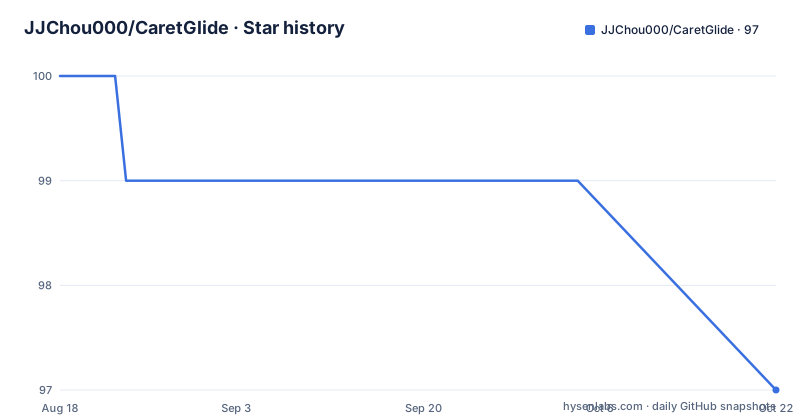
Star history
- JJChou000/CaretGlide99 ★ · -1
| Repository | 2026-08-18 | 2026-10-04 |
|---|---|---|
| JJChou000/CaretGlide | 100 | 99 |
-1 Stars in the last 47 days, measured from the daily GitHub snapshot. Compare with other projects
Editorial analysis
The problem: moving a caret across long lines or code blocks
CaretGlide solves a specific annoyance: moving the text insertion point to a distant position in a document or code file. On a Mac, you usually click with the mouse or trackpad, but that requires taking your hands off the keyboard and aiming at a small target. Arrow keys move the caret one character or line at a time, which is slow over long distances. CaretGlide's approach is to let you hold a modifier key, swipe two fingers on the trackpad, and have a highlight bar follow your finger. When you release the modifier, the caret drops at that spot. The README says it is "specially designed for text and code editing scenarios," which suggests the author had programmers and writers in mind. The tool is not a text editor itself; it is a system-level utility that works across applications, as long as the app supports the underlying Accessibility APIs or responds to synthetic clicks.
How the gesture pipeline works
The architecture is a chain of components. A global CGEventTap feeds scroll and modifier key events into a GestureRouter, which decides whether a gesture has started, moved, or ended. That router drives a GlideSession, which maintains an anchor point and a virtual target position. The session can be in one of three states: idle, active, or committing. Idle becomes active when the modifier is down and a swipe exceeds a threshold. Active stays active as swipes move the target. Releasing the modifier moves to committing, where the placement happens. The data flow is: InputTap, GestureRouter, GlideSession, Placement, and OverlayWindow. The overlay is a borderless, click-through window that draws the highlight bar. The key detail is the placement step: for native apps, CaretGlide uses an Accessibility (AX) precise path that moves the caret without moving the mouse. For editors like VS Code, it falls back to a synthetic click, which means the mouse cursor jumps to the target position and clicks there. That fallback is a compromise, and it likely explains why the README warns about permission state issues.
Installation and first-run setup
The README lists three installation methods. You can download the CaretGlide.dmg from the Releases page, open it, and drag CaretGlide.app into Applications. The build is unsigned, so the first launch requires right-click and Open. The alternative is a Homebrew cask: brew install --cask caretglide. There is also a one-line installer: curl -fsSL https://raw.githubusercontent.com/JJChou000/CaretGlide/main/packaging/install.sh | sh. After installation, you must grant Accessibility permission in System Settings, Privacy and Security, Accessibility. The README gives a specific fix for stale permission state: remove CaretGlide from the list, re-add it from Applications, and relaunch. This is a common failure mode for any app that uses AX APIs. The settings window opens on first launch, and a menu-bar icon appears. You can pause the app from that icon without quitting.
Configuration options and defaults
The settings are grouped into four modules: General, Swipe, Update, and About. The default modifier key is Left Option, but you can choose left or right Option, Control, Command, Shift, or fn. Sensitivity ranges from 0.1 to 5.0, with a default of 1.0, and the README notes that slow swipes give precise small steps while fast swipes accelerate. Launch at login defaults to On, which is convenient but might surprise users who prefer manual control. The app can hide its menu-bar icon, but the README warns that if you hide it, restarting the app reopens Settings so you can restore the icon. That is an odd design choice: hiding the icon effectively requires a restart to undo, unless you remember the keyboard shortcut. Language switching between English and Simplified Chinese applies immediately without restart, which is a nice touch for bilingual users. All preferences are stored in UserDefaults, so there is no cloud sync or external configuration file.
The Accessibility permission is the main failure point
CaretGlide cannot function without Accessibility permission, because it uses AX APIs to locate the caret and to place it. The README dedicates a whole section to troubleshooting gliding not working, and the most common cause is stale permission state. The recommended fix is to remove the app from the Accessibility list and re-add it. This is a real operational cost: every macOS update or app reinstall can invalidate the permission. The README also notes that the app is not sandboxed, because the global event tap and AX access require it. That means the app has broad system access, which is a security consideration. The project is open source and MIT licensed, so you can inspect the code, but the default unsigned build means you are trusting the author's binary unless you build from source yourself. There is no mention of a notarization process, so Gatekeeper will likely block the first launch, and some users may find that unacceptable.
Alternatives: built-in macOS gestures and editor-specific tools
The most obvious alternative is to use the trackpad's built-in click-and-drag to select text, or to use the mouse to click at the target position. That requires no extra software but is less precise for small targets. Another alternative is to use keyboard shortcuts: Command-Arrow to jump to line ends, or Option-Arrow to move by word. Those are faster than per-character arrow keys but still limited to word boundaries. For code editors specifically, many have their own caret navigation features. For example, VS Code has a command palette and a "Go to Line" feature, but that requires typing a line number. CaretGlide's differentiator is that it works across apps without needing per-editor plugins, and it uses a continuous swipe rather than discrete jumps. The trade-off is that the synthetic click fallback in editors like VS Code moves the mouse, which can be disruptive if you are trying to keep the pointer still. A more specialized tool like a text-expansion or editor-specific plugin might offer smoother integration, but it would not be system-wide.
Maintenance, licensing, and project maturity
The project has two releases: v0.1 and v0.2, with the latest push on 2026-08-05. That is a very young project, and the version numbers suggest early development. The README states there are no third-party dependencies, which reduces supply-chain risk, but it also means the author maintains all the gesture logic and AX handling themselves. The CI pipeline builds a universal DMG and publishes it to GitHub Releases on every v* tag, so updates are manual: you check for updates on demand, and the app stays offline otherwise. The license is MIT, which permits commercial use and modification, but you should review the LICENSE file for exact terms. The project is not archived, but with only two releases, you should verify that the author is still actively maintaining it before relying on it for daily work. The lack of a sandbox and the unsigned build are significant caveats for security-conscious users.
Editorial conclusion
Adopt CaretGlide if you edit text or code on a Mac with a trackpad and find precise caret placement slow, especially in native apps where the AX precise path keeps the mouse still. Skip it if you rely on a mouse or keyboard-only navigation, or if you cannot grant Accessibility permission in your environment. Before adopting, verify that the unsigned build meets your security policy, test the synthetic click fallback in your primary editor (VS Code is mentioned as an example), and confirm the sensitivity range 0.1 to 5.0 suits your swipe style. The project is young, with only two releases, so check the repository for recent activity before depending on it for daily work.
Frequently asked questions
What is CaretGlide?
A macOS menu bar app for caret positioning on a trackpad. You hold a modifier key and slide two fingers, a highlight bar follows your finger, and releasing the modifier drops the caret at that position. It is designed for text and code editing, and collects no data.
What are the system requirements for CaretGlide?
macOS 14 Sonoma or later, plus a trackpad that supports two-finger gestures. The app also needs the Accessibility permission, because that is how it synthesizes clicks and moves the caret in other applications.
How do I install CaretGlide?
Download CaretGlide.dmg from Releases and drag CaretGlide.app into Applications, or use brew install --cask caretglide, or the one-line curl installer. The build is unsigned, so the first launch of any fresh copy needs right-click and Open.
Why is CaretGlide not gliding the caret?
The most common cause given is stale permission state. Remove CaretGlide from the Accessibility list, re-add it from Applications with the switch on, then relaunch. That is especially the fix after reinstalling or after switching between debug and release builds. If it is running but still silent, quit and relaunch from the info button next to the switch.
Which key triggers CaretGlide and how fast is it?
Left Option is the default, and Settings then Swipe lets you pick the left or right variant of Option, Control, Command or Shift, or fn. Sensitivity runs from 0.1 to 5.0 with acceleration, defaulting to 1.0, so slow swipes give small steps and fast swipes accelerate.
Official sources
Add this badge to your README
If you maintain this project, the badge below links readers to this analysis and shows its maintenance status from the daily GitHub snapshot. Paste the markdown into your README; add ?metric=license or ?metric=stars to the image URL for a different field.

[](https://hysenlabs.com/projects/jjchou000-caretglide)Star history chart for your README
[](https://hysenlabs.com/projects/jjchou000-caretglide)