Sonora is a Rust and GPUI streaming client whose README rules out ripping first
A native music streaming client, built with Rust and GPUI
At a glance
- What is it?
- A native desktop client for Apple Music, Spotify, YouTube Music, Deezer and Subsonic servers, plus local files, distributed through five different packaging routes. The project's most defining paragraph is the one forbidding stream extraction, so it comes first here.
- Who is it for?
- Sonora suits someone who wants one native window across several streaming services and self hosted music, and who is willing to keep a paid subscription wherever the service requires one. Check four things first.
- Can I use it commercially?
- Yes, with conditions. GPL-3.0 is a copyleft licence: if you distribute software that includes it, you must release that software's source code under the same licence. Running it internally without distributing it does not trigger that obligation.
- Is it still maintained?
- Yes. The repository received new commits within the last day.
- What is it written in?
- Mainly Rust, according to GitHub's language statistics.
Answers come from the project's GitHub data, last synced on November 21, 2026, and from our analysis. They are not legal advice.
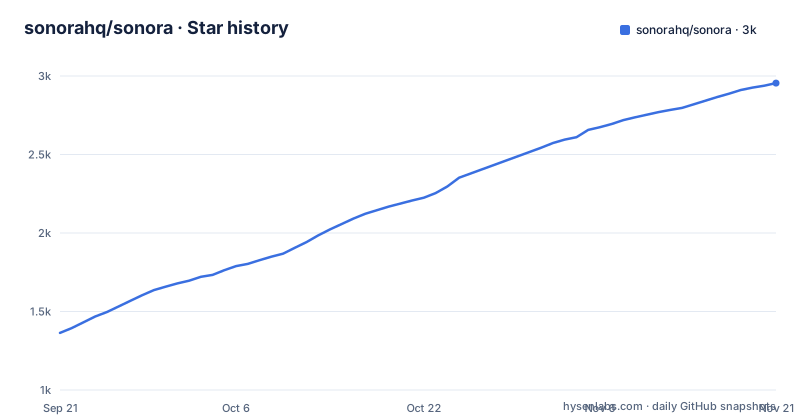
Star history
- sonorahq/sonora2,955 ★ · +1,591
| Repository | 2026-09-21 | 2026-11-21 |
|---|---|---|
| sonorahq/sonora | 1.4k | 3k |
1,591 Stars in the last 61 days, measured from the daily GitHub snapshot. Compare with other projects
Editorial analysis
The rule about protected streams comes before the feature list
The first substantial block under the header is a statement of scope, not a feature. Sonora is not a platform for obtaining or sharing copyrighted material, and the project says it will not implement any function that could be used to export decrypted streams, DRM licences or content keys, or to convert protected streams into media files. It says it is not designed to get around subscriptions or other restrictions put in place by streaming platforms. If a service requires a valid subscription to play back its tracks, Sonora requires one too. Features aimed at ripping, downloading, distributing or gaining access to protected content are declared out of scope.
That has a direct consequence for what the rest of the page can promise. There is no download command in the install instructions, no export button in the feature list, and no offline cache that survives your subscription. What you get is playback through services you already pay for, which is also why the supported source list is written as services and servers rather than as catalogues.
Read as engineering rather than as policy, the constraint shapes the client. Audio comes from the providers through their normal playback paths, and the local file option sits alongside them rather than as a way to convert a stream into a file on disk. If you need a library you own in a standard format, the local playback path and a Subsonic or Navidrome server are the supported routes.
The project is GPL-3.0-or-later, with the licence named in Cargo.toml and a COPYING file at the root. The credits section names the open source projects it is built on, and THIRD-PARTY.md sits next to it.
Six sources behind one router, and four scrobbling services
The supported sources are Apple Music, Spotify, YouTube Music, Deezer, a Subsonic or Navidrome server, and local files. Six, and the sixth is the one you control. A self hosted server is treated as a first class source here rather than as an afterthought, which tells you something about who this client is for.
Around those sources sit the ordinary playback features: gapless playback, audio normalization, shuffle and a sleep timer. Then the ones that are more specific: synced and karaoke lyrics, background vocals, and romanization. Romanization is the one to note, because it implies a pipeline that turns non Latin script lyrics into something you can read along with, and the page gives no detail on how that is produced or how accurate it is.
Scrobbling goes to four services rather than one: LastFM, ListenBrainz, LibreFM and Maloja. Four sinks for the same event is a small but real design decision, since each has a different notion of what a play counts as.
The workspace layout mirrors these concerns. Cargo.toml lists twelve internal crates by path, and their names line up with the feature list closely enough to be a map of the app: music, state, storage, router, views, ui, input, icons, embed, i18n, webview and widevine. router is where a provider request goes out, music is where decoding and the audio path live, views is the interface, and embed and icons are the assets the window styling options draw on. The features described in the readme are not a marketing layer over that structure; they follow it.
The AppImage ships without a Vulkan driver and without an ALSA bridge
The Linux distribution story is where the packaging differences show. Three routes, and they are not the same thing. The Flatpak comes from a flatpakref hosted on the project's own GitHub pages:
flatpak install --user https://sonorahq.github.io/sonora/sonora.flatpakrefThe AppImage is fetched from the latest release and made executable:
chmod +x sonora-*.AppImage
./sonora-*.AppImage
The Arch packages split in two, and the readme is explicit about the difference. The binary package installs the prebuilt release binary:
yay -S sonora-binwhile the source package builds the same version from source, which takes a while on a Rust and GPUI tree but links against your own system libraries:
yay -S sonoraEither pipewire-alsa or pulseaudio-alsa is required, matching whichever sound server you run. That dependency is not optional and is not carried by the AppImage either: the AppImage carries no Vulkan driver and no ALSA bridge, so both still come from your system.
The AppImage does not update itself, which is the usual AppImage trade. The mitigation is that it carries its update information, so AppImageUpdate or an AppImage manager such as AppManager can fetch a new release for you. An aarch64 build is published beside the x86_64 one.
So the choice is between a self-contained file that expects your graphics and audio stack to be present, and a package that pulls your stack in for you at the cost of isolation. For a GPUI application the graphics driver is not incidental, which is why that sentence about Vulkan is in the AppImage section at all.
macOS needs its quarantine attribute stripped, Windows ships two installers
The macOS route is a cask from a tap that is not named after the organisation:
brew install --cask nolight132/tap/sonorafollowed by a second step the readme attributes to Apple with a short parenthetical:
xattr -dr com.apple.quarantine /Applications/Sonora.appThat second command removes the quarantine attribute from the application bundle. Without it the download is marked as coming from the internet and Gatekeeper gets a say. It is a manual step for every user of the cask, and it is the kind of detail that decides whether an install works for someone or not.
Windows has three shapes: an installer, a separate installer for Windows on ARM, and a portable executable. The installer files are named Sonora-Setup.exe and Sonora-Setup-arm64.exe, and the portable build is called windows-msvc.exe, picked for your architecture from the releases page.
Nix gets the most careful treatment of any platform. The flake packages the latest tagged release binary, or builds from source if that binary is not available for your platform, and it exposes three attributes:
inputs.sonora.packages.${system}.default
inputs.sonora.packages.${system}.sonora (build from source)
inputs.sonora.packages.${system}.sonora-bin (prebuilt, if available)
The default picks whichever of the two is possible, which is the whole point of having both. There is also a Home Manager module under programs.sonora, where enable, settings.provider and settings.appearance.theme are set as configuration:
programs.sonora = {
  enable = true;
  settings = {
    provider = "youtube";
    appearance.theme = "dark";
  };
};
Those two settings are a small window into the configuration model. provider is an enum with youtube as a legal value, and appearance.theme is a named theme, with the note that adaptive themes are optional and that everything else is, or will be, customizable.
GPUI is pinned to one fork revision, not to a version
The workspace file makes the unusual dependency choice visible. GPUI is not taken from crates.io. It comes from a git dependency on a fork under this organisation, pinned to an exact commit:
gpui = { git = "https://github.com/sonorahq/gpui", rev = "5ff26c7dedb1c8e27b69f89be13ce2744484874a" }
gpui_platform = { git = "https://github.com/sonorahq/gpui", rev = "5ff26c7dedb1c8e27b69f89be13ce2744484874a", features = [
  "font-kit",
  "wayland",
  "x11",
] }
The platform crate carries the feature set that decides which display paths you get: font-kit for font handling, and both wayland and x11 for the two Linux display servers. Those three features are also part of why the Arch source package is described as slow, since you are compiling a GPU and windowing stack.
The rest of the workspace is a Rust 2024 edition with resolver 3, version 0.42.1, members declared as crates/* and twelve internal crates wired as path dependencies. Audio goes through cpal, Windows integration through the windows and windows-sys crates plus webview2-com for the WebView2 runtime and winresource for resources, and Discord Rich Presence through the discord-rich-presence crate. Images are enabled for jpeg, png and webp with default features off, which keeps the decoder surface small. Translations run on fluent-bundle, which pairs with the internal i18n crate.
The root directory explains the consequences of that pin: .cargo/, .envrc, rust-toolchain.toml and rustfmt.toml all exist so a contributor and a build agree on toolchain and configuration. AGENTS.md and CLAUDE.md sit at the root as well, which is the convention the project has chosen for instructions to automated agents.
Seven of the fifteen translations sit at exactly 605 of 749 strings
The translation table is wrapped in i18n start and end markers, which means it is maintained by tooling rather than typed by hand, and the numbers in it are worth reading closely. English and French are complete at 749 of 749. Czech is at 743, Spanish at 690, Russian, Ukrainian and Polish at 711, Albanian at 714, and German at 628. That is eight languages at or above 84 percent.
Then seven languages report exactly 605 of 749, which is 81 percent: Italian, Bahasa Indonesia, Japanese, Portuguese from Brazil, Simplified Chinese, Turkish, and Italian's neighbours in the same batch. Seven languages landing on the identical count is not a coincidence of translation effort. It is what happens when a batch of strings is added to the application and no translator has been through them yet, and the unchanged denominator tells you the total has not moved in the meantime.
So the practical reading is that the interface is fully translated in two languages, close in a few more, and has a common untranslated tail in seven. That matters more for a client like this than for a typical application, because provider names, settings labels and error messages are exactly the strings that get missed, and they are the strings a new user reads first.
The mechanism behind the table is visible in the dependencies: an internal i18n crate, fluent-bundle for the message catalogue, and deunicode for turning display names into something a font can render. The project also links a Docs site, a changelog, a roadmap and an FAQ page, so the prose documentation lives off the repository while the string table lives in it.
Generated summaries are fine, generated reasoning is not
The AI policy is the most specific policy document in the repository, and it draws a line in an unexpected place. The project says it has nothing against LLMs and uses them itself, that AI can speed up development and help people learn, and that it was particularly useful for locating relevant parts of large codebases such as GPUI and librespot.
The restriction is on authorship rather than on assistance. AI cannot act as an excuse for failing to understand, review and test proposed changes. Communication is expected to come from a real person rather than a computer, and the examples given are concrete: pull request and issue text, comments in discussions. A short summary of minor changes may be generated and does not have to be disclosed. The reasoning and motivation behind a change must come from the contributor and reflect their own understanding. Pull requests that fail to meet these requirements may be rejected without further notice.
That last line is the part to notice. There is no review discussion promised, just rejection, which puts the burden entirely on the submitter to have understood the change.
The closing permission is narrow and sensible: AI assisted proofreading and translation of human written text are allowed. Given the translation table sits seven languages behind, that exception is doing real work.
Elsewhere the project ships the surrounding process files, with CONTRIBUTING.md at the root, a community section pointing at Discord as primary with a Matrix bridge, and a PRIVACY.md next to the licence. The roadmap and changelog pages are linked from the header, and the release history shows v0.41.0 on 28 September 2026, v0.42.0 on 29 September and v0.42.1 on 2 October.
Editorial conclusion
Sonora suits someone who wants one native window across several streaming services and self hosted music, and who is willing to keep a paid subscription wherever the service requires one. Check four things first. Which packaging route matches your system, because each has a different cost: the AppImage borrows your Vulkan driver and ALSA bridge, the AUR source package builds a GPUI tree against your own libraries, and the Home Manager module only exposes settings the project already supports. Whether your language is actually covered, since seven of the fifteen translations sit at 81 percent of 749 strings. Whether you accept a GPUI fork pinned to one revision rather than an upstream release. And the boundary itself: this project will not export decrypted streams, DRM licences or content keys, so if you need to get audio out of a protected track into a file, no release of this client will do it.
Frequently asked questions
Is Sonora a piracy tool?
No, and the project states that as a rule rather than a disclaimer. It says it will not implement functions for exporting decrypted streams, DRM licences or content keys, or for converting protected streams into media files, and that features aimed at ripping, downloading or distributing protected content are out of scope. If a service requires a valid subscription, Sonora requires one as well.
Which streaming services does Sonora support?
Apple Music, Spotify, YouTube Music, Deezer, a Subsonic or Navidrome server, and local files. Around those it offers gapless playback, audio normalization, shuffle, a sleep timer, synced and karaoke lyrics with background vocals and romanization, and scrobbling to LastFM, ListenBrainz, LibreFM and Maloja.
How do I install Sonora on Linux?
On Arch, yay -S sonora-bin installs the prebuilt release binary while yay -S sonora builds the same version from source against your own system libraries. Either pipewire-alsa or pulseaudio-alsa is required. There is also a Flatpak installed from the project's flatpakref, and an AppImage for x86_64 with an aarch64 build beside it.
Why does the Sonora AppImage not update itself?
It does not, but it carries its update information, so AppImageUpdate or an AppImage manager such as AppManager can fetch a new release. The AppImage also carries no Vulkan driver and no ALSA bridge, so both still have to come from your system.
Which platforms does Sonora build for?
macOS, Windows and Linux are named as supported, with FreeBSD described as probably supported. Windows gets an installer, a separate ARM installer and a portable windows-msvc.exe. macOS installs through a Homebrew cask and needs its quarantine attribute removed afterwards. Nix users get a flake with default, source build and prebuilt attributes, plus a Home Manager module.
Can AI tools be used to contribute to Sonora?
Yes for assistance and narrowly for text work. The project uses LLMs itself and permits AI assisted proofreading and translation of human written text, but requires that the reasoning and motivation behind a change come from the contributor, and expects communication with a real person rather than a computer, including pull request and issue text. Changes that fail this may be rejected.
Official sources
Add this badge to your README
If you maintain this project, the badge below links readers to this analysis and shows its maintenance status from the daily GitHub snapshot. Paste the markdown into your README; add ?metric=license or ?metric=stars to the image URL for a different field.

[](https://hysenlabs.com/projects/sonorahq-sonora)Star history chart for your README
[](https://hysenlabs.com/projects/sonorahq-sonora)Was this useful?