helm-secrets: on-the-fly decryption for Helm value files using sops or vals
A helm plugin that help manage secrets with Git workflow and store them anywhere
At a glance
- What is it?
- helm-secrets is a Helm plugin that decrypts encrypted value files during deployments, supporting sops-encrypted Git-stored files and cloud secret manager references. Two operating modes have different performance profiles, and the plugin has documented integration paths for ArgoCD and Terraform.
- Who is it for?
- helm-secrets suits Kubernetes teams that use Helm for deployments and need secrets stored in git with encryption or fetched at deploy time from a cloud secret manager. Use the protocol handler mode rather than the plugin command when deploying multiple encrypted files: the README explicitly notes the plugin command is slow on multiple value files.
- Can I use it commercially?
- Yes. Apache-2.0 is a permissive licence: you can use, modify and sell software built on it, as long as you keep its copyright and licence notices.
- Is it still maintained?
- Yes. The repository received new commits within the last day.
- What is it written in?
- Mainly Shell, according to GitHub's language statistics.
Answers come from the project's GitHub data, last synced on October 23, 2026, and from our analysis. They are not legal advice.
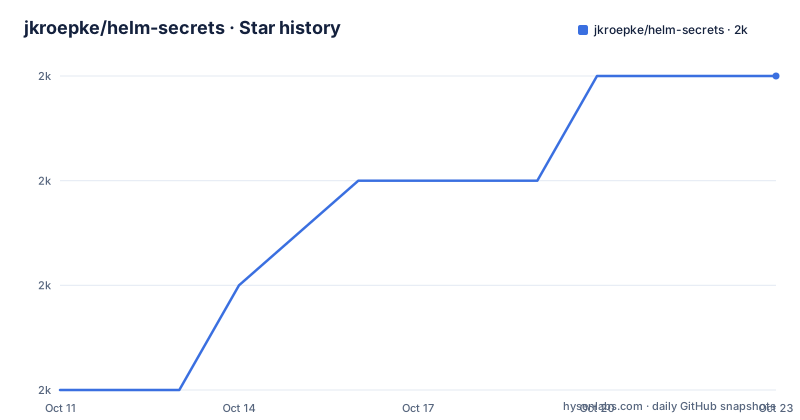
Star history
- jkroepke/helm-secrets2,034 ★ · +3
| Repository | 2026-10-11 | 2026-10-23 |
|---|---|---|
| jkroepke/helm-secrets | 2k | 2k |
3 Stars in the last 12 days, measured from the daily GitHub snapshot. Compare with other projects
Editorial analysis
Two decryption modes with different performance characteristics
helm-secrets offers two ways to decrypt value files. In protocol handler mode, a URI scheme prefix identifies the encrypted file:
helm upgrade name . -f secrets://secrets.yamlA plugin command wraps the full helm invocation instead:
helm secrets upgrade name . -f secrets.yamlThe README explicitly notes the plugin command is "Slow on multiple value files" and marks the protocol handler as preferred. Without the protocol handler, the plugin command processes each encrypted file in sequence, which accounts for the slowdown documented in the README. ArgoCD environments use the protocol handler exclusively. Where both approaches are available, the protocol handler reduces overhead because it decrypts only the files it needs rather than wrapping every part of the helm execution.
sops encrypts files for Git; vals references secrets at runtime from cloud providers
helm-secrets supports two backends with different security models.
With sops, value files are encrypted and committed to git. Encrypted YAML files travel through version control, and helm-secrets decrypts them at deploy time using the key configured in sops. Keeping secrets alongside the chart in the same repository avoids the need for a separate secret storage system.
With vals, the value file contains references rather than values. A reference string like `ref+awsssm://foo/bar?mode=singleparam#/BAR` tells vals where to fetch the secret from a cloud provider at runtime. vals does not encrypt anything; it stores reference strings that are meaningless without credentials for the target cloud provider. Values never appear in git. AWS Secrets Manager, Azure KeyVault and HashiCorp Vault are among the supported providers.
When a team needs both git-stored encryption for infrastructure charts and cloud provider references for application credentials, sops and vals can coexist in the same Helm deployment.
Dependencies: sops 3.10.2, vals 0.40.1, and helm 3 in the official Docker image
helm-secrets installs as a Helm plugin; installation documentation lives on the GitHub wiki. Required external tools depend on which backend is used. Without the matching backend tool installed, helm-secrets cannot decrypt the value files for that backend.
From the Dockerfile in the repository, the official image uses sops 3.10.2, vals 0.40.1, helm 3.17.3 and kubectl 1.33.0. These ARG defaults reflect the versions the maintainer tested against when building the image. Separately, docker-compose.yaml uses sops v3.8.1, vault 1.10.1, and helm v3.7.0 for a different test environment. Both files are independently maintained, which explains the Helm version discrepancy.
For the vals template evaluation feature, `--evaluate-templates` requires helm 3.9 or newer together with vals 0.20 or newer. Those two version floors apply only to template evaluation, not to the plugin as a whole.
Template evaluation with --evaluate-templates injects vals references into rendered templates
Beyond decrypting value files, helm-secrets can evaluate vals references embedded directly inside Helm templates. Both helm 3.9 or newer and vals 0.20 or newer are required for this mode.
A vals reference in a Secret manifest looks like this:
apiVersion: v1
kind: Secret
metadata:
  name: secret
type: Opaque
stringData:
  password: "ref+awsssm://foo/bar?mode=singleparam#/BAR"
Running the following command resolves that reference at deploy time:
helm secrets --evaluate-templates upgrade name .Skipping the flag leaves any ref+ strings inside templates unexpanded and passed literally to Kubernetes. For cloud credentials, referencing a value directly through --set is also possible:
helm secrets --backend vals template bitnami/mysql --name-template mysql \
  --set auth.rootPassword=ref+awsssm://foo/bar?mode=singleparam#/BAR
Shifting the vals reference into the template rather than a separate value file changes where the ref+ syntax must be audited across a chart.
ArgoCD integration uses protocol URI handlers with two GPG key import patterns
ArgoCD integration relies on the protocol handler mode. An Application resource uses three different URI formats in valueFiles:
valueFiles:
  - secrets+gpg-import:///helm-secrets-private-keys/key.asc?secrets.yaml
  - secrets+gpg-import-kubernetes://argocd/helm-secrets-private-keys#key.asc?secrets.yaml
  - secrets://secrets.yaml
Filesystem-based GPG key import uses the first format. Kubernetes-stored keys use the second format, pointing to a secret in the argocd namespace. Plain secrets:// URIs rely on whatever sops key configuration is already present in the ArgoCD environment. Only one of the three URI formats is required per value file; a chart can mix all three formats if different value files are managed by different methods.
fileParameters (which map to the --set-file helm flag) are also supported. A fileParameters entry can reference a value from Azure Key Vault directly:
fileParameters:
  - name: mysql.rootPassword
    path: secrets+literal://ref+azurekeyvault://my-vault/secret-a
This combines the protocol handler approach with the vals cloud reference syntax in one path string.
Terraform Helm provider does not support downloader plugins
Downloader plugins are not supported by the Terraform Helm provider, which is the mechanism the protocol handler mode uses. This blocks the preferred decryption path when managing Helm deployments through Terraform.
A documented workaround uses the Terraform external data source provider. A Terraform configuration calls helm secrets decrypt with the --terraform flag, captures the decrypted output, and passes it to a helm_release resource through the values argument:
data "external" "helm-secrets" {
  program = ["helm", "secrets", "decrypt", "--terraform", "../../examples/sops/secrets.yaml"]
}

resource "helm_release" "example" {
  values = [
    file("../../examples/sops/values.yaml"),
    base64decode(data.external.helm-secrets.result.content_base64),
  ]
}
A full example lives in examples/terraform/helm.tf. Base64 decoding is necessary because the external data source provider encodes binary content as a base64 string before returning it to Terraform. For teams managing many Helm deployments, this extra indirection adds maintenance overhead that running helm secrets directly from CI does not require.
Project layout: main scripts, test suite, and Windows wrapper
Plugin logic lives in scripts/run.sh. Separate subdirectories hold backend implementations under scripts/backends, sub-command definitions under scripts/commands, and shared library functions under scripts/lib. On Windows, scripts/wrapper holds wrapper scripts for platform differences.
Testing in tests/ uses real PGP keys to run actual encryption and decryption operations rather than mocking the secret backends; tests/README.md describes how to set up and run them. Mocked tests would not catch misconfigurations in the sops key trust chain, so the decision to use real keys is a deliberate tradeoff.
Two copyright periods cover the project history: Zendesk from 2017 to 2020 and Jan-Otto Kröpke (jkroepke) from 2020 to 2022, both under the Apache License, Version 2.0; the last push was 2026-10-01 and v4.7.8 shipped on 2026-09-23.
Editorial conclusion
helm-secrets suits Kubernetes teams that use Helm for deployments and need secrets stored in git with encryption or fetched at deploy time from a cloud secret manager. Use the protocol handler mode rather than the plugin command when deploying multiple encrypted files: the README explicitly notes the plugin command is slow on multiple value files. Skip helm-secrets if your CD pipeline uses the Terraform Helm provider directly, since that provider does not support downloader plugins; the external data source workaround with --terraform adds complexity. For ArgoCD, verify that the GPG key import method you need matches your key storage: the Kubernetes-based import differs from the direct file import in the Application valueFiles specification.
Frequently asked questions
What is helm-secrets?
helm-secrets is a Helm plugin that decrypts encrypted value files on the fly during Helm deployments. It supports sops for encrypting files stored in git and vals for referencing secrets from cloud providers like AWS Secrets Manager, Azure KeyVault and HashiCorp Vault.
How do I use helm-secrets with ArgoCD?
ArgoCD integration uses the protocol handler URI format in the Application resource's valueFiles. Three URI formats are supported: a filesystem GPG key import path, a Kubernetes secret-based GPG key import, and a plain secrets:// URI. The ArgoCD integration wiki page covers the setup.
What is the difference between sops and vals in helm-secrets?
sops encrypts value files that are committed to git and decrypted at deploy time. vals uses reference strings inside value files that point to secrets in cloud providers, fetching them at runtime. Both backends serve different workflows and can be used in the same deployment.
Does helm-secrets work with Terraform?
The Terraform Helm provider does not support downloader plugins, so the protocol handler mode does not work directly with Terraform. A documented workaround uses the Terraform external data source provider together with the helm secrets decrypt --terraform command.
What versions of sops and vals does helm-secrets use?
The official Docker image in the repository uses sops 3.10.2 and vals 0.40.1 alongside helm 3.17.3. The --evaluate-templates feature requires a minimum of vals 0.20 and helm 3.9.
Official sources
Add this badge to your README
If you maintain this project, the badge below links readers to this analysis and shows its maintenance status from the daily GitHub snapshot. Paste the markdown into your README; add ?metric=license or ?metric=stars to the image URL for a different field.

[](https://hysenlabs.com/projects/jkroepke-helm-secrets)Star history chart for your README
[](https://hysenlabs.com/projects/jkroepke-helm-secrets)Was this useful?