Lumos Engine for Cross-Platform C++ Games
Cross-Platform C++ 2D/3D game engine
At a glance
- What is it?
- Lumos is a C++ game engine repository for teams building 2D and 3D applications with an ECS foundation, Vulkan rendering, OpenAL audio, ImGui tooling, physics, and basic Lua scripting. Its main trade-off is a source-based setup rather than a documented turnkey editor workflow.
- Who is it for?
- Lumos fits C++ developers who want direct control over an ECS-based, Vulkan-oriented engine and can work with its platform prerequisites and source build process. It is a poor fit for someone seeking a fully documented editor workflow or a turnkey project template.
- Can I use it commercially?
- Yes. MIT is a permissive licence: you can use, modify and sell software built on it, as long as you keep its copyright and licence notices.
- Is it still maintained?
- Yes. The repository last received commits 5 days ago.
- What is it written in?
- Mainly C++, according to GitHub's language statistics.
Answers come from the project's GitHub data, last synced on November 7, 2026, and from our analysis. They are not legal advice.
Star history
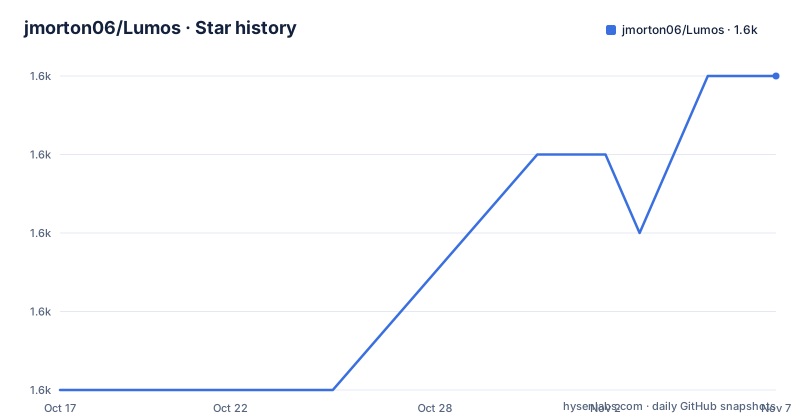
- jmorton06/Lumos1,602 ★ · +4
| Repository | 2026-10-17 | 2026-11-07 |
|---|---|---|
| jmorton06/Lumos | 1.6k | 1.6k |
4 Stars in the last 21 days, measured from the daily GitHub snapshot. Compare with other projects
Editorial analysis
Lumos Engine's ECS and Vulkan Foundation
Lumos addresses developers who want a native C++ codebase for cross-platform 2D and 3D game development instead of beginning with window creation, rendering, input, audio, physics, serialization, and scripting separately. The README describes support for Windows, Linux, and macOS, with separate iOS build instructions also included. The core dependencies identify the engine's shape: EnTT provides the entity-component system, GLFW handles windows and input across platforms, Volk loads Vulkan, and OpenAL supplies 3D audio.
That architecture is relevant to teams that want game logic expressed around entities and components. The repository includes separate `Editor/`, `Runtime/`, and `ExampleProject/` directories, which indicates that the engine is organized beyond a single example application. The README does not describe a particular gameplay loop, scene format, or component API in enough detail to support a more specific implementation claim. It does identify the major subsystems that a new user will encounter.
The engine's stated rendering direction is Vulkan with PBR shading for 3D models. This is a narrower choice than an engine claiming broad renderer support, so developers should check whether their graphics assumptions, drivers, and deployment targets match the documented Vulkan path. The dependency list also includes `volk`, `glfw`, `tinygltf`, and `tinyobjloader`, indicating that the runtime is assembled around conventional C++ libraries rather than a fully isolated game runtime.
Lumos Linux Build and First Project Workflow
The documented Linux workflow begins by cloning the repository and initializing its Git submodules. The README requires the Vulkan SDK and lists the Linux development packages needed for the build. Premake then generates a `gmake2` project, and `make` builds it. The optional comment identifies `config=release`, but the documented command does not show the complete configuration syntax, so an application should not infer additional flags from that comment.
git clone https://github.com/jmorton06/Lumos.git
git submodule update --init --recursive
These commands retrieve the repository and initialize nested dependency repositories. A developer should do this before invoking the platform-specific Premake command because the build description explicitly requires recursive submodule initialization.
sudo apt-get install -y g++-11 libxrandr-dev libxinerama-dev libxcursor-dev libxi-dev libopenal-dev mesa-common-dev
cd Lumos
Tools/linux/premake5 gmake2
make -j$(nproc) # config=release
The package installation supplies the listed Linux build dependencies. `Tools/linux/premake5 gmake2` generates the build files, and `make -j$(nproc)` compiles using the available processor count. The README does not document a first-run game command after compilation, nor does it provide a complete API example for creating a scene, loading a model, or starting Lua. The `ExampleProject/` directory is the concrete starting point named by the repository layout, but the documentation does not explain how to open or run it after a build.
Lumos Windows, macOS, and iOS Build Paths
Lumos documents separate generation and build commands for each platform. Windows users run `Scripts/GenerateVS.bat`, then build the generated solution with MSBuild. macOS uses Premake to generate an Xcode project and `xcodebuild` to build it. Apple Silicon Macs may require the explicit `--arch=arm64 --os=macosx` generation options. The iOS path generates for iOS and disables code signing in the documented `xcodebuild` invocation.
cd Lumos
msbuild /p:Platform=x64 /p:Configuration=Release Lumos.sln
This is the README's Windows build command after running `Scripts/GenerateVS.bat`. It requests an x64 Release build of `Lumos.sln`. The Windows section does not state which Visual Studio generation tool or workload is required, so the build environment remains an important prerequisite to verify.
cd Lumos
Tools/premake5 xcode4
xcodebuild -project Runtime.xcodeproj
The macOS command creates `Runtime.xcodeproj` and builds it. For M1, M2, and M3 Macs, the README gives an architecture-specific variant. It also warns that some Apple devices using Vulkan through MoltenVK may need Metal API Validation disabled in Xcode's Run options. That is a platform configuration note, not a general requirement for every macOS build.
cd Lumos
Tools/premake5 xcode4 --os=ios
xcodebuild -project Runtime.xcodeproj CODE_SIGN_IDENTITY="" CODE_SIGNING_REQUIRED=NO CODE_SIGNING_ALLOWED=NO
The iOS command explicitly disables signing for the build invocation. It should not be treated as an App Store distribution procedure because the README gives no provisioning or distribution instructions.
Lumos Rendering, Physics, Audio, and Scripting Scope
The feature list covers a practical engine baseline, but each item has a defined scope. Rendering is documented through Vulkan, 3D model support, and PBR shading. Audio uses OpenAL and is described as 3D. Collision handling is split between custom 3D shapes and Box2D for 2D. The custom 3D list contains cuboid, sphere, and pyramid shapes, which is narrower than a general rigid-body description and should be checked against the collision needs of a planned game.
ImGui is presented as a debug GUI, and ImGuizmo is listed as a dependency for scene editing and other controls. These components indicate that in-engine tooling is part of the development direction, but the README does not document the editor's panels, asset browser, scene serialization format, or workflow for exporting a game. The presence of `Editor/` confirms an editor-related area in the repository, while the documentation does not provide enough detail to describe its user interface.
Lua support is described as basic and depends on `sol2`, the C++ to Lua API wrapper. The repository therefore has a scripting path, but it is not presented as a replacement for the C++ runtime or as a complete gameplay scripting model. Serialization is represented by the `cereal` dependency, and model loading is supported through `tinygltf` and `tinyobjloader`. These are useful building blocks, though the README does not document save-game compatibility, asset pipeline guarantees, or scripting API stability.
Lumos Dependencies, Licensing, and Upgrade Cost
Lumos uses a broad set of open source libraries. The README names Dear ImGui, ImGuizmo, EnTT, GLFW, stb, tinygltf, tinyobjloader, Volk, Box2D, sol2, cereal, and meshoptimizer. It also instructs users to install the Vulkan SDK separately. This dependency surface creates an adoption cost: a developer must reconcile the engine's build system with the required libraries and the platform development packages listed for Linux.
The repository is licensed under MIT. That identifies the project's declared license, but it does not replace checking the licenses of every bundled or linked dependency. The README links to dependencies with different licensing terms, and it does not discuss the licensing of generated build products or imported assets. The engine's MIT designation and each dependency's terms are separate items to verify before redistribution.
The repository is not archived, and its last push was on 2026-08-31. The listed releases are 0.3.9 from 2024-09-14, 0.3.7 from 2023-07-06, and 0.3.6 from 2022-05-04. That distinction matters when evaluating maintenance. Recent repository activity does not establish a release cadence, compatibility policy, or stable API. Upgrading across Lumos versions may therefore require source-level review, particularly because the README does not provide migration notes. Its contribution section welcomes pull requests and points to `Todo.txt`, but it does not promise response times or a support lifecycle.
Choosing Lumos Instead of a Direct Library Stack
The practical alternative to Lumos is assembling the same category of capabilities directly from standalone libraries and application code. A direct stack could use GLFW for window and input handling, Vulkan or another renderer for graphics, OpenAL for audio, Box2D for 2D physics, and a chosen asset or serialization library. The difference is architectural ownership: Lumos packages these dependencies into an engine repository with `Runtime/`, `Editor/`, and `ExampleProject/` areas, while a direct stack leaves integration, build configuration, subsystem boundaries, and maintenance to the application team.
Lumos is the better fit when a C++ developer wants an existing engine-level arrangement and is prepared to work from its source and dependency configuration. The direct approach may be better when the project needs only one or two subsystems, has an established renderer or asset pipeline, or requires exact control over platform and dependency versions. The README does not document compatibility ranges or a supported engine API, so a migration or integration estimate cannot be made from the available documentation.
Lumos Documentation Gaps Before Adoption
The largest adoption risk is not the feature list but the amount of work left undocumented around it. The README gives build commands, dependency names, and broad capabilities. It does not publish a compatibility matrix for Vulkan SDK versions, compiler versions, graphics drivers, or dependency revisions. The repository uses submodules, so the effective dependency versions must be obtained from the checked-out tree rather than inferred from the release number.
The documentation also leaves several practical questions open. There are no stated engine API examples, editor instructions, sample asset paths, asset import commands, or post-build run commands. The README does not define how a production application is separated from `ExampleProject/`, nor does it explain whether the editor is required for runtime builds. For iOS, the signing-disabled build command is a development-oriented invocation rather than a documented distribution path.
These gaps do not make the repository unusable, but they make an early source inspection more important than the feature bullet list. A team should first determine whether its intended game uses the documented cuboid, sphere, and pyramid collision types, whether PBR and Vulkan are required, and whether basic Lua scripting meets its gameplay needs. The project is most suitable when those constraints are acceptable and the team can own integration work that the README leaves undocumented.
Editorial conclusion
Lumos fits C++ developers who want direct control over an ECS-based, Vulkan-oriented engine and can work with its platform prerequisites and source build process. It is a poor fit for someone seeking a fully documented editor workflow or a turnkey project template. Check the platform dependency installation, generated project configuration, and Vulkan SDK requirement first. The repository is not archived and the last push was on 2026-08-31, but the listed releases stop at 0.3.9 from 2024-09-14, so recent commit activity should not be treated as a release schedule.
Frequently asked questions
What platforms does Lumos Engine support?
The README lists Windows, Linux, and macOS as supported platforms. It also provides separate iOS generation and build instructions, although the feature list does not explicitly describe iOS as a general supported platform.
How do you build Lumos on Linux?
The README requires the Vulkan SDK, the listed Linux development packages, recursive Git submodule initialization, Premake generation with `Tools/linux/premake5 gmake2`, and a `make` build. It does not document a separate first-run command for the example project.
Does Lumos use an entity-component system?
Yes. The dependency list includes EnTT, which the README identifies as an entity-component system. The documentation does not provide a component or system API example.
Does Lumos support Lua scripting?
Yes, but the README describes it as basic Lua scripting support. The `sol2` dependency provides the C++ and Lua API wrapper, while the documentation does not define a complete scripting API.
Official sources
Add this badge to your README
If you maintain this project, the badge below links readers to this analysis and shows its maintenance status from the daily GitHub snapshot. Paste the markdown into your README; add ?metric=license or ?metric=stars to the image URL for a different field.

[](https://hysenlabs.com/projects/jmorton06-lumos)Star history chart for your README
[](https://hysenlabs.com/projects/jmorton06-lumos)Was this useful?