Voxel Tools for Godot: editable volumetric terrain as a C++ module
Voxel module for Godot Engine
At a glance
- What is it?
- Zylann's godot_voxel gives Godot 4 realtime, in-game editable voxel terrain with overhangs and tunnels, shipped both as a custom engine build and as an untested GDExtension.
- Who is it for?
- Voxel Tools is the most complete voxel implementation available inside Godot, and its real strength is that terrain is data rather than a heightmap: you can carve tunnels, build overhangs, and let players edit the world during play rather than only in an editor. The cost is the build model.
- Can I use it commercially?
- Yes. MIT is a permissive licence: you can use, modify and sell software built on it, as long as you keep its copyright and licence notices.
- Is it still maintained?
- Yes. The repository last received commits 22 days ago.
- What is it written in?
- Mainly C++, according to GitHub's language statistics.
Answers come from the project's GitHub data, last synced on October 22, 2026, and from our analysis. They are not legal advice.
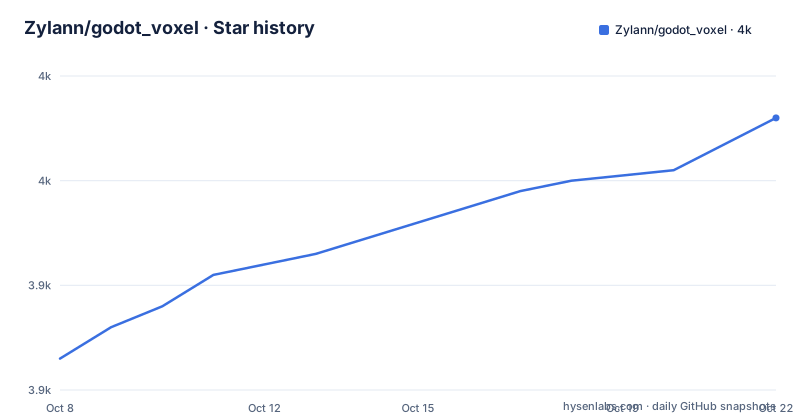
Star history
- Zylann/godot_voxel3,956 ★ · +23
| Repository | 2026-10-08 | 2026-10-22 |
|---|---|---|
| Zylann/godot_voxel | 3.9k | 4k |
23 Stars in the last 14 days, measured from the daily GitHub snapshot. Compare with other projects
Editorial analysis
Terrain you can edit during play, not just in the editor
The README opens with a claim that is more specific than it sounds: realtime 3D terrain editable in-game, unlike a heightmap based terrain, which allows for overhangs, tunnels, and user creation and destruction. That single sentence is the project's reason to exist. A heightmap is a two dimensional array, so it can describe a mountain but cannot describe a hole through one. Voxel storage is a three dimensional grid, and a grid can have negative space in it, which is why tunnels and overhangs come for free rather than as a feature request.
The consequence for a game designer is that the world becomes a runtime object rather than a build-time asset. Destruction in play, terrain that players reshape, caves that matter tactically: all of that follows from the storage model. The feature list also names an instancing system to spawn foliage, rocks and other decoration on surfaces, which is how you keep the voxel grid from turning into an unbroken wall of blocks.
The rest of the feature list is the engineering underneath. Meshing is polygon-based, so voxels become chunked meshes rather than being drawn as cubes, and the project offers two distinct paths. Minecraft-style blocky voxel terrain comes with multiple materials and baked ambient occlusion. Smooth terrain uses level of detail through Transvoxel, a meshing approach that produces continuous surfaces instead of cubes. Infinite terrains work by paging chunks in and out as the player moves, and Godot physics integration comes with an alternate fast Minecraft-like collision mode for cases where full physics is overkill.
Two distributions, and they are not equally finished
The repository ships as both a module and an extension, and the release notes make the difference unusually clear. The v1.7 module release, published on 2026-08-20, is a custom Godot build from the 4.7 branch with the voxel module compiled in, tagged as Godot 4.7.2.stable.custom_build plus Voxel Tools 1.7. The v1.7x release, published the same day, is a GDExtension build of the same voxel module version 1.7 for Godot 4.5 and newer, and it opens with a warning that it has not gone through much testing so it might have bugs that are not present in module builds.
That warning matters more than it might look. The module build goes through the same continuous integration as the engine itself, so the release history shows custom builds for the 4.6 branch in February 2026 and the 4.7 branch in August, which is a twice-yearly cadence tied to Godot's own releases. The extension build inherits a much shorter history.
The extension's practical difference is installation. The release notes say it is structured like a plugin: unzip the contents of the archive at the root of your project. There is no engine compile, which is the entire reason to want it. If your studio ships on stock Godot binaries and treats engine forks as an operational liability, that difference probably outweighs the warning.
One small inconsistency worth knowing: the v1.6 module release includes a line pointing to the documentation for how to get builds, while the v1.7 module release drops it and goes straight to the changelog link. Both link the changelog, both cover the same variants.
Build variants that decide which platform you can ship on
The module releases are not a single artifact. The v1.6 and v1.7 notes both describe a template variant for exporting a game, a double variant that supports large world coordinates but for which export templates are not provided, and a tracy variant instrumented for the Tracy profiler. The tracy variant is the interesting one for anyone profiling: it means the project expects performance questions about voxel meshing and chunk paging to be real, and has a build that answers them with a sampling profiler rather than guesses.
Large world coordinates are worth pausing on. Single precision floats cannot represent a voxel world at planetary scale, so the double variant exists for projects that want a very large editable world. The cost is stated plainly in the same line: no export templates are provided, so you build those yourself.
The notes also give the honest fallback. If your target platform is not among the included builds, you may have to build it yourself for now, or use the extension version. That sentence is the practical test of whether this project fits your release matrix: check the artifact list against your platforms before committing, because an unlisted platform means either an engine compile or a switch to the less-tested distribution.
The build configuration lives in the repository rather than in documentation only. The tree shows SConstruct and SCsub at the root alongside common.py and config.py, which is the SCons build system that Godot itself uses, plus a mono-oriented nuget.config and CI workflows for Windows, Linux, macOS, Mono and GDExtension builds.
The roadmap still lists making the GDExtension work
Here is a place where the README and the release history do not line up, and you have to hold both to see it. The Roadmap section points at a Feature Branches issue for work in progress and lists areas of interest: multiplayer synchronization, smooth voxel texturing, level of detail with blocky voxels, and make GDExtension work.
Make GDExtension work is listed as an area of interest in the same document that announces a GDExtension release carrying an untested warning. Both facts are current. The reading that fits is that the extension path works well enough to publish and is still being stabilized, and the roadmap entry reflects the remaining work rather than the absence of a build. A reader could equally take the roadmap entry to mean the extension is not yet usable, and the release exists mainly for the curious.
This is where checking the concrete artifact beats reading either document alone. The 1.7x release is downloadable and installs by unzipping, so a quick evaluation in an existing Godot 4.5+ project settles the question in a few minutes. Nothing in the README tells you to expect feature parity between the two distributions, and the warning implies the opposite, so treat the extension as the fast evaluation path and the module as the shipping path.
Multiplayer synchronization being on the same roadmap list is worth noticing for a different reason. It is the one item on that list whose absence changes what kind of game you can build. A terrain system where players can destroy voxels has an obvious multiplayer story, and this project is not claiming to have implemented it.
The layout tells you where the interesting problems live
The repository tree is unusually well separated for a Godot module, and reading the directory names is a decent map of the architecture. storage/ holds the voxel data layer, streams/ the streaming and paging side, terrain/ the terrain logic, meshers/ the blocky and smooth meshing, generators/ the world generation that the README says you can write your own against, modifiers/ for editing operations, shaders/ for rendering, engine/ and core registration through register_types.cpp and register_types.h, editor/ for in-editor tooling, and tests/ for the test suite. There is also util/, misc/, constants/, thirdparty/, doc/, project/, edition/ and a voxel_version.py.
The editors/ and editor/ distinction is worth noting: this module ships editor-side tooling, not only runtime code, which is why the project can offer terrain editing inside the Godot editor rather than only through scripts.
The generators/ directory connects to the README line about voxel data being streamed from a variety of sources with the ability to write your own generators. That is the extension point most likely to matter if you already have a world concept, since it lets you feed the storage layer from something other than noise-based generation.
Documentation is not in the README. The three links are the main documentation, a How to install page, and a Quick start page, all on readthedocs, with a readthedocs status badge in the README confirming the docs build. The .readthedocs.yml in the tree backs that up. The README itself is a feature list and a credits page, which is honest but means every real setup question lives in the hosted docs.
Non-profit maintenance, high issue count, and how to start
The README states plainly that this module is a non-profit project developed by voluntary contributors, and then lists supporters in three tiers, Gold, Silver, and a longer supporters section. That framing explains a lot about the shape of the project: it has a named maintainer shipping tagged builds on a twice-yearly cadence against Godot branches, and it does not have a support team behind it.
GitHub reports 3,904 stars, 352 forks and 246 open issues on the repository, which is not archived and was last pushed on 2026-09-16. A queue of 246 open issues against that level of commit activity is the main practical difference between this project and a commercially backed one. Expect to do your own triage reading, and expect some questions to be answered only in the readthedocs pages or on the Discord linked from the README rather than in an issue thread.
The README does not include installation commands, because getting the module means compiling a custom engine, and the How to install page carries that procedure. A plain source checkout is the starting point for either path:
git clone https://github.com/Zylann/godot_voxel
cd godot_voxel
The tree also shows gource_view.sh, which is a small script for rendering the repository's history as a Gource visualization. It tells you the project treats its own history as worth looking at, which is a reasonable proxy for how a long-lived engine-adjacent module ages.
Editorial conclusion
Voxel Tools is the most complete voxel implementation available inside Godot, and its real strength is that terrain is data rather than a heightmap: you can carve tunnels, build overhangs, and let players edit the world during play rather than only in an editor. The cost is the build model. A module build means running a custom engine, which is a serious commitment for a studio that has standardized on stock Godot, and the GDExtension route exists to avoid exactly that commitment while carrying an explicit warning that it has not been through much testing. If you want to evaluate it cheaply, build the extension version against Godot 4.5 or newer, because the release notes for v1.7x call it structured like a plugin and unzipped at your project root, which takes minutes rather than an engine compile. What the README settles is the feature set and the roadmap; what it does not settle is which distribution to pick for a shipping title, and that decision belongs to whoever owns your engine build.
Frequently asked questions
How do I install godot_voxel in a Godot project?
There are two routes. A module build means using a custom Godot engine with the voxel module compiled in, and releases exist as template, double precision and Tracy instrumented variants. A GDExtension build needs no engine compile: the v1.7x release notes say it is structured like a plugin, so you unzip the archive at the root of your project. The How to install page on readthedocs carries the full steps.
What is the difference between the blocky and smooth terrain modes?
Blocky terrain renders as Minecraft-style cubes, with multiple materials and baked ambient occlusion, and the roadmap still lists level of detail for blocky voxels as work in progress. Smooth terrain produces continuous surfaces using level of detail through Transvoxel, with smooth voxel texturing listed as an area of interest. Both come out of the same chunked meshing pipeline.
Is the GDExtension version safe to use for a shipped game?
The v1.7x GDExtension release carries an explicit warning that it has not gone through much testing and might have bugs that are not present in module builds, and the README roadmap still lists making GDExtension work as an area of interest. The module builds track Godot branches more closely. A sensible approach is to prototype on the extension and ship on a module build.
Can players edit the voxel terrain while the game is running?
Yes, that is the core capability. The README describes realtime 3D terrain editable in-game, which unlike a heightmap allows for overhangs, tunnels, and user creation and destruction. It also provides Godot physics integration plus an alternate fast Minecraft-like collision mode, and an instancing system for placing decoration such as foliage and rocks on surfaces.
Official sources
Add this badge to your README
If you maintain this project, the badge below links readers to this analysis and shows its maintenance status from the daily GitHub snapshot. Paste the markdown into your README; add ?metric=license or ?metric=stars to the image URL for a different field.

[](https://hysenlabs.com/projects/zylann-godot-voxel)Star history chart for your README
[](https://hysenlabs.com/projects/zylann-godot-voxel)Was this useful?