jmpress.js: Building Infinite Canvas Sites with jQuery
A jQuery plugin to build a website on the infinite canvas
At a glance
- What is it?
- jmpress.js is a jQuery plugin for presenting pages as navigable content on an infinite canvas, using CSS3 transforms and transitions. It suits developers who want spatial navigation and already work with jQuery.
- Who is it for?
- jmpress.js is appropriate for a small presentation, spatial navigation demo, or internal tool built around jQuery and CSS3 canvas movement. It is a poor fit for a conventional content site, a framework-only team, or anyone requiring current release packaging and upgrade guidance.
- Can I use it commercially?
- Not without permission. GitHub finds no licence file in the repository, and without a licence all rights are reserved by default: you may read the code but not reuse it. Check the README, or ask the authors, before using it.
- Is it still maintained?
- Yes. The repository last received commits 166 days ago.
- What is it written in?
- Mainly JavaScript, according to GitHub's language statistics.
Answers come from the project's GitHub data, last synced on November 7, 2026, and from our analysis. They are not legal advice.
Star history
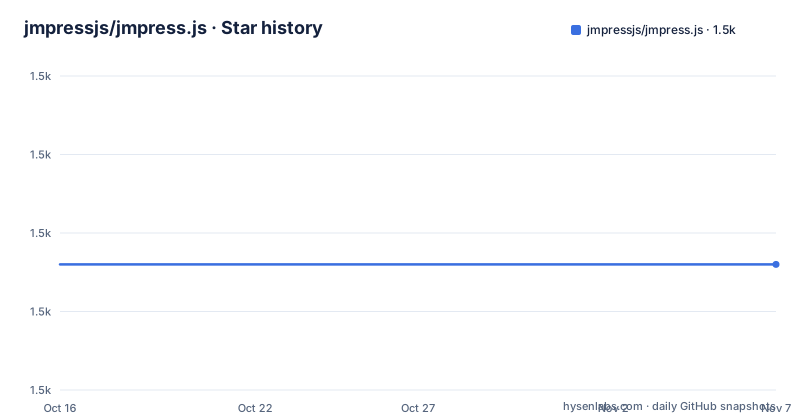
- jmpressjs/jmpress.js1,486 ★ · +0
| Repository | 2026-10-16 | 2026-11-07 |
|---|---|---|
| jmpressjs/jmpress.js | 1.5k | 1.5k |
0 Stars in the last 22 days, measured from the daily GitHub snapshot. Compare with other projects
Editorial analysis
Why jmpress.js Uses an Infinite Canvas
jmpress.js addresses a specific presentation problem: arranging content in a broad virtual space and navigating between it through movement rather than a conventional vertical page scroll. The package description calls it a jQuery plugin for building “a website on the infinite canvas.” That wording matters because the project is intended to shape an entire browsing surface, not merely add a carousel or transition to one component. The target user is therefore a web developer who can define presentation steps in markup and wants jQuery to coordinate navigation among them.
The project began as a jQuery port of impress.js, and the README explicitly says that it uses CSS3 transforms and transitions. Its central mechanism is browser-rendered spatial movement. The repository contains examples named `cube`, `zoomable`, `automatic-layout`, `nested-templates`, `tab-control`, `form-dynamic`, `jqueryui`, and `impress`. Those directory names indicate several kinds of layout and interaction experiments, but their exact configurations cannot be asserted without reading their files.
This is not a general-purpose replacement for page layout. An infinite canvas becomes useful when location itself communicates structure, as in a slide sequence, diagram, guided tour, or spatial interface. For an article, checkout, dashboard, or documentation site whose readers expect predictable document flow, canvas movement would add navigation friction without solving a clear need. The project is most defensible when each location represents a meaningful state and movement helps the user understand the transition between states.
The CSS3 and jQuery Execution Path
The documented execution path has two visible parts. jQuery provides the plugin interface, while CSS3 transforms and transitions perform the visual engine work. The README calls jmpress.js a jQuery plugin, and the package title is `jQuery.jmpress()`. The README does not provide the initialization signature, so an exact call cannot be quoted without guessing.
The repository layout suggests that implementation and delivery are separated. Source files are under `src/`, and the npm metadata lists `dist/jmpress.js` in its `files` array, and the build configuration includes `grunt-contrib-concat`, `grunt-contrib-uglify`, and `grunt-contrib-cssmin`. This indicates that the distribution process combines sources and produces minified JavaScript and CSS assets. The README also says the engine relies on modern-browser CSS3 transform and transition support.
That division introduces an important compatibility boundary. A page can include the correct library and still fail to deliver the intended navigation if the browser does not support the required transform features. The README directs readers to a historical `caniuse.com/#feat=css-animation` compatibility page, but it does not state a minimum browser version, accessibility fallback, keyboard model, reduced-motion policy, or behavior without JavaScript. Those omissions matter for a navigation system. Any evaluation should test the chosen browser set rather than infer support from the word “modern.”
Package Shape, Tests, and Distribution Boundaries
The npm metadata identifies the package as `jmpress.js` version 0.4.5. It declares no runtime dependencies and places only `dist/jmpress.js` in the published `files` list. Consumers should not assume that source examples, the top-level `index.html`, or files under `examples/` will accompany a package installation. Any required stylesheet is also not described in the npm metadata.
Development tooling is dated in a concrete way. The package uses `grunt`, QUnit, JSHint, concatenation, minification, CSS minification, cleaning, and watch tasks. Its sole documented script is:
npm testThe script expands to `grunt qunit` in `package.json`. A contributor can therefore use the package script as the documented test entry point, although the README does not describe browser setup for QUnit or explain whether the tests require a separately prepared test page. The top-level `test/` directory supports the presence of a test suite, but the listed files do not establish its coverage.
There are no GitHub releases. This means a consumer cannot infer a conventional tag-based upgrade cadence from that page. Upgrade planning must account for the lack of published release notes and for the possibility of changes occurring through ordinary repository commits.
A First Use Through the Published Examples
The README does not provide installation commands, a script include sequence, required CSS files, or the exact `jQuery.jmpress()` initialization syntax. It instead directs users to external documentation and publishes separate stable and beta demos. Because the README does not reproduce those setup instructions, an invented snippet would be misleading.
For a first inspection, begin at the documented demo:
http://jmpressjs.github.com/jmpress.js/The repository also identifies a beta demo, but choosing that version would add an extra adoption variable, so the main demo is the safer starting point. If the HTTP address is unavailable or redirects, the repository page is the confirmed starting location:
http://jmpressjs.github.com/jmpress.js/For source-oriented inspection, the repository includes `examples/simple/`, `examples/cube/`, and `examples/zoomable/`. These names provide paths for comparing a basic presentation with specialized spatial effects. However, the repository listing does not show the files inside those directories, so this review cannot confirm the exact page names, JavaScript calls, stylesheet order, or expected controls. The external contribution documentation is the stated place to find build and contribution instructions.
A useful first acceptance pass would record whether navigation advances, whether content remains readable at each canvas position, whether browser controls remain usable, and whether a non-motion fallback exists. Those checks are especially important because the README documents movement as the engine but does not document accessibility behavior.
Where jmpress.js Is the Wrong Web Interface
The clearest failure mode is choosing an infinite canvas when readers need a stable document model. Spatial presentations can make backtracking, deep linking, text selection, and page sharing harder to reason about unless the plugin supplies explicit facilities. The README does not confirm URL-based step addressing, browser history integration, a table of contents, server rendering, or a no-animation mode.
jmpress.js is also a weak candidate when avoiding jQuery is an architectural requirement. The package title and description make jQuery part of the public identity rather than an incidental build tool. A team standardizing on a different framework would need to account for loading jQuery as another client-side dependency.
Browser compatibility is another boundary. The project attempts to use CSS3 transforms and transitions and points to a compatibility page, but it does not name tested versions or define degraded behavior. Pages intended for older browsers, constrained embedded browsers, or strict accessibility policies require direct validation.
The absence of GitHub releases is not proof that the code fails, but it reduces the visible upgrade path. There is no documented changelog, semantic migration guide, support policy, or release artifact list beyond the npm metadata. Maintenance claims should therefore be limited to the repository fact that the last push was on 2026-05-25.
jmpress.js Compared with Conventional Page Flow
The closest documented alternative in lineage is impress.js, because jmpress.js started as its jQuery port. The actual difference in approach is plugin integration: jmpress.js presents itself through the jQuery ecosystem, while the README does not characterize impress.js as a jQuery plugin. A team that already depends on jQuery can evaluate jmpress.js without adding a separate framework, whereas moving to a non-jQuery spatial presentation engine may require changing how components are initialized.
A second alternative is conventional document navigation with anchors and normal page flow. That approach does not try to imitate a large physical canvas. It keeps content in a predictable order and uses links or scrolling between sections. It sacrifices spatial movement, but it also avoids making transform support, transitions, and presentation choreography part of basic content access.
These are genuinely different choices rather than variations in wording. jmpress.js suits experiences where moving through space explains the structure of an interface. Conventional flow suits interfaces where preserving reading order, predictable URLs, and low interaction overhead matters more. The repository’s `impress` example suggests compatibility or comparison work with the original project, but its contents are not listed and its behavior cannot support a detailed comparison.
MIT Licensing and Ongoing Upgrade Work
The README and `package.json` both identify the MIT license, with the README stating that copyright is held by Kyle Robinson Young and Tobias Koppers. The package points to the MIT license text at `http://www.opensource.org/licenses/mit-license.php`. This is a permissive license in general use, but the exact obligations and suitability for a particular distribution should be checked against the full license text rather than inferred from this review.
The package exposes only `dist/jmpress.js` to npm consumers, while source, examples, and tests remain repository assets. This distinction reduces installation ambiguity, but it means npm consumers may not receive the context needed to understand the engine. It also makes review of repository history more relevant when adopting an older version line.
Maintenance should be described narrowly. The repository is not archived, and its last push was on 2026-05-25. The repository contains no GitHub releases, and the README does not provide a changelog, compatibility matrix, or migration documentation. Upgrading therefore carries a specific cost: the adopter may need to compare `dist/jmpress.js` directly, rerun the project’s QUnit command, and retest navigation across the application’s supported browsers rather than follow formal release notes.
Editorial conclusion
jmpress.js is appropriate for a small presentation, spatial navigation demo, or internal tool built around jQuery and CSS3 canvas movement. It is a poor fit for a conventional content site, a framework-only team, or anyone requiring current release packaging and upgrade guidance. Before adoption, open the simple example, confirm the required markup and initialization call from the external docs, and verify that `dist/jmpress.js` works with the browser matrix in use. The repository reports version 0.4.5, has no GitHub releases, and states that its last push was on 2026-05-25, so consumers should judge the code and documentation directly rather than assume a modern release process.
Frequently asked questions
What is jmpress.js used for?
jmpress.js is a jQuery plugin for building a website whose content is arranged and navigated on an infinite canvas. It started as a jQuery port of impress.js and uses CSS3 transforms and transitions.
How do I install and initialize jmpress.js?
The README does not give installation commands or the initialization syntax. It directs users to the documentation at `http://jmpressjs.github.com/docs/` and lists `http://jmpressjs.github.com/jmpress.js/` as the main demo.
Does jmpress.js have automated tests?
The package declares `npm test` as its test script, and that script runs `grunt qunit`. A `test/` directory and QUnit tooling are present, but the README does not document the test scope or browser setup.
Official sources
Add this badge to your README
If you maintain this project, the badge below links readers to this analysis and shows its maintenance status from the daily GitHub snapshot. Paste the markdown into your README; add ?metric=license or ?metric=stars to the image URL for a different field.

[](https://hysenlabs.com/projects/jmpressjs-jmpress-js)Star history chart for your README
[](https://hysenlabs.com/projects/jmpressjs-jmpress-js)Was this useful?