Zenburn: a low-contrast color scheme for long Vim sessions
Zenburn is a low-contrast color scheme for Vim.
At a glance
- What is it?
- Zenburn is a Vim color scheme built around low contrast and muted, warm colours, designed to be easy on the eyes over long editing sessions. It installs as a single file in your colours directory and needs 256-color mode, and the trade-off is that the terminal rendering is close to, but not identical to, the GVim one.
- Who is it for?
- Zenburn fits a Vim user who spends hours in the editor and finds bright themes fatiguing, and who wants a scheme that behaves the same in a terminal and in GVim without much fuss. It does not fit a team looking for a maintained theme with a recent release cycle, because the repository has no GitHub releases and the last push was on 2026-05-05, and it does not fit someone whose terminal cannot do 256 colors, since the scheme depends on it.
- Can I use it commercially?
- Not without permission. GitHub finds no licence file in the repository, and without a licence all rights are reserved by default: you may read the code but not reuse it. Check the README, or ask the authors, before using it.
- Is it still maintained?
- Activity is slowing. The repository last received commits 6 months ago.
- What is it written in?
- Mainly Vim Script, according to GitHub's language statistics.
Answers come from the project's GitHub data, last synced on November 7, 2026, and from our analysis. They are not legal advice.
Star history
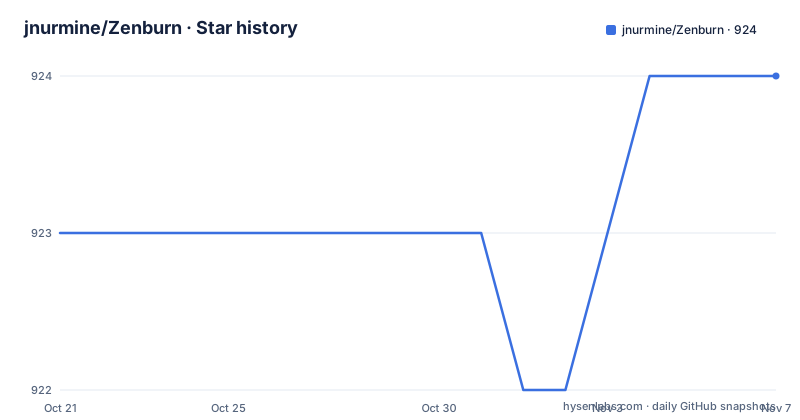
- jnurmine/Zenburn924 ★ · +1
| Repository | 2026-10-21 | 2026-11-07 |
|---|---|---|
| jnurmine/Zenburn | 923 | 924 |
1 Stars in the last 17 days, measured from the daily GitHub snapshot. Compare with other projects
Editorial analysis
A scheme built around muted, warm colours
Zenburn is a low-contrast color scheme for Vim, and the README makes the claim simply: it is easy for your eyes and designed to keep you in the zone for long programming sessions. The aesthetic is described with some humour, in a No and Yes list. On the No side: dayglo vomit, black, red, blue and green on a screaming white background, headache, watery squinting eyes, and the I wanna run away feeling. On the Yes side: alien fruit salad, harmonious colors that help with concentration, improved focus, staying longer in the zone, more productivity, and a 256-color terminal mode with GVim mode and customizeability. What that translates to technically is a dark, warm background with desaturated accents, which is the standard recipe for a low-contrast theme, and the low contrast is the point rather than a side effect. For a reader deciding whether to try it, the honest summary is that it is one of the long-lived Vim themes rather than a new one, with the emphasis on not straining the eyes rather than on expressive syntax colours.
256-color mode is a prerequisite, not a detail
The installation notes for Vim say you must enable the 256-color mode for Vim, and give the mechanism with an example:
export TERM=xterm-256colorYou might also need to add:
set t_Co=256into your .vimrc file, before loading the colorscheme. The README is honest about the consequence: due to the limitations of the 256-color mode the color scheme is not exactly like it appears in GVim, but very close nevertheless. That caveat matters more than it sounds, because it means the scheme you judge in a screenshot is not the scheme you will see in a terminal. The palette is built for a 256-colour palette rather than true colour, so shades that look distinct in GVim get quantised. The practical implication is that a Vim user on a modern terminal emulator with true colour support is using a second-best rendering of the scheme, and should compare the two in their own setup rather than trusting a screenshot.
Loading it is one command, or one line in .vimrc
Once the file is in place, loading the scheme is the standard Vim colourscheme command:
:colors zenburnTo have it applied automatically at startup, add the same line without the leading colon to your .vimrc:
colors zenburnThere is nothing else to configure in the README's instructions, which is the appeal of the scheme: it is a drop-in colourscheme rather than a plugin with settings, options and a status line to fight with. The customizeability that the feature list mentions refers to the usual Vim mechanism of overriding highlight groups in your own configuration after loading the scheme, not to options shipped with the project. For someone moving from a bright default theme, the switch itself may be the whole installation effort, and the colour list in the README gives a fair idea of what to expect before you install anything.
The install is a file copy into the colours directory
For GVim, the README says to simply copy the file to the colors subdirectory under your Vim configuration folder, and it names three typical locations:
~/.vim/colorsalongside C:\vim\colors and C:\vimfiles\colors for Windows installations. There is no package manager step, no build, no dependency. The developers section adds one piece of advice that saves copying files around later: make a symlink from ~/.vim/colors/zenburn.vim which points to the real zenburn.vim, so updates to the file are picked up without recopying it. The repository listing shows how small the project is: a README.md, a TODO file, a colors directory and zb-vimball.txt. There is also a packaging path for people who want to distribute it as a Vimball. To make one, open zb-vimball.txt and run:
:MkVimball zenburn.vbawhich produces a single installable archive rather than a file the user has to place by hand.
Ports to other editors, and where the derivatives live
Zenburn has been ported to many different editors and environments, and the README points to the project page at kippura.org/zenburnpage for more information and a list of derivatives. That page is the reference for anyone whose editor is not Vim, and it also explains why the theme is recognisable in contexts that have nothing to do with Vim. The README thanks the creators of the BlackDust, Camo and Desert themes, which the author used to work out how Vim color schemes behave in practice, and it lists the contributors in the zenburn.vim file itself, plus the people who made the ports. A note on the file's provenance is in that same file, so the repository is also the reference for who did what, which is useful context when a derivative behaves differently from the original.
What the repository does not settle
Several practical questions are left open by the README. There is no GitHub release history, so there is no versioned artifact to pin and no changelog to read; the repository root carries a README, a TODO, the colors directory and the vimball descriptor, and that is the whole tree. The last push was on 2026-05-05, so the file is not being changed constantly, and if you are the kind of user who wants a theme with a visible maintenance cadence, the release history of the derivatives listed on the project page is the better place to look. On licensing, the README states GNU GPL and links the GPL page, while the licence field on the repository is empty, so the README is the only statement of terms available here. The README also does not document a way to report a problem, and it does not say which Vim versions are supported. What it does say, clearly, is that the terminal rendering is close to but not identical to GVim, which is the single fact you should test before making it your default scheme.
Editorial conclusion
Zenburn fits a Vim user who spends hours in the editor and finds bright themes fatiguing, and who wants a scheme that behaves the same in a terminal and in GVim without much fuss. It does not fit a team looking for a maintained theme with a recent release cycle, because the repository has no GitHub releases and the last push was on 2026-05-05, and it does not fit someone whose terminal cannot do 256 colors, since the scheme depends on it. Verify first that your terminal supports 256 colors and that the colours in the colours directory look acceptable to you in that terminal rather than only in GVim. The README states the licence as GNU GPL, while the licence field on the repository is empty, so read the terms in the README before redistributing the file.
Frequently asked questions
How do I install Zenburn in Vim?
Copy the zenburn.vim file into the colors subdirectory of your Vim configuration folder, for example ~/.vim/colors, C:\vim\colors or C:\vimfiles\colors, then load it with :colors zenburn, or add colors zenburn to your .vimrc so it loads at startup.
Does Zenburn need 256-color terminal mode?
Yes. The README says you must enable the 256-color mode for Vim, for example with export TERM=xterm-256color and possibly set t_Co=256 in your .vimrc before loading the colorscheme. It also notes that because of the limitations of that mode the scheme is not exactly as it appears in GVim.
Is Zenburn available for editors other than Vim?
The README says Zenburn has been ported to many different editors and environments and points to kippura.org/zenburnpage for more information and a list of derivatives.
How do I package Zenburn as a Vimball?
Open zb-vimball.txt in Vim and run :MkVimball zenburn.vba, which produces a single installable archive. The README also suggests making a symlink from ~/.vim/colors/zenburn.vim to the real zenburn.vim so the file does not have to be copied around.
Under which licence is Zenburn released?
The README states GNU GPL and links to the GPL page, while the licence field on the repository is empty. The README is the only statement of terms in the repository, so read it before redistributing the file.
Official sources
Add this badge to your README
If you maintain this project, the badge below links readers to this analysis and shows its maintenance status from the daily GitHub snapshot. Paste the markdown into your README; add ?metric=license or ?metric=stars to the image URL for a different field.

[](https://hysenlabs.com/projects/jnurmine-zenburn)Star history chart for your README
[](https://hysenlabs.com/projects/jnurmine-zenburn)Was this useful?