scottokeebs: Handwired Keyboard and Macropad Designs
A collection of free-to-build handwired keyboard and macropad projects.
At a glance
- What is it?
- scottokeebs collects more than 19 free handwired keyboard and macropad designs, with most intended for a 220 x 220 mm 3D printer and common microcontroller platforms.
- Who is it for?
- scottokeebs suits makers who can print parts, handwire a switch matrix, and follow the files for one selected board. It does not suit buyers seeking a complete retail kit or a single configurable firmware platform.
- Can I use it commercially?
- Check first. The repository uses a licence we do not classify automatically, so read its LICENSE file before any commercial use.
- Is it still maintained?
- Yes. The repository last received commits 3 days ago.
- What is it written in?
- Mainly C, according to GitHub's language statistics.
Answers come from the project's GitHub data, last synced on November 7, 2026, and from our analysis. They are not legal advice.
Star history
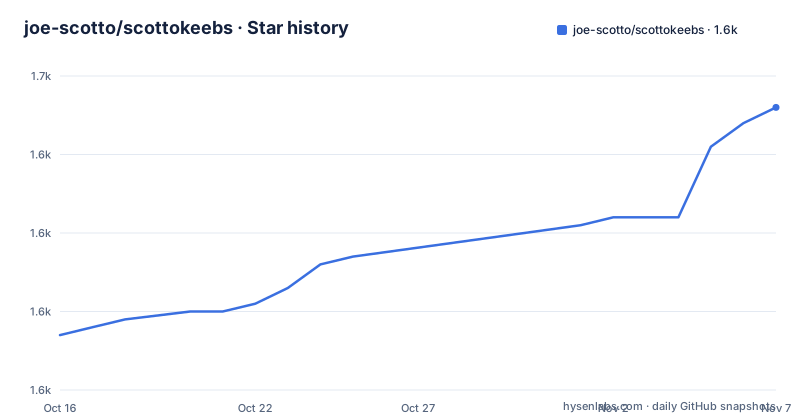
- joe-scotto/scottokeebs1,646 ★ · +29
| Repository | 2026-10-16 | 2026-11-07 |
|---|---|---|
| joe-scotto/scottokeebs | 1.6k | 1.6k |
29 Stars in the last 22 days, measured from the daily GitHub snapshot. Compare with other projects
Editorial analysis
The Physical-Design Gap Addressed by scottokeebs
scottokeebs provides source material for the physical side of custom keyboard construction. The README describes it as an extensive collection of freely available handwired keyboard and macropad projects. It is not one finished keyboard, and the root documentation does not present it as a controller library or a unified firmware framework.
The repository includes many named board directories. `Scotto108/`, `Scotto16/`, `ScottoCMD/`, `ScottoErgo/`, `ScottoMacrodeck/`, `ScottoPad/`, `ScottoSplit/`, and `ScottoT9/` indicate that the collection spans full keyboards, compact layouts, split boards, and macropads. According to the README, Joe Scotto released more than 19 projects after starting ScottoKeebs in September 2022.
Its audience is the builder who has access to a 3D printer and can wire switches to a microcontroller by hand. The README says most projects fit on a common 220 x 220 mm 3D printer, use little support material, and use either an Arduino Pro Micro or Raspberry Pi Pico. Those points reduce uncertainty about printer size and controller family, although they do not make the boards turnkey devices.
The repository topics include QMK, KMK, ZMK, Arduino, and Raspberry Pi. The README does not assign those firmware technologies to individual board directories. A project selected from the catalog therefore needs its own inspection for firmware, pin assignments, and build requirements.
How the scottokeebs Repository Is Organized
The repository uses a directory per design, with supporting content under `Extras/`. This arrangement reflects a catalog of related hardware projects rather than one application whose settings are changed through a common command. A builder working with `ScottoStarter/`, for example, must examine that directory instead of assuming that a repository-wide setup file applies to every other board.
C is the repository's primary language, which aligns with its inclusion of embedded controller code. That fact does not establish one shared build system. Firmware built for an Arduino Pro Micro may have different dependencies and flashing requirements from firmware built for a Raspberry Pi Pico. The repository's QMK, KMK, and ZMK topics show association with those environments, but the README does not map a board to any one of them.
The documented 220 x 220 mm print target is a useful baseline. It applies to most designs, not necessarily every design, and it says nothing by itself about layer height, tolerances, supports, or print orientation. Those settings must come from the selected board's documentation or files.
The handwired approach also means the builder joins the printed structure, switch positions, matrix wiring, and firmware configuration. The root README does not provide one matrix diagram, pin map, parts inventory, or flashing procedure for all projects. The individual project is the relevant source for those details.
Selecting a First Keyboard or Macropad
There is no package installation step for scottokeebs because the repository does not describe a packaged application. The README directs builders to the project website, the keyboard catalog, the macropad catalog, and the directories in the source repository. The first action is choosing a physical design that matches the intended layout and available equipment.
The website divides the catalog into keyboards and macropads. Within those categories, the repository directory names help identify concrete candidates. A builder interested in learning from a compact project can inspect `ScottoStarter/`; someone seeking a split layout can inspect `ScottoSplit/`; someone interested in a command-oriented pad can inspect `ScottoCMD/`. These directory names establish availability, but the README does not summarize each board's dimensions or component list.
Before printing, the selected project should reveal four essentials: its controller choice, its printed components, its switch or matrix connections, and its firmware files. The root documentation says designs use either an Arduino Pro Micro or Raspberry Pi Pico, yet it does not claim that either controller is interchangeable across the collection.
Printing follows the mechanical files for that particular design. A board designed around the documented 220 x 220 mm volume can be produced on a compatible FDM printer. If a project's files exceed that volume, another printer or fabrication service would be necessary, but the root README does not identify which projects require one.
Wiring then follows the project's matrix and pin definitions. The collection does not support a repository-wide wiring shortcut, so applying another ScottoKeebs pinout without checking the selected board would risk an incorrect matrix. Firmware compilation and controller flashing also require the instructions associated with that design.
Free Source Files and the Cost of Assembly
The README states that ScottoKeebs is released entirely for free. That statement applies to the project's freely shared designs. It does not make the finished device free to manufacture. A builder can still incur costs for printing, switches, a microcontroller, wire, connectors, fasteners, and assembly time. No per-project budget or universal component price is given in the root documentation.
The larger cost is the builder's integration work. Printed parts must match switch locations, and those switches must correspond to the matrix and firmware. Electronics need clearance inside the enclosure and a reliable physical connection. The selected C code also needs its associated firmware environment, none of which is specified uniformly in the README.
This approach has a different cost profile from buying a complete mechanical keyboard. A conventional kit may arrive with a PCB and defined component set, leaving the buyer to install switches and finalize assembly. A ScottoKeebs design exposes more of the electrical construction. In exchange, the builder can work from an openly shared physical design and print the required case or components locally.
The README links donation, patronage, and shop channels and says new board development comes from Joe Scotto's own funding. It does not describe paid support, per-file pricing, or a subscription attached to the designs. The repository has no GitHub releases, so there is no documented release stream for firmware images, dependencies, or revised print files.
License Review for Modified Boards
The repository metadata describes the license as custom and points GitHub users to `LICENSE.md`. The README displays CC BY-NC-SA 4.0. It also asks people converting a ScottoKeeb to a PCB not to release production or design files publicly, citing Joe Scotto's concern about theft and resale.
These statements matter when a builder changes a design, manufactures a board, or publishes files derived from the originals. The README's displayed license includes a noncommercial designation, while the separate PCB statement imposes an additional project-specific request. The exact effect of the wording in `LICENSE.md` cannot be replaced with a generic permission or prohibition, and this review does not constitute legal advice.
A commercial product should not be based on assumptions drawn from the word "free." Before manufacturing or publishing files, the builder needs to compare the project-specific PCB request with the terms in `LICENSE.md`, including attribution, noncommercial use, and share-alike language. Personal redistribution should follow any attribution and share-alike conditions that apply to the files being distributed.
The repository is not archived. Its last push was on 2026-10-08, which confirms recent activity at repository level. It does not prove that every board receives review or that existing firmware and printed files remain mutually compatible. With no GitHub releases, there are also no release notes through which the project documents per-board upgrades.
ScottoKeebs and Complete Mechanical Keyboard Kits
A complete mechanical keyboard kit is the main alternative. Such a kit commonly combines a PCB, switch or socket hardware, a case, and an assembly procedure. The seller defines the switch matrix, so the buyer concentrates on joining modules or fitting switches rather than deriving every connection from a schematic.
scottokeebs separates those concerns into a printable mechanical design, handwiring, and firmware configuration. This approach gives the builder direct access to several layouts and case designs. It also makes assembly accuracy part of the user's responsibility. A design can fit within the documented 220 x 220 mm print envelope and still require work on matrix wiring, connector placement, and controller clearance.
A firmware-only approach is another alternative when an existing keyboard already has a defined PCB, matrix, and case. QMK, KMK, and ZMK can provide software features for such hardware, but firmware cannot replace absent switches, a switch matrix, or a printed enclosure. The distinctive part of scottoKeebs is the physical-project catalog surrounding that embedded code.
The choice depends on what the builder wants to make. A person interested in custom layouts, printed enclosures, and handwired assembly can use the collection as a design source. A person who wants a guided assembly with a predetermined electrical design may find a complete kit easier to purchase and build.
Limits That Affect a ScottoKeebs Build
The root README leaves several engineering questions to individual designs. It does not list a common controller pin map, a complete matrix diagram, a standard bill of materials, a shared firmware command, or one flashing procedure. It also does not state whether a particular directory uses QMK, KMK, or ZMK.
A direct failure can occur when a builder assumes controller interchangeability. The Arduino Pro Micro and Raspberry Pi Pico are both documented controller families, but the README does not say that firmware and wiring can move unchanged between them. Another failure occurs when the selected files exceed the printer's build volume or when switch spacing and case geometry have not been checked.
scottokeebs is also a poor match for a buyer who expects a complete product. The repository offers designs for users to fabricate and wire. It does not describe stocked kits, assembled keyboards, universal production files, or a common configuration interface.
Upgrade planning requires particular care. The repository has no GitHub releases, and the last push on 2026-10-08 does not provide per-board compatibility notes. A prospective builder should review the chosen directory for its controller, firmware environment, wiring, printable parts, and license before purchasing components.
Editorial conclusion
scottokeebs suits makers who can print parts, handwire a switch matrix, and follow the files for one selected board. It does not suit buyers seeking a complete retail kit or a single configurable firmware platform. Before building, check the selected project's controller, wiring definitions, printable files, firmware instructions, and license terms. For a first unmodified build, select a design whose documented controller and print-volume requirements match the equipment already available.
Frequently asked questions
What is scottokeebs designed for?
scottokeebs is a collection of freely available handwired keyboard and macropad projects. Most are intended for a common 220 x 220 mm 3D printer and use either an Arduino Pro Micro or Raspberry Pi Pico.
How do I choose a first scottokeebs project?
Use the keyboard or macropad catalog, choose a board directory, and check that project's controller, printed components, matrix wiring, and firmware requirements. The root README does not give a universal build procedure.
Can I use a scottokeebs design commercially?
Check `LICENSE.md` before commercial reuse. The README displays CC BY-NC-SA 4.0 and separately requests that public PCB production and design files not be released for conversions.
Official sources
Add this badge to your README
If you maintain this project, the badge below links readers to this analysis and shows its maintenance status from the daily GitHub snapshot. Paste the markdown into your README; add ?metric=license or ?metric=stars to the image URL for a different field.

[](https://hysenlabs.com/projects/joe-scotto-scottokeebs)Star history chart for your README
[](https://hysenlabs.com/projects/joe-scotto-scottokeebs)Was this useful?