joerdav/xc: A Markdown-Based Task Runner for Go Projects
Markdown defined task runner.
At a glance
- What is it?
- joerdav/xc reads development tasks from Markdown or org-mode code blocks and runs them through a Make-like interface. It fits projects that want useful commands documented beside their descriptions, but it adds a dependency on readable task metadata and compatible editors for some workflows.
- Who is it for?
- Adopt joerdav/xc when documentation and executable development commands should live together, especially for Go repositories with repeated build, test, lint, release, or documentation tasks. Do not adopt it solely for shell portability or editor automation.
- Can I use it commercially?
- Yes. MIT is a permissive licence: you can use, modify and sell software built on it, as long as you keep its copyright and licence notices.
- Is it still maintained?
- Yes. The repository last received commits 51 days ago.
- What is it written in?
- Mainly Go, according to GitHub's language statistics.
Answers come from the project's GitHub data, last synced on November 7, 2026, and from our analysis. They are not legal advice.
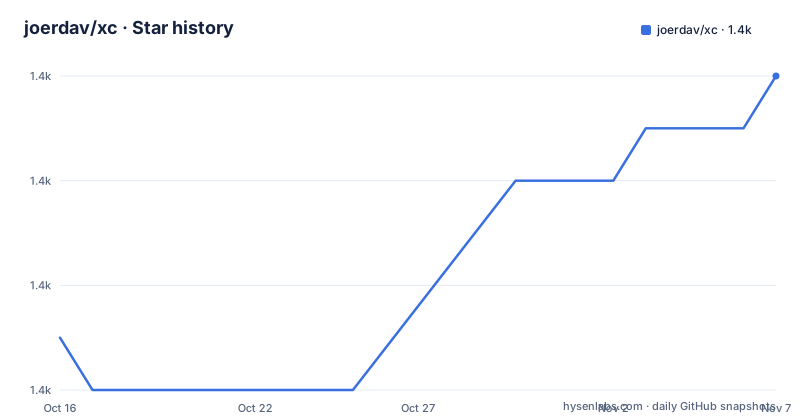
Star history
- joerdav/xc1,414 ★ · +5
| Repository | 2026-10-16 | 2026-11-07 |
|---|---|---|
| joerdav/xc | 1.4k | 1.4k |
5 Stars in the last 22 days, measured from the daily GitHub snapshot. Compare with other projects
Editorial analysis
Why xc Puts Tasks Beside Project Documentation
joerdav/xc addresses a specific documentation maintenance problem: useful scripts often live in a Makefile or package.json while the README explains them separately. Those two locations can drift as commands are added or changed. xc defines tasks inline in Markdown or org-mode, using code blocks as the executable source and the surrounding documentation as the explanation. The intended audience is developers who want approachable project commands without requiring every contributor to learn a separate task definition syntax. A reader without xc can still open the documentation and copy the commands from the code blocks. This is the main difference between xc and a conventional task runner where the executable definitions may not also serve as readable project instructions. The README describes xc as similar to Make or npm run, but its organizing principle is literate programming rather than a separate configuration file. That design can work well for small project utilities whose commands are already worth documenting, especially test, build, lint, and release procedures. It also means the documentation itself becomes an interface. Changes to a task can be reviewed in the same place as its purpose and usage notes. The trade-off is that parsing human-readable documentation creates a dependency on the project maintaining clear headings, code fences, and task metadata. xc does not eliminate the need to maintain project automation. It changes where that automation lives.
Markdown, Org-Mode, and Task Metadata
xc discovers tasks from Markdown or org-mode files rather than requiring a dedicated task file. The README shows a task named `tag` as a Markdown heading followed by a description, dependencies, and a fenced shell block. The dependency declaration is `Requires: test`, which means the `test` task is part of the task definition before the tag command proceeds. The project also documents `Inputs: VERSION`, so a task can declare values expected from the caller. These declarations are more than descriptive prose. They provide xc with metadata used when selecting or preparing tasks. The example separates the task heading from the executable block, which keeps the command copyable and readable while preserving the dependency and input information around it. xc supports editor integrations for VSCode, Vim, and Emacs. The README links to a VSCode extension for listing and running xc tasks, a recommended Vim configuration, and an Emacs package. Those integrations are useful for contributors who prefer selecting tasks interactively, but they are not required for using the basic command described in the README. The documentation also points to org-mode-specific features. The repository layout shows parsing code under `parser/`, execution code under `run/`, and the command entry point under `cmd/`, which is consistent with a parser-and-runner architecture. The README does not specify every parsing edge case or the complete precedence rules when multiple files contain tasks.
Running the Repository's First xc Task
The README does not provide a direct installation command in its installation section. It sends readers to `https://xcfile.dev/getting-started/#installation`, so no installation command can be reproduced from that page content. After installing xc, a documented task can be run with its task name. For example, this invocation runs the repository's `tag` task:
xc tagThe task invokes `test` first because its definition includes `Requires: test`. The test definition runs the repository's Go tests. After that, the tag task derives a version from the number of commits and creates and pushes a Git tag. The README's example output shows `go test ./...` followed by commands that add a tag and push it to the origin remote. That example is not a harmless no-op because it changes the Git repository and contacts the remote. A first real use should therefore be chosen more carefully than `xc tag` unless the reader intends to publish a tag. The repository also documents `test`, `lint`, and `build` as separate tasks. Their bodies are simple enough to understand without xc:
go test ./...golangci-lint rungo build ./cmd/xcThese tasks illustrate the intended relationship: xc provides task selection and dependency handling, while the command blocks remain ordinary shell commands that can be inspected and run directly. The README does not document rollback behavior for a partially completed tag or push operation.
Dependency Handling and Shell Execution
The `tag` example gives the clearest evidence of xc's execution model. A task declares `Requires: test`, and invoking `xc tag` causes the test task to run before the tag commands. The README's output prints each command with a leading `+`, making the executed shell sequence visible. The tag block uses shell syntax such as command substitution, environment assignment, and backticks. This indicates that xc treats the code block as a shell script rather than as a list of opaque commands. The input declaration `Inputs: VERSION` is separate from the example that computes `VERSION` from the Git commit count. The repository's current tag task instead says to specify `major`, `minor`, or `patch` with `VERSION`, then parses the current Git tag and constructs the next version. The task body branches on that value and exits with an error for an invalid input:
if [[ $VERSION == 'major' ]]
then
  VNUM1=$((VNUM1+1))
  VNUM2=0
  VNUM3=0
elif [[ $VERSION == 'minor' ]]
then
  VNUM2=$((VNUM2+1))
  VNUM3=0
elif [[ $VERSION == 'patch' ]]
then
  VNUM3=$((VNUM3+1))
else
  echo "Invalid version"
  exit 1
fi
Based on the repository layout, task execution is implemented in `run/`, while parsing is separate under `parser/`. The README does not document environment isolation, parallel execution, failure propagation, or how multiple task files are merged. Those behaviors should not be inferred beyond the shown dependency and shell behavior. A project that expects deterministic execution across several machines still needs to document its required shell and external programs. The tag task, for example, assumes Git and a shell that supports the syntax shown in the block.
Release Tasks Expose the Main Operational Boundary
The repository's release workflow shows both xc's value and its risk. The documentation explains what the tag task does, and the task itself enforces a `test` dependency before creating and pushing a Git tag. That visibility is useful because a contributor can inspect the exact deployment commands in the README without installing xc. However, the same design puts operational actions directly beside prose. A reader may understand the intended purpose of `tag` without fully accounting for authentication, remote permissions, tag protection, or the consequences of pushing the wrong version. The README's example prints successful test and Git output, but it does not document behavior when tests fail, Git rejects the tag, authentication expires, or the remote push succeeds after local state has changed. There is no documented rollback procedure in the README. This does not make the task unsafe by definition, but it does make release use less predictable than reading the command alone might suggest. Teams should inspect the exact shell block before invoking the release task and choose a non-publishing task such as `test` or `build` for an initial check. The project's repository includes `CONTRIBUTING.md`, but the README excerpt does not state that it defines a complete release or rollback policy.
Where xc Is Less Suitable
xc is not the best choice when a project needs task definitions that are difficult to represent as readable Markdown blocks. A Makefile can model targets, variables, conditionals, and file dependencies in a dedicated format. xc's documented examples are command-oriented and rely on shell logic for more complex behavior. That model is readable for a small set of project commands, but a long script embedded in documentation can become harder to review than a separate build file. xc also does not appear to replace the build system of the language or project. The `build` task runs `go build ./cmd/xc`; it does not document automatic change detection, artifact graphs, or incremental compilation. Projects that require those features still need their existing build system. The release task illustrates another boundary. Its commands create and push a Git tag, but the README does not say how xc handles partial failure, retries, authentication, protected branches, or rollback. A contributor with a shell environment that differs from the project's expected shell may also encounter behavior not covered by the README. The editor integrations improve discoverability, but they are separate projects or configuration resources. They should not be treated as part of the basic xc binary without checking their own installation requirements.
Comparison With Make and npm Scripts
Make is the closest conceptual alternative named by the README, but the difference is primarily where task definitions live and how they are presented. Make reads a dedicated `Makefile`, where targets and recipes are separated from explanatory documentation unless the project adds comments. xc reads ordinary Markdown or org-mode files, so the task heading, description, metadata, and shell block can remain together. npm scripts offer a similar command-oriented interface through `package.json`, but their definitions are not themselves the README. xc is therefore more directly aimed at repositories where documentation is already the natural place for contributor instructions. The trade-off is that the documentation parser must recognize the task structure. A project with complex Make semantics, npm lifecycle hooks, or generated build metadata may retain those tools and use xc only for a small set of documented commands. xc does not claim to be a replacement for every feature of either system. Its useful role is narrower: make selected development commands discoverable and executable from the documentation. That narrower role can be an advantage when contributors need a quick answer to “how do I build this?” or “how is this released?” without opening another configuration file.
MIT License, Releases, and Maintenance Cost
The repository is licensed under `MIT`. That identifier is relevant when an organization reviews dependency and redistribution requirements, but the README does not provide legal interpretation or a complete compliance procedure. Review the repository's `LICENSE` file before deciding how the license affects internal distribution or third-party use. The latest listed release is `v0.9.0`, dated 2026-01-05, with earlier releases `v0.8.6` and `v0.8.5`. The repository is not archived, and its last push was on 2026-09-18. That indicates recent repository activity, but it does not establish compatibility for every future xc release. The upgrade cost is likely concentrated in task syntax, parser behavior, editor extensions, and shell command changes rather than in application runtime code. The repository uses Go 1.25 in `go.mod`, so teams should also verify that the current Go toolchain matches the version expected by the checkout. The README does not document a formal migration process for upgrading xc or a compatibility matrix for its editor integrations. Those checks matter for projects where task names or commands are referenced by other documentation and automation. The presence of recent activity is useful context, but it is not a substitute for reviewing the release notes and task syntax changes before an upgrade.
Editorial conclusion
Adopt joerdav/xc when documentation and executable development commands should live together, especially for Go repositories with repeated build, test, lint, release, or documentation tasks. Do not adopt it solely for shell portability or editor automation. Before choosing it, verify that your documentation format and required tasks can be represented by xc, inspect how inputs and dependencies behave in your environment, and confirm that the documented installation path matches your deployment requirements.
Frequently asked questions
How do I install xc?
The README directs users to the installation instructions at `https://xcfile.dev/getting-started/#installation`. It does not include an installation command in the README's installation section, so a shell command cannot be confirmed from the repository information.
How do I run a task defined in a Markdown file with xc?
Use the task name shown in its documentation. For example, the README documents `xc tag` for the `tag` task, whose definition declares `Requires: test`.
Does xc require a separate Makefile or package.json?
The documented design places tasks in Markdown or org-mode code blocks, so the README does not require a separate Makefile or package.json for those tasks. Existing build configuration can still be used independently.
Official sources
Add this badge to your README
If you maintain this project, the badge below links readers to this analysis and shows its maintenance status from the daily GitHub snapshot. Paste the markdown into your README; add ?metric=license or ?metric=stars to the image URL for a different field.

[](https://hysenlabs.com/projects/joerdav-xc)Star history chart for your README
[](https://hysenlabs.com/projects/joerdav-xc)Was this useful?