Tinytorch: a sub-1000-line autograd engine that stays honest about its limits
A really tiny autograd engine
At a glance
- What is it?
- Tinytorch is a numpy-backed automatic differentiation library that fits in one file under 1000 lines. It trades scale and speed for readability, and the README says so directly.
- Who is it for?
- Adopt Tinytorch if you want to read every line of an autograd engine and understand how reverse-mode differentiation works in practice. Do not adopt it for production training: numpy is too slow for LLMs, the project has no releases, and the 1000-line rule means features will stay minimal.
- Can I use it commercially?
- Yes. MIT is a permissive licence: you can use, modify and sell software built on it, as long as you keep its copyright and licence notices.
- Is it still maintained?
- Probably not. The repository last received commits 17 months ago, on May 26, 2025.
- What is it written in?
- Mainly Python, according to GitHub's language statistics.
Answers come from the project's GitHub data, last synced on October 22, 2026, and from our analysis. They are not legal advice.
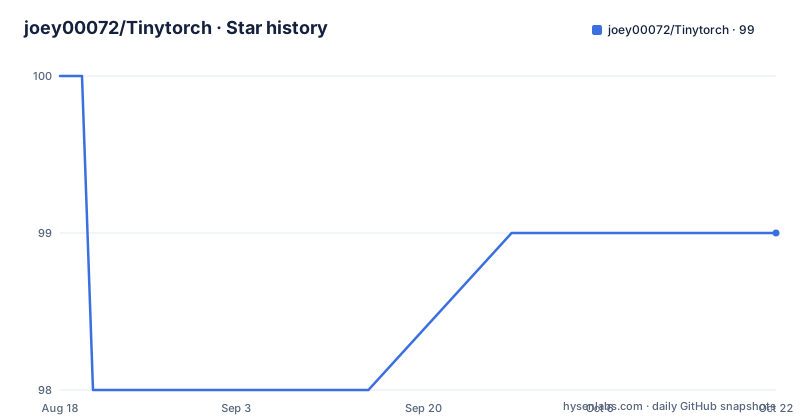
Star history
- joey00072/Tinytorch99 ★ · -1
| Repository | 2026-08-18 | 2026-10-22 |
|---|---|---|
| joey00072/Tinytorch | 100 | 99 |
-1 Stars in the last 65 days, measured from the daily GitHub snapshot. Compare with other projects
Editorial analysis
What Tinytorch actually is
Tinytorch is an automatic differentiation engine written in Python, backed by numpy. The README calls it "the newest ML framework that you probably don't need", which sets the tone. It is not a production tool. It is a single-file library that implements tensors, operations, and backward passes so you can compute gradients of arbitrary functions. The target user is someone who wants to see how autograd works without digging through thousands of lines of PyTorch internals. The README explicitly positions it between Karpathy's micrograd and tinygrad on a "powerlevel" scale, giving itself a 3.14. That self-deprecating ranking is the clearest signal of its intent: it is a teaching artifact, not a competitor.
The hard 1000-line rule and what it forces
The most distinctive constraint is the README's promise: "tinytorch.py shall always remain under 1000 lines. if not we will revert commit." That is a hard design boundary. It means every feature must fit into a single file with a strict line budget. This forces the author to make trade-offs that larger frameworks avoid. For example, the README notes that numpy is too slow to train an LLM, so you need to install JAX just to use it as a faster numpy. That is not an optional optimization; it is a consequence of the line limit. The rule also means the code cannot grow complex error handling, custom memory management, or a large operator set. If you need a function that is not in the file, you either write it yourself or fork the project. The line limit is a feature for learners, but it is a hard ceiling for anyone else.
How the autograd mechanism works
The README gives a concrete example that shows the core data flow. You create a tensor with requires_grad=True, apply operations, call sum() to reduce the output to a scalar, then call backward(). The gradient is stored in the tensor's .grad attribute. In the first example, f(x) = x^3 + x is defined over an arange of 700 values, and backward() fills x.grad with the derivative 3x^2 + 1 at each point. The second example shows multivariate functions: f(x, y) = x^2 + x*y + (y^3 + y)^0.5, and both x.grad and y.grad are computed. This is reverse-mode automatic differentiation, the same mechanism PyTorch uses, but implemented on top of numpy arrays. The README does not explain the internal graph construction, but the dev blog links suggest it builds a computation graph and traverses it backwards. The key point is that you do not write gradient formulas yourself; the library derives them from the operations you compose.
Getting it running: commands and examples
The README shows two entry points. First, you can import the library directly with "import tinytorch as tt" and define functions that use tensor operations like arange, rand, and **. The examples run in a plain Python script, and no installation command is given for the library itself, which suggests you clone the repository and add the file to your path. Second, there are two training scripts. "python mnist.py" runs MNIST, and "GPU=1 python mnist.py" runs the same script with GPU support, which the README says means using JAX as a faster numpy backend. There is also a visualization script: "python visulize.py" renders the computation graph, but it requires graphviz installed via pip and apt. The README warns that on Windows you are on your own and suggests WSL. These are real commands, but the README does not specify the exact dependencies beyond numpy, JAX for GPU, and graphviz for visualization. You will need to infer the rest from the repository contents.
What it can and cannot do: MNIST and GPT claims
The README makes two bold claims: "Train MNIST, no problemo" and "GPT?? you bet (yes LLM fr fr)". The MNIST script is straightforward, and a numpy-backed autograd engine can plausibly train a small model on MNIST, though slowly. The GPT claim is more questionable. The README itself admits that numpy is too slow to train an LLM and that you need JAX. That is a significant caveat. It means the GPT example is not a practical training script; it is a demonstration that the autograd engine can express a transformer architecture, but the actual training speed depends entirely on JAX. The README does not provide training times, loss curves, or model sizes. So the claims are honest about the bottleneck, but they do not prove that the GPT example converges to anything useful. For a learner, that is fine. For someone expecting a usable LLM trainer, it is not.
The main limitation: speed and scope
The most obvious limitation is speed. Numpy is a CPU library, and the README says so explicitly. Autograd on top of numpy means each operation creates a new array, and backward passes add more overhead. For small tensors, that is acceptable. For anything larger, it is not. The README's own note about JAX confirms that the author knows this. The second limitation is scope. With a 1000-line file, you get a limited set of operations. The README shows arithmetic, power, and square root, but there is no mention of convolution, pooling, or a full neural network module. You can build a linear layer from tensor operations, but you will write it yourself. The third limitation is maintenance. The repository has no releases, no homepage, and the last push is unknown. The README links to a dev blog, but the code could change at any time, and the line limit may force breaking changes. If you depend on it, you are depending on a hobby project.
A real alternative: micrograd and tinygrad
The README itself names two alternatives. Micrograd is Karpathy's autograd engine, which the README rates as powerlevel 1.0: "really simple, not much you can do with it". Micrograd is even smaller than Tinytorch, with a single scalar-valued tensor implementation, and it is designed purely for education. Tinygrad is rated 69: "no longer simple you can do lot more". Tinygrad is a full framework with a JIT compiler, GPU support, and a larger operator set, but it is far more complex. The difference in approach is that micrograd sacrifices scope for absolute clarity, Tinytorch sits in the middle by using numpy to handle array operations, and tinygrad sacrifices readability for performance and breadth. If you want to learn autograd from the absolute basics, micrograd is the starting point. If you want to run real models, tinygrad is the practical choice. Tinytorch is the middle ground, but it inherits micrograd's educational purpose and tinygrad's ambition without matching either's extremes.
Maintenance, license, and what to verify before adopting
The project is licensed under MIT, which means you can use, modify, and distribute it freely, but the README gives no warranty. There are no releases, so you cannot pin a version. The contribution guidelines are simple: "be nice", welcome performance optimizations and examples, and keep tinytorch.py under 1000 lines. That last rule is a double-edged sword. It keeps the code readable, but it also means any new feature must fit within the budget, so the maintainer may reject a useful addition if it pushes the line count over. The dev blog is a good source for understanding the design, but it is not documentation. Before adopting Tinytorch, you should verify the current line count, check the git log for recent activity, and run the MNIST example yourself to see if the performance is acceptable. The README does not provide a test suite beyond the GitHub Actions workflow badge, so you should run the unit tests if they exist in the repository. The project is a snapshot of an idea, not a stable dependency.
Editorial conclusion
Adopt Tinytorch if you want to read every line of an autograd engine and understand how reverse-mode differentiation works in practice. Do not adopt it for production training: numpy is too slow for LLMs, the project has no releases, and the 1000-line rule means features will stay minimal. Before using it, verify that the current tinytorch.py is still under 1000 lines, check the last commit date, and test the MNIST and GPT examples on your own hardware. If you need a stable, GPU-accelerated framework, use PyTorch or tinygrad instead. Tinytorch is a learning tool, and it is honest about being one.
Frequently asked questions
what is tiny torch
Tinytorch describes itself as really an autograd engine backed by numpy, an ML framework you probably do not need. In its own powerlevel scale it sits at 3.14, between karpathy's micrograd at 1.0, which is described as really simple, and tinygrad at 69, with pytorch at infinity.
How do I run gradients with Tinytorch?
Import the module, write a function over tensors created with tt.tensor, tt.arange or tt.rand, pass requires_grad=True, then call backward() on the summed result and read the grad attribute of each input. The README does not enumerate an API beyond what the examples use.
What are Tinytorch's dependencies?
requirements.txt opens with a find-links line for the PyTorch stable wheel index and pins torch==2.0.1+cpu, then lists numpy, jax, jaxlib, pytest and graphviz. The engine itself is numpy-backed, and jax is installed to serve as a faster numpy for larger training runs.
How do I train MNIST with Tinytorch?
Run python mnist.py, or set GPU=1 in front of the same command for the accelerated path. Both sections link to a Colab notebook so the demonstration can be run without a local install, and a gpt.py script also exists in the repository.
How do I visualize the Tinytorch computation graph?
Run the separate visualization script. It needs the Python package and the system binary, so pip install graphviz plus an apt-get install of graphviz, and the README notes that the Windows equivalent was unknown to the author, who used WSL instead.
Official sources
Add this badge to your README
If you maintain this project, the badge below links readers to this analysis and shows its maintenance status from the daily GitHub snapshot. Paste the markdown into your README; add ?metric=license or ?metric=stars to the image URL for a different field.

[](https://hysenlabs.com/projects/joey00072-tinytorch)Star history chart for your README
[](https://hysenlabs.com/projects/joey00072-tinytorch)