KDiskMark: a graphical and terminal disk benchmark for Linux
A simple open-source disk benchmark tool for Linux distros
At a glance
- What is it?
- KDiskMark provides a configurable interface around Flexible I/O Tester for measuring HDD and SSD performance on Linux. It suits desktop users and headless administrators who want presets, reports, or a TUI, subject to its privilege and dependency requirements.
- Who is it for?
- KDiskMark is appropriate for Linux users who want an accessible fio interface, saved reports, and configurable read and write presets through either a graphical session or terminal. It is a poor fit for a remote SSH benchmark when policy authentication cannot complete, or for systems that cannot supply fio, libaio, Qt, and polkit components.
- Can I use it commercially?
- Yes, with conditions. GPL-3.0 is a copyleft licence: if you distribute software that includes it, you must release that software's source code under the same licence. Running it internally without distributing it does not trigger that obligation.
- Is it still maintained?
- Yes. The repository received new commits within the last day.
- What is it written in?
- Mainly C++, according to GitHub's language statistics.
Answers come from the project's GitHub data, last synced on November 7, 2026, and from our analysis. They are not legal advice.
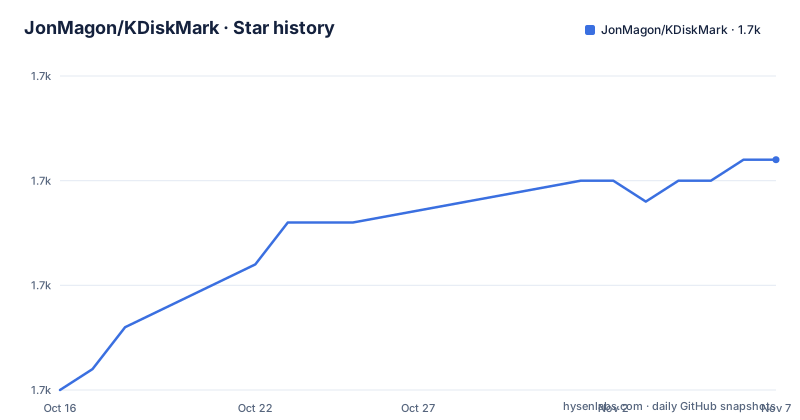
Star history
- JonMagon/KDiskMark1,726 ★ · +11
| Repository | 2026-10-16 | 2026-11-07 |
|---|---|---|
| JonMagon/KDiskMark | 1.7k | 1.7k |
11 Stars in the last 22 days, measured from the daily GitHub snapshot. Compare with other projects
Editorial analysis
Why KDiskMark wraps fio for Linux storage testing
KDiskMark addresses a specific problem: Flexible I/O Tester, or fio, exposes extensive storage workload controls, while KDiskMark presents common disk checks through a graphical interface and organizes reports for human reading. Its intended users include people evaluating HDD or SSD performance on Linux who want to vary block size, queue depth, and thread count for individual tests. The project also supports administrators and server operators through a full-screen terminal interface.
The distinction between KDiskMark and fio matters. The README states that KDiskMark is not an independent benchmark engine. It calls fio and handles the output. Its presets can simplify routine checks, while the advanced settings retain controls that materially affect measurements. A queue depth of one and a queue depth of 32 impose different demands on a device and should not be treated as interchangeable readings.
KDiskMark reports throughput in MB/s, IOPS, and latency in microseconds. Its example also records the profile, test size, loop count, measurement duration, operating system, kernel, and fio version. This context is useful because a bare transfer-rate number does not explain what was selected or how it was configured. KDiskMark is therefore a configuration, execution, and presentation layer around fio rather than a separate measurement model.
KDiskMark configuration, privileges, and report flow
The README identifies a C++ application built with Qt and states that it has no KDE dependencies. Based on the repository layout, source code lives under `src/`, package and interface data under `data/`, assets under `assets/`, and build configuration in `CMakeLists.txt`. Configuration uses CMake, while SingleApplication is included to prevent multiple application instances.
A benchmark starts from a selected storage location and profile. The user can configure block size, queues, threads, test size, loop count, measuring time, interval time, mode, test data, mix ratio, and page-cache behavior. The interface also exposes O_DIRECT, CoW detection, and presets. According to the README, all configurable items in the GUI are editable in the TUI, and the two interfaces share configuration.
Administrator privileges are requested through polkit when needed. On a local virtual console, KDiskMark says it starts `pkttyagent` automatically. An SSH session presents a different boundary: the README states that polkit usually denies authentication for non-local users. The application therefore documents running the TUI with `sudo` in that case, but that changes the account under which the process runs and differs from local interactive authorization.
The report generator turns the selected workload and fio output into compact read and write sections. The example contains sequential 1 MiB tests and random 4 KiB tests at multiple queue depths. These labels expose storage access patterns and concurrency rather than presenting one unexplained headline speed.
Installing KDiskMark through Linux package channels
For a graphical installation, the README directs users to Flathub. This command installs the application with the identifier published by the project:
flatpak install flathub io.github.jonmagon.kdiskmarkDebian and Ubuntu users can install the distribution package with the documented commands:
sudo apt update
sudo apt install kdiskmark
The README also lists package availability for Arch Linux, Fedora, and openSUSE Tumbleweed. The corresponding native commands are:
sudo pacman -Syu kdiskmarksudo dnf install kdiskmarksudo zypper install kdiskmarkKDiskMark is also available through the Snap Store, but its README explicitly warns that the package is no longer maintained and will receive no updates. Its continued availability does not make it equivalent to an updated installation channel. Access to external storage through Snap requires the documented removable-media connection:
sudo snap install kdiskmark
sudo snap connect kdiskmark:removable-media
Binary releases are linked from the project's Releases page. Release 3.3.0 is dated 2026-06-12, and the last repository push was on 2026-08-22. That is recent activity, but it does not establish which version each distribution has packaged. Users should compare their installed version with the release or distribution package before assuming a recent commit is present.
A first KDiskMark run in terminal mode
The TUI supports servers and virtual consoles instead of depending on a graphical display. The README says the interactive full-screen terminal interface starts automatically when no graphical display is available. It can also be forced from a desktop terminal:
kdiskmark --tuiThe main screen permits changes to the profile, file size, loops, storage, comparison unit, mix ratio, and language. `Up` and `Down` navigate, `Left` and `Right` change a value, and `Enter` runs all tests or the focused test. On the Storage field, `Enter` adds a directory. Pressing `E` opens settings for queues and threads per test, measuring and interval time, mode, test data, page-cache flushing, O_DIRECT, CoW detection, and presets.
A directory can be supplied when starting the TUI. This is the documented way to add an arbitrary storage location:
kdiskmark --tui /mnt/dataReports can be saved with `S`, storage can be rescanned with `R`, and `Q` exits. Because the terminal and graphical interfaces share configuration, a profile prepared in one environment can remain available in the other.
Authorization is the main practical condition. For SSH, the README documents this command:
sudo kdiskmark --tuiThe README specifically gives this fallback because polkit usually cannot authenticate a remote non-local user. It should be understood as an explicit administrative execution path, not as equivalent to a locally approved polkit request.
Building KDiskMark with CMake and Qt5
Building requires GCC or Clang with C++17 or later, CMake 3.12 or later, Extra CMake Modules 5.73 or later, and Qt with Widgets and DBus 5.9 or later. The required stack also includes a polkit agent with `PolkitQt-1` bindings, fio, and libaio 3.1 or later. A graphical KDiskMark installation therefore depends on more than Qt widgets.
The documented packaging path configures a release build in a new `build` directory and invokes CPack. The example selects DEB, while the README also names RPM and ZIP as alternatives:
mkdir build && cd build
cmake -D CMAKE_BUILD_TYPE=Release ..
cpack -G DEB
Qt6 is the default according to the README. A source build that must use Qt5 sets `USE_QT5` during CMake configuration:
mkdir build && cd build
cmake -D CMAKE_BUILD_TYPE=Release -D USE_QT5=ON ..
cpack -G DEB
The repository layout follows a conventional CMake project with separate source and data directories. However, the README does not provide distribution-specific development package names or describe the project's test suite. A custom builder must resolve dependencies under the package names used by the target distribution.
KDiskMark is distributed under GPL-3.0. That license governs copying, modification, and redistribution of the project, although this review does not provide legal interpretation.
KDiskMark limitations and direct fio differences
The clearest limitation is environmental. Without a polkit agent or usable authentication, operations requesting administrator privileges may not proceed. The README specifically warns about SSH sessions and offers root execution as the documented fallback. KDiskMark is therefore less suitable for a remote benchmark that must remain under a non-root account unless the host is configured so authorization succeeds.
The documented interface also does not cover every part of fio. The README does not describe arbitrary fio jobs, device-specific preparation, filesystem validation procedures, or detailed rules for deciding when a run is invalid. A user who needs an fio option outside the presets and settings exposed by KDiskMark may be better served by running fio directly. Direct use removes KDiskMark's profile selection, polkit layer, shared configuration, and report formatting from the measurement path.
Results are only comparable when their workloads match. Sequential and random access, block size, queue depth, thread count, cache settings, and O_DIRECT describe different conditions. KDiskMark records these settings in its report, which helps prevent accidental comparison across unlike tests, but it does not remove normal benchmark variability.
Upgrade coverage also varies by channel. Binary releases and several distribution packages are available, but the README says the Snap package receives no updates. An organization that standardizes on Snap should account for that explicit maintenance boundary rather than assuming every installation receives the same releases.
Editorial conclusion
KDiskMark is appropriate for Linux users who want an accessible fio interface, saved reports, and configurable read and write presets through either a graphical session or terminal. It is a poor fit for a remote SSH benchmark when policy authentication cannot complete, or for systems that cannot supply fio, libaio, Qt, and polkit components. Verify writable test storage, whether polkit can authorize cache flushing, and the selected test profile before treating the results as meaningful.
Frequently asked questions
Can KDiskMark run without a graphical desktop?
Yes. When no graphical display is available, KDiskMark starts its full-screen TUI automatically. The terminal interface exposes the same configurable benchmark settings as the GUI.
How does KDiskMark execute disk benchmarks?
KDiskMark calls Flexible I/O Tester, or fio, and organizes its output into readable reports. Presets and controls configure details such as block size, queues, and thread counts.
How should KDiskMark be used over SSH?
The README says polkit usually denies authentication to non-local users in SSH sessions. It documents `sudo kdiskmark --tui` for that case, while the local TUI requests privileges through a polkit agent.
Does KDiskMark require KDE?
No. The project is written in C++ with Qt, and the README explicitly states that it has no KDE dependencies. Extra CMake Modules, Qt components, polkit bindings, fio, and libaio are still listed dependencies.
Can KDiskMark build with Qt5?
Yes. Configure the build with `-D USE_QT5=ON`. The README identifies Qt6 as the default and gives a separate CMake configuration for Qt5.
Official sources
Add this badge to your README
If you maintain this project, the badge below links readers to this analysis and shows its maintenance status from the daily GitHub snapshot. Paste the markdown into your README; add ?metric=license or ?metric=stars to the image URL for a different field.

[](https://hysenlabs.com/projects/jonmagon-kdiskmark)Star history chart for your README
[](https://hysenlabs.com/projects/jonmagon-kdiskmark)Was this useful?