JSCAD: Parametric 2D and 3D Models Written as JavaScript
JSCAD is an open source set of modular, browser and command line tools for creating parametric 2D and 3D designs with JavaScript code. It provides a quick, precise and reproducible method for generating 3D models, and is especially useful for creating ready-to-print 3D designs.
At a glance
- What is it?
- JSCAD is a monorepo of modular browser and command line tools that turn JavaScript code into parametric 2D and 3D designs. It suits engineers who want their geometry in version control, not in a GUI file.
- Who is it for?
- Adopt JSCAD when the model has to be regenerated from parameters, reviewed as a diff, or produced in a server-side pipeline, and when JavaScript is already in the stack.
- Can I use it commercially?
- Yes. MIT is a permissive licence: you can use, modify and sell software built on it, as long as you keep its copyright and licence notices.
- Is it still maintained?
- Yes. The repository last received commits 8 days ago.
- What is it written in?
- Mainly JavaScript, according to GitHub's language statistics.
Answers come from the project's GitHub data, last synced on November 15, 2026, and from our analysis. They are not legal advice.
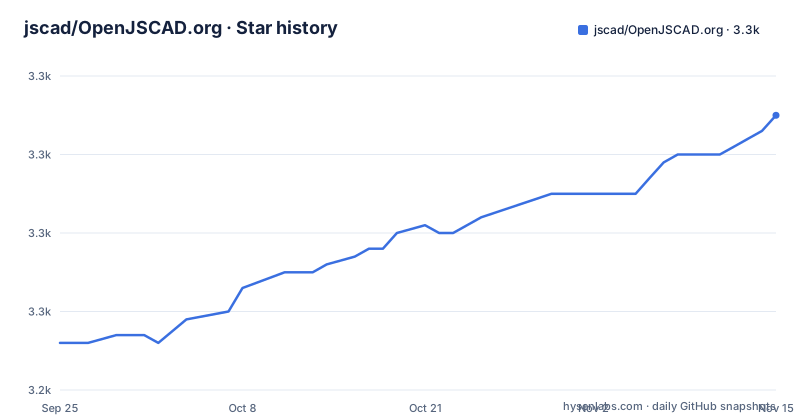
Star history
- jscad/OpenJSCAD.org3,275 ★ · +29
| Repository | 2026-09-25 | 2026-11-15 |
|---|---|---|
| jscad/OpenJSCAD.org | 3.2k | 3.3k |
29 Stars in the last 51 days, measured from the daily GitHub snapshot. Compare with other projects
Editorial analysis
What JSCAD Is For, and Who Ends Up Using It
The README describes JSCAD as "a set of modular, browser and command line tools for creating parametric 2D and 3D designs with JavaScript code." The word parametric is doing the work here. A JSCAD design is a program: change a number at the top, re-run it, and you get a different solid. That is a different proposition from a mesh editor where the shape is the file.
The people this fits are the ones who already think in code and want the model to behave like code. Mechanical parts that come in families of sizes, brackets and enclosures generated per project, jigs cut to a measured dimension, 2D profiles exported as DXF or SVG for a laser cutter. The repository topics list both 2D and 3D formats, and the input and output formats named there include STL, AMF, 3MF, OBJ, X3D, DXF and SVG, so the same source can feed a printer, a laser, or a downstream viewer.
It is also a reasonable fit for people who want to publish a configurator. Because the geometry is JavaScript, a web page can carry the model and let a visitor set the parameters, and the project ships a self-hostable web UI under packages/web for exactly that kind of deployment.
How the Monorepo Splits Modeling, IO and Rendering
This repository is a monorepo managed with Lerna-Lite, and the root package.json declares npm workspaces covering packages/cli, packages/core, packages/examples, packages/io/*, packages/modeling, packages/utils/* and packages/web. That layout is the architecture. There is no single library that does everything; there is a core, a modeling layer, a set of IO packages, and presentation layers that consume them.
The practical consequence is that the geometry kernel and the file formats are separable. The README states that from version 1.0.0 onwards almost all individual parts are available as scoped npm packages under the @jscad name, and lists the benefits it intends: writing your own renderer for 3D and 2D geometries, building custom UIs, using packages inside Node.js or Browserify projects, and picking only the input and output formats you need instead of pulling in every format. The io/* workspace pattern matches that promise: formats are separate packages, not one omnibus importer.
Rendering is likewise a package rather than a built-in. The README points to packages/utils/regl-renderer for use of components and a viewer in websites, which tells you the viewer is a consumer of geometry, not part of the modeling layer. If you are building a tool, that separation is the thing to exploit. If you are building a model, you can ignore all of it and stay in the modeling API.
Install and First Model: CLI and npm Packages
There is nothing to install if you only want to try it. The README says to go to openjscad.xyz, and notes that tested browsers include Chrome, Edge, Firefox, Opera and Safari. That is the fastest way to see whether the modeling API makes sense to you.
For server-side work, the README points at packages/cli for a command line interface with Node.js, and at packages/README.md for the individual Node.js packages. The root package.json exposes a web development script, which starts the self-hosted web UI from the repository:
npm install
npm run web
The first command installs the workspace dependencies; the root package.json also defines a postinstall script that runs lerna run postinstall across packages, so expect that to execute as part of the install. The second changes into packages/web and runs its dev script, which serves the self-hosted UI. The README does not state the port the dev server binds to, so read the output of the command rather than assuming one.
Building the documentation from source is a separate script, and it is a useful way to get the API reference offline:
npm run docsThat runs jsdoc with the jsdoc.json configuration at the repository root. For a first real model, the honest answer is that the README does not print a code sample. It directs you to the JSCAD User Guide and the API Reference, both linked from openjscad.xyz, and the packages/examples directory exists in the workspace list. Read the guide's first example there before writing anything of your own.
Where JSCAD Stops Being the Right Tool
The clearest limitation is stated by the project itself. The desktop app under packages/desktop is labelled "pre pre alpha work in progress". If your requirement is an installed application with a native file dialog and offline project management, that requirement is not met by this repository today. The browser version and the CLI are the supported paths; the desktop package is not.
The second limitation is the modeling paradigm. Everything is expressed as code, which means there is no direct manipulation of a face or an edge. If your work is sculpting organic surfaces, retopologising a scan, or iterating visually on a shape you cannot yet describe mathematically, a mesh editor will be faster and the parametric payoff will never arrive. JSCAD rewards parameters; it does not reward freeform exploration.
Third, the README does not document rollback or a migration path between major versions. The root package.json carries version 2.0.0 while the README talks about changes "from version 1.0.0 onwards", and the repository has no published releases. That gap matters if you are pinning JSCAD inside a long-lived build. Verify the version you install and read the CHANGELOG.md at the repository root before upgrading, because the README will not tell you what broke.
JSCAD and OpenSCAD: Two Answers to the Same Question
The obvious comparison is OpenSCAD, and the difference is the language, not the idea. Both describe solids in text and both regenerate the model when the text changes. OpenSCAD has its own declarative language with its own syntax and its own runtime; JSCAD uses JavaScript and ships as npm packages that run in Node.js or in a browser.
That single difference propagates. In JSCAD, the full JavaScript ecosystem is available to the model: functions, modules, loops, data structures, and whatever library you already trust for reading a CSV of dimensions. In OpenSCAD, the language is the boundary. The reverse is also true: OpenSCAD's language is small and consistent, and there is no build tooling between you and a rendered model, whereas JSCAD asks you to be comfortable with npm, workspaces and package versions.
Deployment differs as well. JSCAD's README makes a point of the browser and of the self-hostable web UI, which is why it is a plausible base for a configurator that a customer opens in a tab. OpenSCAD is a desktop-oriented program. If your model needs to be generated on a server from user input, JSCAD's CLI and package layout are the shorter path.
Maintenance, Licence and What an Upgrade Costs
The repository is not archived, and its last push was on 2026-09-13. The README states that the packages and source are maintained by a group of volunteers, and the project describes itself as stable via its stability badge. That combination is worth reading carefully: stable in behaviour, volunteer in capacity. Bug reports and pull requests go through GitHub, and questions are directed to the JSCAD User Group forum rather than to an issue tracker, which is a deliberate separation between usage help and code defects.
The licence is MIT, declared in the root package.json and present as LICENSE at the repository root. MIT is permissive: it allows commercial use and modification. This is not legal advice, and if you redistribute JSCAD inside a product you should read the LICENSE file and your own obligations rather than relying on a summary.
Upgrade cost is where the monorepo shape cuts both ways. Because the parts are published as separate @jscad packages, you can upgrade one IO format without touching the modeling layer, which limits the blast radius. But the root package.json also shows a publish pipeline built on Lerna-Lite with conventional commits and a preversion script that runs the full test suite and the docs build before a version bump. That is the maintainers' cost, not yours. Your cost is the version matrix: several packages, each with its own version, resolved through npm. Pin them and test the exported geometry, not just the exit code.
Editorial conclusion
Adopt JSCAD when the model has to be regenerated from parameters, reviewed as a diff, or produced in a server-side pipeline, and when JavaScript is already in the stack. Do not adopt it if you need a graphical modelling workflow, a stable desktop application, or a documented upgrade path across major versions: the desktop app is described as pre-alpha, the README does not document rollback or migration between major releases, and the repository gives no release notes to work from. Before committing, open the CLI package README and verify the exact command and flags for your version, and check that the export formats you need (STL, AMF, 3MF, OBJ, X3D, DXF, SVG) are covered by the packages you intend to install.
Frequently asked questions
How do I install JSCAD?
You do not have to install anything to try it: the README says to open openjscad.xyz in a browser. For server-side use, the README points to packages/cli for a Node.js command line interface, and the individual parts are published as scoped @jscad packages on npm.
Can I use JSCAD in a web page instead of the online editor?
Yes. The README lists a self-hostable web based UI under packages/web, and the root package.json provides an npm run web script that runs the dev script in that package. For embedding a viewer, the README points to packages/utils/regl-renderer.
Does JSCAD have a desktop application?
There is a package under packages/desktop, but the README labels it pre pre alpha work in progress. The browser version and the CLI are the paths the README presents as usable.
What file formats can JSCAD produce?
The repository topics name 2D and 3D formats including STL, AMF, 3MF, OBJ, X3D, DXF and SVG. From version 1.0.0 onwards the README says the parts are available as separate packages, so you can install only the formats you need.
Who maintains JSCAD?
The README states that the packages and source code are maintained by a group of volunteers, with bug reports and pull requests handled on GitHub and usage questions directed to the JSCAD User Group forum.
Official sources
Add this badge to your README
If you maintain this project, the badge below links readers to this analysis and shows its maintenance status from the daily GitHub snapshot. Paste the markdown into your README; add ?metric=license or ?metric=stars to the image URL for a different field.

[](https://hysenlabs.com/projects/jscad-openjscad-org)Star history chart for your README
[](https://hysenlabs.com/projects/jscad-openjscad-org)Was this useful?