Concat is a local-only Rust video editor aimed at CapCut users, shipped as unsigned beta builds
Open-Source CapCut replacement.
At a glance
- What is it?
- Concat is an AGPL-3.0 video editor for macOS, Windows, Linux and Android that runs captions, voices and background removal on your own machine and exposes an MCP server for AI agents. It is in beta, its Windows and macOS builds are unsigned, and some platforms carry caveats.
- Who is it for?
- Concat fits creators who want CapCut style captions, voices and cutouts without an account, watermark or uploads, and developers who want an editor an AI agent can drive through MCP. It is not yet for anyone who needs signed installers, Windows on ARM, or a finished product without rough edges.
- Can I use it commercially?
- Yes, with strict conditions. AGPL-3.0 is a network copyleft licence: if people use a modified version over a network, for example as a hosted service, you must offer them its source code under the same licence.
- Is it still maintained?
- Yes. The repository received new commits within the last day.
- What is it written in?
- Mainly Rust, according to GitHub's language statistics.
Answers come from the project's GitHub data, last synced on November 14, 2026, and from our analysis. They are not legal advice.
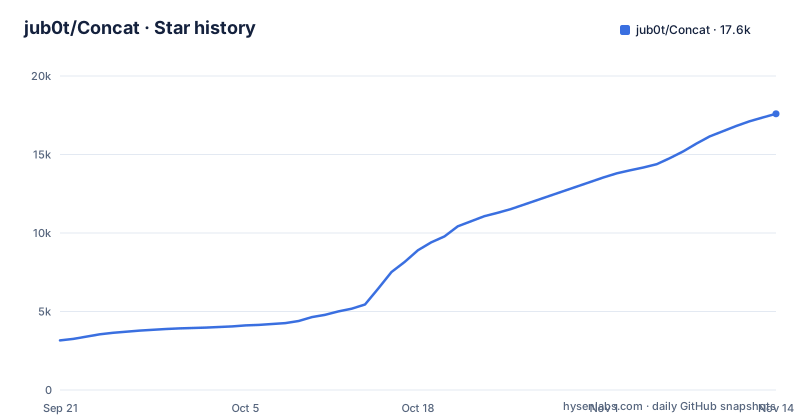
Star history
- jub0t/Concat17,590 ★ · +14,433
| Repository | 2026-09-21 | 2026-11-14 |
|---|---|---|
| jub0t/Concat | 3.2k | 17.6k |
14,433 Stars in the last 54 days, measured from the daily GitHub snapshot. Compare with other projects
Editorial analysis
Captions, voices and cutouts run on your disk, not a server
Concat's main promise is that nothing leaves your machine. The editor runs on a native Rust engine with a GPU compositor, proxies and hardware decode. The AI features are local too: auto-captions use Whisper with a model size you pick, text-to-speech offers free local voices plus voice cloning from a few seconds of a recording, and background removal handles people, objects or a mask you paint yourself. The models download once from Settings and then work offline. The consequence is a trade: you avoid accounts, subscriptions and uploads, but your own hardware does the work, and the optional model sizes and system requirements are listed on the project website rather than in the repository. Pick a large Whisper model on a weak machine and you pay for it in speed.
An MCP server and a JSON-RPC API let agents and scripts cut video
Concat is built to be driven by software as well as people. Starting it with concat --mcp exposes a built-in MCP server, so Claude and other AI agents can edit with it, and docs/MCP.md covers the one-line setup. A JSON-RPC API serves ordinary scripts. Two more interfaces, gRPC and a command-line tool, exist only in a build from source, so anyone who downloads a release installer gets MCP and JSON-RPC but not those two. If your automation plan depends on gRPC or the CLI, budget for building the project yourself.
Unsigned builds have to be pushed past SmartScreen and Gatekeeper
The Windows builds are not code signed yet; CODE_SIGNING.md explains why and also states what Concat sends over the network. When SmartScreen blocks the installer, the documented path is More info, then Run anyway. On macOS, an unsigned build may refuse to open, and the project's fix is to strip the quarantine attribute:
xattr -dr com.apple.quarantine /Applications/Concat.appFor an individual this is a minor step. For a company with managed machines that block unsigned software, it can stop deployment entirely, and every user has to trust the download source on their own. Use the official website or GitHub Releases, which ship checksums for each build, and verify them.
Windows on ARM is paused and iOS needs sideloading
Platform coverage is wide but uneven. Windows ships only for x86_64, as a setup program and an .msi; ARM builds are paused, tracked in issue #326. macOS covers Intel and Apple silicon. Linux gets x86_64 and ARM builds as .deb, .rpm, .AppImage and an Arch package, plus a Flatpak on Flatpark, a community remote that wraps the x86_64 .deb of each release. Since that Flatpak is built from the x86_64 package, ARM Linux users should use the native packages instead. Android runs on phones and tablets. iOS and iPadOS appear in the platform list as supported but sideloaded, so there is no App Store install. The same project files open across all of them.
Building from source hinges on FFmpeg 7 development libraries
A source build needs Rust 1.93 or newer, as set by rust-version in src/Cargo.toml, the FFmpeg 7+ development libraries, cmake and a C++ compiler. On macOS, brew install ffmpeg covers FFmpeg. On Windows you download BtbN's win64-gpl-shared build, the one CI uses, unpack it and point FFMPEG_DIR at it. On Linux, your distribution's FFmpeg works only if it is version 7 or newer; otherwise use a BtbN shared build with FFMPEG_DIR. Older long-term-support distributions that ship FFmpeg 6 or earlier fall into that second case. Then:
cd src
cargo run -p concat          # the editor window
The shipping binary and the tests use:
cargo build --profile app -p concat   # the shipping binary (fat LTO, stripped)
cargo test                            # run the test suite
A flake.nix and flake.lock also sit at the top level of the repository.
Weekly beta releases funded partly by donations
Concat calls itself beta: it works, and it still has edges, and the project asks users to file issues when they hit one. Releases have come at a weekly pace, with v0.2.6 on 2026-10-06, v0.2.7 on 2026-10-13 and v0.2.8 on 2026-10-20, and the last push was on 2026-11-02. A fast cadence brings fixes quickly, but it also means the app you installed a month ago is several versions behind, and beta edges are part of the deal. Funding is visible in the README itself: a paid sponsor slot for a proxy service and a Patreon appeal stating that Concat needs donations to continue development.
AGPL-3.0, a CLA and a trademark file govern reuse
The code is licensed AGPL-3.0, and the repository also carries CLA.md, LICENSING.md, TRADEMARK.md and THIRD_PARTY_NOTICES.md. Contributors should read CLA.md before sending a pull request, and anyone planning a fork or a redistributed build should read LICENSING.md and TRADEMARK.md, because the name and the code are governed by separate files. For an end user who only edits video, none of this costs anything: the editor has no paywall, no watermark and no account. The interface comes in 26 languages, and translated READMEs live under docs/, with TRANSLATING.md for new translations.
Export and editing cover the short-form workflow
The feature list maps onto what short-form creators use. Export goes to H.264, HEVC or AV1, up to 4K 60 with 10-bit colour. The timeline supports split, trim, ripple, merge, freeze frame and speed changes, with an optional magnetic mode, plus multiple tracks and multiple timelines in one project, blend modes, crop and flips. Keyframes cover position, scale, rotation, opacity, volume and effect parameters, with a curve editor. There are 100 GPU-rendered effects, filters and transitions previewed live, title presets with stroke, shadow and background plates, and a one-switch voice cleanup that denoises and levels loudness. The project names TikTok, Reels, Shorts, YouTube videos, tutorials, podcast clips and memes as its targets.
Editorial conclusion
Concat fits creators who want CapCut style captions, voices and cutouts without an account, watermark or uploads, and developers who want an editor an AI agent can drive through MCP. It is not yet for anyone who needs signed installers, Windows on ARM, or a finished product without rough edges. Before switching, check the system requirements and model sizes on the website, confirm your platform's build status, and expect to approve an unsigned app by hand.
Frequently asked questions
What is Concat used for?
Concat is a free, open-source video editor for short-form and YouTube content, with auto-captions, text-to-speech, background removal, keyframes and 4K export, all running locally without an account or watermark.
what is concat
In the jub0t/Concat project, Concat is an AGPL-3.0 video editor written in Rust for macOS, Windows, Linux and Android, positioned as a CapCut replacement. It is currently in beta.
how to use concat
Download the build for your machine from the Concat website or GitHub Releases, install it and drop in footage. AI agents can drive it through the built-in MCP server started with concat --mcp.
Official sources
Where developers are discussing it
Posts on Hacker News, dev.to and Lobsters that link to this repository, found by our scan of those communities. 0 in the last 30 days; newest first.
- Show HN: Concat: the open-source CapCut replacement.Hacker News · Sep 18, 2026 · 5 points · 3 comments
Add this badge to your README
If you maintain this project, the badge below links readers to this analysis and shows its maintenance status from the daily GitHub snapshot. Paste the markdown into your README; add ?metric=license or ?metric=stars to the image URL for a different field.

[](https://hysenlabs.com/projects/jub0t-concat)Star history chart for your README
[](https://hysenlabs.com/projects/jub0t-concat)Was this useful?