JuiceFS: A POSIX File System That Puts Metadata in Redis and Data in S3
JuiceFS is a distributed POSIX file system built on top of Redis and S3.
At a glance
- What is it?
- JuiceFS splits files into blocks stored in object storage and keeps metadata in Redis, MySQL, SQLite, or TiKV. It targets cloud-native workloads that need POSIX semantics without managing a traditional file server.
- Who is it for?
- Adopt JuiceFS if you need a POSIX file system that scales with object storage and already run Redis or MySQL, especially in Kubernetes or Hadoop environments. Do not adopt it if you require sub-millisecond metadata latency or if you cannot tolerate the operational complexity of a separate metadata engine.
- Can I use it commercially?
- Yes. Apache-2.0 is a permissive licence: you can use, modify and sell software built on it, as long as you keep its copyright and licence notices.
- Is it still maintained?
- Yes. The repository received new commits within the last day.
- What is it written in?
- Mainly Go, according to GitHub's language statistics.
Answers come from the project's GitHub data, last synced on November 23, 2026, and from our analysis. They are not legal advice.
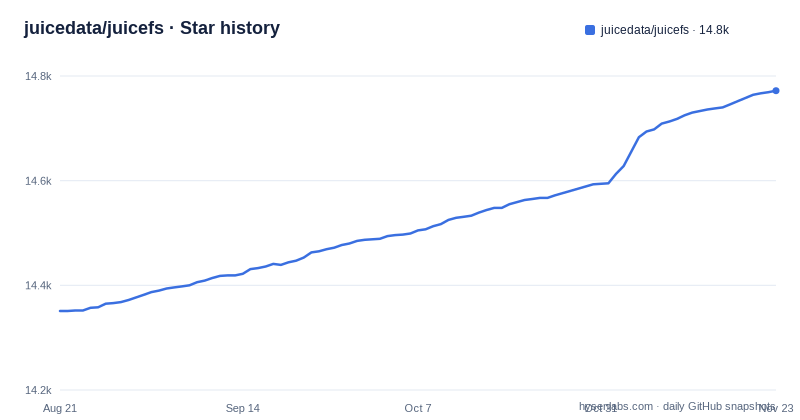
Star history
- juicedata/juicefs14,772 ★ · +421
| Repository | 2026-08-21 | 2026-11-23 |
|---|---|---|
| juicedata/juicefs | 14.4k | 14.8k |
421 Stars in the last 94 days, measured from the daily GitHub snapshot. Compare with other projects
Editorial analysis
The Problem JuiceFS Solves
Cloud object storage like Amazon S3 is cheap and virtually unlimited, but it is not a file system. It has no POSIX semantics, no file locking, and no directory tree that behaves like a local disk. Traditional network file systems such as NFS require a dedicated server and do not scale horizontally. JuiceFS sits between these two worlds. It presents a POSIX interface to applications while storing file data in object storage and metadata in a separate database. The intended users are teams running big data, machine learning, or AI workloads in the cloud who want to mount massive storage as if it were local. The README states that JuiceFS can be used without modifying application code, which is the core promise: keep your existing tools, change the underlying storage.
Architecture: Chunks, Slices, and Blocks
JuiceFS has three components: a client, a data storage layer, and a metadata engine. The client coordinates between object storage and the metadata engine, and it exposes file system interfaces including POSIX, Hadoop, Kubernetes, and an S3 gateway. Data is stored in object storage, such as S3, local disk, or HDFS. Metadata, which includes file names, sizes, permissions, and timestamps, lives in a separate engine like Redis, MySQL, SQLite, or TiKV. The README describes how files are split: each file is divided into chunks with a default maximum size of 64 MiB. Each chunk is composed of one or more slices, and the length of a slice varies depending on how the file is written. Each slice is further split into fixed-size blocks of 4 MiB by default. These blocks are what actually get stored in object storage. Because of this layout, the source files are not visible in the object storage bucket. Instead, you see a chunks directory with numbered subdirectories. This design is the key to performance: it allows parallel reads and writes of blocks, but it also means you cannot inspect or recover files directly from the bucket without the metadata engine.
Getting Started: Commands and Dependencies
To run JuiceFS, you need three things: a supported metadata engine, a supported object storage, and the JuiceFS client. The README points to separate guides for setting up each. The client is a single binary that you download and install. For the actual commands, the README links to a quick start guide and a command reference. For container use, JuiceFS can be used as a persistent volume in Docker and Podman. For Kubernetes, a CSI driver is provided, and the README links to a guide on how to use it. For Hadoop, there is a Java SDK compatible with Hadoop 2.x and 3.x. The setup is not trivial: you must provision and maintain a metadata engine, and you must configure object storage credentials. This is more involved than installing a single-server file system, and it assumes you already have operational experience with Redis or MySQL.
POSIX Compatibility and Strong Consistency
The README claims full POSIX compatibility, which means applications can use standard file operations without modification. It also claims strong consistency: once a modification is confirmed, it is immediately visible on all clients mounted to the same file system. This is a significant claim, because object storage like S3 has its own consistency model, and the metadata engine must coordinate to provide this guarantee. The README mentions global file locks, supporting both BSD locks (flock) and POSIX record locks (fcntl). These are essential for multi-writer workloads, but they add complexity to the metadata engine. The strong consistency is likely achieved by routing all metadata operations through the metadata engine, which serializes them.
Performance and Data Compression
JuiceFS claims latency as low as a few milliseconds and throughput that scales nearly unlimitedly, depending on the object storage size. The README includes a link to benchmark results, but those numbers are not reproduced here. The performance characteristics are tied to the block size and the metadata engine. The 4 MiB block size is a trade-off: it is large enough for efficient object storage operations, but it may cause overhead for workloads with many small files. The chunk-slice-block design means a small write can create a new slice, and the metadata engine must track it. JuiceFS supports LZ4 and Zstandard compression for all data, which can reduce storage costs and network transfer, but it also adds CPU overhead on the client. For workloads that are already compressed, such as video or encrypted data, compression is wasted CPU.
Limitations and Wrong-Tool Cases
JuiceFS is not a fit for every scenario. First, it requires a separate metadata engine, which is an extra component to operate and a single point of failure if not highly available. Redis, for example, is in-memory and may lose data if not configured with persistence, which could mean losing metadata even though data blocks are safe in S3. Second, the README explicitly warns that files are not visible in the object storage bucket. This means that if your metadata engine is lost and you do not have a backup, you cannot simply browse the bucket to recover files. Third, the block size and chunking are optimized for large files and sequential writes. Workloads that generate many small files or random writes will create many slices, which can bloat metadata and slow down operations. Fourth, the claim of low latency depends on the metadata engine's speed. Latency can differ by engine, and the README acknowledges that the choice of engine depends on the scenario. For applications that need truly local disk performance, such as a database running on the same node, JuiceFS is likely the wrong tool.
Alternative Approaches
A direct alternative is to use a distributed file system like CephFS or GlusterFS, which also provide POSIX interfaces but manage data and metadata themselves. CephFS uses a cluster of metadata servers (MDS) and stores data in RADOS, an object store that is part of Ceph. The key difference is that CephFS is a self-contained system: you run Ceph and get file storage with its own consistency and replication. JuiceFS, in contrast, decouples the data path from the metadata path, letting you choose your object storage and metadata engine separately. Another alternative is to use object storage directly with a compatibility layer like s3fs, which mounts an S3 bucket as a file system. s3fs is simpler but does not provide strong consistency or POSIX locks, and it is generally slower due to the lack of a dedicated metadata engine. JuiceFS's approach is closer to a distributed file system than to a simple S3 mount, but it trades away the simplicity of a single-vendor solution for flexibility.
Maintenance, Upgrade, and License
JuiceFS is released under the Apache License 2.0, which is permissive and allows commercial use without copyleft obligations. The repository is actively maintained, with recent releases including v1.4.2 and v1.3.4 in October 2026 and v1.3.3 in August 2026. The release cadence suggests regular updates. Upgrading the client is likely straightforward, but upgrading the metadata engine or the file system format may require downtime. The README includes a roadmap and a section for reporting issues. The operational cost is non-trivial: you must monitor both the metadata engine and the object storage, and you must handle backup and recovery of metadata. The README mentions fault diagnosis and analysis as an advanced topic, which implies that debugging issues requires specialized knowledge. Before adopting JuiceFS, plan for the extra operational burden of running a metadata engine, and test the upgrade process in a staging environment.
Editorial conclusion
Adopt JuiceFS if you need a POSIX file system that scales with object storage and already run Redis or MySQL, especially in Kubernetes or Hadoop environments. Do not adopt it if you require sub-millisecond metadata latency or if you cannot tolerate the operational complexity of a separate metadata engine. Before adopting, verify your object storage's consistency guarantees and test JuiceFS with your actual workload, especially write patterns that create many small files, since the chunk-slice-block design favors large sequential writes. Confirm that your metadata engine choice (Redis, MySQL, SQLite, TiKV) meets your durability and backup requirements, because a metadata loss means losing the file system structure even if data blocks remain in S3.
Frequently asked questions
what is juicefs
A high-performance POSIX file system released under the Apache 2.0 licence, designed for cloud environments. It persists file data in object storage and the corresponding metadata in a separate database engine, so cloud storage can be mounted as a local file system without changing application code. The client also implements Hadoop, Kubernetes and object-storage-compatible interfaces.
How do JuiceFS work?
Files are split into chunks at a fixed size with a default upper limit of sixty-four mebibytes, each chunk into one or more slices whose length varies with how the file was written, and each slice into fixed-size blocks of four mebibytes. The blocks go to object storage and the metadata about the file and its chunks, slices and blocks goes to the metadata engine. The consequence is that your files are not visible as files in the object storage console.
Is JuiceFS compatible with Kubernetes?
Yes. A container storage interface driver is provided, described on the front page as a headline cloud-native feature for using the file system in Kubernetes, with its own documentation page. It can also be used as a persistent volume for two container runtimes, with a separate page for that.
is juicefs open source
Yes, under the Apache 2.0 licence, which the front page states in its opening paragraph and links. The repository also carries a code of conduct, a contributing guide and separate English and Chinese READMEs. The README links a Discord server and a community introduction page.
juicefs vs minio
The front page does not compare the two. It describes itself as a POSIX file system that stores data in object storage and metadata in a database engine, and separately notes that it provides an object-storage-compatible gateway so that existing object-storage clients can read through it. A comparison against a specific alternative would have to come from their documentation rather than this repository.
Official sources
Add this badge to your README
If you maintain this project, the badge below links readers to this analysis and shows its maintenance status from the daily GitHub snapshot. Paste the markdown into your README; add ?metric=license or ?metric=stars to the image URL for a different field.

[](https://hysenlabs.com/projects/juicedata-juicefs)Star history chart for your README
[](https://hysenlabs.com/projects/juicedata-juicefs)Was this useful?