DataFrames.jl: In-memory tabular data in Julia
In-memory tabular data in Julia
At a glance
- What is it?
- DataFrames.jl is Julia's package for working with tabular data in memory. It is aimed at Julia users who need a dedicated dataframe package, with documented installation, stable documentation, tests, benchmarks, and collective maintenance.
- Who is it for?
- Adopt DataFrames.jl when your Julia work specifically requires an in-memory tabular data package and you are prepared to use its documented interface. Do not treat it as a suitable choice without checking the `LICENSE.md` terms, the stable documentation for your required operations, and the behavior of your existing Julia and package environment.
- Can I use it commercially?
- Check first. The repository uses a licence we do not classify automatically, so read its LICENSE file before any commercial use.
- Is it still maintained?
- Yes. The repository last received commits 12 days ago.
- What is it written in?
- Mainly Julia, according to GitHub's language statistics.
Answers come from the project's GitHub data, last synced on October 23, 2026, and from our analysis. They are not legal advice.
Star history
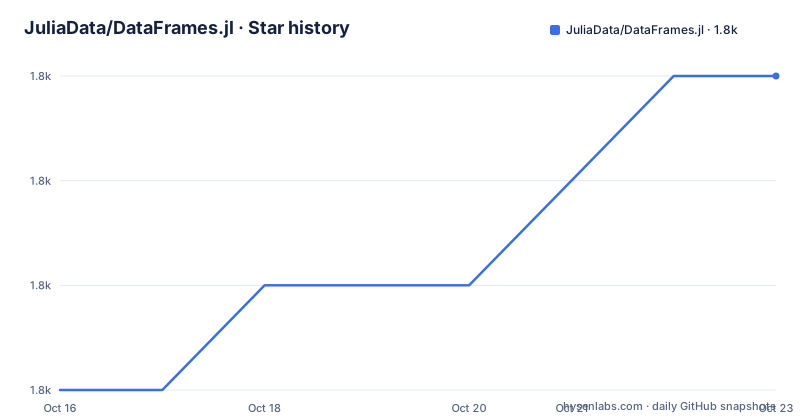
- JuliaData/DataFrames.jl1,842 ★ · +3
| Repository | 2026-10-16 | 2026-10-23 |
|---|---|---|
| JuliaData/DataFrames.jl | 1.8k | 1.8k |
3 Stars in the last 7 days, measured from the daily GitHub snapshot. Compare with other projects
Editorial analysis
DataFrames.jl and the Julia in-memory table problem
DataFrames.jl addresses a specific need in Julia: working with tabular data held in memory. That places it between ad hoc collection manipulation and dedicated dataframe operations without requiring the reader to infer a broader data platform from its name. The README describes the package simply as "Tools for working with tabular data in Julia," so its declared scope is narrower than a database, dashboard, or general analytics suite.
The intended audience is fairly clear. Julia developers who represent rows and columns in memory and want a package centered on that representation are the primary users. The README also points newcomers to a Julia Academy course and Bogumił Kamiński's DataFrames.jl tutorial. Those references indicate that learning resources exist, but they do not specify the package's internal design or every operation supported by the current release.
The project is not archived, and its last push was on 2026-10-11. That is recent enough to describe the repository as receiving development, but not as proof that every issue or pull request receives a prompt response. In fact, the README directly qualifies maintenance by saying that responsiveness can vary with the availability of key collaborators. The maintenance model is collective among the JuliaData collaborators rather than tied by the README to one permanent maintainer.
Repository structure and the package delivery path
The repository layout separates package metadata, implementation, documentation, tests, and performance work. `Project.toml` is the package-level Julia project file, while `src/` is the directory associated with package source code. Documentation has a dedicated `docs/` directory, and tests have a separate `test/` directory. A `benchmarks/` directory is also present, which is concrete evidence that the project includes a place for benchmark work. The README does not describe the internal modules, column representations, indexing rules, or execution model, so those details should not be inferred merely from directory names.
The package is distributed through Julia's package tooling rather than as a standalone application. The documented installation path uses `Pkg.add("DataFrames")`, which adds the package to the active Julia environment. That distinction matters when reproducing a project: the relevant context is the Julia environment in which the command is executed. The repository's default branch is `main`, and the release history includes v1.8.2, v1.8.1, and v1.8.0.
Documentation is published through separate stable and latest locations in the README. The stable URL points to `http://dataframes.juliadata.org/stable/`, while the latest documentation points to `http://dataframes.juliadata.org/latest/`. The repository also includes `NEWS.md`, which is the natural place to look for recorded changes when moving between releases. The README does not document a rollback procedure or compatibility matrix, so neither should be assumed.
Installing DataFrames.jl at the Julia REPL
The command is entered at the Julia REPL through Julia's package manager:
using Pkg; Pkg.add("DataFrames")After installation, the README does not provide a minimal dataframe construction example, so this article does not invent one. The project's stable documentation is the authoritative place to select the operation needed for a first real task, such as constructing or inspecting a table only if that operation appears there. The README also links a free Julia Academy course and Bogumił Kamiński's DataFrames.jl tutorial for a broader introduction.
For an existing Julia project, the README does not state whether installation should be performed at the top-level environment or inside a project-specific environment. It also does not give commands for pinning a release, downgrading, updating, or removing DataFrames.jl. Those steps must be taken from the installed Julia package tooling and the project's documentation rather than inferred from the package name.
Documentation, tests, and benchmarks as adoption evidence
DataFrames.jl includes several forms of project information beyond the README. The stable and latest documentation links allow readers to distinguish the documented release line from changing development documentation. `NEWS.md` can provide release history, while `CONTRIBUTING.md` is identified as the place for contribution and issue guidance. `CITATION.bib` contains formal citation information for users who need to cite the package in academic or technical work.
The repository's `test/` and `benchmarks/` directories are useful signs of development infrastructure, but their presence does not establish a particular performance level. No benchmark results are supplied, so it would be misleading to claim that DataFrames.jl is faster than another dataframe implementation. The README's citation names a Journal of Statistical Software article, "Flexible and Fast Tabular Data in Julia," but a publication title is not a substitute for examining a workload that matches the reader's tables.
For adoption review, the stable documentation should be checked for the exact operations required by the project. The tests are relevant when contributors need to understand expected behavior or reproduce a reported issue. The benchmark directory is relevant when performance affects the decision, although the README does not document how to invoke those benchmarks or which datasets they use.
Maintenance and the custom DataFrames.jl license
Maintenance is collective. The README says that DataFrames is maintained by the JuliaData collaborators and explicitly warns that responsiveness to pull requests and issues can vary according to key collaborators' availability. The repository is not archived, and its last push was on 2026-10-11. Recent releases include v1.8.2 on 2026-04-12, v1.8.1 on 2025-10-17, and v1.8.0 on 2025-09-11. These facts support continued project activity, but they do not promise a fixed response time or guarantee that every proposed change will be accepted.
The license requires separate attention. GitHub classifies it as a custom license that it cannot place into one of its standard categories, and the repository directs readers to `LICENSE.md`. The README does not reproduce the license terms, so redistribution duties, modification conditions, attribution requirements, or compatibility with a commercial deployment cannot be stated confidently here. This is not a routine BSD or MIT assumption. A team considering DataFrames.jl should read `LICENSE.md` for the release it intends to use and check that the terms fit the intended distribution model.
Upgrade cost also depends on release notes, dependency resolution, and changes between Julia environments. The repository provides `NEWS.md`, but the README does not summarize migration requirements for v1.8.0, v1.8.1, or v1.8.2.
In-memory tables versus broader storage workflows
The clearest alternative approach is to keep the data outside an in-memory dataframe workflow and use a system built around persistent storage and query execution. The practical difference is architectural: DataFrames.jl's stated role is tabular data in memory, while an external database workflow centers its lifecycle on stored datasets and database queries. This comparison identifies a boundary rather than claiming that either approach is universally better.
The README does not discuss streaming, distributed execution, on-disk formats, database connectors, or automatic conversion between DataFrames.jl tables and other storage systems. It also names no alternative Julia package. Those omissions limit a feature-by-feature comparison. If a workload depends on data larger than available memory, concurrent writers, transactional updates, or a governed database layer, the README does not show that DataFrames.jl covers those cases. If the task is a bounded in-memory table inside Julia, the package's declared focus is a closer fit, subject to checking the stable documentation for the required behavior.
This distinction also prevents a common category error. DataFrames.jl is not presented as a spreadsheet editor, a plotting package, or a data warehouse. Its adoption case depends on Julia code needing a tabular data structure in memory. The repository is better evaluated against that requirement than against unrelated tools that happen to visualize or export tables.
Editorial conclusion
Adopt DataFrames.jl when your Julia work specifically requires an in-memory tabular data package and you are prepared to use its documented interface. Do not treat it as a suitable choice without checking the `LICENSE.md` terms, the stable documentation for your required operations, and the behavior of your existing Julia and package environment. The first project-specific checks are the custom license and the compatibility of the documented API with your data workflow.
Frequently asked questions
How do I install DataFrames.jl?
At the Julia REPL, the README specifies `using Pkg; Pkg.add("DataFrames")`. This installs the package through Julia's package manager in the active environment.
Where can I find the stable DataFrames.jl documentation?
The README links the stable documentation at `http://dataframes.juliadata.org/stable/`. It separately links the latest documentation at `http://dataframes.juliadata.org/latest/`.
What license does DataFrames.jl use?
GitHub classifies the repository license as a custom license that it cannot categorize. The repository points users to `LICENSE.md`, so the actual terms must be checked there.
Official sources
Add this badge to your README
If you maintain this project, the badge below links readers to this analysis and shows its maintenance status from the daily GitHub snapshot. Paste the markdown into your README; add ?metric=license or ?metric=stars to the image URL for a different field.

[](https://hysenlabs.com/projects/juliadata-dataframes-jl)Star history chart for your README
[](https://hysenlabs.com/projects/juliadata-dataframes-jl)Was this useful?