IconFontCppHeaders for native icon-font integration
C and C++ headers, C# and Python classes, Rust files and Go package for icon fonts Font Awesome, Fork Awesome, Google Material Design icons and symbols, Pictogrammers Material Design icons, Kenney game icons, Fontaudio, Codicons and Lucide.
At a glance
- What is it?
- IconFontCppHeaders turns icon-font codepoints and embedded font bytes into files for C, C++, C#, Python, Rust, and Go. It suits native applications that want compile-time icon names, especially projects using Dear ImGui, but it is not a runtime icon-rendering library.
- Who is it for?
- Adopt IconFontCppHeaders when a native application needs named icon codepoints across several supported languages or needs a TTF embedded as a C or C++ byte array. Do not adopt it as a substitute for a rendering library, or when licensing of the selected icon font cannot be accepted separately.
- Can I use it commercially?
- Yes. Zlib is a permissive licence: you can use, modify and sell software built on it, as long as you keep its copyright and licence notices.
- Is it still maintained?
- Yes. The repository last received commits 156 days ago.
- What is it written in?
- Mainly C, according to GitHub's language statistics.
Answers come from the project's GitHub data, last synced on November 7, 2026, and from our analysis. They are not legal advice.
Star history
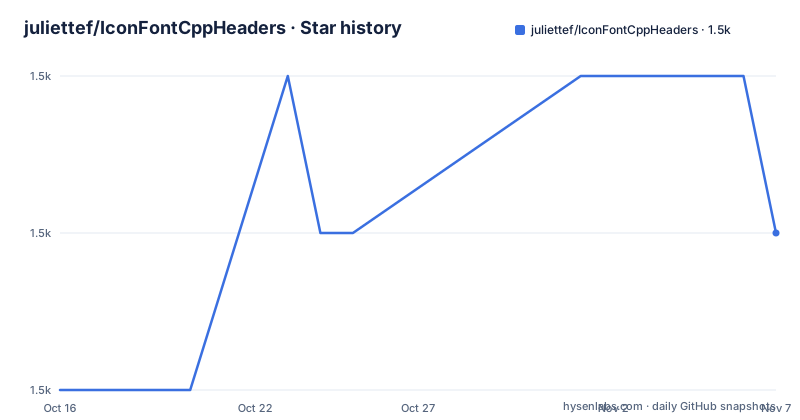
- juliettef/IconFontCppHeaders1,508 ★ · +1
| Repository | 2026-10-16 | 2026-11-07 |
|---|---|---|
| juliettef/IconFontCppHeaders | 1.5k | 1.5k |
1 Stars in the last 22 days, measured from the daily GitHub snapshot. Compare with other projects
Editorial analysis
What IconFontCppHeaders solves across native languages
IconFontCppHeaders addresses a narrow but recurring problem: native applications often need to refer to icon glyphs by stable names rather than unexplained numeric code points. The repository supplies C and C++ headers, C# classes, Python classes, Rust files, and Go packages for Font Awesome, Fork Awesome, Google Material Design, Pictogrammers Material Design icons, Kenney game icons, Fontaudio, Codicons, and Lucide. The available files are separated by font family and, where relevant, version or icon subset. For example, the repository contains distinct files for Font Awesome 4, Font Awesome 5 free and pro, Font Awesome 6 free, and Font Awesome 7 free. This versioning matters because an icon name is not enough on its own. An application must use definitions that match the font data it actually loads. The project is therefore most useful to developers building native interfaces with Dear ImGui, game tooling, editors, desktop applications, or other software that loads icon fonts directly. It does not present a widget toolkit, font rasterizer, layout engine, or icon renderer. Its role is to provide source-level constants and language bindings, leaving font loading and glyph drawing to the application or another library. That boundary keeps the generated files useful across rendering stacks, but it also means inclusion alone will not make icons appear.
Code points, ASCII bounds, and Dear ImGui compatibility
Each language file represents one font. Individual icon code points are exposed as `ICON_*` definitions, so application code can refer to an icon by its generated name instead of copying a raw Unicode value. Each file also includes the minimum code point, maximum code point, and maximum 16-bit code point. According to the README, the minimum excludes ASCII character code points, which helps an application identify the icon-specific range rather than treating printable ASCII as part of the icon collection. The maximum 16-bit value is intended for libraries that only accept 16-bit code points. Dear ImGui is the named example. These range values matter at font-loading time because applications need to configure or validate the font against the actual glyph coverage. They do not select an icon at runtime by themselves. The project deliberately generates static definitions, so the application still needs code that loads the corresponding font, maps the generated code point to a glyph, and submits it to its rendering system. The repository does not document a runtime loader or rendering callback. Based on the repository layout, adoption is likely to involve copying or including the relevant file while keeping it synchronized with a compatible font asset. The naming and bounds reduce accidental literal code points, but they cannot detect a mismatch between generated constants and an arbitrary TTF supplied by the user.
Using the repository files for a first native use
The README does not document a package-manager installation, dependency command, build step, or release artifact for IconFontCppHeaders. It identifies the project repository as the place to obtain the files. There are therefore no documented installation commands to reproduce. For a first C or C++ use, the concrete repository entry is `IconsFontAwesome6.h`, or another header that matches the selected icon font and version. Add that file to the application's source tree, reference it from the appropriate translation unit, and then use the `ICON_*` definitions it contains. The exact rendering calls depend on the application's GUI library, and the README does not give a Dear ImGui initialization or draw example, so it would be misleading to invent one. For Go, the repository includes `go.mod` with the module path `github.com/juliettef/IconFontCppHeaders` and the declaration `go 1.19`. That file establishes module metadata, although the README excerpt does not show a complete command or program for importing and drawing an icon. The safest first integration is therefore a small review of the selected file: confirm the font version, confirm that a required icon has a suitable `ICON_*` definition, and compare the included bounds with the font that the application will load. This verifies source compatibility before any GUI code is written.
GenerateIconFontCppHeaders.py and embedded TTF output
The repository includes `GenerateIconFontCppHeaders.py`, the Python script used to create the language files. The README also documents a second mode for converting TTF icon-font files directly into C and C++ headers. Conversion is enabled with the setting below. This setting is documented as `ttf2headerC = True`; the README does not show the script's surrounding configuration or a complete command line, so those details should not be guessed. In conversion mode, each TTF is represented in the resulting C or C++ header as a single array of bytes. That approach is relevant when an application needs the font data compiled into native code instead of loading a separate font asset at runtime. It also changes the maintenance model. Updating an embedded array means regenerating a source file and rebuilding the application, while a separately loaded TTF can potentially be replaced independently, subject to code point compatibility. The repository layout confirms that the generator is a source utility rather than a package with a documented runtime API. No output naming scheme, dependency list, error behavior, or exact invocation is provided in the README excerpt. Engineers who need regeneration should inspect the script itself rather than assume the conversion settings or dependencies. The project does not document rollback for a bad generated header or a compatibility check between a generated byte array and the corresponding constants.
Language coverage brings synchronization costs
Supporting C, C++, C#, Python, Rust, and Go is the repository's main convenience, but it can become a consistency problem. A multi-language product, such as a desktop client with a Python build tool or a Go backend, may consume several generated files for the same icon family. Updating Font Awesome, Codicons, Lucide, or another family may require replacing files in every used language. The presence of separate files for multiple Font Awesome versions and brands does not reduce that work. It gives teams a way to pin a known set, but the README does not document a compatibility manifest, automated synchronization check, or package release system. There are also no GitHub releases, so consumers may copy files from the default `main` branch without receiving versioned artifacts. The generated nature of the files makes diffs easy to classify in principle, yet large icon updates can still be noisy. A team should treat a font update as a coordinated operation: select one upstream font version, regenerate or obtain matching definitions, check every language binding in use, and ensure the application loads the same asset version. The project is better suited to teams prepared to vendor static source files than to teams wanting a dependency manager to resolve and update all language bindings automatically.
Zlib coverage does not settle icon-font licensing
The repository uses the Zlib license, according to repository metadata. That license covers the generated language files and generator as project content, but it should not be read as a blanket grant covering every bundled or referenced icon font. The repository names Font Awesome free and pro variants, among other libraries. The README excerpt does not reproduce the licenses for each icon family, identify whether font binaries are bundled in the repository, or describe obligations for applications that load a separate TTF. This is a real adoption boundary. Before shipping an application, examine the license text for the exact icon set and version used, including the Font Awesome pro files if applicable. Also determine where the runtime font asset comes from and whether its license permits the intended distribution. No legal conclusion can be drawn from the repository's Zlib identifier alone. The practical point is narrower: code-generation permission and font-asset permission are separate checks, and adoption is incomplete until both are understood for the selected icon family.
Where generated constants are the wrong alternative
The closest functional alternative is to keep each icon mapping beside the application's own font-loading and rendering code. Instead of vendoring an `IconsFontAwesome*.h`, `IconsFontAwesome*.cs`, `IconsFontAwesome*.py`, `IconsFontAwesome*.go`, or `IconsFontAwesome*.rs` file, an application could maintain its own smaller icon list and map semantic UI actions to code points. This reduces generated-file churn when the product uses only a few icons, but it transfers maintenance to the application and loses IconFontCppHeaders' broader icon definitions. Another approach is to embed a TTF through `GenerateIconFontCppHeaders.py`, producing a C or C++ byte array. That is not a separate icon system: it changes font delivery from an external asset to compiled-in bytes, while icon names and code points still need a suitable source. For dynamic icon selection or applications that require SVG paths rather than font glyphs, neither approach documented here provides the needed representation. IconFontCppHeaders should not be selected merely because a GUI is being built. It fits when font glyphs are an intentional rendering strategy and generated code point definitions are preferred over a hand-maintained mapping.
Editorial conclusion
Adopt IconFontCppHeaders when a native application needs named icon codepoints across several supported languages or needs a TTF embedded as a C or C++ byte array. Do not adopt it as a substitute for a rendering library, or when licensing of the selected icon font cannot be accepted separately. Verify first that the repository contains the exact font version and language file your application needs, then check the corresponding icon font license before distribution.
Frequently asked questions
Which languages does IconFontCppHeaders support?
The repository provides C and C++ headers, C# and Python classes, Rust files, and Go packages for its listed icon fonts.
Does IconFontCppHeaders render icons by itself?
No. It supplies icon definitions and optional embedded font byte arrays. The README describes the files as language bindings and generated headers, while font loading and rendering remain responsibilities of the application or its GUI library.
How can a TTF icon font be embedded in C or C++?
The README says to run `GenerateIconFontCppHeaders.py` with `ttf2headerC = True`. Conversion produces a C or C++ header containing a single array of bytes for the TTF.
Does IconFontCppHeaders provide versioned releases?
The repository has no GitHub releases. It does contain separate Font Awesome files for several major versions, but the README does not describe a formal release or upgrade process.
Official sources
Add this badge to your README
If you maintain this project, the badge below links readers to this analysis and shows its maintenance status from the daily GitHub snapshot. Paste the markdown into your README; add ?metric=license or ?metric=stars to the image URL for a different field.

[](https://hysenlabs.com/projects/juliettef-iconfontcppheaders)Star history chart for your README
[](https://hysenlabs.com/projects/juliettef-iconfontcppheaders)Was this useful?