justjavac/google-ips: a country-grouped Google IP list you can query from Node.js
Google IP address list grouped by country, with JSON data and query helpers (npm API).
At a glance
- What is it?
- The repository turns a README table of Google addresses into data/google-ips.json and an npm package with lookup helpers. It is a static snapshot, not a live feed, and the README says so.
- Who is it for?
- Adopt google-ips if you need a small, offline, MIT-licensed dataset of Google addresses grouped by country for a Node.js script, and you accept that the list is historical rather than live. Do not adopt it if you need current Google ranges for firewall rules or geolocation decisions, because the README describes the data as historical public collection results and gives no refresh schedule.
- Can I use it commercially?
- Not without permission. GitHub finds no licence file in the repository, and without a licence all rights are reserved by default: you may read the code but not reuse it. Check the README, or ask the authors, before using it.
- Is it still maintained?
- Yes. The repository last received commits 131 days ago.
- What is it written in?
- Mainly TypeScript, according to GitHub's language statistics.
Answers come from the project's GitHub data, last synced on November 14, 2026, and from our analysis. They are not legal advice.
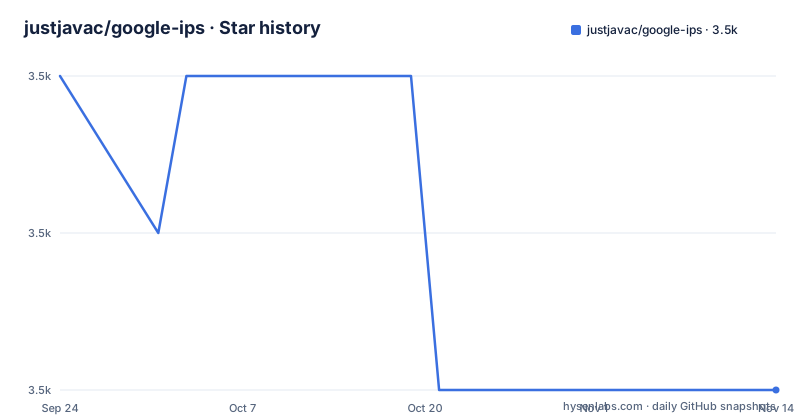
Star history
- justjavac/google-ips3,479 ★ · -2
| Repository | 2026-09-24 | 2026-11-14 |
|---|---|---|
| justjavac/google-ips | 3.5k | 3.5k |
-2 Stars in the last 51 days, measured from the daily GitHub snapshot. Compare with other projects
Editorial analysis
What problem a country-grouped Google IP list solves
If you are writing a Node.js script that needs to answer "is this address a Google address, and which country is it filed under", you have three options. Query a live geolocation API and pay per call. Pull Google's own published ranges and parse them yourself. Or take a prepacked list. justjavac/google-ips is the third option: a data file plus a thin query layer, shipped as an npm package named google-ips.
The README describes it as a Google IP address library organized by country and region, offering an npm package, JSON data files and a query API for direct use in Node.js projects. The intended user is a developer who wants a local lookup without a network dependency. The package has no runtime dependencies at all: package.json lists only @types/node and typescript, both as devDependencies. That matters if you are embedding this in a CLI or a build step where adding a dependency tree is unwelcome.
The scope is narrower than the name suggests. This is not a general IP intelligence library. It does not resolve hostnames, it does not cover non-Google networks, and the country labels come from however the original collection grouped them.
How the README table becomes data/google-ips.json
The pipeline is visible in package.json, and it is unusual: the README is the source of truth. The README contains large HTML tables, each with a country name in a th header and rows of anchor tags pointing at http:// addresses. The generate-data script reads those tables and emits data/google-ips.json. The build script chains three steps: clean, generate-data, then tsc against tsconfig.json.
That design has a real consequence. Editing the dataset means editing README.md and rerunning the generator, not touching a JSON file by hand. The repository layout matches this: a scripts/ directory holds the generator, src/ holds the TypeScript query layer, data/ holds the generated output, and test/ holds tests. Two TypeScript configs exist, tsconfig.json for the package and tsconfig.scripts.json for the generator, because the generator is compiled separately and run from dist-scripts.
There is no fetch step. Nothing in package.json downloads anything at build time. The addresses are whatever was collected historically and pasted into the README, which the README states directly: the data comes from historical public collection results. Treat the JSON file as a frozen artifact with a build date, not as a mirror of Google's current allocations.
Installing google-ips and running a first lookup
The README gives a single install command and a CommonJS example. The package declares "type": "commonjs", so require is the documented path. Install it with npm:
npm install google-ipsThen a first script that exercises the four helpers the README shows. The example prints the total address count, the list of countries, the addresses filed under Hong Kong, a boolean membership check, and the country for a specific address:
const googleIps = require("google-ips");

console.log(googleIps.ips.length);
console.log(googleIps.countries);
console.log(googleIps.getByCountry("Hong Kong"));
console.log(googleIps.has("93.123.23.1"));
console.log(googleIps.findCountry("118.174.25.251"));
If you only want the raw data and not the helpers, package.json exposes a second subpath. The README shows requiring the generated JSON directly:
const data = require("google-ips/data");The exports map is worth reading before you write an import. The root export points at dist/src/index.js with types at dist/src/index.d.ts, and ./data points at dist/data/google-ips.json with types at data/google-ips.d.ts. There is no ESM entry: both the require and default conditions resolve to the same CommonJS file. If your project is ESM-only, you will be importing a CommonJS module.
Node 16 or newer is required, per the engines field.
The dataset is historical, and the README does not hide it
The most important limitation is stated in the README itself: the data comes from historical public collection results. That single sentence rules out a whole class of uses. You cannot treat google-ips as an authoritative source of Google's current address space. Addresses get reassigned, prefixes get announced and withdrawn, and a list assembled from past collection will contain entries that no longer belong to Google and will miss ranges allocated since.
There is no update mechanism in the package. No scheduled job, no fetch script, no versioned data release described in the README. The generator runs at build time over the README tables, and prepack runs the build before publishing, so a published tarball is internally consistent, but nothing pulls fresh addresses from anywhere.
For firewall allowlists, geolocation, or abuse scoring, this is the wrong tool. Those need a source with a stated refresh cadence and a published provenance chain. A static JSON file with country labels and no timestamp on individual entries cannot support an enforcement decision. Where it does fit is offline work: a build-time check, a test fixture, a script that needs to recognize a known Google address without making a network call.
The README also does not document rollback, a data schema, or how countries with no entries are represented. Those are gaps you will discover by reading data/google-ips.json rather than the documentation.
google-ips versus Google's own published ranges
The obvious alternative is the range list Google publishes for its own crawlers and services. The difference is not just freshness, it is shape. Google's published list is a set of CIDR prefixes with a stated purpose, and it is meant to be fetched and re-fetched. google-ips is a flat list of individual addresses grouped by country label, with no CIDR notation and no purpose field.
That shape difference decides the use case. If you need to match an incoming request against a prefix, CIDR is the right representation and google-ips is not, because you would be doing per-address membership checks over a list rather than a prefix match. The has() and findCountry() helpers are lookups into that flat list.
What google-ips offers instead is the country grouping, which the published ranges do not carry. If your question is "which country was this Google address collected under", the published list will not answer it. If your question is "is this address inside Google's current announced space", the published list will, and google-ips cannot.
A second alternative, for people who need live answers rather than a file, is a geolocation or ASN lookup service. That trades the offline property and the zero-dependency install for accuracy, and it introduces a network call and usually a quota.
Maintenance, licence and what upgrading costs you
The last push to the repository was on 2026-07-06, and the repository is not archived. That is recent enough that the codebase is not abandoned, but it says nothing about whether the address data has been refreshed, because the data lives in README tables that only change when someone edits them.
Version 1.0.0 is the version in package.json, and the repository has no published releases. A refreshed package published to the public npm registry requires a new version. Check the package and lockfile when updating; the README does not describe a release policy.
The licence is stated as MIT in package.json, while the repository listing does not give a licence. The package metadata declares MIT, while GitHub does not identify a license file. MIT is permissive and imposes no copyleft obligation on your code, but it also means the data comes with no warranty of accuracy, which for an address list is the thing you actually care about. This is a description of what the files say, not legal advice; if the licence matters to your organization, confirm it with the maintainer.
Editorial conclusion
Adopt google-ips if you need a small, offline, MIT-licensed dataset of Google addresses grouped by country for a Node.js script, and you accept that the list is historical rather than live. Do not adopt it if you need current Google ranges for firewall rules or geolocation decisions, because the README describes the data as historical public collection results and gives no refresh schedule. Before relying on it, check the generated data/google-ips.json against the current Google published ranges, and read the licence field in package.json, which says MIT while the repository listing does not state a licence.
Frequently asked questions
What is google-ips?
It is a Google IP address library organized by country and region, distributed as an npm package, JSON data files and a query API for Node.js projects. The repository generates data/google-ips.json from tables in the README.
How many IPs does google-ips contain?
The README does not state a total. Its example prints googleIps.ips.length, which is the count, so the number is read from the installed package rather than from the documentation.
How do I install google-ips and use it in Node.js?
Run npm install google-ips, then require("google-ips") and call the helpers the README lists: ips, countries, getByCountry, has and findCountry. Node 16 or newer is required.
Is the google-ips address data current?
The README states the data comes from historical public collection results, and package.json contains no step that fetches addresses at build time. There is no documented refresh schedule.
What licence does google-ips use?
package.json declares "license": "MIT", while the repository listing does not state a licence. The README does not discuss licensing.
Official sources
Add this badge to your README
If you maintain this project, the badge below links readers to this analysis and shows its maintenance status from the daily GitHub snapshot. Paste the markdown into your README; add ?metric=license or ?metric=stars to the image URL for a different field.

[](https://hysenlabs.com/projects/justjavac-google-ips)Star history chart for your README
[](https://hysenlabs.com/projects/justjavac-google-ips)Was this useful?