ShowHiddenChannels: a BetterDiscord plugin for hidden channels
A BetterDiscord plugin which displays all hidden channels and allows users to view information about them.
At a glance
- What is it?
- ShowHiddenChannels lists the private channels in a Discord server that your account cannot open, showing the name, the description and which roles or users have access. It deliberately does not let you read those channels, and the readme is explicit about why that limit exists and what happens when Discord changes the client.
- Who is it for?
- ShowHiddenChannels suits a server administrator or a member who needs to know what private channels exist and who can see them, for instance to plan roles or to check a configuration, and it is a good example of a plugin that states its own limits. It is a poor fit if you need to read the contents of a channel you cannot access, because the plugin does not do that and the readme explains why that is not an accident.
- Can I use it commercially?
- Yes, with conditions. GPL-3.0 is a copyleft licence: if you distribute software that includes it, you must release that software's source code under the same licence. Running it internally without distributing it does not trigger that obligation.
- Is it still maintained?
- Yes. The repository last received commits 1 day ago.
- What is it written in?
- Mainly JavaScript, according to GitHub's language statistics.
Answers come from the project's GitHub data, last synced on November 7, 2026, and from our analysis. They are not legal advice.
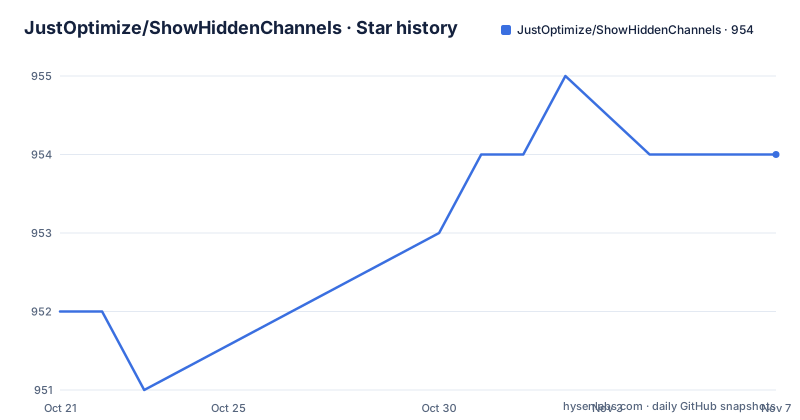
Star history
- JustOptimize/ShowHiddenChannels954 ★ · +2
| Repository | 2026-10-21 | 2026-11-07 |
|---|---|---|
| JustOptimize/ShowHiddenChannels | 952 | 954 |
2 Stars in the last 17 days, measured from the daily GitHub snapshot. Compare with other projects
Editorial analysis
What it shows, and what it deliberately does not
The description in the repository listing is a plugin which displays all hidden channels and allows users to view information about them, and the package description in the manifest adds the important caveat in parentheses: this will not allow you to read them, impossible.
The readme says the same thing in a bold line. The plugin allows users to view information about hidden channels in a Discord server, such as their name, their description, and which roles or users have access to them. It will not allow you to read the messages in those channels, and it will only show you information about them.
That limit is the design, not a missing feature, and it is what makes the plugin defensible to use on a server you do not own. Knowing that a channel called moderation exists, what it says in its topic, and which roles are granted access is organisational information that a server member can often infer anyway. Reading the messages is a different act, and the plugin stops short of it.
The readme also points at a companion plugin from the original author, PermissionsViewer, which shows the channel permissions and access, and which is a natural pairing if what you want is the access lists rather than the channel metadata.
It fills a hole left by a removed plugin
The history is short and explains why the repository exists at all.
The original plugin was written by a different author and was discontinued and removed from the official add-ons repository, so this plugin was created to fill that void.
The readme credits the original author with a link to their GitHub profile. There is also a parallel version for a different Discord modification, and the readme points at it under a different author's name.
That history explains the shape of the repository. The plugin is a single file at the root, the built artefact that you install, and the source lives beside it. The release history is a stream of small versions with titles that describe what the Discord client did: a version for a Discord update, a version for a dispatcher update in the client internals, and a version for the native channel header.
Those titles are the clearest statement of what this project actually is. It is a plugin that reads the Discord client's internal state, and so it has to be updated whenever Discord changes that state. A plugin that reads what the client already has will always be one Discord release behind.
The experiment that takes the data away entirely
There is a section of the readme that is the most useful thing in it, and it explains a failure mode that looks like a bug in the plugin.
Discord has rolled out an experiment that hides private channels on the server side. If your account is in that experiment, the real channel names are never sent to your client, so every hidden channel appears as No Access. The plugin still starts normally and the console reports no error, because there is nothing left for it to read.
That is the whole explanation. The data is not being hidden from the plugin, it is being hidden from the client, and the plugin is a client.
The readme is also clear about a decision. A bypass exists, but it would make the plugin detectable on the server side, so it will not be shipped with the plugin. That is a deliberate refusal to ship a capability that could get a user banned, and it is worth noting that a plugin which reads only what the client is given is very hard to detect, and a plugin that works around the experiment is not.
What is offered instead is an opt out, in four steps. You need access to the experiments page, and there are several ways to get it, including a settings option in a separate tool and a snippet you can paste into the developer tools, and the equivalent plugin for two other Discord modifications. Then you open the experiments settings, search for the private channel hiding entry, set the variant override to not eligible, and fully close and reopen Discord.
private-channel-hidingNot EligibleIf the channels are still hidden, the readme gives two things to try in order. Switch the override to another variant, set it back to not eligible and press the reload shortcut, and if that does not work, log out and back in so that Discord invalidates its cached channel list. That second one is the fix for the case where the client is still showing the old data from before the override took effect.
Installation is four steps
The installation instructions are short and assume a running Discord with the modification already installed.
Go to the releases page of the repository, download the latest version by clicking on the plugin file, move that file into your plugins folder for the modification, enable the plugin, and restart Discord to complete the installation.
There is no package manager here, no build step for the user, and no configuration file. You download one file, put it in a folder, and turn it on, which is the right shape for a plugin that many people will install once and never think about again.
The filename itself is part of the convention, since the modification discovers plugins by name, and the releases page publishes that single file as the release asset. That also means the repository's release history is a history of a file you can read, which is a good property for a plugin whose behaviour depends on the client internals.
The one thing the readme does not spell out is what happens when Discord updates and the plugin breaks, which is the more common failure than a misconfiguration. The release titles tell the story: each Discord client change gets its own plugin version.
The build, and why the Babel pragma is set that way
The manifest shows the build pipeline, and one detail in it is the kind of thing that only makes sense if you have built a plugin for this client before.
The build is a webpack run with progress and colour, and the source is compiled with Babel. The React preset is configured with a pragma that points at the client's own React factory and a fragment pragma that points at the client's fragment object.
That is the whole trick of a plugin for this client. The client bundles its own copy of React, and if your plugin bundles a different one, the two will not agree about hooks, and the symptom is a component that renders once and then does nothing. By compiling to the client's factory functions directly, the plugin shares the client's instance and the hooks work.
The rest of the tooling is conventional. There is a Biome configuration alongside an ESLint configuration, a JavaScript configuration file for the editor, a Webpack configuration, and the source and the tests in their own directories.
The test setup is worth a look. There is a single test script that runs the Node test runner over one file, and the file is named for the Discord modules. So the tests cover the parts of the client interface the plugin depends on, which is the part that changes when Discord updates, and that is the right thing to test when you cannot test the plugin itself.
The dependencies are minimal. There is one runtime dependency, the type definitions for the modification, taken from a fork rather than from the registry, and the development dependencies are Babel, the Webpack toolchain, the Discord type packages, and a raw loader.
Support, licensing and the state of the project
The last details are about the person behind it.
Support is invited in the form of a follow, a star, a fork, a share, or a tip through a donation button, and the readme points at the commit history for the changelog rather than maintaining a separate file, which for a project whose releases are a single file is the sensible choice.
The licence is GPL-3.0-only in the manifest, and the repository listing agrees. That is worth noting for a plugin, because the typical use is a single file copied into a client, and the GPL's reach in that situation is a question a user might want answered before installing.
The release history shows a project that ships on client updates. Version 6.12 in September 2026 was for the native channel header, 6.13 in early October for a dispatcher change, and 6.14 on the 7th of October for a Discord update. The last push was on the same day, and the repository is not archived.
The pattern across the three releases is the one to remember when judging the maintenance situation. This is not a project that goes quiet for a year, it is a project that has to move every time the platform it plugs into moves, and the version titles are a running log of those moves.
Editorial conclusion
ShowHiddenChannels suits a server administrator or a member who needs to know what private channels exist and who can see them, for instance to plan roles or to check a configuration, and it is a good example of a plugin that states its own limits. It is a poor fit if you need to read the contents of a channel you cannot access, because the plugin does not do that and the readme explains why that is not an accident. Before you install it, read the section on the private channel hiding experiment, because on a server that has the experiment enabled the plugin has nothing left to show, and the fix is a client side opt out rather than anything in the plugin.
Frequently asked questions
Does the ShowHiddenChannels plugin let you read hidden channels?
No. The plugin shows information about hidden channels, such as their name, their description and which roles or users have access, and the readme states plainly that it will not allow you to read the messages in those channels.
Why do hidden channels show as No Access in the ShowHiddenChannels plugin?
Because Discord rolled out an experiment that hides private channels on the server side, so the real names are never sent to your client and the plugin has nothing left to read. The fix is to opt out of the experiment by setting its variant override to not eligible and restarting Discord fully.
How do I install the ShowHiddenChannels plugin?
Download the plugin file from the releases page, move it into the plugins folder of the modification, enable the plugin, and restart Discord. There is no package manager or configuration step involved.
Why does the plugin get updated so often?
Because it reads the client's internal state, and the release titles follow the client. Recent versions are for a native channel header change, a dispatcher change in the client internals, and a Discord update, so a plugin release is usually a reaction to the platform changing underneath it.
Official sources
Add this badge to your README
If you maintain this project, the badge below links readers to this analysis and shows its maintenance status from the daily GitHub snapshot. Paste the markdown into your README; add ?metric=license or ?metric=stars to the image URL for a different field.

[](https://hysenlabs.com/projects/justoptimize-showhiddenchannels)Star history chart for your README
[](https://hysenlabs.com/projects/justoptimize-showhiddenchannels)Was this useful?