K3s: A Single-Binary Kubernetes Distribution for Edge and Embedded Workloads
Lightweight Kubernetes
At a glance
- What is it?
- K3s packages Kubernetes into a single binary under 100 MB, swapping etcd for sqlite3 and running components in one process. It targets edge, IoT, CI, and ARM environments where a full upstream cluster is overkill.
- Who is it for?
- Adopt K3s if you run Kubernetes on resource-constrained hardware, need a quick local cluster for development or CI, or want a conformant distribution with minimal operational overhead. Avoid it if you rely on in-tree storage drivers or cloud provider integrations, since those are removed and require out-of-tree CSI and CCM replacements.
- Can I use it commercially?
- Yes. Apache-2.0 is a permissive licence: you can use, modify and sell software built on it, as long as you keep its copyright and licence notices.
- Is it still maintained?
- Yes. The repository last received commits 1 day ago.
- What is it written in?
- Mainly Go, according to GitHub's language statistics.
Answers come from the project's GitHub data, last synced on November 22, 2026, and from our analysis. They are not legal advice.
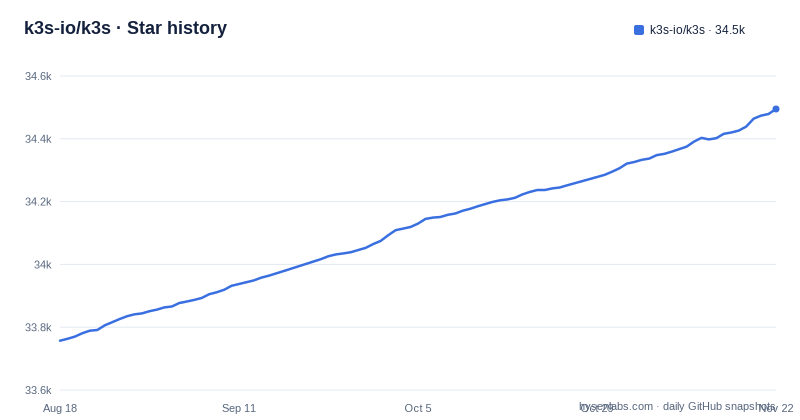
Star history
- k3s-io/k3s34,495 ★ · +738
| Repository | 2026-08-18 | 2026-11-22 |
|---|---|---|
| k3s-io/k3s | 33.8k | 34.5k |
738 Stars in the last 96 days, measured from the daily GitHub snapshot. Compare with other projects
Editorial analysis
What K3s Actually Solves
K3s exists for one reason: running Kubernetes where a full cluster is impractical. The README is explicit about the target audience: edge, IoT, CI, development, ARM, and embedding Kubernetes. If you have a Raspberry Pi, a small VM, or a CI runner that needs to spin up ephemeral pods, upstream Kubernetes with its separate etcd, kubelet, kube-apiserver, and controller-manager processes consumes too much memory and requires too much setup. K3s compresses all of that into a single binary under 100 MB. The name itself is a joke about being half the size of Kubernetes, and that is the core value proposition. It is not a fork that diverges from upstream; it is a distribution that packages Kubernetes with opinionated defaults so you do not have to assemble the pieces yourself.
The Architecture: One Process, Multiple Components
The lightweight claim comes from a specific design choice: running many Kubernetes components inside a single process. The README notes that the memory footprint is reduced by eliminating the overhead that would otherwise be duplicated for each component. Instead of separate daemons for each component, K3s runs many of them inside a single process. The second reduction is binary size, achieved by removing in-tree storage drivers and cloud providers. Both have out-of-tree alternatives via CSI and CCM, which work in K3s. The architecture also includes a websocket tunnel that exposes the kubelet API on worker nodes to the control plane, eliminating the need to open a port on workers for the kubelet. This is a meaningful security and networking simplification for edge deployments where nodes sit behind NAT or firewalls.
Storage Backends: sqlite3 by Default, etcd Optional
A notable deviation from upstream is the default storage backend. K3s uses sqlite3 instead of etcd. The README lists etcd3, MariaDB, MySQL, and Postgres as supported alternatives, but sqlite3 is the default. This is possible because K3s includes Kine, a datastore shim that translates Kubernetes API requests into SQL queries for whatever database you choose. For single-node clusters, sqlite3 is fine. For multi-server high availability, you would need to configure etcd or an external database. The trade-off is clear: sqlite3 keeps things simple and light, but it is not designed for the same write concurrency as etcd. If you plan to run a production cluster with multiple control plane nodes, you should not assume the default works for you.
Bundled Components: Convenience with Opinionated Defaults
K3s does not just package Kubernetes; it bundles a full stack. The README lists containerd and runc for the runtime, Flannel for CNI, CoreDNS for DNS, Metrics Server, Traefik for ingress, Klipper-lb as a service load balancer, Kube-router for network policy, Helm-controller for CRD-driven Helm deployments, and local-path-provisioner for local storage. These are opinionated choices. You can disable or swap any of them, but the default experience is a working cluster with ingress, DNS, and storage out of the box. That is a double-edged sword. For a quick start, it is excellent. For a production environment with existing standards, you may need to replace Traefik with your own ingress controller or Flannel with Calico. The README acknowledges this by stating these technologies can be disabled or swapped out, but the effort to do so is on you.
Installation and First Steps
The README points to the Quick Install guide on docs.k3s.io, and the repository root contains an install.sh script with an install.sh.sha256sum checksum file. What is clear is that K3s is designed to be easy to install, with minimal OS dependencies beyond a sane kernel and cgroup mounts. The binary is a single file, so installation likely involves downloading it and running it. The README also mentions auto-deploying Kubernetes resources from local manifests in realtime, which is a feature for GitOps-style workflows. You can place YAML files in a directory and K3s applies them automatically. For a development or edge environment, this reduces the need for a separate CD tool. For the exact commands, consult the Quick Install guide.
Limitations: What Is Removed and What That Means
The most significant limitation is the removal of in-tree storage drivers and cloud providers. If you use a cloud provider's managed disk or load balancer, you cannot rely on the built-in integration. You must install a CSI driver and a cloud controller manager yourself. The README says these have out-of-tree alternatives, but that is extra work. On edge devices, this is rarely a problem because you are not using cloud storage or load balancers. For a hybrid environment where you want the same Kubernetes distribution across edge and cloud, you need to plan for those additions. Another limitation is the default Flannel CNI. It is simple and works, but it does not support network policies on its own; K3s bundles Kube-router for that, but if you need advanced policy or encryption, you may need a different CNI. The README does not go into these details, but the component list makes it clear that you are getting a specific, opinionated stack.
Alternatives and How K3s Differs
The most direct alternative is upstream Kubernetes, installed with kubeadm or a distribution like kOps. The difference is not just size; it is the operational model. Upstream Kubernetes expects you to run etcd, configure networking, and manage certificates separately. K3s bundles all of that. Another alternative is MicroK8s from Canonical, which also targets lightweight deployments but uses snap packaging and has a different approach to high availability. The README does not mention MicroK8s, but the comparison is useful: MicroK8s also runs a single-node cluster with add-ons, but K3s differentiates itself by being a single binary with no OS package dependency, which is important for embedded systems where you cannot install snaps. For edge devices running a minimal Linux distribution, a single binary is easier to deploy and update than a snap. If you need a conformant cluster with minimal footprint, K3s is a strong choice, but if you need deep integration with a specific cloud provider, upstream Kubernetes with a managed control plane might be better.
Maintenance, Licensing, and Upgrade Path
K3s is licensed under Apache-2.0, which is permissive and does not impose copyleft obligations. The repository is actively maintained, with release candidates v1.34.13-rc2+k3s1, v1.35.10-rc2+k3s1 and v1.36.6-rc2+k3s1 published on 2026-10-30. The versioning scheme includes the upstream Kubernetes version, so you can track which Kubernetes release you are on. The README mentions that K3s maintains a small set of patches, well under 1000 lines, to stay close to upstream. This is important for upgrades: you are not running a divergent fork, so you can reasonably expect to upgrade between Kubernetes minor versions without major rework. However, because K3s bundles components like Traefik and Flannel, those components have their own upgrade cycles. You need to watch for changes in those defaults when upgrading K3s. Because it tracks upstream closely, the upgrade path should be fairly predictable. The main cost is learning the K3s-specific configuration for datastore and component disabling, which differs from standard kubeadm.
Editorial conclusion
Adopt K3s if you run Kubernetes on resource-constrained hardware, need a quick local cluster for development or CI, or want a conformant distribution with minimal operational overhead. Avoid it if you rely on in-tree storage drivers or cloud provider integrations, since those are removed and require out-of-tree CSI and CCM replacements. Before deploying, verify that your workloads can run with the bundled Flannel CNI or are prepared to swap in a different CNI, and check whether the default sqlite3 datastore meets your HA requirements or if you need to configure etcd or an external database. K3s is a distribution, not a fork, so it tracks upstream closely, but the opinionated bundling of Traefik, local-path-provisioner, and Klipper-lb means you should confirm those defaults align with your stack before relying on them in production.
Frequently asked questions
What does K3s stand for?
The project explains the name as a derivation rather than an abbreviation. The aim was half the memory footprint of Kubernetes, and since Kubernetes is a 10 letter word written as k8s, something half as big would be a 5 letter word written as K3s, with a 3 being an 8 cut in half vertically. There is no long form of K3s and no official pronunciation.
Is K3s the same as Kubernetes?
It is a fully conformant, production-ready Kubernetes distribution rather than a fork, and the README says so explicitly: the intent is not to change core Kubernetes functionality and to stay as close to upstream as possible. What it adds is packaging, since eleven components including Traefik, Flannel, Kine and Local-path-provisioner are bundled, and what it removes is limited to in-tree storage drivers and the in-tree cloud provider.
What is the current version of K3s?
The most recent releases listed are the release candidates v1.34.13-rc2+k3s1, v1.35.10-rc2+k3s1 and v1.36.6-rc2+k3s1, all published on 2026-10-30. The repository carries a channel.yaml file, which is where release channels are described.
Should I install K3s as root?
The repository ships two systemd units, k3s.service and k3s-rootless.service, so both shapes are accounted for. The published compose file takes a different route: the server and agent services are marked privileged: true, and the file writes the cluster credentials to a kubeconfig with mode 666 so anyone on the host can read them.
Official sources
Add this badge to your README
If you maintain this project, the badge below links readers to this analysis and shows its maintenance status from the daily GitHub snapshot. Paste the markdown into your README; add ?metric=license or ?metric=stars to the image URL for a different field.

[](https://hysenlabs.com/projects/k3s-io-k3s)Star history chart for your README
[](https://hysenlabs.com/projects/k3s-io-k3s)Was this useful?