kagent: Kubernetes Custom Resources for AI Agents, With an ADK Engine Underneath
Cloud Native Agentic AI | Discord: https://bit.ly/kagentdiscord
At a glance
- What is it?
- kagent defines agents, model providers and MCP tools as Kubernetes custom resources and runs them through an engine built on Google's ADK. It fits teams already operating clusters with kubectl; it does not fit anyone who wants an agent runtime without a control plane.
- Who is it for?
- Adopt kagent if your agents need to act on cluster resources and you already run Kubernetes with a working kubectl and GitOps flow. Do not adopt it if you want an agent runtime outside a cluster, or if you cannot accept that the engine layer is built on Google's ADK and therefore inherits that project's release cadence.
- Can I use it commercially?
- Yes. Apache-2.0 is a permissive licence: you can use, modify and sell software built on it, as long as you keep its copyright and licence notices.
- Is it still maintained?
- Yes. The repository last received commits 1 day ago.
- What is it written in?
- Mainly Go, according to GitHub's language statistics.
Answers come from the project's GitHub data, last synced on November 15, 2026, and from our analysis. They are not legal advice.
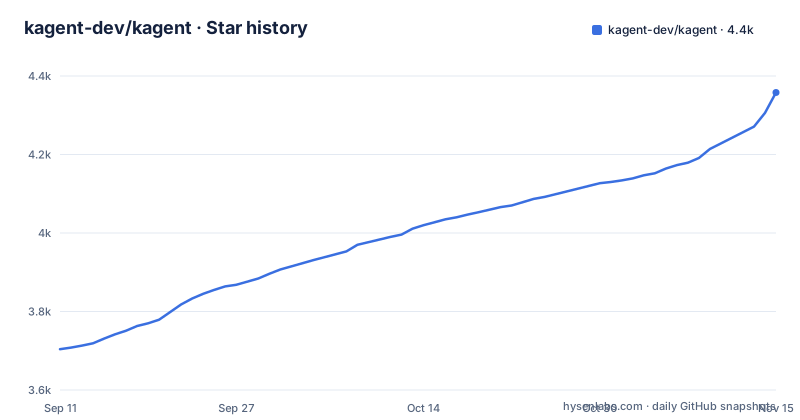
Star history
- kagent-dev/kagent4,358 ★ · +654
| Repository | 2026-09-11 | 2026-11-15 |
|---|---|---|
| kagent-dev/kagent | 3.7k | 4.4k |
654 Stars in the last 65 days, measured from the daily GitHub snapshot. Compare with other projects
Editorial analysis
The Problem: Agent Configuration Lives Outside the Cluster It Operates On
Most agent frameworks keep their configuration in an application directory: a Python file with a system prompt, a JSON list of tools, an environment variable holding an API key. That works fine when the agent only touches an API. It stops working when the agent's job is to inspect or change things inside a Kubernetes cluster, because now you have two control planes. The agent's definition lives in a repo and is deployed one way; the resources it manipulates live in the cluster and are deployed another way. Rollback, review and access control diverge between the two.
kagent's answer is to make the agent itself a cluster object. The README states that agents are "a system prompt, a set of tools and agents, and an LLM configuration represented with a Kubernetes custom resource called 'Agent'." The audience follows from that sentence. This is for platform and infrastructure engineers who already treat kubectl as their primary interface and who want agent definitions to go through the same review and apply path as a Deployment. It is not aimed at someone prototyping a chatbot in a notebook.
Four Components, Three Custom Resource Types
The README lists four core components. A controller watches the kagent custom resources and creates whatever is needed to run the agents. A UI manages agents and tools from a browser. An engine runs the agents, and the README names the runtime it uses: ADK, Google's Agent Development Kit. A CLI manages agents and tools from a terminal.
The data flow implied by that split is conventional for an operator pattern. You write YAML, the controller reconciles it into running workloads, the engine executes the agent loop, and the UI or CLI is a client over the same resources. What matters is the resource model. There are three kinds. Agent is the unit of work. ModelConfig represents an LLM provider or model. ToolServer represents an MCP server whose tools agents can call.
The ToolServer design is the part worth pausing on. The README says all tools are Kubernetes custom resources and "can be used by multiple agents." A server can be shared among agents, subject to its namespace and access rules. Current 1.x documentation uses a namespaced `RemoteMCPServer` and allows cross-namespace references only when the server admits the referring namespace and other access conditions are met; consult the documentation for the version you install. The trade-off is coupling: a broken ToolServer is now a shared failure, not a single agent's problem.
Providers and MCP Servers the README Names
On the model side, the README lists OpenAI, Azure OpenAI, Anthropic, Google Vertex AI and Ollama, plus "any other custom providers and models accessible via AI gateways." Each is represented by a ModelConfig resource. That list covers the common hosted providers and one local runtime, which is enough to run the same agent against a hosted model in production and Ollama on a laptop without rewriting the agent definition, provided the ModelConfig is the only thing that changes.
On the tool side, the README says kagent ships an MCP server with tools for Kubernetes, Istio, Helm, Argo, Prometheus, Grafana and Cilium. Read that list carefully, because it is a statement about scope. Every named integration is infrastructure tooling. The bundled toolset is aimed at cluster operations, and anything outside that set you would supply yourself as an MCP server. Whether the bundled server exposes a stable, documented tool schema per integration is not something the README answers, and that is the first thing to check in the docs before you build on it.
Getting It Running: Install, Then Apply YAML
The README does not inline installation commands. It points to two pages: a Quick Start at kagent.dev/docs/kagent/getting-started/quickstart and an Installation guide at kagent.dev/docs/kagent/introduction/installation. Anyone evaluating kagent should read those two pages rather than reconstructing a helm or kubectl invocation from the repository description, because the exact install path is the one thing the README deliberately delegates.
What the README does commit to is the workflow after installation. The core principles section says agents and tools are managed "using familiar kubectl workflows" and that kagent is declarative, so you "define the agents and tools in a YAML file." That means the day-to-day loop is: author an Agent resource with a system prompt, a model reference and a tool list; author or reference a ModelConfig; point at a ToolServer; apply; observe. The controller does the rest.
The remaining operational surface named in the README is tracing. The README says kagent supports OpenTelemetry tracing and links to a tracing page under getting-started. It does not specify exporter configuration keys, sampling defaults or which spans are emitted. If trace coverage is part of your evaluation, that page is where the answer is, not the README. There is also a DEVELOPMENT.md file for running everything locally, which is the reference point if you want to work on kagent itself rather than consume it.
The ADK Dependency Is the Structural Constraint
The engine runs agents using ADK. That single sentence carries more architectural weight than anything else in the README, and the README gives it one line. It means the agent execution semantics, the tool-calling loop and the agent composition model are not kagent's to define. They belong to an upstream project with its own versioning, its own breaking changes and its own opinions about how multi-agent systems should be structured.
For an operator, this is a real limitation. You can pin kagent to a release, but you cannot pin away a change in how ADK represents an agent's internal state or how it sequences tool calls. When ADK shifts, kagent either follows or diverges, and either path has a cost. The README also describes agents as containing "a set of tools and agents," which suggests kagent composes agents hierarchically. Those are the questions to ask before designing anything non-trivial.
The second constraint is the cluster requirement itself. Everything in kagent assumes a Kubernetes API server. If your agent's job is to summarize documents on a schedule, or to sit behind an HTTP endpoint in a serverless function, kagent adds a control plane you do not need. The declarative model is a benefit only when you already have something reconciling declarative state.
Compared With a Plain ADK Application
The obvious alternative is to skip kagent and write the ADK application directly. The difference is not the agent loop, since kagent uses ADK anyway. The difference is everything around it: where the agent definition lives, how it is versioned, how it is granted access to cluster resources, and how you find out what it did.
A plain ADK application stores its configuration in code and its credentials in whatever secret store you already use for that application. Deploying a change means a build and a rollout. An agent built on kagent stores its configuration in a custom resource, so a prompt change is a YAML diff that goes through the same review as any other manifest, and the controller reconciles it. You also get the UI and CLI as ready-made clients over those resources, which a hand-rolled application would have to build.
The cost of that trade is the operator itself. A plain application has one moving part. kagent has a controller, an engine, a UI and a CLI, plus the CRDs they depend on, plus the ADK version underneath. If your team does not already run an operator-based platform, you are adopting a platform to get a feature. Choose kagent when the Kubernetes integration is the point. Choose a direct ADK application when it is incidental.
Versioning, Licence and What to Verify
The GitHub releases show v0.10.1 released on 2026-09-08, four days after v0.10.0 on 2026-09-04, with v0.10.0-rc6 before that on 2026-09-01. A patch landing four days after a minor release is normal for a project at this stage, but the 0.x version number is the honest signal here: the API surface is not frozen. The README says the project is "currently in active development" and points to a Kanban board for the roadmap. Treat the CRD schemas as movable between minor versions and read the release notes before upgrading.
Licensing is Apache-2.0, which is permissive and includes an explicit patent grant. That is the standard choice for a CNCF-adjacent project and imposes no copyleft obligation on your own code. It says nothing about the licence of ADK or of any MCP server you connect, and those are separate questions worth checking independently. This is not legal advice.
On cost, two statements hold. Maintenance cost scales with the number of ToolServers and ModelConfigs you maintain, since those are shared resources with their own lifecycle. Upgrade cost is the ADK version coupling described above, plus whatever CRD migrations a release requires. Verify the CRD schemas against your cluster version and confirm the v0.10.x release notes for field changes before you write production manifests.
Editorial conclusion
Adopt kagent if your agents need to act on cluster resources and you already run Kubernetes with a working kubectl and GitOps flow. Do not adopt it if you want an agent runtime outside a cluster, or if you cannot accept that the engine layer is built on Google's ADK and therefore inherits that project's release cadence. Before committing, verify the Agent, ModelConfig and ToolServer CRD schemas against your cluster version, and confirm the v0.10.x release notes for anything that changes those fields.
Frequently asked questions
What is kagent?
A Kubernetes native framework for building, deploying and managing AI agents. An Agent is a Kubernetes custom resource that brings together an agent's behaviour and runtime configuration, and both are managed through the Kubernetes API and familiar command line workflows.
How do I install kagent?
The page carries no command. It links a getting-started page and an installation guide, both under the version 1.x documentation, and points at the architecture guide held in the repository for how agents actually run. The repository is built with a makefile over either a docker buildx or a podman.
Is kagent cncf?
The page never says so. It asks contributors to share tips in a channel of that foundation's Slack workspace and lists community meetings on a shared calendar, which places the project alongside that community without claiming any project status.
What are the four types of agents?
The page does not enumerate four types. It defines seven core concepts, of which agents are one: the Agent resource, a shareable Agent Template, a Harness that picks the runtime, model configuration, MCP tools, sessions and observability.
is kagent open source
Yes, under the Apache 2.0 licence, with a licence file in the repository. The code of conduct appears both in the repository and in a separate community repository.
What runtimes can kagent agents use?
Two first-party toolkits, one for Go and one for Python, plus two named third-party agent runtimes and any custom runtime you register. The harness on an agent selects which one runs, and which model providers are available depends on that choice.
Official sources
Add this badge to your README
If you maintain this project, the badge below links readers to this analysis and shows its maintenance status from the daily GitHub snapshot. Paste the markdown into your README; add ?metric=license or ?metric=stars to the image URL for a different field.

[](https://hysenlabs.com/projects/kagent-dev-kagent)Star history chart for your README
[](https://hysenlabs.com/projects/kagent-dev-kagent)Was this useful?