KodExplorer: a PHP file manager that tries to be an IDE
A web based file manager,web IDE / browser based code editor
At a glance
- What is it?
- Six thousand stars for a single drop-in PHP application that gives a shared host a file browser, an editor and a document preview, now in maintenance mode.
- Who is it for?
- KodExplorer is a reasonable answer to a specific constraint: no shell, no root, no daemons, just a PHP upload into a hosting account. Under those conditions it delivers a lot, including archive handling, chunked uploads and a surprisingly capable editor.
- Can I use it commercially?
- Not without permission. GitHub finds no licence file in the repository, and without a licence all rights are reserved by default: you may read the code but not reuse it. Check the README, or ask the authors, before using it.
- Is it still maintained?
- Yes. The repository last received commits 14 days ago.
- What is it written in?
- Mainly PHP, according to GitHub's language statistics.
Answers come from the project's GitHub data, last synced on October 23, 2026, and from our analysis. They are not legal advice.
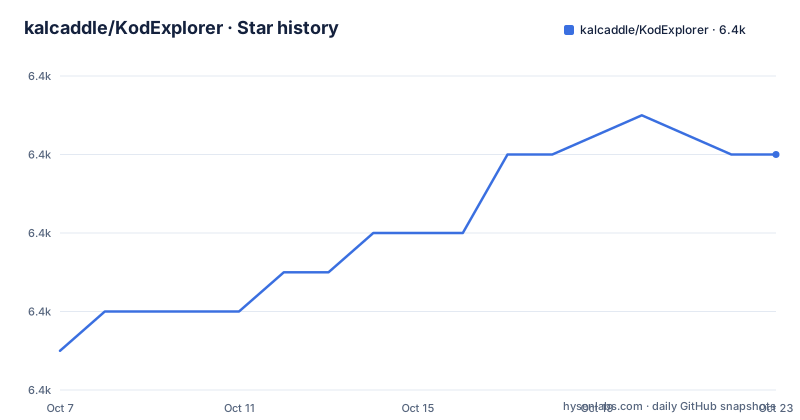
Star history
- kalcaddle/KodExplorer6,396 ★ · +5
| Repository | 2026-10-07 | 2026-10-23 |
|---|---|---|
| kalcaddle/KodExplorer | 6.4k | 6.4k |
5 Stars in the last 16 days, measured from the daily GitHub snapshot. Compare with other projects
Editorial analysis
The README leads with a successor, not a feature list
The first block of the README is a recommendation to move to a different project, kodbox, described as a redesigned upgrade of this one. A line below it says the project is in maintenance mode and will not gain new features, and a download badge still advertises an archive of roughly 953 KB.
That framing matters for anyone evaluating it now. KodExplorer is not going to become something else, so the question is whether what it already does fits your situation.
The GitHub license field is empty, while the README carries a GPLv3 badge. The README itself points to a changelog file, a documentation site at doc.kodcloud.com, a demo instance with shared demo credentials, and mirrors on both GitHub and Gitee. Forks are at 1814 against 6394 stars, which for a project people deploy onto their own servers is a healthy ratio.
Install is a git clone and a recursive chmod
The README gives two install paths, and both end the same way. From source:
git clone https://github.com/kalcaddle/KODExplorer.git
chmod -Rf 777 ./KODExplorer/*
Or from the archive:
wget https://github.com/kalcaddle/KODExplorer/archive/master.zip
unzip master.zip
chmod -Rf 777 ./*
The only stated requirement is PHP 5, and it runs on Linux, Windows or Mac. There is no database, no build step and no configuration wizard, which is exactly the appeal for shared hosting.
The `chmod 777` is also the reason to read the rest of this before deploying. The project's own FAQ answers how to make the system more secure, and the answers are four manual steps: choose a complex administrator password, enable the login verification code, configure the web server not to list directory contents, and set the `open_basedir` path in PHP. None of that happens automatically.
File management built around the desktop metaphor
The feature list reads like a desktop file manager translated to a browser, which is the project's whole pitch. Rich context menus, toolbar, drag and drop and keyboard shortcuts are the first items. Everything else follows from that framing: copy, cut, paste, move, rename, remove, create, multi-select with mouse and keyboard combined, and a file tree that can keep several subfolders open at once.
The implementation details are specific enough to be credible. Sorting is natural rather than lexicographic, done client side. Filenames and paths go through a UTF-8 normalizer, and there is a sanitizer plus multi-charset handling for garbled names. Upload supports chunking, background drag and drop, folder upload in Chrome, Firefox and Edge, and extraction that lands in the current directory rather than creating a wrapper folder.
Archive support lists zip, rar, 7z, tar, gzip and tgz for create, extract and preview. Search covers both filenames and file contents, with exclusion by name. There is a Quicklook for common types and browser-based playback for video and audio.
The editor covers more ground than expected
Syntax highlighting for over 120 languages, more than 15 themes, multiple tabs with drag and drop reordering, multiple cursors and selections, code folding, line wrapping, automatic indentation and a toggle between soft and real tabs.
There is also Emmet for HTML, CSS and JavaScript, a live syntax checker covering JavaScript, CoffeeScript, CSS, XQuery, HTML and PHP, formatters for JavaScript, CSS, HTML, JSON and PHP, regex search and replace with matching-parenthesis highlighting, and visible whitespace toggles.
Two items set it apart from a plain textarea with highlighting. Key bindings are fully customizable with vim and Emacs modes available, which is a real concession to people who arrived from a terminal. And Markdown support includes live preview and conversion to HTML.
The README is candid that this was written from scratch, calling it a nice try. The docs site is separate from the repository, so the editor's configuration surface is documented somewhere other than in the code you would read to change it.
Users and rights, and the shape of the tree
Multi-user support with custom role groups is listed under file management, along with configurable access rights, file type restrictions and interface preferences. Screenshots in the README show both a system role screen and theme customization, so permissions are a first-class concept here rather than a single shared password.
The repository is small in structure: `index.php` at the root, then `app/`, `config/`, `data/`, `plugins/` and `static/`. With no `composer.json` and no package manifest in the tree, dependencies are vendored, which is consistent with the single-directory deployment the install steps assume.
Release history is thin and explains itself. Version 4.54, published 2026-03-13, has a one-line release note. Before that, 4.52.01 from 2023-12-14 and 4.51.03 from 2023-04-12 have empty bodies, so the `ChangeLog.md` file in the repository root is the better record of what actually changed between versions.
Editorial conclusion
KodExplorer is a reasonable answer to a specific constraint: no shell, no root, no daemons, just a PHP upload into a hosting account. Under those conditions it delivers a lot, including archive handling, chunked uploads and a surprisingly capable editor. What it will not give you is a safe default configuration, because the documented install requires recursive world-writable permissions and the README's own security section tells you to disable directory listing and configure `open_basedir` yourself. The author recommends kodbox for new deployments, so the sensible move is to read the security FAQ before you install anything rather than after, and to treat version 4.54 as the final shape of this codebase.
Frequently asked questions
What is the best browser-based code editor?
It depends on what you are editing and where it runs. KodExplorer is a browser-based editor bundled with a PHP file manager, which suits shared hosting where you cannot install a desktop editor or run a container. For a standalone editor in the browser, other projects focus more narrowly on editing and less on file management.
What does KodExplorer need to run?
PHP 5 or newer and a writable directory. There is no database and no build step. The documented install is a git clone or a zip download followed by a recursive chmod that grants write permission to every file in the directory.
Is KodExplorer still being developed?
The README says the project is in maintenance mode and will not receive new features, and it recommends a redesigned successor project called kodbox. Version 4.54 was published on 2026-03-13 with only a one-line release note.
How do I make a KodExplorer installation more secure?
The project's own FAQ lists four manual steps: use a complex administrator password, enable the login verification code, configure the web server so it does not list directory contents, and set the `open_basedir` path in PHP. The install instructions themselves do a recursive chmod 777, so these steps matter.
Can KodExplorer handle archives and file uploads?
Yes. It creates, extracts and previews zip, rar, 7z, tar, gzip and tgz archives, and uploads support chunking, background drag and drop, folder upload in Chrome, Firefox and Edge, and extraction directly into the current directory.
Official sources
Add this badge to your README
If you maintain this project, the badge below links readers to this analysis and shows its maintenance status from the daily GitHub snapshot. Paste the markdown into your README; add ?metric=license or ?metric=stars to the image URL for a different field.

[](https://hysenlabs.com/projects/kalcaddle-kodexplorer)Star history chart for your README
[](https://hysenlabs.com/projects/kalcaddle-kodexplorer)Was this useful?