WordPress on GitHub is a mirror whose readme.html documents a browser-only upgrade path
WordPress, Git-ified. This repository is just a mirror of the WordPress subversion repository. Please do not send pull requests. Submit pull requests to https://github.com/WordPress/wordpress-develop and patches to https://core.trac.wordpress.org/ instead.
At a glance
- What is it?
- The WordPress/WordPress repository is a read-only Git mirror of the Subversion trunk, packaged as a deployable document root rather than a source tree. Its readme is an HTML page that documents installing and updating in a browser, with a manual path that deletes files and no rollback anywhere.
- Who is it for?
- Site operators who already have a host and a backup routine can install from the five minute procedure and keep it current with the automatic updater, but the manual path deserves a rehearsed rollback before you need it. Contributors should send pull requests to wordpress-develop and patches to core.trac.wordpress.org, because nothing proposed here will merge.
- Can I use it commercially?
- Check first. The repository uses a licence we do not classify automatically, so read its LICENSE file before any commercial use.
- Is it still maintained?
- Yes. The repository received new commits within the last day.
- What is it written in?
- Mainly PHP, according to GitHub's language statistics.
Answers come from the project's GitHub data, last synced on November 13, 2026, and from our analysis. They are not legal advice.
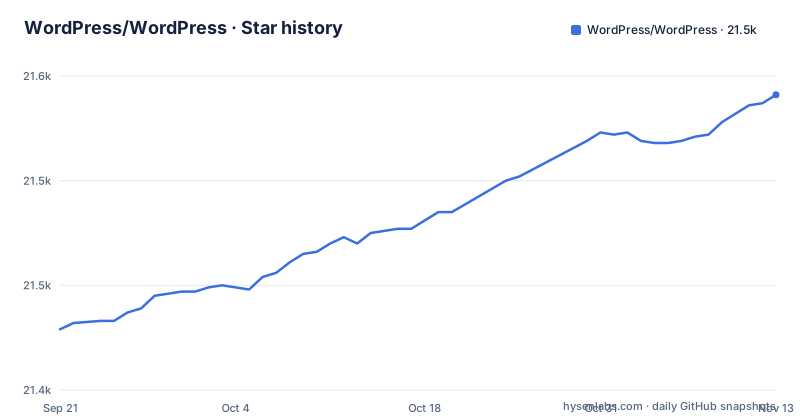
Star history
- WordPress/WordPress21,541 ★ · +112
| Repository | 2026-09-21 | 2026-11-13 |
|---|---|---|
| WordPress/WordPress | 21.4k | 21.5k |
112 Stars in the last 53 days, measured from the daily GitHub snapshot. Compare with other projects
Editorial analysis
The repository description is one long redirect
The repository description is a single instruction. It reads WordPress, Git-ified, then says this repository is just a mirror of the WordPress subversion repository, asks that pull requests not be sent, and gives two destinations instead: https://github.com/WordPress/wordpress-develop for pull requests and https://core.trac.wordpress.org/ for patches. The default branch is master, the primary language is PHP, the homepage is https://wordpress.org, and no GitHub releases are published here, which fits a mirror rather than a source of truth. The consequence is that a first-time contributor's instinct is the wrong one. The git history in this repository is useful for reading and blame, but a change proposed here has no route to a release, and the two upstream destinations use different tools and have different expectations for what a patch looks like.
The readme is an HTML page that asks not to be indexed
Unlike most projects, the readme here is a web page rather than a Markdown file: readme.html at the repository root. It carries a meta tag whose content is noindex,nofollow, a title rendered as WordPress, ReadMe, and a stylesheet link to wp-admin/css/install.css with a version query of 20100228, a date stamp far older than the current state of the tree. The page opens with a paragraph about WordPress being a very special project, signed by Matt Mullenweg, and describes the platform as a Semantic Personal Publishing Platform. The effect on readers is mostly about how the file arrives: tooling that expects a plain text or Markdown README has nothing to parse here, and the noindex directive asks search engines to leave this copy out of their results in favour of the site it links to.
Updating deletes files and keeps only what you edited
The manual update procedure is the part of this document most likely to cost someone work. It says to make backup copies of any files you may have modified, such as index.php, then to delete the old WordPress files while saving the ones you have modified, then to upload the new files, and finally to point the browser at /wp-admin/upgrade.php. The instruction to preserve edited files sits awkwardly beside the closing advice in the same file, which says you shouldn't modify any of the core code and points developers at the plugin API instead. Both are aimed at different readers. For an operator who patched a core file years ago, that patch is not carried forward: it has to be reapplied by hand after every update, and nothing in this procedure notices when the patched file has changed shape between releases.
The only upgrade path is an admin page, with no rollback
The automatic updater gets two steps: open wp-admin/update-core.php in a browser and follow the instructions, followed by a line reading you wanted more, perhaps, that's it. There is no command line path in this document, no scripted update, no mention of a deployment tool, and no rollback step anywhere in readme.html. That absence has a practical shape. An update that succeeds is easy. An update that breaks a site leaves the operator holding a browser-only tool plus a manual procedure that begins by deleting files. Anyone who needs to undo a bad update has to restore a backup they made themselves, because neither path records the version being replaced and neither offers a way back to it.
The manual config fallback puts database credentials in an uploaded file
When the installer cannot write the configuration file, the documented fallback has you open wp-config-sample.php in a text editor like WordPad or similar, fill in the database connection details, save it as wp-config.php, upload it, and open wp-admin/install.php again. Two other details from the same list carry direct consequences: if you did not provide a username, it will be admin, and if you did not enter a password, the installer issues one for you to note down. An operator who skips either step ends up with a predictable account name on a site reachable from the internet. The document warns only that the first path may not work on all web hosts, which means the people most likely to take the manual fallback are the same people running on unusual hosts.
Requirements state a floor of PHP 7.4 and a much higher recommendation
The requirements arrive in two tiers that are far apart. The stated minimums are PHP version 7.4 or greater and MySQL version 5.5.5 or greater. Above them sit the recommendations: PHP 8.3 or greater, MySQL 8.0 or greater or MariaDB 10.11 or greater, the mod_rewrite Apache module, HTTPS support, and a link to wordpress.org on your site. A host on PHP 7.4 satisfies the stated requirement while sitting a major PHP version behind the recommendation, and this file says nothing about PHP releases past 8.3 or about MariaDB versions newer than 10.11. Reading only the System Requirements list gives you a floor that will pass an installer and a stack that nobody recommends running.
Every top level file is something a web server would serve
The entries at the root are index.php, wp-load.php, wp-settings.php, wp-login.php, wp-mail.php, wp-cron.php, wp-trackback.php, wp-signup.php, wp-comments-post.php, wp-activate.php, wp-blog-header.php, wp-config-sample.php, wp-links-opml.php, xmlrpc.php, readme.html, license.txt, and the wp-admin, wp-includes, and wp-content directories, which matches the first install step: unzip the package in an empty directory and upload everything. This is the layout of a document root, not of a source checkout, and wp-content is where plugins and themes are added. It also means uploading everything places wp-admin/install.php and wp-config-sample.php inside the reachable web root, which is why the manual configuration fallback matters as much as the happy path. The one endorsed extension route is the plugin API, and the same page says plainly that you shouldn't modify any of the core code.
Editorial conclusion
Site operators who already have a host and a backup routine can install from the five minute procedure and keep it current with the automatic updater, but the manual path deserves a rehearsed rollback before you need it. Contributors should send pull requests to wordpress-develop and patches to core.trac.wordpress.org, because nothing proposed here will merge. Anyone evaluating WordPress for the first time should read the recommended tier of system requirements, not just the minimums.
Frequently asked questions
how to install wordpress
Unzip the package in an empty directory and upload everything, then open wp-admin/install.php in a browser, which walks through creating a wp-config.php with your database connection details and then sets up the tables. If that page does not work on your host, edit wp-config-sample.php with a text editor, save it as wp-config.php, upload it, and open wp-admin/install.php again.
how to use wordpress
After the installer sends you to wp-login.php, you sign in with the username and password chosen during installation, and change a generated password from the Profile screen. The readme also covers importing from other systems through the import tools at wp-admin/import.php, which need a working install first, and keeping the site current through wp-admin/update-core.php or a manual file replacement followed by /wp-admin/upgrade.php.
What is WordPress used for?
Its own readme calls it a Semantic Personal Publishing Platform, and it notes the project is the official continuation of b2/cafelog, which came from Michel V. Extending it is meant to happen through the plugin API rather than by editing core files, and the document points developers at the Plugin Developer Handbook for that.
Is WordPress still relevant in 2026?
This repository is not archived and received a push on 2026-11-02, and the tree still carries the standard WordPress entry points. Changes do not land here: the repository description says it is just a mirror of the WordPress subversion repository, with pull requests going to wordpress-develop and patches to core.trac.wordpress.org.
Official sources
Add this badge to your README
If you maintain this project, the badge below links readers to this analysis and shows its maintenance status from the daily GitHub snapshot. Paste the markdown into your README; add ?metric=license or ?metric=stars to the image URL for a different field.

[](https://hysenlabs.com/projects/wordpress-wordpress)Star history chart for your README
[](https://hysenlabs.com/projects/wordpress-wordpress)Was this useful?