Promnesia: Browser History with Context
Another piece of your extended mind
At a glance
- What is it?
- Promnesia is a Chrome and Firefox extension that adds context to browsing history, including chats, notes, annotations, bookmarks, and related visits. It is best suited to people who already keep personal information in searchable local files or services.
- Who is it for?
- Adopt Promnesia if you regularly save links through messages, notes, annotations, or bookmarks and can maintain the indexed source data. Do not choose it for basic browser-history search alone, or if a three-month browser record with no external context is sufficient.
- Can I use it commercially?
- Yes. MIT is a permissive licence: you can use, modify and sell software built on it, as long as you keep its copyright and licence notices.
- Is it still maintained?
- Yes. The repository last received commits 41 days ago.
- What is it written in?
- Mainly Python, according to GitHub's language statistics.
Answers come from the project's GitHub data, last synced on October 23, 2026, and from our analysis. They are not legal advice.
Star history
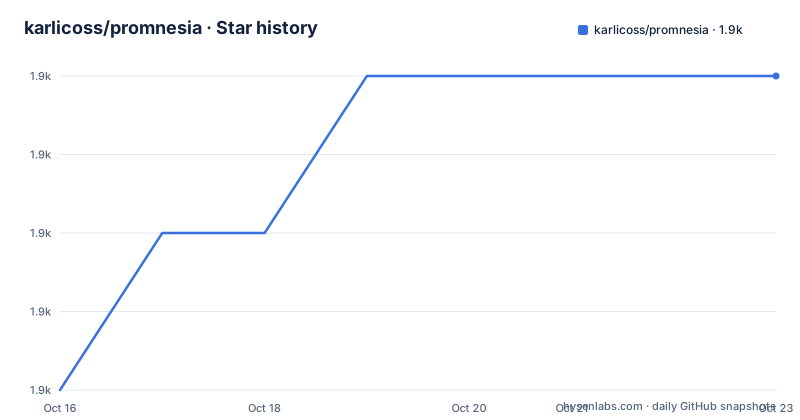
- karlicoss/promnesia1,908 ★ · +4
| Repository | 2026-10-16 | 2026-10-23 |
|---|---|---|
| karlicoss/promnesia | 1.9k | 1.9k |
4 Stars in the last 7 days, measured from the daily GitHub snapshot. Compare with other projects
Editorial analysis
Why Promnesia Treats a Link as More Than a Visit
Promnesia addresses a specific gap in ordinary browser history. A browser record can tell you that a URL was visited and when it was visited, but it usually does not tell you why the link mattered. The README describes situations such as forgetting who sent a useful link, discovering that a bookmark has an annotation elsewhere, or wanting to return to a YouTube item saved in a watch-later list months earlier.
The project is aimed at people whose useful web references are spread across several systems. A link may appear in Telegram, Twitter, Reddit, a personal text file, an Instapaper annotation, a Hypothesis highlight, or a browser bookmark. Promnesia treats those appearances as context associated with a URL, then presents that context from the browser.
The distinction matters because browser history is local and, according to the README, generally stores only three months. Promnesia is therefore not positioned as a complete browser-history archive. Its purpose is to connect a current page with personal records that can survive beyond that period. The README lists Chrome and Firefox as supported browsers, including Firefox for Android.
The Context Sidebar and Link Marking
The central interaction is a sidebar associated with links on the current page. The README says that a green eye marks a link that has been visited before and has associated contexts. Selecting that marker opens the sidebar with more information about the visits. A context can point to a Telegram message, a tweet, a note in a personal file, a bookmark, or an annotation.
Promnesia also handles links that are not necessarily the current page. Its examples include clicking a context to open Telegram at the message containing the URL, opening a tweet where the link was mentioned, or opening an Emacs file containing a note. For an Org-mode file, the README describes jumping to the heading where the link occurred. That is a different experience from reading a browser-history row and manually searching another application.
The extension can also mark previously explored links on the current page and identify posts on a blog page that have already been read. The linked feature guide covers additional behavior, but README.org does not enumerate every supported source or configuration option. The visible design centers on URL matching plus a context index, rather than on semantic search across arbitrary personal documents.
The README's screenshots also show annotations and highlights connected to a link. Promnesia can surface an Instapaper annotation or Hypothesis highlight and can identify text that matched selected content in personal notes. These examples indicate source-specific integration. They do not establish that arbitrary services can be queried through the same mechanism without separate configuration.
Indexing External Sources into URL Context
The repository layout contains separate areas for the Python package, browser extension, documentation, tests, benchmarks, and Docker assets. `pyproject.toml` identifies SQLAlchemy as its database API and defines separate optional dependency groups for the indexer and server. This separation is consistent with a design in which data is indexed outside the browser and then queried when the extension needs context.
The package metadata calls Promnesia an enhancement of browsing history. Its direct dependencies include `platformdirs` for portable user-directory detection, `tzlocal` for local timezone guessing, `more_itertools`, `typing-extensions`, and `sqlalchemy>=2.0`. The default dependencies also include `promnesia[indexer]` and `promnesia[server]`. The project metadata explains that these dependencies remain in the default package for backwards compatibility, even though the indexer and server may run on separate hosts or containers.
The `indexer` extra adds `urlextract`, while the `server` extra includes `fastapi` and `uvicorn[standard]`. The `optional` group includes `logzero` and `python-magic`. The `html` group includes `beautifulsoup4` and `lxml` for extracting links from pages. There is also an `HPI` dependency group associated with the HPI package.
The README describes a useful source format: personal data represented in a searchable, grepable form can be fed into the plugin. It gives chat and notes examples rather than claiming that every application can be imported automatically. Promnesia can expose context when the relevant records are available to its index, but README.org does not claim that arbitrary browser sessions, encrypted services, or proprietary databases work without additional setup.
The green marker therefore represents an indexed association, not merely a browser cache entry. If a source is absent, unreadable, or not configured, the README gives no basis for assuming that its contexts will appear. This distinction separates a useful personal-data layer from a claim of universal search coverage.
Python Packaging and the First Browser Check
README.org links to Install and setup sections, but it does not document a complete command sequence in the sections shown here. The package configuration requires Python `>=3.12`. The repository also defines scripts, tests, documentation, and Docker directories, but README.org does not document a complete container deployment sequence.
Because README.org does not show the installation command, this article does not invent a package installer command or configuration flag. The concrete starting requirement documented by `pyproject.toml` is Python 3.12 or later. The browser component must also be obtained for Chrome or Firefox through the extension listings linked by the README.
After installation, the first useful check can remain simple: open a page containing links and look for the extension's markers. A previously encountered and indexed link may receive the green eye indicator. Clicking the indicator is intended to open the sidebar and expose related contexts. For a link found in a chat, the context can point back to the original message. For a link found in a personal note, it can point to the corresponding file or heading. For an annotated page, the sidebar can identify the annotation or highlights.
A useful first verification is therefore the chain Promnesia promises: open a page, confirm whether links show prior-visit markers, and inspect one returned context. If a marker is absent, possible explanations include missing source indexing, a URL mismatch, unavailable local data, or an unsupported integration. The README links to a separate troubleshooting guide but does not establish that every source behaves identically.
What Promnesia Does Not Solve
The first limitation is scope. Promnesia is a context layer over browsing history, not a universal personal-data search engine. The README emphasizes links encountered in chats, Twitter, Reddit, text files, bookmarks, and annotation services. It does not claim that Promnesia understands every application or can recover information from services whose data is not accessible.
The second limitation is source coverage. Personal notes and files can be valuable because they are searchable and close to existing workflows, but not every format is necessarily equally easy to index. The README mentions plaintext chat representations and grepable sources, while the repository contains source-specific integration code and documentation. It does not state that malformed files, inaccessible paths, or incomplete exports always produce no results, so users should check the relevant source documentation before migration.
The third limitation is browser-history retention. The README says browser history is stored locally for three months. Promnesia can make older associations more useful when those associations exist elsewhere, but it cannot recreate a deleted browser visit unless another indexed source records that visit. Users who need a complete chronological archive of browser activity should not treat the extension as a replacement for dedicated history retention.
There is also a mobile qualification. The README explicitly supports Firefox for Android and shows a mobile panel screenshot, but it does not establish that every desktop feature, file jump, or annotation integration is available on Android. Mobile users should verify the exact feature they need rather than assume desktop parity.
Promnesia Versus Conventional History Search
A conventional browser-history search answers a narrow question: when did this browser visit this URL, and perhaps which URLs belong to the same domain. Promnesia follows a different retrieval path. It looks for personal references to the URL and presents the surrounding source, such as the message, tweet, note, bookmark, or annotation where the reference appeared.
This is a difference in approach, not simply a different search interface. History-first tools organize records around browser sessions. Promnesia organizes them around the URL as a shared key across separate personal systems. That makes it more useful when the reason for saving a link is scattered across applications. It also makes configuration and source coverage more important because the answer depends on which sources have been indexed.
Promnesia is not a better fit when the user wants only ordinary browser filtering, chronological browsing records, or a self-contained archive with no external integrations. Its documented value is strongest for people who already save and discuss links in multiple places and want to return to the original context.
The README also describes direct and child visits in its sidebar examples. This indicates that context can include relationships among pages, not only a flat list of matching URLs. However, README.org does not define the full ranking or retrieval algorithm, so exact ordering behavior should be verified in the linked feature guide or source code.
Maintenance, Licensing, and Adoption Cost
The repository is not archived, and its last push was on 2026-09-12. Recorded releases include `extension-v.1.4.1` dated 2026-04-07, `v1.5.20251011` dated 2025-10-11, and `v1.4.20250909` dated 2025-09-09. The October 2025 release notes identify a minimum Python increase to 3.12, showing that runtime requirements can change during upgrades.
Recent repository activity does not establish compatibility with every external service. Promnesia depends on source integrations and on the data exported or made available by services such as Telegram, Twitter, Reddit, Instapaper, Hypothesis, and local editors. A service-side change can affect an integration even when the Python package itself has not changed. The linked troubleshooting guide is the relevant first place to inspect for an existing installation problem.
`pyproject.toml` separates indexer, server, optional, HPI, and HTML dependencies. That structure supports different deployment roles, although the default package retains both the indexer and server groups for backwards compatibility. Users may need to decide whether those components run locally, on separate hosts, or in containers. The existence of Docker files shows container assets in the repository, but README.org does not document enough of their configuration to prescribe a production setup.
The project uses the MIT License. That license governs use, modification, distribution, and notice obligations, but this article does not provide legal advice. The practical upgrade cost is more likely to involve Python compatibility, changing exports, and integration maintenance than the basic license terms. Before replacing an existing workflow, check the changelog for source-specific changes and test one known link from each personal system you intend to use.
Editorial conclusion
Adopt Promnesia if you regularly save links through messages, notes, annotations, or bookmarks and can maintain the indexed source data. Do not choose it for basic browser-history search alone, or if a three-month browser record with no external context is sufficient. Verify first that Python 3.12 or later is available, that the extension can access the relevant sources, and that the supported integrations match the services where your link history actually lives.
Frequently asked questions
What problem does Promnesia solve?
It adds personal context to browsing history, such as the Telegram message, tweet, note, bookmark, or annotation where a URL was encountered. The README presents it as a way to answer why a link matters, not only when it was visited.
Which browsers support Promnesia?
The README lists Chrome and Firefox, including Firefox for Android. It does not specify support for other browser families.
What Python version does Promnesia require?
`pyproject.toml` specifies Python `>=3.12`. README.org links to installation instructions, but it does not include a complete installation command in the sections shown.
Can Promnesia show where a link was mentioned in a chat?
Yes, the README describes clicking a context associated with a Telegram message to jump to that message. It gives similar examples for tweets and personal notes, provided the relevant source has been indexed.
Does Promnesia replace browser history?
No. The README presents Promnesia as an enhancement of browsing history. It says browser history is generally retained locally for three months, while external sources can provide older context when those sources are available.
Official sources
Add this badge to your README
If you maintain this project, the badge below links readers to this analysis and shows its maintenance status from the daily GitHub snapshot. Paste the markdown into your README; add ?metric=license or ?metric=stars to the image URL for a different field.

[](https://hysenlabs.com/projects/karlicoss-promnesia)Star history chart for your README
[](https://hysenlabs.com/projects/karlicoss-promnesia)Was this useful?