GammaRay for Qt Runtime Inspection and Manipulation
GammaRay is a tool to poke around in a Qt-application and also to manipulate the application to some extent.
At a glance
- What is it?
- GammaRay gives Qt developers a runtime view of objects, signals, models, widgets, timers, and other framework structures. It targets desktop and embedded Qt applications, with manipulation and remote inspection supported alongside observation.
- Who is it for?
- Adopt GammaRay when debugging a running Qt application requires visibility into QObject connections, model/view state, widgets, timers, or QML structures that are difficult to follow in source. Do not choose it as a general C++ instruction debugger or assume that every Qt application feature is supported without checking compatibility.
- Can I use it commercially?
- Check first. The repository uses a licence we do not classify automatically, so read its LICENSE file before any commercial use.
- Is it still maintained?
- Yes. The repository last received commits 5 days ago.
- What is it written in?
- Mainly C++, according to GitHub's language statistics.
Answers come from the project's GitHub data, last synced on November 7, 2026, and from our analysis. They are not legal advice.
Star history
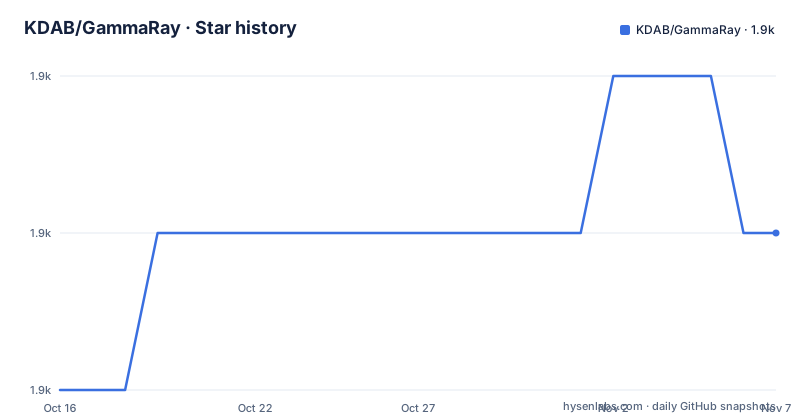
- KDAB/GammaRay1,924 ★ · +1
| Repository | 2026-10-16 | 2026-11-07 |
|---|---|---|
| KDAB/GammaRay | 1.9k | 1.9k |
1 Stars in the last 22 days, measured from the daily GitHub snapshot. Compare with other projects
Editorial analysis
Why GammaRay targets Qt Runtime State
GammaRay addresses a specific gap between reading Qt source code and stepping through native instructions in a debugger. A Qt application is organized around runtime relationships: QObject instances send signals, slots receive them, layouts position widgets, proxy models transform data, and state machines move through named states. Those relationships can be spread across many classes and files, making an instruction-level debugger a poor view of the behavior a developer is trying to understand.
The tool is aimed at developers working with Qt applications, especially applications using complex framework features such as model/view, state machines, scene graphs, widgets, and Qt Quick. Its inspection model follows Qt concepts instead of presenting only native frames, memory addresses, and machine instructions. The practical target is diagnosis: identify which object emits a signal, see which slot is connected, inspect an intermediate proxy-model result, or understand why a widget has a particular layout.
GammaRay also permits runtime manipulation to a limited extent. The README lists viewing and editing object properties, invoking QObject slots, intercepting translations, and editing QTextDocuments. That makes it more than a passive object viewer, but it is still a focused Qt introspection tool rather than a general-purpose debugger or application automation platform. It is most relevant when the object model itself is part of the problem.
GammaRay's Introspection and Manipulation Model
According to the README, GammaRay is built around QObject introspection. At runtime, it can browse the QObject tree with live updates, inspect properties, list inbound and outbound signal and slot connections, invoke slots, and monitor signals. This follows the relationships Qt applications already expose through their object and meta-object systems. The result is a view of the application's structure as Qt sees it, rather than a reconstructed application model inferred from source.
Several inspectors operate on more specialized Qt data. The model/view support covers QAbstractProxyModel hierarchies and intermediate results in a chain of proxies. The widget inspector provides a layout overlay for QWidget and QtQuick2 applications, while the QPainter inspector records operations used to draw a widget. Other areas cover Qt Quick item trees, scenegraph data, shaders, geometry, and QGraphicsView scenes and transformations.
GammaRay can plot object lifetimes and emitted signals, list QTimers with wakeup counts and wakeup time, browse QResource contents, show registered meta types, and report installed fonts and codecs. It also documents HTML, CSS, DOM, and JavaScript inspection through QWebInspector for QWebPage applications, plus a JavaScript debugger attachable to QScriptEngine. These are separate inspectors with distinct requirements. The breadth is useful, but it should not be interpreted as identical support across every Qt module.
Desktop and Embedded Qt Inspection Boundaries
GammaRay supports inspection on a local workstation or on a remote embedded target. The embedded examples directory includes a `yocto` project, and the repository contains deployment-related directories, but the README does not document a complete deployment procedure in the README. The available evidence establishes remote use as a supported mode, not the exact configuration needed for a particular board or Yocto image.
The distinction between local and remote operation matters when choosing GammaRay. A local inspection session can be used during application development on a desktop. An embedded workflow introduces target-side integration, deployment, and communication concerns that the feature list does not explain. Engineers should therefore treat the `examples/yocto/` directory and `INSTALL.md` as the starting points for platform-specific work, not as a universal recipe that can be reconstructed from the README.
GammaRay also does not replace a native debugger. Its own description says that it augments an instruction-level debugger and works at the framework level. It is therefore a poor fit when the primary question concerns generated machine code, native memory corruption, or a crash inside a non-Qt dependency. It is a better companion when the useful evidence is an object relationship, Qt state transition, rendering decision, or model transformation.
Installation and First Qt Inspection Workflow
The README directs users to `INSTALL.md` for installation notes, but it does not provide install commands, package names, build flags, or a launch command. The repository layout does show CMake configuration files, including `CMakeLists.txt`, `CMakePresets.json`, and `GammaRayConfig.cmake.in`, so GammaRay is a source project with build configuration rather than a README-documented single-package installation.
A first use should begin with a Qt application that exposes a small, reproducible behavior. The available examples provide candidates such as `examples/signal-slot/`, `examples/state-machine/`, `examples/timer/`, and `examples/widget-layouting/`. Start with one example whose runtime relationship is easy to state, such as a signal connected to a slot or a widget with a visible layout. The expected observation should be chosen before starting: the connected objects, the state transition, the timer statistics, or the widget geometry.
After following the platform-specific instructions in `INSTALL.md`, attach GammaRay using the integration method documented there. The README does not state whether that is done by modifying the application, injecting a probe, or another mechanism, so the exact attachment step cannot be confirmed here. Once attached, begin with the QObject tree and live updates. Follow the relevant object into its property and signal/slot views, then use the specialized inspector only after confirming that the basic object relationships are visible. This order keeps the first investigation tied to Qt state that can be checked directly.
Licensing, Contributions, and Maintenance
The README states that GammaRay is available under GPL version 2 or any later version, at the user's option. Source bundles also include Graphviz code licensed under the Eclipse Public License v1.0, and the repository notes other freely distributable third-party files. Any distribution review must account for the actual files included in the relevant bundle and the applicable license texts. The project directs questions about copyright, licensing, and commercial licensing to KDAB.
Contribution procedures add an administrative constraint. The README says that all contributions require a signed KDAB Copyright Assignment Agreement. Individual contributors who are not employees are directed to the GitHub `cla-assistant` hook, while company employees must email a completed agreement to `[email protected]`. The repository's stated reason is to allow continued dual licensing. This is not a routine issue-report workflow: issue reports and source contributions have different documented paths.
The repository is not archived, and its last push was on 2026-10-05. Releases listed for 2026 include `v3.4.1` on 2026-09-23 and `v3.4.0` on 2026-03-09, with `v3.3.1` released on 2025-11-22. These facts indicate recent repository activity and recent releases. The README does not document a compatibility matrix, upgrade procedure, or migration guide, so the cost of moving between versions cannot be determined from the README.
GammaRay Compared with Native Debugging and Custom Logging
A native debugger starts from execution inside the process and follows machine-level state. GammaRay starts from Qt's QObject introspection and exposes framework relationships at runtime. The practical difference is the level of the questions each tool answers. Native debugging is appropriate for native execution, memory, and call-stack problems; GammaRay is appropriate when the answer lies in a QObject connection, widget layout, proxy-model transformation, QML scene, timer record, or state-machine transition.
Custom logging is a third approach. Logging can provide controlled traces without attaching an inspector, but it requires developers to decide in advance what to record, modify the application or add instrumentation, and interpret text after the event. GammaRay provides a live, navigable object view and exposes existing Qt runtime relationships. It also offers runtime edits and invocations, which can be useful when reproducing a state-dependent issue. Its tradeoff is dependence on compatible Qt introspection surfaces and the need to understand whether the target framework is covered by the relevant inspector.
The three approaches can be complementary, but they are not substitutes. GammaRay does not claim to remove the need for native debugging or structured logging. It fills the framework-level gap left when those tools do not show which Qt object, model proxy, widget relationship, or scenegraph node is responsible.
Editorial conclusion
Adopt GammaRay when debugging a running Qt application requires visibility into QObject connections, model/view state, widgets, timers, or QML structures that are difficult to follow in source. Do not choose it as a general C++ instruction debugger or assume that every Qt application feature is supported without checking compatibility. Verify the applicable build and deployment instructions in INSTALL.md, confirm that the target Qt version and application configuration work with your chosen integration, and review GPL-2.0-or-later obligations before distribution.
Frequently asked questions
Can GammaRay inspect Qt applications on an embedded target?
Yes. The README says GammaRay works locally and remotely on an embedded target. It does not provide the full target integration procedure, so platform-specific details must come from `INSTALL.md` and the deployment or Yocto materials in the repository.
What can GammaRay show about Qt signals and slots?
It can browse the QObject tree, view and invoke slots, monitor signals, and list inbound and outbound signal and slot connections. These features are based on QObject introspection.
Does GammaRay replace a C++ debugger?
No. The README describes GammaRay as an augmentation to an instruction-level debugger, operating at the Qt framework level. Native debugging remains relevant for machine-level execution and native memory issues.
Official sources
Add this badge to your README
If you maintain this project, the badge below links readers to this analysis and shows its maintenance status from the daily GitHub snapshot. Paste the markdown into your README; add ?metric=license or ?metric=stars to the image URL for a different field.

[](https://hysenlabs.com/projects/kdab-gammaray)Star history chart for your README
[](https://hysenlabs.com/projects/kdab-gammaray)Was this useful?