Kup: A Plasma Backup Scheduler That Lets the Hardware Decide When to Run
Backup scheduler for the Plasma desktop
At a glance
- What is it?
- Kup is a backup scheduler for the KDE Plasma desktop that reacts to the presence of external drives and your idle time. It wraps rsync and bup into a system tray tool, but its usefulness depends on how well those two programs fit your workflow.
- Who is it for?
- Adopt Kup if you are a Plasma user who wants a backup tool that runs without a daemon and reacts to plugging in a USB drive, and you are comfortable installing rsync or bup separately. Skip it if you need backup over the network as a first-class feature, or if you want a single binary that handles everything without external dependencies.
- Can I use it commercially?
- Not without permission. GitHub finds no licence file in the repository, and without a licence all rights are reserved by default: you may read the code but not reuse it. Check the README, or ask the authors, before using it.
- Is it still maintained?
- Yes. The repository last received commits 2 days ago.
- What is it written in?
- Mainly C++, according to GitHub's language statistics.
Answers come from the project's GitHub data, last synced on November 14, 2026, and from our analysis. They are not legal advice.
Star history
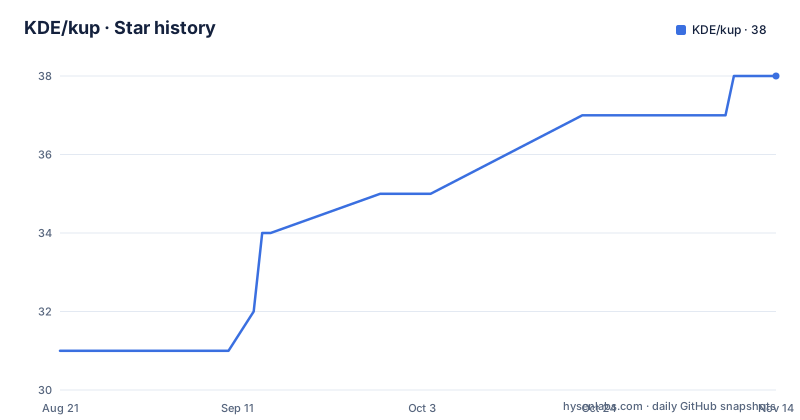
- KDE/kup38 ★ · +7
| Repository | 2026-08-21 | 2026-11-14 |
|---|---|---|
| KDE/kup | 31 | 38 |
7 Stars in the last 85 days, measured from the daily GitHub snapshot. Compare with other projects
Editorial analysis
The Problem Kup Solves: Backup Without a Fixed Schedule
Most backup tools force you to pick a time, like every night at 2 AM. Kup starts from a different assumption: the best time to back up is when your backup drive is actually connected and you have been using the computer enough that files have changed. The README states that when you plug in an external hard drive, Kup will automatically start copying your latest changes, but only if you have been active for some number of hours since the last backup. It can also ask before copying. That design fits people who carry a laptop and attach a USB drive occasionally, rather than a server that is always on. The target user is a Plasma desktop user who wants minimal interruption and is willing to let the hardware presence trigger the backup.
Two Backup Schemes: rsync for Sync, bup for Versioned Archives
Kup supports two distinct backup types, and the choice changes both the storage format and the restoration experience. The first is a synchronized folder using rsync: the backup folder mirrors your source exactly, deleting files that you deleted on your computer. This is simple, but it gives you no history. The second scheme uses bup, a program that stores incremental backups with deduplication. The README explains that only the small parts of files that have changed since the last backup are saved, yet every backup contains a complete version of your directories, because identical content is stored only once. This is a pragmatic trade-off: you get both cheap incremental backups and easy access to full snapshots. The cost is that you need bup installed separately, and you need to learn how to browse bup archives.
Architecture: A Configuration Module, a Background Monitor, and Two Browsers
Kup is not a single backup program. It is a set of KDE components. The README lists four parts: a configuration module in System Settings, a small background program that monitors when the backup destination is available and runs plans, a KIO worker for accessing bup archives, and a file browsing application for restoring files. The background program is the scheduler. It watches for the destination to become available, which can be a local folder that only exists when a network share is mounted, or an external USB drive. The KIO worker lets any KDE application open files directly from a bup archive, while the dedicated browser is meant to make locating a specific file easier. That separation means you can restore a file from a file manager, but the dedicated browser is the more guided path.
Scheduling Models: Manual, Interval, and Usage-Based
Kup offers three scheduling modes, and the usage-based one is the most distinctive. Manual mode triggers backups only from the system tray applet. Interval mode suggests a new backup after a fixed time has passed since the last one. Usage-based mode suggests a backup after you have been active on your computer for a number of hours. The README gives no details on how activity is measured, but it likely relies on KDE's kidletime library, which is listed as a dependency. The key point is that Kup does not force a backup at a clock time; it waits until you have been productive, which reduces the chance of backing up while the system is idle but also means a backup might not run if you never reach the activity threshold.
Getting It Running: Dependencies and Build Steps
Kup is not a standalone binary. It requires a stack of KDE Frameworks libraries, including kio, solid, kidletime, knotifications, and plasma-framework. The README lists the full set: qt5-base, kcoreaddons, kdbusaddons, ki18n, kio, solid, kidletime, knotifications, kconfig, kjobwidgets, kcmutils, plasma-framework, and libgit2. The build process is standard CMake: create a build directory, run cmake with -DCMAKE_INSTALL_PREFIX=/usr and -DCMAKE_BUILD_TYPE=release, then make and sudo make install. Notably, the README says you also need either bup or rsync installed to actually create backups. Kup itself does not implement the backup logic; it only schedules and orchestrates. That is a significant requirement: you must install two external programs and keep them updated.
Where Kup Falls Short: Network Backups and Recovery Depth
The README positions USB drives as the primary storage, and network backups are described as possible for advanced users. That is a real limitation. If your backup target is a NAS or a remote server, Kup's availability monitoring might work, but the documentation does not explain how to configure network destinations beyond saying they can exist when a network share is mounted. There is also no mention of encryption, compression settings, or bandwidth throttling. The recovery story is thin: the README mentions a file browsing application and a KIO worker, but gives no example of how to restore a single file or a full directory. That matters because bup's archive format is not a plain folder tree. If the browser fails, you are left with command-line bup tools, which the README does not cover.
Alternatives and the Maintenance Reality
A direct alternative is using rsync with a cron job, or bup with a wrapper script like bup-scheduler. The difference is that those tools do not monitor hardware presence or user activity; they run on a timer. Kup adds that awareness, but it also adds a KDE dependency layer. If you are not on Plasma, or you prefer a simpler script, you lose little by skipping Kup. On maintenance, the README does not state a license, which is a red flag for adoption in a corporate environment. The repository has no published GitHub releases, and the default branch is master. The latest default-branch commit visible on the GitHub repository on 7 November 2026 was dated 6 November 2026. Check KDE’s current project history for maintenance details. Before adopting Kup, check the KDE invent repository for recent commits and confirm the license, because the README omits it.
Editorial conclusion
Adopt Kup if you are a Plasma user who wants a backup tool that runs without a daemon and reacts to plugging in a USB drive, and you are comfortable installing rsync or bup separately. Skip it if you need backup over the network as a first-class feature, or if you want a single binary that handles everything without external dependencies. Before using it, verify that your distribution packages rsync and bup, and test restoring from a bup archive with the included browser, because the README gives no examples of recovery workflows.
Frequently asked questions
Is KDE Plasma for beginners?
The repository does not discuss desktop onboarding. What it documents is Kup, a backup scheduler for the Plasma desktop that copies to a connected drive automatically or, for advanced users, to a server over the network.
What is the current KDE version?
No KDE version is stated in this repository. The build requirements name qt5-base along with KDE libraries such as kcoreaddons, ki18n, kio and plasma-framework, which is the closest the project comes to naming a platform generation.
How do I set up KDE Plasma?
That setup is outside this project. Kup installs by configuring a CMake build with an install prefix and running make, but it also needs bup or rsync present on the system, since those provide the two backup implementations Kup drives.
Official sources
Add this badge to your README
If you maintain this project, the badge below links readers to this analysis and shows its maintenance status from the daily GitHub snapshot. Paste the markdown into your README; add ?metric=license or ?metric=stars to the image URL for a different field.

[](https://hysenlabs.com/projects/kde-kup)Star history chart for your README
[](https://hysenlabs.com/projects/kde-kup)Was this useful?