ReUI: a copy-and-own shadcn/ui registry with 22 in-house components
Design-forward shadcn kit for interfaces that stand out. 1000+ free patterns!
At a glance
- What is it?
- ReUI is an MIT-licensed shadcn/ui registry of 1,105 copy-paste components, including 22 in-house pieces such as a TanStack-based Data Grid and an Event Calendar, shipped in both Radix UI and Base UI flavours. The trade-off is that you own the code you copy, and the tooling that generates the registry is not the part you get.
- Who is it for?
- Adopt ReUI if you are already on shadcn/ui and Tailwind CSS 4 and need dashboard-grade pieces such as Data Grid, Event Calendar or Filters that the base set does not ship. Skip it if you want a versioned npm dependency with a changelog and a semver upgrade path, because ReUI has no npm package for the components and the repository has no published releases.
- Can I use it commercially?
- Yes. MIT is a permissive licence: you can use, modify and sell software built on it, as long as you keep its copyright and licence notices.
- Is it still maintained?
- Yes. The repository last received commits 30 days ago.
- What is it written in?
- Mainly TypeScript, according to GitHub's language statistics.
Answers come from the project's GitHub data, last synced on November 15, 2026, and from our analysis. They are not legal advice.
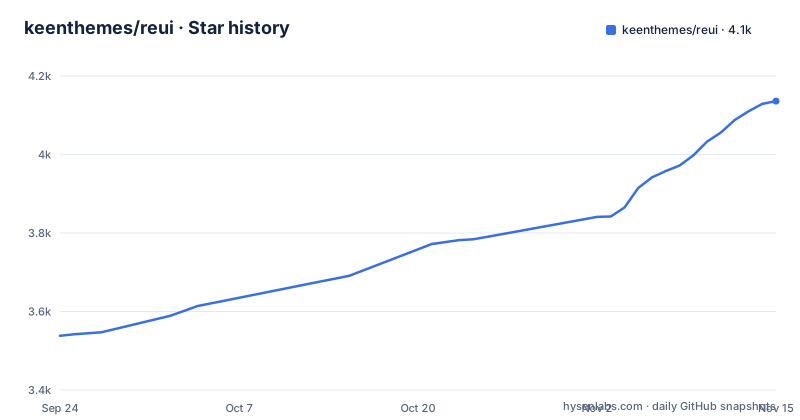
Star history
- keenthemes/reui4,136 ★ · +598
| Repository | 2026-09-24 | 2026-11-15 |
|---|---|---|
| keenthemes/reui | 3.5k | 4.1k |
598 Stars in the last 52 days, measured from the daily GitHub snapshot. Compare with other projects
Editorial analysis
The gap ReUI fills in a shadcn/ui project
shadcn/ui gives you primitives: button, dialog, select, table. It does not give you a filter builder with a boolean query tree, a Gantt view, or a data grid with column pinning and infinite scroll. Teams building admin dashboards end up writing those themselves, usually twice, once for the first product and again when a second product needs the same thing.
ReUI positions itself in that gap. The README describes it as "a free, open-source component library for the shadcn/ui ecosystem" with 1,105 registry components across 74 categories, and 22 in-house components the README says are "not found in base shadcn/ui". The audience is narrow and identifiable: React and TypeScript developers already inside the shadcn/ui and Tailwind CSS world, building internal tools, SaaS dashboards, or any interface with tables, calendars and filters at its centre. If you are not on shadcn/ui, almost nothing here applies to you, because the components are composed from shadcn primitives and assume those tokens exist.
Copy-and-own instead of a versioned dependency
The README states there is "No npm package, no lock-in. Own the source code in your repo." That is the central design decision and it drives everything else. You pull component source into your project, and from that moment it is yours to edit. There is no upgrade path in the usual sense: no `pnpm update` that merges upstream fixes into your modified copy. If Keenthemes changes the Data Grid API, you find out by reading the docs, not by resolving a version conflict.
For a component you will customise heavily, this is the right trade. For a component you want to consume untouched and forget about, it is more work than a package would be, because you carry the maintenance. The README's framing of this as a feature is honest about the model, though it does not discuss how upstream changes reach an existing copy. That question is unanswered in the README.
The repository layout backs the model up. There are `registry/` and `registry-reui/` directories at the top level, alongside `components/`, `hooks/`, `lib/` and `styles/`. The registry is generated, not hand-maintained: `package.json` defines `registry:build`, `registry:verify` and `registry:prod` scripts that run through `tsx` against files in `scripts/`. So the published catalogue is an artefact of a build pipeline, and the pipeline is what the site serves.
Two component APIs, and why that doubles the surface
ReUI ships every one of its 22 in-house components in two flavours, one built on Radix UI and one on Base UI, with separate documentation pages for each. The README lists them side by side, for example Radix UI and Base UI docs for Alert, Autocomplete, Cascader, Code Block, Data Grid, Date Selector and Event Calendar.
This is unusual and worth thinking about before you start. Supporting two headless layers means two sets of props, two sets of edge-case behaviour, and two places a bug can live. The benefit is real if your organisation has standardised on Base UI and the rest of the shadcn ecosystem has not caught up. The cost is that you must pick one and stay consistent; mixing Radix-based and Base-based ReUI components in the same app means carrying both headless libraries.
The component list itself is where the value sits. Data Grid is documented as powered by TanStack Table plus Virtual, with drag-and-drop, pinning, resizing and infinite scroll. Event Calendar is described as headless-first with month, week, day, N-day and agenda views, drag-and-drop scheduling, recurring events, time zones, and what the README calls "an external CRUD contract". Filters is a stepped builder with nested attributes, popover value editors and a boolean query tree. Those three are the components a dashboard team would otherwise spend weeks on.
Installing ReUI and pulling your first component
ReUI's own repository is a Next.js application, not a package you install. The README points readers to the component catalogue and the docs site, and the `.env.example` file states that "ReUI runs locally with zero configuration - every value below is optional". So the intended path for a consumer is the docs site and the shadcn CLI, not cloning this repository.
If you do want to run the site locally, the repository is a pnpm workspace. The `package.json` declares `dev` as `next dev`, with a `predev` hook that runs `pnpm components:build` first, so the component sources are generated before the dev server starts.
pnpm install
pnpm dev
The `.env.example` file confirms the defaults: the public site URL falls back to `http://localhost:3000` in development, and the two optional variables are `NEXT_PUBLIC_APP_URL` and `NEXT_PUBLIC_WEB_URL`. There is also a `REUI_SOURCE` variable whose comment says it points at a local checkout of a private ReUI source monorepo, defaulting to `../reui.io`, and is used by a `pnpm sync` script. That script is referenced in the environment file but does not appear in the portion of `package.json` available here, so treat it as a maintainer-facing path rather than something a new user needs.
For actual use in your own app, the model is the shadcn registry: you browse the catalogue, pick a component, and add its source to your project. The README does not reproduce the exact CLI invocation, so follow the command shown on the component page at reui.io rather than guessing a registry URL.
What you give up: no releases, no upgrade path, no rollback
The repository has no published GitHub releases, and the README does not document rollback or a migration procedure between component versions. Combined with the copy-and-own model, that means there is no supported way to undo a bad pull other than your own version control. If you copy a Data Grid on Monday and the upstream source changes on Tuesday, nothing tells you. You are not on a release channel, because there is no release channel.
The second limitation is scope. Everything here assumes shadcn/ui, Tailwind CSS and React. The README badges state React 18+ and Tailwind CSS 4+, and the components are described as built on shadcn primitives and Tailwind CSS. There is no Vue, Svelte or Angular story, and no plain-CSS build. If your team is not on that stack, ReUI is simply the wrong tool, however good the Data Grid looks.
The third is the repository itself. It is a `private: true` Next.js app at version 2.5.5, with a build chain involving `components:build`, `components:packages` and `registry:build`. Reproducing the published registry from a clone means running that chain, and the README does not walk through it. The last push was on 2026-09-16, so the project is not dormant, but the README does not describe a release cadence or a compatibility policy for the components it publishes.
How ReUI compares with shadcn/ui and with a packaged grid
The obvious alternative is shadcn/ui itself. The difference is one of scope, not of kind: shadcn/ui provides the primitives and the copy-in model, ReUI provides composed, dashboard-shaped components on top of those primitives plus 22 pieces shadcn/ui does not ship. If shadcn/ui already covers your needs, adding ReUI means adding a second catalogue to track for no gain.
The more interesting alternative is a packaged data grid such as AG Grid or a commercial table product. Those give you a versioned dependency, a changelog and vendor support, at the cost of a licence and a bundle you do not control. ReUI's Data Grid is documented as built on TanStack Table and Virtual, which means the underlying engine is open source and the ReUI layer is source you own. You trade vendor support for full control of the rendering layer. For a team with strong frontend capacity and unusual table requirements, that trade usually wins. For a team that wants to file a ticket and get a fix, it does not.
A third comparison sits inside the ReUI catalogue itself: the Radix UI and Base UI variants are effectively two implementations of the same component. Choosing between them is a real architectural decision, not a cosmetic one, and the README gives no guidance on which to prefer.
Licence, maintenance and what a clone actually costs
The repository is MIT licensed, and the README repeats that as "Free and open-source forever". MIT is permissive: you can use the components commercially, modify them, and ship them in a closed product, subject to the usual attribution and warranty terms in the licence text. The README also links to a ReUI Pro offering, so there is a paid tier alongside the free registry, and the boundary between the two is not described in the README. If your organisation has rules about mixing free and commercial components, check that boundary on the pricing page before you standardise on ReUI components.
The maintenance picture is straightforward from the repository facts: the last push was on 2026-09-16. The repository has no published GitHub releases, so there is no version history to read for breaking changes. Your upgrade cost is therefore not a dependency bump but a diff against the upstream registry, performed by hand, per component, whenever you decide to refresh. That is the number to estimate before adopting: count the ReUI components you plan to use, multiply by how much you expect to customise each one, and decide whether you would rather own that diff or pay for a supported package.
Editorial conclusion
Adopt ReUI if you are already on shadcn/ui and Tailwind CSS 4 and need dashboard-grade pieces such as Data Grid, Event Calendar or Filters that the base set does not ship. Skip it if you want a versioned npm dependency with a changelog and a semver upgrade path, because ReUI has no npm package for the components and the repository has no published releases. Before committing, check the Radix UI and Base UI docs pages for the one component you actually need, confirm which of the two APIs your app already depends on, and read the licence file at the repository root rather than trusting the README badge.
Frequently asked questions
Is ReUI installed as an npm package?
No. The README states the model is copy-and-own, with "No npm package, no lock-in", so component source is copied into your repository rather than installed as a dependency.
Which UI libraries does ReUI support for its in-house components?
The README says all 22 in-house components ship in both Radix UI and Base UI versions, each with its own documentation page.
What React and Tailwind CSS versions does ReUI require?
The README badges state React 18+ and Tailwind CSS 4+, and the components are described as built on shadcn primitives and Tailwind CSS.
What is the Data Grid in ReUI built on?
The README describes the Data Grid as an advanced table powered by TanStack Table plus Virtual, with drag-and-drop, pinning, resizing and infinite scroll.
What licence does ReUI use?
The repository is MIT licensed, which the README describes as free and open-source forever. There is also a ReUI Pro offering linked from the README, whose boundary with the free registry is not described there.
Do I need to configure anything to run the ReUI repository locally?
The .env.example file states that ReUI runs locally with zero configuration and that every value in it is optional, with the public site URL defaulting to http://localhost:3000 in development.
Official sources
Add this badge to your README
If you maintain this project, the badge below links readers to this analysis and shows its maintenance status from the daily GitHub snapshot. Paste the markdown into your README; add ?metric=license or ?metric=stars to the image URL for a different field.

[](https://hysenlabs.com/projects/keenthemes-reui)Star history chart for your README
[](https://hysenlabs.com/projects/keenthemes-reui)Was this useful?