binary-parser turns a byte layout into a chain of parse calls
A blazing-fast declarative parser builder for binary data
At a glance
- What is it?
- binary-parser is a TypeScript parser builder for JavaScript that compiles a declarative chain of field definitions on the first parse and caches it. It suits people who read file formats, protocol headers and firmware images without wanting to hand-roll buffer arithmetic.
- Who is it for?
- Adopt binary-parser when you parse a binary format repeatedly in JavaScript and want the field layout to read like the specification instead of like offset arithmetic, and treat its ES module packaging and Node 22.12 floor as the first thing to check. Do not adopt it for a CommonJS project on an older Node release, or when you need a parser that is generated ahead of time and shipped without runtime compilation.
- Can I use it commercially?
- Yes. MIT is a permissive licence: you can use, modify and sell software built on it, as long as you keep its copyright and licence notices.
- Is it still maintained?
- Yes. The repository last received commits 8 days ago.
- What is it written in?
- Mainly TypeScript, according to GitHub's language statistics.
Answers come from the project's GitHub data, last synced on November 7, 2026, and from our analysis. They are not legal advice.
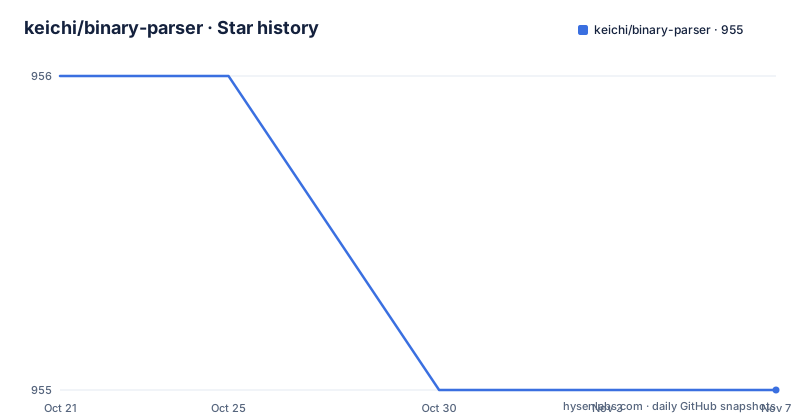
Star history
- keichi/binary-parser955 ★ · -1
| Repository | 2026-10-21 | 2026-11-07 |
|---|---|---|
| keichi/binary-parser | 956 | 955 |
-1 Stars in the last 17 days, measured from the daily GitHub snapshot. Compare with other projects
Editorial analysis
The parser compiles itself on the first parse and caches the result
binary-parser is a builder rather than a library of hand-written decoders. You create a parser object, chain a method per field, then hand it a Buffer or Uint8Array and receive a plain object back. The chain you write is not interpreted field by field at runtime. The documentation states that the associated parser code is compiled on the fly when parse is called for the first time and internally cached, so the compilation cost is paid once per parser rather than once per buffer.
That design is the point of the project. The README argues that a declaratively built parser runs as fast as a hand-written one, while the hand-written version takes considerably more time and effort to produce. Whether that holds for your workload is something you would need to measure in your own code, since no benchmark figures are published, beyond the fact that a benchmark directory exists in the repository.
The audience is specific. Someone implementing a BMP decoder, a tar reader, an ELF header parser or a TCP segment dissector wants a place where the field order and widths are visible at a glance, and where an offset mistake surfaces as a thrown exception rather than as silently shifted bytes.
A first parse: the IP header example from the quick start
The quick start describes four steps: create an empty parser with new Parser() or Parser.start(), chain methods to build the parser, call parse with a Buffer or Uint8Array, and receive an object. If parsing fails, an exception is thrown rather than a partial result.
The module is imported as a named export in ES module code, and the project also notes a CommonJS alternative using require. The example parser below reads an IPv4 header, with bit4 and bit13 calls carving out the version and fragment offset fields.
import { Parser } from "binary-parser";

const ipHeader = new Parser()
  .endianness("big")
  .bit4("version")
  .bit4("headerLength")
  .uint8("tos")
  .uint16("packetLength")
  .uint16("id")
  .bit3("offset")
  .bit13("fragOffset")
  .uint8("ttl")
  .uint8("protocol")
  .uint16("checksum")
The chain continues with the two address arrays, each a fixed-length array of four uint8 values.
  .array("src", {
    type: "uint8",
    length: 4
  })
  .array("dst", {
    type: "uint8",
    length: 4
  });
The input is prepared as a hex buffer and passed to parse, which logs the resulting object with its named fields.
const buf = Buffer.from("450002c5939900002c06ef98adc24f6c850186d1", "hex");

console.log(ipHeader.parse(buf));
Because the buffer is parsed against the chain as written, a field that is declared in the wrong order will read the wrong bytes. The value of the builder is that the order is stated once, in one place, in the order the specification describes it.
Integer methods return number for 32 bits and bigint for 64
The numeric API is method naming rather than a type argument, which keeps a field declaration to a single token. Integers come in 8, 16, 32 and 64 bit widths, each in signed and unsigned form, and each with an le or be suffix for byte order. A method without the u prefix parses a signed value, and the u prefix selects unsigned.
const parser = new Parser()
  // Signed 32-bit integer (little endian)
  .int32le("a")
  // Unsigned 8-bit integer
  .uint8("b")
  // Signed 16-bit integer (big endian)
  .int16be("c")
  // signed 64-bit integer (big endian)
  .int64be("d")
One detail deserves attention before you design a result shape around it. The runtime type returned by the 8, 16 and 32 bit methods is number, while the 64 bit methods return bigint. JSON has no bigint type, so 64-bit fields will not serialise as plain numbers, and any equality check against a plain number will fail for a bigint. The 64-bit methods also require Node v12.0.0 or greater and throw a runtime error below that.
Floating point values follow the same shape, with float and double methods carrying the same le and be suffixes.
const parser = new Parser()
  // 32-bit floating value (big endian)
  .floatbe("a")
  // 64-bit floating value (little endian)
  .doublele("b");
Field names have a light constraint worth knowing before you generate names programmatically: they should consist only of alphanumeric characters and start with an alphabet.
String and buffer options are where real formats get complicated
Numeric fields are the easy half of a binary format. Strings and opaque byte regions are where a parser earns its place, and the options for both are deliberately explicit.
For strings, encoding defaults to utf8, and hex plus anything TextDecoder supports can be selected instead. Length can be a number for a statically sized field, a string naming another variable, or a function that computes the length. zeroTerminated reads until a zero byte is found, greedy reads until the end of the buffer and will consume zero bytes, and stripNull trims trailing null characters and must be combined with a length.
For buffers, the returned type matches the input type of parse, so a Uint8Array in gives a Uint8Array out. The clone option is the interesting one: by default the parser returns a new buffer that references the same memory as the input, offset and cropped to the requested range, and clone is what forces a copy into a separate memory region. That default is efficient and also means the returned slice keeps the whole parent buffer alive, which matters when you parse many small records out of one large file.
A buffer field needs either length or readUntil. readUntil accepts "eof" to consume the remainder of the input, or a function to compute the boundary. Note that the string documentation refers to a length option with a trailing space in the key name, which is a typo in the source rather than a distinct option.
Bit fields, arrays, choices, pointers and user defined types
The remaining method families cover the structures that show up in headers and containers. Bit fields have dedicated methods from bit1 to bit32, one per bit length, which is what lets the IP header example split a byte into a 4-bit version and a 4-bit header length without manual masking.
Arrays are declared with a type and a length, and the element type can be a built-in or a user defined type, so a fixed-length array of records works the same way as an array of bytes. Choices support integer keys and let one field select among alternatives. Pointers exist for formats where an offset is stored in the stream and the payload sits elsewhere, and user defined types are arbitrary combinations of the built-in ones, which is how you build a reusable record type and then parse a file full of them.
Choices and pointers are worth calling out as the parts of the surface area where the visible documentation is thinnest in this project. The available pages list them among the supported data types and describes them at that level only, so if your format leans on either, expect to read the API section closely rather than assume the semantics from the names.
Packaging moved to ES modules and the Node floor is 22.12
The package is distributed as an ES module. CommonJS code can still load it with require on Node.js 22.12 or later, and the package manifest sets the engine requirement to node >=22.12. The project is tested on Node.js, Bun, Deno and web browsers, and on Deno the import specifier is npm:binary-parser.
That is a meaningful constraint for adoption. A codebase pinned to an older Node release, or a CommonJS project that cannot move, will hit the module boundary immediately. The rest of the toolchain follows the same modern lean: TypeScript with generated declarations, the build script running tsc, vitest for the node test project and a separate browser project driven by playwright, and prettier for formatting.
The npm package ships the dist and lib directories, with the compiled entry point at dist/binary_parser.js and the type declarations at dist/binary_parser.d.ts, so consumers get types without running the build.
One more constraint belongs with the string options. The encoding option accepts hex and everything TextDecoder supports, and since TextDecoder is a web platform API, an encoding outside the common set depends on the runtime rather than on the library.
Release history, licence and the shape of the repository
The last push to this repository was on 2026-10-18, so work is recent. The release history is less smooth. v2.3.0 shipped on 2025-11-26, while v2.2.1 and v2.2.0 both landed in September 2022, on 2022-09-20 and 2022-09-05 respectively. The gap between the two pairs suggests the project spent most of its recent life on a newer minor version rather than shipping patch after patch.
The version in the package manifest is 2.3.0, matching the latest tag, and the project is authored by Keichi Takahashi. The licence is MIT, which permits use, modification and redistribution inside a larger product without any special obligation beyond retaining the copyright and licence text.
The repository layout explains what kind of library this is. The example directory contains parsers for bmp, classfile, elf32, jpg, mbr, raspbian.img, tar and tcp, plus a Hello.class file and the matching Java source, so the examples are exercised against real artifacts rather than synthetic arrays. The benchmark directory exists for measuring parse throughput, which is where you would look if the performance claim in the README matters to you. The lib directory holds the TypeScript source, with tests, a vitest configuration and a tsconfig for the build.
Editorial conclusion
Adopt binary-parser when you parse a binary format repeatedly in JavaScript and want the field layout to read like the specification instead of like offset arithmetic, and treat its ES module packaging and Node 22.12 floor as the first thing to check. Do not adopt it for a CommonJS project on an older Node release, or when you need a parser that is generated ahead of time and shipped without runtime compilation. Before building on it, parse one real file from your own format with the chain you intend to ship and confirm the returned types, in particular number versus bigint on 64-bit fields.
Frequently asked questions
How do I install binary-parser and parse my first buffer?
Install it from npm with npm install binary-parser, then create a parser with new Parser(), chain one method per field, and call parse with a Buffer or Uint8Array. The result is an object, and a failed parse throws an exception.
Does binary-parser work with CommonJS require?
The npm package is distributed as an ES module, but CommonJS code can still load it with require on Node.js 22.12 or later. The package manifest declares the engine requirement as node >=22.12.
What type do 64-bit integer fields return in binary-parser?
The 8, 16 and 32 bit integer methods return number, while the 64 bit methods return bigint. The 64-bit methods require Node v12.0.0 or greater and throw a runtime error on lower versions.
How does binary-parser handle a string with no fixed length?
A string can be marked zeroTerminated so the parser reads until it reaches a zero byte, or greedy so it reads until the end of the buffer, in which case zero bytes are consumed. A length can also be supplied as a number, a name of another variable or a function.
Does the parsed buffer share memory with the input?
By default, the buffer method returns a new buffer that references the same memory as the parser input, offset and cropped to the requested range. Passing the clone option copies the data into a separate memory region instead.
Official sources
Add this badge to your README
If you maintain this project, the badge below links readers to this analysis and shows its maintenance status from the daily GitHub snapshot. Paste the markdown into your README; add ?metric=license or ?metric=stars to the image URL for a different field.

[](https://hysenlabs.com/projects/keichi-binary-parser)Star history chart for your README
[](https://hysenlabs.com/projects/keichi-binary-parser)Was this useful?