imp: a single-chip inference engine that bets everything on the RTX 5090
From-scratch C++23/CUDA inference engine for the NVIDIA RTX 5090 (sm_120a). The best single-GPU backend for agentic AI: tool calling, long-context loops, reasoning and concurrent sub-agents. Decode beats llama.cpp b9976 by 42-48% on dense GGUF (measured 2026-07-12), at-or-ahead of vLLM on NVFP4. 100% written by Claude Code.
At a glance
- What is it?
- imp is a from-scratch C++23/CUDA engine that serves only consumer Blackwell GPUs, with native NVFP4 and dual OpenAI/Anthropic APIs. It is fast, but it is also deliberately narrow: one chip, no CPU path, no multi-GPU, and a one-author support model.
- Who is it for?
- Adopt imp if you run an RTX 5090, 5080, 5070 Ti, or PRO 6000, you have one GPU and one user or an agent loop, and you want NVFP4 weights served without dequantization or an Anthropic-compatible endpoint without a proxy. Do not adopt it if you have any other GPU, need multi-GPU or high-concurrency batching, or require SLOs, a support contract, or a security response process.
- Can I use it commercially?
- Yes. MIT is a permissive licence: you can use, modify and sell software built on it, as long as you keep its copyright and licence notices.
- Is it still maintained?
- Yes. The repository last received commits 1 day ago.
- What is it written in?
- Mainly Cuda, according to GitHub's language statistics.
Answers come from the project's GitHub data, last synced on October 22, 2026, and from our analysis. They are not legal advice.
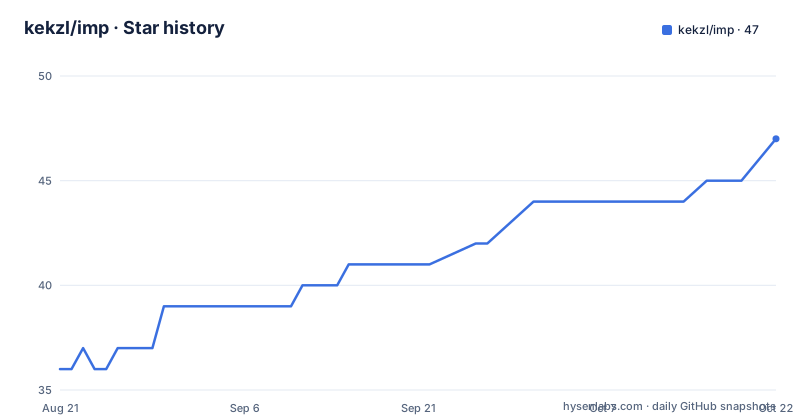
Star history
- kekzl/imp47 ★ · +11
| Repository | 2026-08-21 | 2026-10-22 |
|---|---|---|
| kekzl/imp | 36 | 47 |
11 Stars in the last 62 days, measured from the daily GitHub snapshot. Compare with other projects
Editorial analysis
One chip, one job
imp is an LLM inference engine that targets exactly one chip: the NVIDIA RTX 5090, which uses the consumer Blackwell architecture `sm_120a`. The README is blunt about the scope. There is no CPU path, no other GPU, and no fallback. The project does not try to be portable, and it does not attempt multi-GPU or datacenter batching. The intended user is someone running a single 5090 (or a 5080, 5070 Ti, or PRO 6000) with one user or an agent loop. That means tool calling, long-context loops, reasoning, and concurrent sub-agents, which the README names as the workload imp is built for. If you have anything else, including datacenter Blackwell, the README points you to llama.cpp for breadth or vLLM for scale. This is a refreshingly honest positioning, and it shapes every design decision in the project.
The mechanism: from-scratch kernels and native NVFP4
imp is not a wrapper around existing libraries. It has its own GGUF and SafeTensors loaders, a tokenizer, a paged KV cache, and CUDA kernels written from scratch in C++23. The engine includes NVFP4 block-scaled `mma.sync` GEMM/GEMV kernels, FP8 `f8f6f4` attention scores, FlashAttention-2 prefill for head dimensions 128 and 256, CUDA graphs on prefill and decode, and support for Gated DeltaNet and Mamba2. The key architectural point is that NVFP4 is the primary quantization path. The README states that published NVFP4 exports of Qwen3.8-27B do not run on this card because they keep attention in FP8, and this card has no kernel for that. So imp serves NVFP4 weights natively, without dequantization, but only if the checkpoint was made with the in-tree quantizer. That is a real constraint, not a marketing bullet.
Getting it running: the 60-second quickstart
The quickstart is Docker-based, and you do not need a CUDA toolkit on the host. The worked example is Qwen3.8-27B, a 27B multimodal model quantized to NVFP4. First, run `make build` to produce the `imp:test` image, which takes about 3.5 minutes. Then download the weights with `scripts/stage-model.sh kekzle/Qwen3.8-27B-NVFP4 ~/models/Qwen3.8-27B-NVFP4`. That is a 19.2 GiB download, nothing to convert. Then serve with `docker run --gpus all -v ~/models:/models -v imp-cache:/home/imp/.cache/imp -p 127.0.0.1:8080:8080 ghcr.io/kekzl/imp:latest --model /models/Qwen3.8-27B-NVFP4`. A curl to `/v1/chat/completions` returns a JSON completion. The model id is the file or directory basename, and `GET /v1/models` lists it. A GGUF file works the same way, just swap the path. The README notes that `make build` exits 1 without the `imp:test` image even on the download-only path, and that `docker compose build imp-server` produces `imp:latest`, a different tag. That is a small trap worth knowing before you start.
Bringing your own model: the quantizer caveat
If you do not want to use the pre-made checkpoint, you can build one from any BF16 or FP8 release using the in-tree quantizer. The command is `scripts/stage-model.sh Qwen/Qwen3.8-27B-FP8 ~/models/my-Qwen3.8-NVFP4`. That downloads 28.8 GiB, takes about 25 minutes of conversion, and outputs 18.8 GiB. The README claims the FP8 release costs 0.24% perplexity against converting the BF16 one. The script forecasts the output size and whether it fits the card before writing anything, so a model that would not fit costs seconds rather than half an hour. This is a practical feature, but it also highlights a limitation: if your model does not have a compatible NVFP4 export, you must run the quantizer yourself, and the result is only guaranteed to work on this engine. The cache volume is optional but pays off on the second start, reducing Qwen3-14B-NVFP4 init from 7.9 seconds to 2.1 seconds.
Performance numbers and the caveat you must read
The README includes a performance table with numbers like decode 287.19 tok/s, prefill pp512 12406.87 tok/s, and peak VRAM 20716 MiB, measured on a Qwen3-8B-Q8_0 model. But the README explicitly says to read the caveat before quoting these. Decode on the test host moves several percent between sessions with nothing changed, and prefill moves more because cuBLAS re-times its algo selection per process. That is why the regression thresholds are 8% and not 3%. The competitive figures are in `docs/BENCHMARKS.md`, each with a date, commit, and command. The methodology is in `docs/PERF.md`. This is a model of how to present benchmarks: numbers with provenance, and a clear statement of variance. Do not treat the table as a stable spec.
Where imp loses: the five limitations that matter
The README lists five reasons to decide against imp. First, one GPU, one chip, no multi-GPU, no tensor parallelism, and no plan for either, because consumer Blackwell has no NVLink and TP is net-negative on the target workload. Second, no GPU in continuous integration, so every kernel correctness and performance check runs on one person's desktop. That is a real risk for a project that claims 100% of its code was written by Claude Code. Third, no CPU path, so you cannot even run a smoke test without the exact GPU. Fourth, no support contract or security response process, which matters if you are serving anything sensitive. Fifth, the model support matrix has gaps, like Llama-4 marked as untested. The full list is in `docs/LIMITATIONS.md`. These are not hidden flaws; they are stated plainly, and they define the tool's boundary.
Alternatives: llama.cpp for breadth, vLLM for scale
The README itself names the two alternatives. llama.cpp is the choice if you need breadth: it supports many GPUs, CPU offload, and a wide range of models. vLLM is the choice for scale, with high-concurrency batching and multi-GPU support. The difference in approach is fundamental. llama.cpp is a portable, CPU-first engine that runs on almost anything, while imp is a GPU-only, single-chip engine that uses NVFP4 natively. vLLM is built for datacenter throughput and dynamic batching, while imp is built for a single user's agent loop with per-token SSE and tool calling. If you have a fleet or high-concurrency traffic, the README says both are better at those jobs than imp. If you have exactly one RTX 5090 and an agent workload, imp's narrow focus may be an advantage, because it does not carry the portability abstractions that llama.cpp needs.
Maintenance and license: one author, MIT, no SLO
imp is licensed under MIT, which means you can use, modify, and embed it without copyleft obligations, but the README is explicit that this is not a supported product. There is one author, no SLO, no support rotation, and no security response process. The last push was 2026-08-27, with releases v0.31.0, v0.30.1, and v0.30.0 in the same month, so the project is actively developed. However, the lack of CI on real GPU hardware means regressions can slip through, and the performance variance between sessions suggests that the engine is tuned to one specific environment. The upgrade cost is tied to the Docker image and the model staging script; you will need to rebuild images and re-stage models when versions change. The cache volume helps with re-init time, but you should test each new release against your own model and workload before adopting it.
Editorial conclusion
Adopt imp if you run an RTX 5090, 5080, 5070 Ti, or PRO 6000, you have one GPU and one user or an agent loop, and you want NVFP4 weights served without dequantization or an Anthropic-compatible endpoint without a proxy. Do not adopt it if you have any other GPU, need multi-GPU or high-concurrency batching, or require SLOs, a support contract, or a security response process. Before adopting, verify that your model has a published NVFP4 export that works on this card, or plan to use the in-tree quantizer, and confirm that the Docker image tag you use matches your workflow, since `make build` produces `imp:test` while `docker compose build imp-server` produces `imp:latest`, a different tag.
Frequently asked questions
Which GPUs does imp support?
The RTX 5090 generation at sm_120a is the target, specifically the 32 GB card that was tested. The list also names the 5080, the 5070 Ti and the RTX PRO 6000. There is no CPU mode and no multi-GPU, and the README points to llama.cpp for breadth and vLLM for many GPUs.
How do I install and serve a model with imp?
You need a supported card, Docker with the NVIDIA Container Toolkit, and Linux or Windows with WSL2; no CUDA toolkit on the host. Run make build for the image, stage the weights with scripts/stage-model.sh, then start the container with the model path. The imp-cache volume keeps converted weights so a restart skips the conversion.
Does imp's server require authentication by default?
No. The image has no authentication unless IMP_API_KEY is set, which is why the compose file binds the port to loopback by default. Exposing it deliberately means setting IMP_BIND=0.0.0.0 together with IMP_API_KEY, since publishing the port on every interface would otherwise leave an open inference API on the network.
Official sources
Add this badge to your README
If you maintain this project, the badge below links readers to this analysis and shows its maintenance status from the daily GitHub snapshot. Paste the markdown into your README; add ?metric=license or ?metric=stars to the image URL for a different field.

[](https://hysenlabs.com/projects/kekzl-imp)Star history chart for your README
[](https://hysenlabs.com/projects/kekzl-imp)Was this useful?