agent-bom: A self-hosted evidence pipeline for AI, MCP, and cloud security
Open security scanner and self-hosted control plane for AI, MCP, and cloud. One evidence model — run scans in your environment, centralize findings, govern in your VPC.
At a glance
- What is it?
- agent-bom is an open-source scanner and control plane that turns local scans and read-only cloud connections into a single evidence model. It targets teams that want to keep findings, credentials, and policy data inside their own environment.
- Who is it for?
- Adopt agent-bom if you are a security or platform team that wants a local-first, self-hosted way to scan repositories, MCP configs, and cloud accounts into one evidence model, and you are willing to accept Python-based deployment and a maturing integration surface. Skip it if you need a turnkey commercial scanner with guaranteed support, or if your CI must never fail on missing advisory data.
- Can I use it commercially?
- Yes. Apache-2.0 is a permissive licence: you can use, modify and sell software built on it, as long as you keep its copyright and licence notices.
- Is it still maintained?
- Yes. The repository last received commits 18 days ago.
- What is it written in?
- Mainly Python, according to GitHub's language statistics.
Answers come from the project's GitHub data, last synced on October 4, 2026, and from our analysis. They are not legal advice.
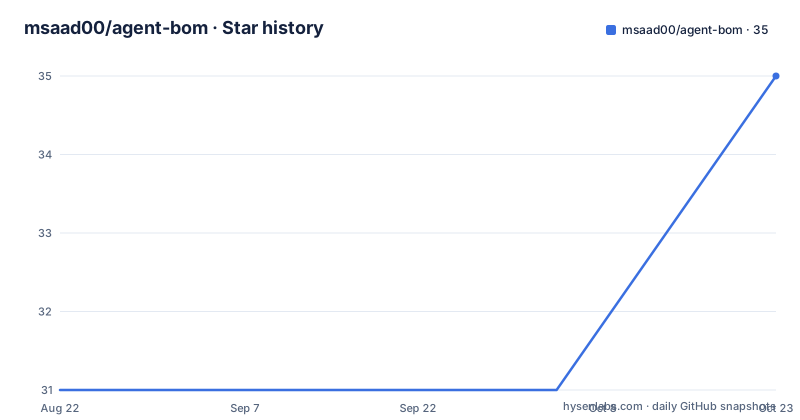
Star history
- msaad00/agent-bom31 ★ · +0
| Repository | 2026-08-22 | 2026-10-04 |
|---|---|---|
| msaad00/agent-bom | 31 | 31 |
0 Stars in the last 43 days, measured from the daily GitHub snapshot. Compare with other projects
Editorial analysis
The problem: scattered evidence, not missing scanners
Security teams already have scanners for repositories, cloud accounts, and software supply chains. What they lack, according to the agent-bom README, is one trustworthy view of what was scanned, what was found, which findings connect to critical systems, who owns the fix, and whether the fix held. agent-bom positions itself as that unifying layer. It is for developers who want to see dependencies, secrets, IaC, agents, MCP, models, and datasets before shipping; for AppSec teams that want SARIF output for CI gating; for cloud security teams that need scoped inventory from read-only connections; and for platform and GRC roles that want centralized evidence with ownership and SLAs. The project deliberately separates security engineering from audit certification: findings and reachability are not presented as compliance proof. That boundary is a useful honesty signal in a field where many tools blur the line.
Two entry paths, one evidence model
The architecture gives you two ways in. Path A starts with a local target: a repository, image, SBOM, workstation, or MCP config. You run a scan without any network connection, and the scanner emits inventory, findings, provenance, and graph evidence together. Path B starts with a managed source: AWS, Azure, GCP, Snowflake, Kubernetes, or another provider. You add a read-only connection in the self-hosted control plane, and the scan collects the source to create an inventory snapshot. Both paths converge after collection: evidence is normalized into the same Finding and UnifiedGraph contracts, then correlated for reachable risk, assigned an owner and SLA, and re-scanned to verify remediation. The key design choice is that inventory is always the output of a named target or connected source, never unexplained preloaded data. That constraint keeps the evidence lineage auditable, which matters when you are using the output for decisions.
Running it: two commands to start
The quick start is minimal. For a local scan with no account or control plane, you run `pip install agent-bom` and then `agent-bom scan .`. There is also a demo mode: `agent-bom scan --demo --offline` runs without downloading an advisory database and shows the inventory, finding, reachable path, and remediation output shape. The demo intentionally includes a known-malicious package, so exit status 1 is expected. For the control plane path, you install the UI extra: `pip install 'agent-bom[ui]'` and then `agent-bom serve`. Connections default to auto-scan on creation, and scheduled scans are an explicit operator opt-in. For headless onboarding, `agent-bom connect <provider>` prints the exact grant, credential boundary, verification step, and next scan command. For offline scans, you seed a package-advisory database first: `agent-bom db update --osv-ecosystem PyPI` followed by `agent-bom scan . --offline`.
The offline failure mode you need to plan for
The README describes a specific failure mode for offline scans. If the advisory database is missing or unreadable, the scan writes a partial artifact when `-o` is set and exits with status 1. That means CI cannot mistake unavailability for a clean result, which is good for honesty but bad for convenience. If your CI pipeline treats any non-zero exit as a hard failure, a missing database will block the build even when the scan itself found nothing. You need to ensure the database is seeded before running offline scans in automation. This is a real operational constraint, not a theoretical one. The trade-off is deliberate: the project prefers a visible partial result over a silent false negative. That is defensible, but it adds a step to your pipeline that other scanners may not require.
What the control plane actually governs
The control plane is self-hosted and customer-controlled, which means raw data, credentials, findings, and policy decisions stay inside your environment. The README lists roles and outcomes: platform and DevOps teams can schedule scans, centralize evidence, assign owners and SLAs, and verify remediation. GRC and audit teams can export mapped evidence via `agent-bom report compliance-narrative scan.json`, while preserving unavailable, partial, and not-assessed states. The posture and investigation views show material paths, coverage, ownership, and change over time, not just raw alert counts. The architecture is documented in `docs/ARCHITECTURE.md`, and the integration capability matrix in `docs/INTEGRATIONS.md` is the source of truth for which backends support which capabilities. That matrix is where you should start if you are evaluating whether your cloud provider or MCP server is covered.
A real alternative: point scanners with separate aggregation
The closest alternative is to keep using dedicated scanners per domain and aggregate results in a generic SIEM or issue tracker. For example, you might run Trivy for container images, Checkov for IaC, and a cloud posture tool like ScoutSuite, then export findings to a common platform. The difference in approach is that those tools each have their own output format and evidence model, so correlation across domains requires custom glue logic. agent-bom's bet is that a single evidence model from the start reduces that integration burden. The trade-off is that you are betting on one project's schema and roadmap rather than on stable, widely adopted formats. If you already have a working aggregation layer, agent-bom may be redundant. If you are starting from scratch, its unified graph might save you the glue work.
Maintenance, licensing, and what to verify first
The project is Apache-2.0 licensed, which is permissive for commercial use. It is written in Python, and the primary distribution is via PyPI, with a Docker image available on Docker Hub. The repository is actively maintained, with recent releases in August 2026 and no archive flag. The README references a measured matcher proof in `docs/CVE_MATCHING_ACCURACY.json`, which suggests the project is trying to substantiate its matching quality. That file is worth reading before you trust its CVE correlation. For maintenance cost, the self-hosted control plane means you are responsible for upgrades, database backups, and scheduler operations. The documentation covers cloud connection guides and an architecture doc, but the integration matrix is the first thing to check. Verify that your target providers and MCP servers are listed, and confirm the offline database seeding workflow fits your network. The project is young enough that you should treat the integration surface as evolving.
Editorial conclusion
Adopt agent-bom if you are a security or platform team that wants a local-first, self-hosted way to scan repositories, MCP configs, and cloud accounts into one evidence model, and you are willing to accept Python-based deployment and a maturing integration surface. Skip it if you need a turnkey commercial scanner with guaranteed support, or if your CI must never fail on missing advisory data. Before adopting, verify that the integration capability matrix covers your specific cloud providers and that the offline database seeding workflow matches your network constraints. Run `agent-bom scan --demo --offline` first to see the evidence shape and confirm the exit-status behavior fits your pipeline.
Frequently asked questions
What does BOM stand for in the context of technology?
In this project it is a bill of materials extended past packages. agent-bom inventories AI agents, MCP servers, packages and credentials in a repository, workstation or cloud account, matches packages against vulnerability advisories, and connects findings to recorded agent, tool and credential relationships.
What is BOM software used for?
Here it is used to answer reachability questions, running scans in your own environment, centralising findings in a self-hosted control plane and exporting them as SARIF, CycloneDX, SPDX, JSON or HTML. A finding is reported as a chain, for example agent to MCP server to named API key.
What are the 5 types of AI agents?
The README does not enumerate agent types. The bundled demo estate does show a Type column with two values in use, custom for a langchain-service agent and claude-desktop for a Claude Desktop agent, across a sample of five agents, ten servers and 23 packages.
Is ChatGPT an AI agent?
The README does not discuss ChatGPT as an agent. What it does describe is agent discovery from MCP configuration and code, plus a keyword list that includes llm-security, openclaw and model-provenance, and a sample estate containing a custom LangChain service and a Claude Desktop client.
Official sources
Add this badge to your README
If you maintain this project, the badge below links readers to this analysis and shows its maintenance status from the daily GitHub snapshot. Paste the markdown into your README; add ?metric=license or ?metric=stars to the image URL for a different field.

[](https://hysenlabs.com/projects/msaad00-agent-bom)Star history chart for your README
[](https://hysenlabs.com/projects/msaad00-agent-bom)