AgentsView: A Local-First Session Search and Cost Tracker for AI Coding Agents
Local-first session search, analytics, insights, and token use statistics for coding agents, supporting Claude Code, Codex, and more than 20 other agents.
At a glance
- What is it?
- AgentsView is a single Go binary that indexes sessions from Claude Code, Codex, and 20+ other coding agents into a local SQLite database, offering search, analytics, and token cost summaries without an account. This review covers its architecture, setup, and where it stumbles.
- Who is it for?
- Adopt AgentsView if you use multiple coding agents and want a local, unified interface for searching past sessions and tracking token costs across Claude Code, Codex, Forge, and others. Skip it if you only use one agent and already have that agent's built-in session viewer, or if you need cloud sync and collaboration features, as the project deliberately stays local-first.
- Can I use it commercially?
- Yes. MIT is a permissive licence: you can use, modify and sell software built on it, as long as you keep its copyright and licence notices.
- Is it still maintained?
- Yes. The repository received new commits within the last day.
- What is it written in?
- Mainly Go, according to GitHub's language statistics.
Answers come from the project's GitHub data, last synced on November 13, 2026, and from our analysis. They are not legal advice.
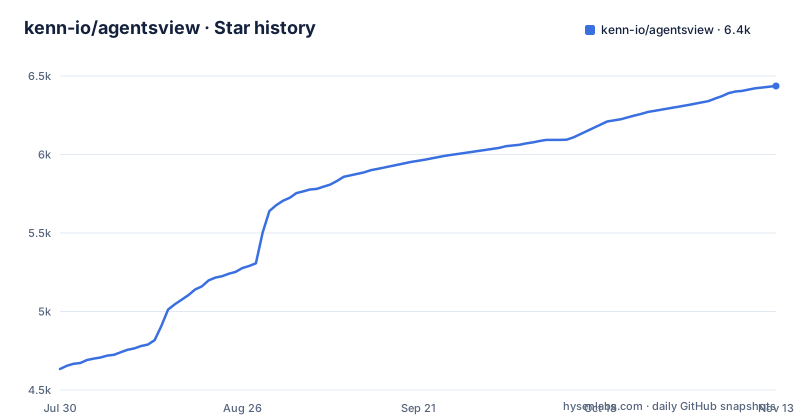
Star history
- kenn-io/agentsview6,436 ★ · +1,802
| Repository | 2026-07-30 | 2026-11-13 |
|---|---|---|
| kenn-io/agentsview | 4.6k | 6.4k |
1,802 Stars in the last 106 days, measured from the daily GitHub snapshot. Compare with other projects
Editorial analysis
The Problem: Sessions Scattered Across Agents and Directories
If you switch between Claude Code, Codex, Forge, and other AI coding agents, each one stores its session history in its own format and location. Finding a past conversation, comparing token usage across agents, or calculating costs means opening each agent's logs separately. AgentsView solves this by indexing sessions from more than 20 agents into a single local SQLite database, then providing a web UI for search, analytics, and token use statistics. The target user is a developer who runs multiple agents daily and wants a unified view without uploading data to a cloud service. The project's value proposition is clear: one binary, no accounts, everything local. That local-first stance is the core differentiator, and it also shapes the tool's limitations, as we will see.
How It Works: Sync, SQLite, and a Daemon
AgentsView's architecture centers on a sync process that discovers sessions from every supported agent on your machine and writes them into a local SQLite database. The README describes a detached daemon: `agentsview daemon start` runs a writable SQLite daemon, while read-only CLI commands like `agentsview session list` attach to it if it is already running, but fall back to direct read-only SQLite on a cold archive. This dual-mode design keeps one-off scripts fast: they do not wait for a daemon to spin up. Commands that need fresh data or write operations, such as `sync`, `usage`, `token-use`, `pg push`, and `duckdb push`, auto-start the daemon when needed. The daemon self-exits after an idle period unless a client request or daemon-owned job is active. That idle timeout is a notable design choice: it conserves resources but means the daemon is not always available, which could affect latency for commands that must auto-start it. The data flow is straightforward: source directories are scanned, sessions are parsed, and the resulting records land in SQLite, which then feeds the web UI at `http://127.0.0.1:8080`.
Getting It Running: Install, Serve, and Docker
Installation is a one-liner for macOS and Linux: `curl -fsSL https://agentsview.io/install.sh | bash`. Windows users get a PowerShell equivalent. Alternatively, you can download a desktop app from GitHub Releases, install via Homebrew with `brew install --cask agentsview`, or run the published Docker image. The quick start shows the main commands: `agentsview serve` starts the server in the foreground, `agentsview daemon start` starts the writable SQLite daemon, and `agentsview session list` reads from the daemon or SQLite. For daily cost summaries, `agentsview report usage daily` prints a cost summary. The Docker example mounts agent session directories as read-only volumes and sets environment variables like `CLAUDE_PROJECTS_DIR` and `FORGE_DIR`. This is essential: a containerized instance can only discover sessions from directories you explicitly mount. If you forget to mount an agent's directory and set the matching env var, that agent simply will not appear in the UI.
Remote Access and the Host Header Problem
AgentsView binds to loopback by default and validates the request `Host` header to guard against DNS-rebinding attacks. That is a sensible security measure, but it creates friction when you access the UI through SSH port-forwarding, a reverse proxy, or a remote dev environment like Codespaces. The browser sends a `Host` that the server does not recognize, so API requests are rejected with `403 Forbidden`. The fix is to restart the server with `--public-url` set to the exact origin you open in the browser. For example, if you use `ssh -L 18080:127.0.0.1:8080 host`, you run `agentsview serve --public-url http://127.0.0.1:18080`. You can also use `--public-origin` to trust additional origins. This is a real usability hurdle for remote workflows, but the solution is documented clearly. The trade-off is between security and convenience, and the project leans toward security, which is defensible for a tool that reads session data that may contain sensitive code context.
Token Usage and Cost Tracking: The ccusage Replacement
The `report usage daily` command prints a daily cost summary. The token-use statistics are part of the core value proposition, and the project's homepage mentions token use statistics as a feature. What is clear is that the tool calculates costs locally, which means it must have access to the token counts and pricing data for each model. This is a strong feature for developers who want to track spending across multiple agents without sending data to a third-party service.
PostgreSQL, DuckDB, and Quack: Beyond SQLite
While SQLite is the default storage, AgentsView offers paths for scaling and integration. The Docker image can set `AGENTSVIEW_MODE=pg-serve` (or pass `pg serve`; the older `PG_SERVE=1` selector still works) to read PostgreSQL instead. This is for users who want a central server for multiple instances or need SQL access to the data. There are also `duckdb push` and `clickhouse push` commands, which auto-start the daemon when needed. These options show a clear path from a single-user local tool to a multi-user or analytics-oriented deployment, but they add complexity that most users will not need.
Security and Secret Handling: What You Must Not Do
The tool still processes session content that may contain sensitive code or prompts, so the local-first approach is a security feature: the README says your session archive stays on your machine unless you choose a feature that shares it. Session discovery also covers supported S3 sources.
Limitations and Wrong Tool Cases
AgentsView is not the right tool if you need real-time collaboration or multi-user editing of sessions, as it is fundamentally a local viewer and analyzer. The web UI is served from a single instance, and while you can expose it with `--require-auth`, that is not a collaboration platform. Another limitation is the daemon's idle self-exit: if you run scripts that call `agentsview session list` frequently, the fallback to direct SQLite is fast, but commands that auto-start the daemon may incur a startup delay. Also, the project's reliance on specific session directory structures means it only works with agents that store sessions in a known format; if an agent changes its storage layout, the sync may break until the project updates. The list of supported agents is finite. For a single-agent user, the overhead of installing and configuring AgentsView may not be worth it, since the agent's own UI might suffice. Finally, the S3 integration is a double-edged sword: it enables centralization but requires you to manage object storage credentials and secure the bucket, which is a non-trivial operational burden.
Alternatives and the Difference in Approach
ccusage is a lightweight CLI that focuses specifically on token usage and cost for Claude Code sessions. The difference is scope: ccusage is a narrow utility that reads Claude Code's session files and prints cost summaries, while AgentsView is a broader platform that indexes multiple agents, provides a web UI for search and analytics, and supports multiple storage backends. If you only use Claude Code and only need cost tracking, ccusage is simpler and faster to set up. If you need cross-agent search and unified analytics, AgentsView is the more comprehensive choice. Another alternative is a manual approach: writing your own scripts to parse session files and aggregate costs. That gives you full control but requires ongoing maintenance as agent formats change. AgentsView abstracts that parsing, which is its main value. The trade-off is that you rely on the project to keep up with agent updates, which is a maintenance cost you must accept.
Maintenance and Upgrade Considerations
The project is actively maintained, with recent releases including v0.46.1 and v0.46.0, both on 2026-10-23. The release cadence suggests frequent updates, which is good for bug fixes and agent compatibility, but it also means you should expect to upgrade regularly to keep up with new agent versions. The license is MIT, which is permissive and allows commercial use and modification without restriction, but it also means there is no warranty or support obligation. You are responsible for your own data. The project's architecture, with SQLite as the default, means data is stored in a file that you own, and you can back it up or export it. The DuckDB and PostgreSQL options provide additional flexibility for data portability. Before adopting, check the project's issue tracker for known migration issues.
Editorial conclusion
Adopt AgentsView if you use multiple coding agents and want a local, unified interface for searching past sessions and tracking token costs across Claude Code, Codex, Forge, and others. Skip it if you only use one agent and already have that agent's built-in session viewer, or if you need cloud sync and collaboration features, as the project deliberately stays local-first. Before adopting, verify that your agent's session directory is supported and correctly mounted, especially in Docker, and test the `--public-url` handling if you access the UI through a forward proxy. Also confirm the daemon's idle self-exit behavior matches your usage pattern, as commands that need fresh data auto-start it, which may surprise you in scripted environments.
Frequently asked questions
What is AgentsView?
agentsview is a local-first archive for developers who run several coding agents at once. On first run it discovers sessions from Claude Code, Codex and more than twenty other agents, copies them into a local SQLite database, and serves a web UI at http://127.0.0.1:8080.
How do I install agentsview and see my sessions the first time?
On macOS and Linux run `curl -fsSL https://agentsview.io/install.sh | bash`, then `agentsview serve` starts the server in the foreground and serves the UI at http://127.0.0.1:8080 after the first-run discovery and sync. Windows uses `powershell -ExecutionPolicy ByPass -c "irm https://agentsview.io/install.ps1 | iex"`.
Why does agentsview answer 403 Forbidden when I open it through an SSH tunnel?
The server binds to loopback and validates the request `Host` header to guard against DNS-rebinding attacks, so a forwarded hostname gets rejected. Restart it with `--public-url` set to the exact origin you open in the browser, and add `--require-auth` if the UI is published beyond loopback.
Official sources
Add this badge to your README
If you maintain this project, the badge below links readers to this analysis and shows its maintenance status from the daily GitHub snapshot. Paste the markdown into your README; add ?metric=license or ?metric=stars to the image URL for a different field.

[](https://hysenlabs.com/projects/kenn-io-agentsview)Star history chart for your README
[](https://hysenlabs.com/projects/kenn-io-agentsview)Was this useful?