Soft Serve: A Git Server That Lives Entirely in Your Terminal
The mighty, self-hostable Git server for the command line. You can also try some of the following commands: Or you can use Soft Serve to browse local repositories using soft browse [directory] or running soft within a Git repository.
At a glance
- What is it?
- Soft Serve is a self-hostable Git server operated through SSH, offering a TUI for browsing and managing repositories. Charmbracelet has since sunset it: the repository is archived and the README says no further security updates will be applied.
- Who is it for?
- Soft Serve has been sunset and its repository archived, with no further security updates, so weigh that first. Adopt it only if you are a small team or a solo developer who prefers terminal workflows and needs a Git server that is trivial to run: a single binary, a data directory, and an SSH key.
- Can I use it commercially?
- Yes. MIT is a permissive licence: you can use, modify and sell software built on it, as long as you keep its copyright and licence notices.
- Is it still maintained?
- No. The owners have archived the repository on GitHub, so it is read-only and no longer receives changes.
- What is it written in?
- Mainly Go, according to GitHub's language statistics.
Answers come from the project's GitHub data, last synced on November 13, 2026, and from our analysis. They are not legal advice.
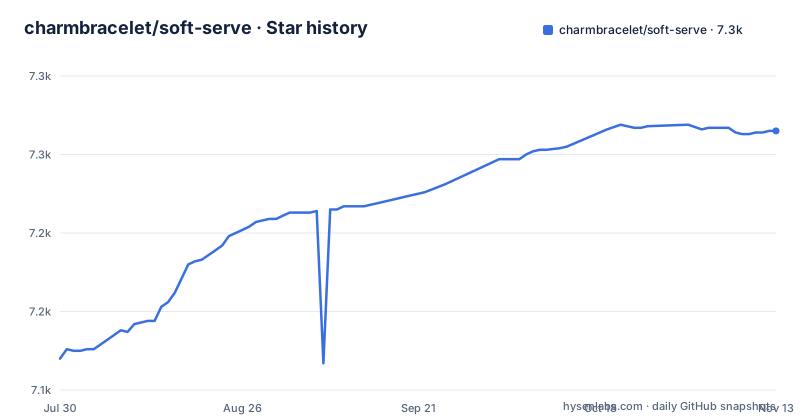
Star history
- charmbracelet/soft-serve7,265 ★ · +145
| Repository | 2026-07-30 | 2026-11-13 |
|---|---|---|
| charmbracelet/soft-serve | 7.1k | 7.3k |
145 Stars in the last 106 days, measured from the daily GitHub snapshot. Compare with other projects
Editorial analysis
A Git Server for People Who Live in the Terminal
Soft Serve solves a specific problem: managing Git repositories without leaving the command line. It is a self-hostable Git server that you operate entirely over SSH. The server exposes a TUI that you can navigate with arrow keys, and you can clone, push, and browse repositories through standard Git commands. The project is from Charmbracelet, the same team behind the popular Bubble Tea TUI framework, so the terminal interface is polished. The intended user is someone who already uses SSH daily and finds web-based Git hosts like GitHub or GitLab to be overkill or too heavy. It is not for teams that rely on code review workflows, issue trackers, or a graphical browser interface.
How Soft Serve Works: SSH, HTTP, and Git Protocol
The server runs as a single binary called `soft`. When you start it with `soft serve`, it creates a `data` directory that stores repositories, SSH keys, and a database. The server listens on multiple protocols: SSH for the TUI and Git operations, HTTP for cloning, and the Git protocol. The SSH endpoint is the primary interface. You can connect to the server with `ssh git.charm.sh` to see a demo, or to your own server to browse repositories. The TUI lets you navigate repos, files, and commits. You can also issue commands directly over SSH, such as `ssh git.charm.sh repo tree soft-serve` to print a directory tree, or `ssh git.charm.sh repo blob soft-serve cmd/soft/main.go -c -l` to print a file with syntax highlighting and line numbers. This command-line access is a distinct advantage over web-based servers, because it allows scripting and automation without scraping HTML.
Getting Started: From Binary to Running Server
Installation is straightforward. You can use a package manager: `brew install charmbracelet/tap/soft-serve` on macOS or Linux, `winget install charmbracelet.soft-serve` on Windows, `pacman -S soft-serve` on Arch, or `nix-env -iA nixpkgs.soft-serve` on Nix. Debian and Fedora repositories are also available. Or you can install with Go: `go install github.com/charmbracelet/soft-serve/cmd/soft@latest`. Once installed, you run `soft serve`. On first boot, you must set the `SOFT_SERVE_INITIAL_ADMIN_KEYS` environment variable to your SSH public key, so the server can create an admin user. The server then generates a `config.yaml` file in the data directory. You can override settings with environment variables prefixed with `SOFT_SERVE_`, such as `SOFT_SERVE_SSH_LISTEN_ADDR` for the SSH listen address or `SOFT_SERVE_DATA_PATH` to change where data is stored. There is also `SOFT_SERVE_DEFAULT_REPO` to create a repository on boot, which the README notes is useful for GitOps tools like ArgoCD that need a remote to point at during bootstrap.
Configuration and Authentication: Keys, Anon Access, and Access Tokens
Authentication is based on SSH public keys. When you add a collaborator, you give them access via their public key. The server supports public and private repositories, and you can allow or disallow anonymous access. There is also support for user access tokens, which can be used for HTTP cloning. The `config.yaml` file contains settings like `anon-access` and `allow-keyless`, which control whether anonymous users can read or clone repositories. The README warns that these settings govern reachability, meaning even if a repo is created with `SOFT_SERVE_DEFAULT_REPO`, its accessibility depends on these flags. This is a critical distinction: a repo created on boot is empty and public, but only its existence is guaranteed; whether anyone can reach it still depends on those settings. The database can be SQLite or Postgres (go.mod carries modernc.org/sqlite and lib/pq); check the full documentation for the exact configuration keys.
Limitations: Where Soft Serve Falls Short
Soft Serve is not a full-featured Git hosting platform. It lacks a web interface, so there is no pull request workflow, issue tracker, or code review tools. If your team depends on those, this is the wrong tool. The `SOFT_SERVE_GIT_MAX_CONNECTIONS` setting lets you limit simultaneous connections to the git daemon. For a large organization with many users, the SSH TUI might be a barrier to adoption. The documentation is clear that this is a command-line tool, so if your users are not comfortable with SSH, they will struggle.
Alternatives: Gitea and the Web-Based Approach
The most direct alternative is Gitea, a self-hosted Git server with a web UI. Gitea offers pull requests, issue tracking, a web editor, and a REST API. The key difference is the interface: Gitea is browser-based, while Soft Serve is SSH-based. If your team is distributed and non-technical, Gitea is easier to adopt. But Gitea is heavier: it has more moving parts, more configuration options, and a larger attack surface. Soft Serve's advantage is simplicity and speed. You can spin it up in minutes with just an SSH key. The trade-off is feature depth. For a solo developer or a small team that lives in the terminal, Soft Serve is sufficient. For a team that needs code review, Gitea is the safer bet.
Maintenance, Upgrades, and License
Soft Serve is written in Go and ships as a single binary called soft. That simplifies deployment and upgrades: you replace the binary and restart the service. The project is under the MIT license, which gives you freedom to modify and redistribute. The README mentions Systemd service units, so you can run it as a service on Linux. The data directory stores everything, so backups are a matter of copying that directory. You should check the release notes for breaking changes. The most recent releases are v0.12.2 (2026-08-07), v0.12.3 (2026-10-05) and v0.12.4 (2026-10-23), but the project has since been sunset: the repository is archived, and the README states that no further security updates will be applied and invites anyone who wants to maintain a fork to do so. The database configuration supports SQLite and Postgres; consult the full documentation to understand the trade-offs. For a small installation, SQLite is likely sufficient; Postgres is for larger setups.
Editorial conclusion
Soft Serve has been sunset and its repository archived, with no further security updates, so weigh that first. Adopt it only if you are a small team or a solo developer who prefers terminal workflows and needs a Git server that is trivial to run: a single binary, a data directory, and an SSH key. Avoid it if your users expect a web UI for code review and issue tracking. Before adopting, verify that your Git workflow does not depend on features like pull requests or webhooks, and confirm that the SSH TUI is acceptable for your collaborators. Also check the current release notes for any changes to the database configuration, since the README indicates support for both SQLite and Postgres.
Frequently asked questions
How do I install soft-serve on Fedora or RHEL?
The README gives a Yum repository definition named Charm with its baseurl at repo.charm.sh/yum/. Packages in RPM format are also available from the releases page, along with Alpine and Debian builds.
What does soft-serve create the first time it runs?
Running `soft serve` creates a data directory that stores all the repositories, the SSH keys and the database. Program configuration lives inside that directory unless SOFT_SERVE_CONFIG_LOCATION points at a file you pre-created.
Does soft-serve need an admin key before the first run?
Yes. SOFT_SERVE_INITIAL_ADMIN_KEYS must be set to your SSH authorized key on first run, and any key listed is treated as admin with full privileges, with Soft Serve creating a new admin user. The Docker image ships that variable as an empty string, so it has to be supplied at container start.
Can soft-serve reach Postgres as well as SQLite?
It supports both databases, and every other setting follows the same override rules. The dependency list carries modernc.org/sqlite, github.com/lib/pq and sqlx for the two drivers.
How do I browse a repository with soft-serve without running a server?
Use `soft browse [directory]`, or just run `soft` inside a Git repository. Over SSH the same surface takes `repo tree` and `repo blob`, with `-c -l` adding syntax highlighting and line numbers.
How many ports does a soft-serve container expose?
Four: 23231 for SSH, 23232 for HTTP, 23233 labelled Stats, and 9418 for the Git protocol.
Official sources
Add this badge to your README
If you maintain this project, the badge below links readers to this analysis and shows its maintenance status from the daily GitHub snapshot. Paste the markdown into your README; add ?metric=license or ?metric=stars to the image URL for a different field.

[](https://hysenlabs.com/projects/charmbracelet-soft-serve)Star history chart for your README
[](https://hysenlabs.com/projects/charmbracelet-soft-serve)Was this useful?