keshavgbpecdelhi/Web-Development: Beginner Web Project Collection
Here you will find different web development mini projects which are made up of HTML, CSS & little bit of JavaScript. Do you have any such small project which is not already in the List!? 😄
At a glance
- What is it?
- This repository collects small HTML, CSS, JavaScript, and jQuery projects for learning basic front-end development. It is useful as a browsable practice library, not as a production application framework or a fully specified course.
- Who is it for?
- Adopt this repository when you want small, readable examples for practicing HTML, CSS, and basic browser JavaScript. Do not treat it as a complete curriculum, a reusable UI system, or an application foundation.
- Can I use it commercially?
- Yes. Apache-2.0 is a permissive licence: you can use, modify and sell software built on it, as long as you keep its copyright and licence notices.
- Is it still maintained?
- Yes. The repository last received commits 4 days ago.
- What is it written in?
- Mainly JavaScript, according to GitHub's language statistics.
Answers come from the project's GitHub data, last synced on November 7, 2026, and from our analysis. They are not legal advice.
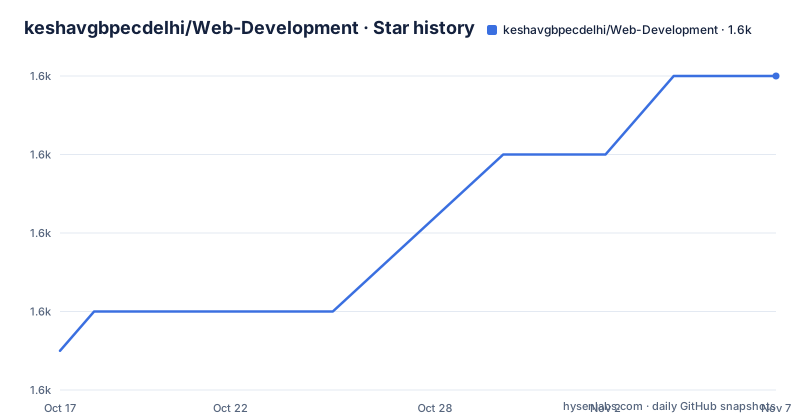
Star history
- keshavgbpecdelhi/Web-Development1,600 ★ · +7
| Repository | 2026-10-17 | 2026-11-07 |
|---|---|---|
| keshavgbpecdelhi/Web-Development | 1.6k | 1.6k |
7 Stars in the last 21 days, measured from the daily GitHub snapshot. Compare with other projects
Editorial analysis
A Practice Library for Basic Browser Development
keshavgbpecdelhi/Web-Development addresses a narrow but useful problem: giving beginner developers concrete examples of browser technologies instead of an abstract explanation with no visible result. The repository description calls these “web development mini projects” made with HTML, CSS, and a little JavaScript. Its README presents the collection as a demo pages project set, with separate entries for basic HTML pages, CSS demonstrations, jQuery examples, and larger front-end projects.
The intended audience appears to be learners working through basic web development. The repository topics include beginner-friendly, beginner-project, HTML, CSS, JavaScript, landing-page, and project-template terms. That makes the collection more suitable for experimentation and reference than for a team selecting infrastructure. There is no documented component API, server layer, authentication mechanism, database design, or deployment system beyond links to hosted demo pages.
The collection is broad in examples but shallow in instructional structure. A learner can inspect headings, tables, forms, video embeds, color values, backgrounds, pseudo states, dropdown menus, event handling, text replacement, email validation, a calculator, a todo project, responsive pages, and landing pages. However, the README does not explain prerequisites, expected learning outcomes, test procedures, or a recommended order. That makes it closer to a directory of examples than a structured tutorial.
Repository Layout and Project Data Flow
The repository layout separates introductory material under `basics/` and larger examples under `projects/`. Within `basics/`, the README identifies HTML examples such as `basics/html/types_of_headings.html`, `basics/html/a_simple_table_in_html.html`, `basics/html/Basic_form.html`, and `basics/html/survey-form.html`. CSS examples appear in numbered or named directories, including `basics/css/css-1` for RGBA and `basics/css/css-4/background-img` for a background image.
JavaScript examples are also divided by topic. The README points to `basics/javascript/hi_name`, an extend-class example, and a calculator at `basics/javascript/js-calculator/index.html`. A separate `basics/javascript/jQuery/` group contains dropdown-menu, event-handling, right-click, replace, and valid-email examples. The jQuery grouping matters because those files may demonstrate older browser-library techniques rather than the same JavaScript patterns used elsewhere in the repository.
The visible data flow is mostly page-level. The HTML examples represent static document structures. CSS examples apply styles to document elements. JavaScript examples add browser behavior, while jQuery examples appear to use a library to handle DOM interaction. The README does not provide the contents of those files, so the exact event flow, validation rules, and state handling cannot be confirmed from the index alone. Likewise, the repository does not document whether every example is self-contained, whether local assets are required, or whether external services are called.
The linked demo pages provide a second route into the projects. They can help a learner inspect behavior without first configuring a local server, but a live demo is not a substitute for source inspection. The repository does not state whether demos and source are kept in lockstep.
Opening an Example Without a Documented Install Workflow
The README does not document an installation command, package manager, build step, or local server configuration. For that reason, there is no repository-specific command block to copy here. The documented starting point is the GitHub Pages homepage at `https://keshavgbpecdelhi.github.io/Web-Development/`, followed by the live demo links listed in the README. A learner can also open the linked source files in GitHub and inspect the corresponding `basics/` or `projects/` path.
For a first real use, choose one simple example rather than starting with the entire collection. The headings page is a direct choice because the README links to `basics/html/types_of_headings.html` and labels its demo “See headings.” Open the source file in GitHub, compare it with the rendered demo, and identify which HTML heading elements are used. That gives a small exercise with a clear result and avoids assuming that a larger project has dependencies that the README does not list.
The repository does not state that users should run a local development server. It also does not document browser versions, compatibility requirements, or asset installation. If an example fails when opened from GitHub Pages, the repository does not provide a documented troubleshooting procedure. A learner should inspect the browser console and the linked source files, but that is a diagnostic step rather than a project-specific command documented by the maintainers.
Choosing Between Basic Examples and Larger Projects
The `basics/` examples cover individual concepts, while `projects/` contains broader compositions. The README lists a landing page at `projects/landing-page/index.html`, a simple todo project under `projects/simple-todo`, and responsive pages inside a project directory whose name includes `TinDog Website [HTML + CSS + Bootstrap]`. This separation gives learners a choice between isolating one technique and studying how several techniques appear in a complete page.
The larger projects should not be assumed to form a unified application. The landing page is linked as a standalone page, while the todo and responsive entries have separate directories and separate demo URLs. The repository does not document shared components, build tooling, data persistence, or a common design system. A todo example may be useful for studying interaction, but the README does not confirm whether its data is stored in local storage or retained in memory. It is therefore unsafe to infer a persistence model from the project name.
The responsive examples introduce another variable. One README entry is labeled “Fully Responsive,” and another links a Bootstrap form. The labels suggest responsive layout and Bootstrap usage, but the index does not describe breakpoints, grid choices, or component conventions. Learners interested in modern responsive design should inspect the actual CSS and HTML rather than treating the demo label as a technical specification.
For production use, the collection is the wrong abstraction. It has no documented API, test suite, release tags, compatibility policy, or extension mechanism. It is better used as a source of small examples to study, copy selectively, and adapt in a separate project.
Maintenance, Licensing, and Upgrade Boundaries
The repository is not archived. The last push was on 2026-10-12, which indicates recent repository activity, but activity alone does not establish that every example is reviewed or that the documentation is current. The README links `MAINTAINERS.md` for active maintainers, yet it does not define a review schedule, issue response policy, or version compatibility policy.
There are no GitHub releases. Consequently, the repository does not provide documented release tags, migration notes, or a supported upgrade procedure. An update to the `master` branch can change the examples without giving a consumer a release boundary. That matters for learners who copy code into a course or personal project, because there is no documented statement about whether older examples remain unchanged.
The repository identifies its license as `Apache-2.0`, and the top-level directory includes a `LICENSE` file. The repository documentation does not summarize the license obligations or provide project-specific guidance about redistribution. Anyone planning to reuse an example should read `LICENSE` and the repository's contribution documents directly. This is a licensing review, not a claim that the examples are suitable for every distribution model.
There is also no documented automated test command. The index provides live demos, but it does not say whether form behavior, JavaScript interactions, or responsive layouts are tested automatically. Maintenance cost is therefore low for a learner browsing individual files, but higher for someone trying to turn the collection into a maintained baseline.
A Practical Alternative for Structured Front-End Learning
A structured course or framework-based application is a different approach. Instead of a directory of small pages, a course can prescribe a sequence, explain each concept, include exercises, and state which browser and runtime versions are expected. A framework application can provide reusable components, a build tool, a package manifest, tests, and a defined deployment workflow. None of those project-level facilities is documented for this repository.
The practical alternative is therefore not another small demo collection. It is a maintained learning project with an explicit syllabus and tooling contract. For example, a learner who needs to understand state management, routing, testing, and deployment may get more value from a complete tutorial application than from adding another standalone HTML page to this repository. The distinction matters because Web-Development's examples are organized around visible techniques, not around application architecture.
This repository remains useful for targeted practice. A learner can use the headings example to review semantic heading tags, inspect the calculator directory to study a browser interaction, or examine the landing page as a composition of HTML and CSS. The choice depends on the required outcome: isolated demonstrations fit this collection, while a reproducible curriculum or production foundation does not.
Editorial conclusion
Adopt this repository when you want small, readable examples for practicing HTML, CSS, and basic browser JavaScript. Do not treat it as a complete curriculum, a reusable UI system, or an application foundation. First verify that the particular example loads its referenced assets correctly, matches the concept you want to study, and can be adapted without relying on undocumented dependencies. The repository is not archived, and its last push was on 2026-10-12, but the absence of GitHub releases means there is no documented versioned upgrade path.
Frequently asked questions
What is keshavgbpecdelhi/Web-Development used for?
It is a collection of small web development examples built with HTML, CSS, JavaScript, and some jQuery. The repository description presents it as a set of beginner-oriented mini projects.
Does keshavgbpecdelhi/Web-Development include live demos?
Yes. The README lists live demo links for individual examples, including headings, tables, forms, CSS demonstrations, JavaScript examples, responsive pages, a landing page, and a simple todo project.
How do I install keshavgbpecdelhi/Web-Development?
The README does not document an installation command, package manager, or build process. It directs readers to the GitHub Pages homepage and links to source files and live demos in the repository.
Is keshavgbpecdelhi/Web-Development suitable for production applications?
The repository documents small educational examples rather than a production application foundation. It does not specify an API, test suite, release process, deployment system, or shared application architecture.
What license does keshavgbpecdelhi/Web-Development use?
The repository lists the `Apache-2.0` license and includes a top-level `LICENSE` file. The README does not provide additional guidance about reusing or redistributing the examples.
Official sources
Add this badge to your README
If you maintain this project, the badge below links readers to this analysis and shows its maintenance status from the daily GitHub snapshot. Paste the markdown into your README; add ?metric=license or ?metric=stars to the image URL for a different field.

[](https://hysenlabs.com/projects/keshavgbpecdelhi-web-development)Star history chart for your README
[](https://hysenlabs.com/projects/keshavgbpecdelhi-web-development)Was this useful?